
1. Introduction
Thank you for choosing the Anker SOLIX S2000 Portable Power Station. This manual provides essential information for the safe and efficient use of your power station. Please read this guide thoroughly before operating the device and retain it for future reference.
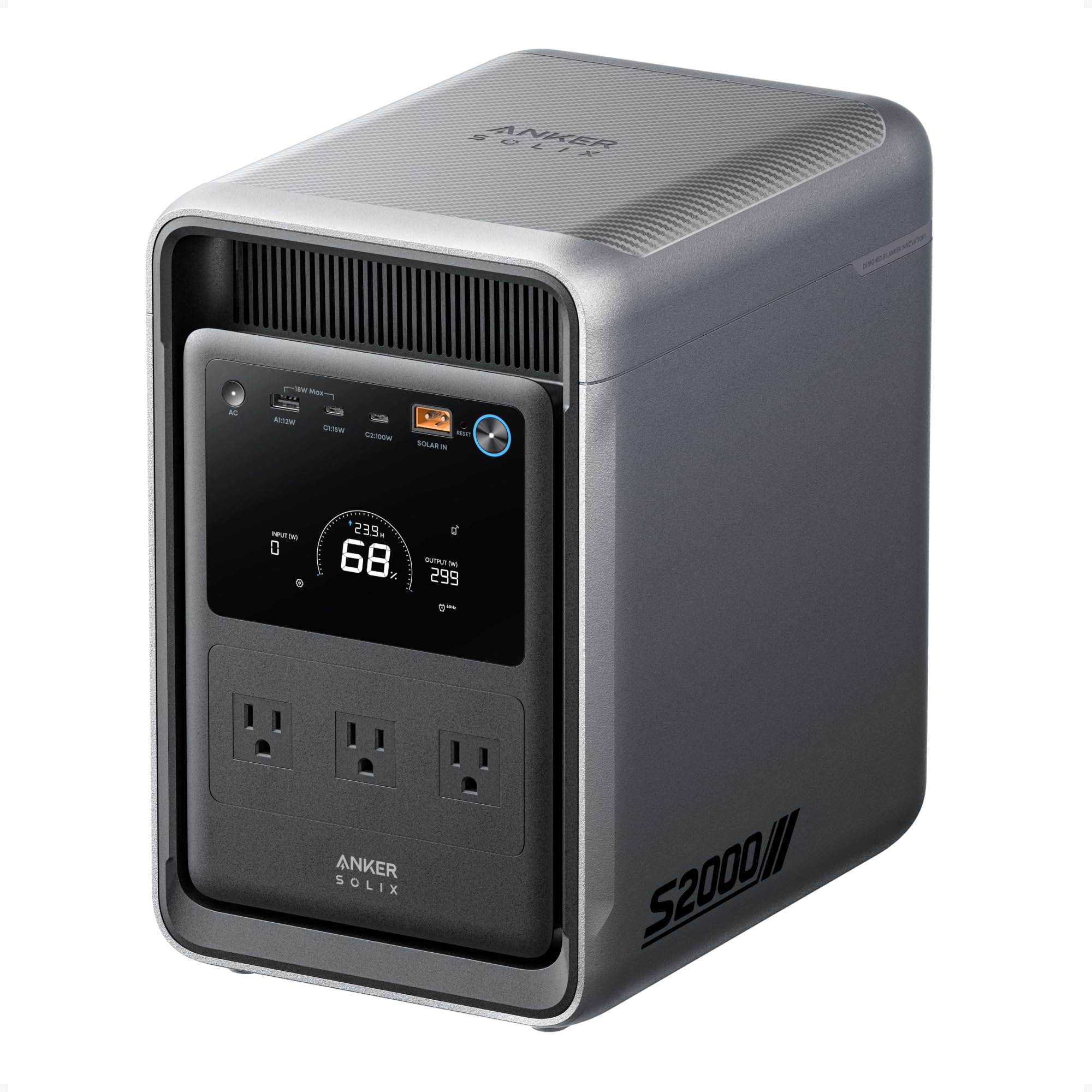
Image: Anker SOLIX S2000 Portable Power Station, a compact gray unit with a display screen and multiple outlets.
2. Safety Instructions
Always follow basic safety precautions when using this product to reduce the risk of injury, electric shock, or fire.
- Do not disassemble, repair, or modify the unit.
- Do not place the unit near fire or expose it to high temperatures.
- Do not use or store the unit in a bathroom or in areas exposed to water or moisture.
- Keep the unit away from children and pets.
- Ensure proper ventilation during use and charging. Do not block ventilation openings.
- Use only recommended accessories and charging cables.
- For safer handling, do not lift the unit with one hand. Use both built-in handles for two-handed carry.
3. Package Contents
Verify that all items are included in your package:
- Anker SOLIX S2000 Portable Power Station
- Quick Start Guide
- Safety and Warranty Card
4. Product Overview
Familiarize yourself with the various ports and controls on your Anker SOLIX S2000 Portable Power Station.

Image: Detailed diagram highlighting the Main Power Button, XT60I Input Port, USB-C Ports (15W x 1, 100W x 1), AC Output Button, USB-A Port (12W), LCD Screen, AC Output Ports (front and rear), and AC Input Port.
- Main Power Button: Powers the unit on/off.
- XT60I Input Port: For solar panel or car charging.
- USB-C Ports: Two ports, one 15W and one 100W, for charging compatible devices.
- AC Output Button: Activates/deactivates the AC outlets.
- USB-A Port: One 12W port for charging compatible devices.
- LCD Screen: Displays battery percentage, input/output wattage, and remaining runtime.
- AC Output Ports: Multiple standard AC outlets located on the front and rear of the unit.
- AC Input Port: For charging the power station via a wall outlet.
The unit features integrated handles for easy two-handed transport, and its upright profile is designed to save space.

Image: The Anker SOLIX S2000 showing its front and rear AC outlets for cable management, and a person carrying the unit using its built-in handles, demonstrating its portability.
5. Setup
Before first use, fully charge your Anker SOLIX S2000. It is recommended to connect the unit to a wall outlet for initial charging.
- Unpack the power station and all accessories.
- Place the power station on a stable, flat surface in a well-ventilated area.
- Connect the provided AC charging cable to the AC Input Port on the power station and then plug it into a wall outlet.
- The LCD screen will illuminate, indicating the charging status. Charge until the battery indicator shows 100%.
- For advanced control and monitoring, download the Anker app and connect your power station via Bluetooth or Wi-Fi.
6. Operating Instructions
6.1. Powering On/Off
Press and hold the Main Power Button for a few seconds to turn the unit on or off. The LCD screen will activate upon power-on.
6.2. Charging the Power Station
The Anker SOLIX S2000 supports multiple charging methods:

Image: Visual guide demonstrating six charging methods: 1,600W Wall Outlet (UltraFast Mode), 1,400W AC + 400W Solar Input, 400W Solar Input, 1,600W Generator (UltraFast Mode), 400W Alternator Charger Input, and 120W Car Outlet.
- AC Wall Outlet: Connect the AC charging cable to the AC Input Port and a wall outlet. Supports up to 1,600W (UltraFast Mode, activated via app) for a full charge in approximately 1.2 hours.
- Solar Panels: Connect compatible solar panels (up to 400W input) to the XT60I Input Port. Recharges to 80% in 4.5 hours with 400W solar input.
- AC + Solar: Combine AC wall charging with solar input for faster charging (e.g., 1,400W AC + 400W Solar for 80% in 1 hour).
- Car Outlet: Use a car charger to connect to the XT60I Input Port. Recharges to 80% in 18 hours.
- Generator: Connect to a generator for charging, similar to AC wall charging. Supports UltraFast Mode.
- Alternator Charger: Connect an alternator charger to the XT60I Input Port. Recharges to 80% in 4.5 hours.
6.3. Using AC Outlets
Press the AC Output Button to enable the AC outlets. Plug your devices into the desired AC ports. The LCD screen will show the output wattage. Press the AC Output Button again to turn off the AC outlets when not in use.
6.4. Using USB Ports
The USB-A and USB-C ports are always active when the power station is on. Simply plug your USB-powered devices into the appropriate ports.
6.5. Uninterruptible Power Supply (UPS) Function
The Anker SOLIX S2000 features a seamless UPS function with a switchover time of less than 10 milliseconds. This allows it to provide uninterrupted power to connected devices during a power outage. Connect essential devices like CPAP machines, laptops, or aquarium equipment to the power station while it is connected to a wall outlet. In case of a power failure, the unit will automatically switch to battery power.
6.6. Smart Power Management via App
Monitor and control your power station remotely using the Anker app. The app allows you to:
- View real-time input/output power and battery level.
- Adjust charging speed (e.g., enable UltraFast Mode).
- Set AC output schedules.
- Configure power usage scenarios like Time-of-Use mode to save on electricity bills.
- Enable Storm Guard Auto-Charging to ensure the unit is charged before severe weather.
- Set charge and discharge limits to prolong battery lifespan.
Video: A user demonstrates the Anker app interface, showing how to monitor input/output, battery percentage, and adjust settings like charging speed and output schedules for the Anker SOLIX S2000.
Video: A user highlights a specific feature or aspect of the Anker SOLIX S2000, discussing its functionality and potential considerations for users.
Video: An overview and demonstration of the Anker SOLIX S2000, showcasing its features, ports, and how it operates in various scenarios.
Video: A demonstration of how solar panels effectively charge the Anker SOLIX S2000, illustrating the solar input process and efficiency.
Video: A detailed review explaining the primary benefits and use cases for purchasing the Anker SOLIX S2000.
Video: An analysis of the Anker SOLIX S2000's efficiency, exploring whether it lives up to its claims as a highly efficient power station.
Video: A comprehensive overview of the Anker SOLIX S2000 Portable Power Station, detailing its 2,010Wh capacity, 1,500W output, home backup capabilities, and LiFePO4 battery technology.
7. Maintenance
Proper maintenance ensures the longevity and optimal performance of your power station.
- Storage: Store the unit in a cool, dry place away from direct sunlight and extreme temperatures.
- Charging Cycles: The S2000 uses durable 314Ah LFP cells, designed for 10,000 charge cycles, providing a 15-year lifespan. To further prolong battery life, consider using the app to set charge limits (e.g., 80-90%) and discharge limits (e.g., 10%) if full capacity is not always needed.
- Cleaning: Use a dry, soft cloth to clean the exterior of the unit. Do not use liquid cleaners or immerse the unit in water.
- Ventilation: Regularly check that the ventilation openings are clear of dust and debris to prevent overheating.
8. Troubleshooting
If you encounter issues with your Anker SOLIX S2000, refer to the following common solutions:
- Unit Not Turning On: Ensure the battery is charged. If completely depleted, connect to an AC wall outlet for a few minutes.
- No Output from AC Ports: Press the AC Output Button to ensure the AC function is enabled. Check if the connected device exceeds the 1,500W continuous or 3,000W peak output.
- Slow Charging: Verify that the charging method is optimal. For fastest charging, use AC UltraFast Mode via the app or combine AC with solar input. Ensure solar panels are receiving adequate sunlight.
- Overload Protection: If the unit shuts down, it may be due to an overload. Disconnect some devices and restart the power station.
- App Connectivity Issues: Ensure Bluetooth and Wi-Fi are enabled on your smartphone and the power station. Try restarting both devices.
For persistent issues or further assistance, please contact Anker customer support.
9. Specifications
| Feature | Detail |
|---|---|
| Capacity | 2,010Wh |
| Battery Type | 314Ah LFP Cells |
| Cycle Life | 10,000 Cycles |
| AC Output Power | 1,500W (Continuous) |
| Peak Output | 3,000W |
| Active Idle Power | 6W |
| System Standby Power | 2W |
| AC Input (Charging) | 1,150W (Standard), 1,600W (UltraFast) |
| Bypass Mode Power | 1,800W |
| Solar Input | 400W Max |
| UPS Switchover Time | <10 ms |
| AC Outlets | 5 Ports |
| USB Ports | 1 x USB-C (100W Max), 1 x USB-C (15W Max), 1 x USB-A (12W Max) |
| Dimensions (L x W x H) | 8.19" x 11.1" x 12.7" (208 x 282 x 323.3 mm) |
| Net Weight | 35.7 lbs (16.2 kg) |
| Color | Black |
10. Warranty and Support
The Anker SOLIX S2000 Portable Power Station comes with a 5-year warranty, ensuring peace of mind for your investment.
For technical support, warranty claims, or general inquiries, please contact Anker customer service through their official website or the contact information provided in your Quick Start Guide or Safety and Warranty Card.
You can also visit the official Anker support page for FAQs and additional resources: www.anker.com/support


