
1. Important Safety Information
Please read this manual carefully before operating your Garvee 3-in-1 Portable Air Conditioner. Keep it for future reference. Failure to follow these instructions may result in electric shock, fire, or serious injury.
- Always ensure the unit is placed on a stable, level surface.
- Do not block air inlets or outlets. Maintain at least 20 cm clearance from walls or furniture.
- Do not immerse the unit, power cord, or plug in water or other liquids.
- Unplug the unit from the power outlet before cleaning, maintenance, or when not in use.
- Do not operate the unit with a damaged cord or plug. Contact customer support for repairs.
- This appliance is not intended for use by persons (including children) with reduced physical, sensory, or mental capabilities, or lack of experience and knowledge, unless they have been given supervision or instruction concerning use of the appliance by a person responsible for their safety.
- Only use the unit indoors.
2. Product Overview
The Garvee 3-in-1 Portable Air Conditioner offers cooling, ventilation, and humidification functions to enhance your indoor comfort. Its compact design and mobility make it suitable for various rooms.
Key Features:
- 3-in-1 Functionality: Cooling, ventilation, and dehumidification in a single unit.
- Quiet Operation: Operates at an ultra-quiet 45 dB, ideal for bedrooms and offices.
- Efficient Cooling: Powerful cooling for rooms up to 32 m² with low energy consumption (0.13 kWh/h).
- Washable Dual Filter: Effectively captures dust, pollen, and pet dander for cleaner air.
- Easy Mobility: Equipped with 360° wheels and an ergonomic handle for effortless movement.
- Large Water Tank: Features a removable 7L water tank for extended operation.
- Automatic Water Refill: Supports automatic water refilling for convenience.
- Timer Function: 1-12 hour timer for scheduled operation.
Package Contents:
- Garvee 3-in-1 Portable Air Conditioner Unit
- Remote Control
- User Manual (this document)
- Cooling Packs (quantity may vary)
Unit Components:
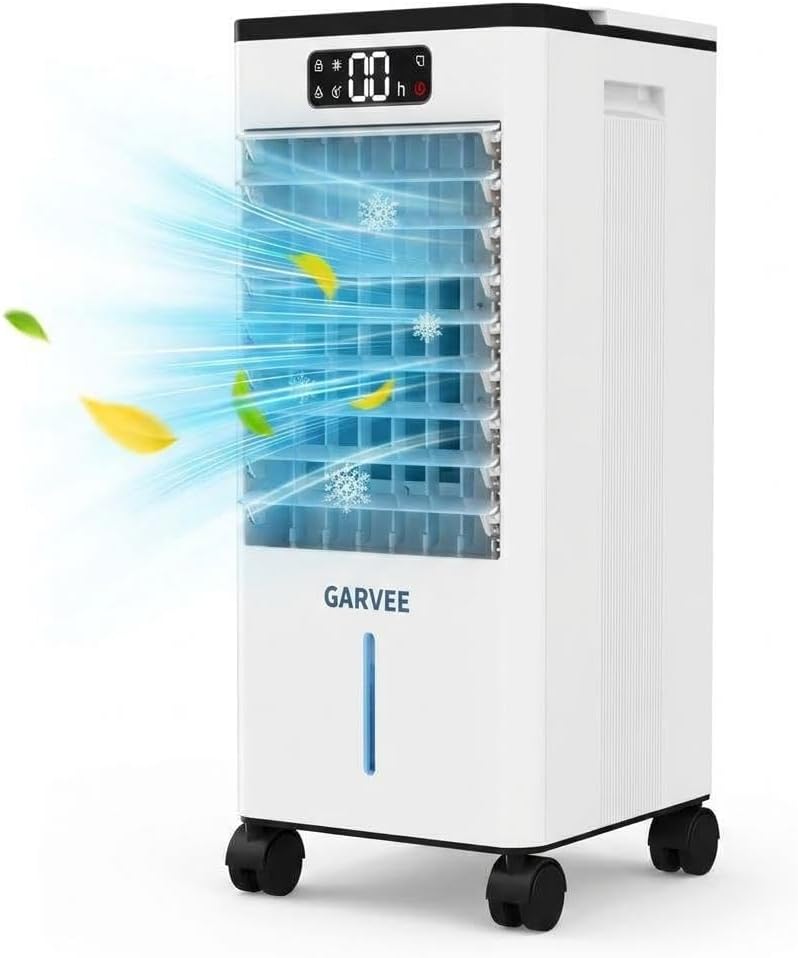
Figure 2.1: Front view of the Garvee 3-in-1 portable air conditioner, showcasing its sleek design and visible airflow during operation.

Figure 2.2: This diagram illustrates the air circulation within the unit, showing how it produces cold air and takes in warm air for cooling.
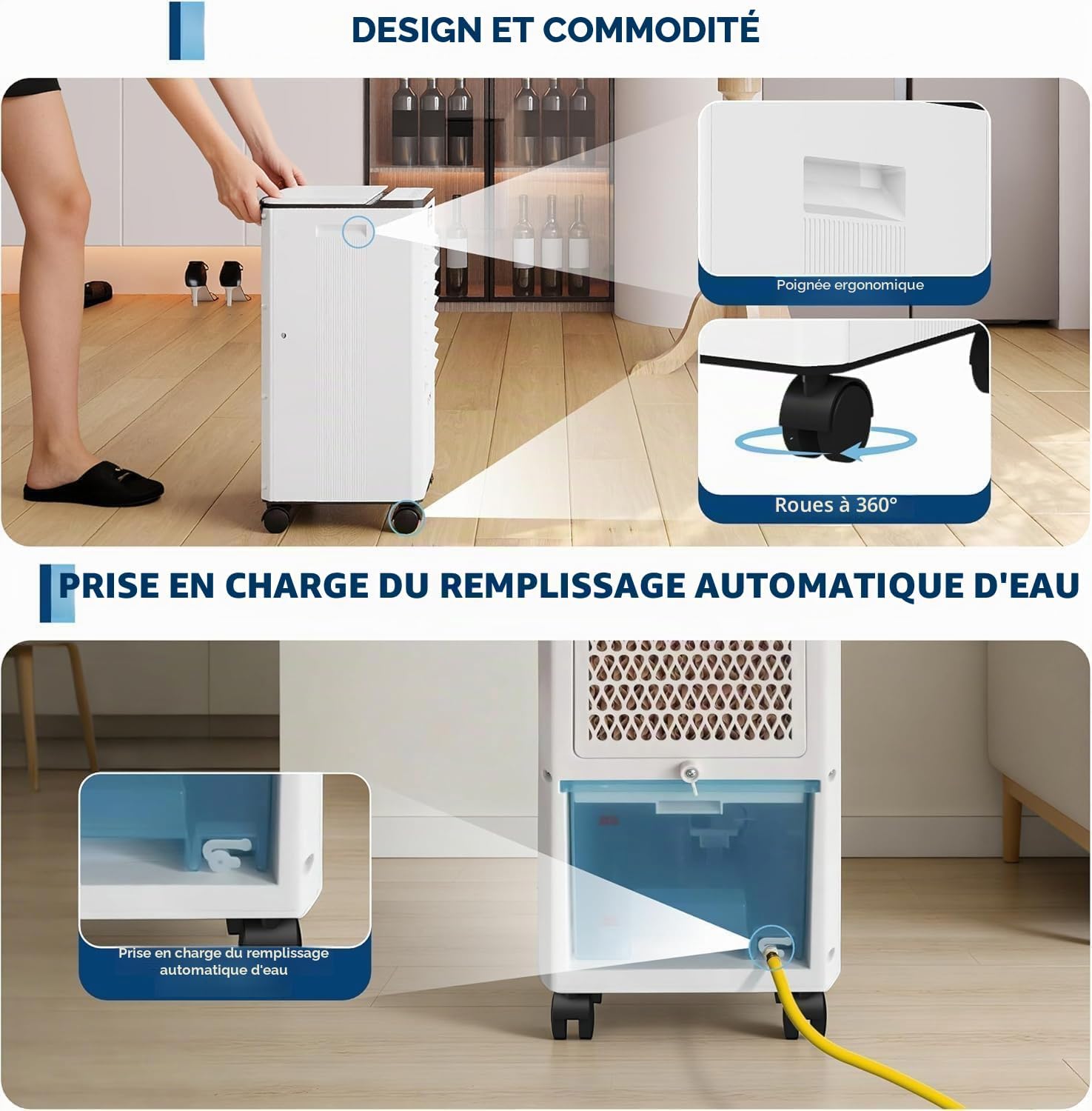
Figure 2.3: This image demonstrates the unit's portability features, including an ergonomic handle for easy lifting, 360-degree swivel wheels for effortless movement, and the automatic water refill mechanism.
3. Setup
3.1 Unpacking
- Carefully remove the unit from its packaging.
- Remove all packing materials, including any protective films or tapes.
- Check for any damage during transit. If damaged, do not operate and contact customer support.
3.2 Placement
Place the air conditioner on a firm, level surface in the desired room. Ensure there is at least 20 cm of clear space around the unit for proper airflow.

Figure 3.1: The unit is shown in different environments such as a living room, office, garage, and kitchen, illustrating its versatility and suitability for various residential and small office spaces.
3.3 Filling the Water Tank
For cooling and humidification functions, the water tank must be filled.
- Open the water tank cover located on the top of the unit.
- Carefully pour clean, cold water into the tank, ensuring not to exceed the 'MAX' fill line.
- For enhanced cooling, you may add the included cooling packs or ice cubes to the water tank.
- Close the water tank cover securely.

Figure 3.2: The image shows the dual water tanks being filled, highlighting the unit's large capacity for extended operation and its ultra-quiet 45 dB noise level, ideal for use in bedrooms or nurseries.
3.4 Connecting Power
Plug the power cord into a standard 220V electrical outlet. Ensure the outlet is properly grounded.
4. Operating Instructions
The unit can be operated using the control panel on top of the unit or the included remote control.
4.1 Control Panel Overview

Figure 4.1: A close-up of the control panel, featuring the 1-12 hour timer setting, a visual water level indicator, and an automatic refill reminder to ensure continuous operation.
Familiarize yourself with the buttons and indicators on the control panel:
- Power Button: Turns the unit ON/OFF.
- Mode Button: Cycles through Cooling, Fan, and Humidifier modes.
- Speed Button: Adjusts fan speed (Low, Medium, High).
- Timer Button: Sets the auto-off timer (1-12 hours).
- Oscillation Button: Activates or deactivates the 120° oscillation function.
- Display Screen: Shows current settings, timer, and water level indicators.
4.2 Operating Modes

Figure 4.2: This graphic explains the three operating modes: a 3-speed fan, a humidifier when water is added, and an air cooler when water and ice packs are used, providing versatile climate control.
- Cooling Mode: When water (and optionally ice packs) is in the tank, the unit will provide evaporative cooling. Press the Mode button until the cooling indicator lights up.
- Fan Mode: Operates as a standard fan, circulating air without water. Press the Mode button until the fan indicator lights up. Adjust fan speed as desired.
- Humidifier Mode: When water is in the tank, the unit will release moisture into the air. Press the Mode button until the humidification indicator lights up.
4.3 Timer Function
To set the auto-off timer:
- Press the Timer button.
- Each press will increase the timer by 1 hour, up to a maximum of 12 hours.
- The unit will automatically turn off after the set time.
4.4 Oscillation
Press the Oscillation button to activate the 120° oscillation feature, which helps distribute air more widely throughout the room. Press again to stop oscillation.
5. Maintenance
Regular maintenance ensures optimal performance and longevity of your air conditioner.
5.1 Cleaning the Air Filter
The unit features a washable dual filter. It is recommended to clean the filter every two weeks, or more frequently depending on usage and air quality.
- Unplug the unit from the power outlet.
- Locate the filter panel (usually at the back or side of the unit).
- Remove the filter.
- Rinse the filter under running water until clean. For stubborn dirt, use a soft brush and mild detergent.
- Allow the filter to air dry completely before reinserting it into the unit.
5.2 Draining and Cleaning the Water Tank
To prevent mold and mildew growth, regularly drain and clean the water tank, especially if the unit will not be used for an extended period.
- Unplug the unit.
- Remove the water tank.
- Empty any remaining water.
- Clean the tank with a soft cloth and mild detergent. Rinse thoroughly.
- Allow the tank to air dry completely before reinserting.
5.3 Storage
If storing the unit for a long period:
- Perform a thorough cleaning of the filter and water tank.
- Ensure all components are dry.
- Store the unit in a cool, dry place, away from direct sunlight and extreme temperatures.
6. Troubleshooting
Before contacting customer support, please refer to the following troubleshooting guide:
| Problem | Possible Cause | Solution |
|---|---|---|
| Unit does not turn on. | No power supply. Power cord not plugged in. | Ensure the unit is plugged into a working 220V outlet. Check the power switch. |
| No cooling effect. | Water tank is empty. Filter is dirty. Room is too large. | Fill the water tank. Clean the air filter. Ensure the unit is suitable for the room size (up to 32 m²). |
| Weak airflow. | Air filter is dirty. Air inlet/outlet blocked. | Clean the air filter. Ensure there is no obstruction around the unit. |
| Unusual noise. | Unit not on a level surface. Foreign object inside. | Place the unit on a flat, stable surface. Unplug and check for any foreign objects. |
| Water leakage. | Water tank not properly installed. Tank overfilled. | Ensure the water tank is correctly seated. Do not fill past the 'MAX' line. |
7. Specifications
| Brand | Garvee |
| Model Number | bc9-0-AzHufJ5Qe1WOnQ049wCh |
| Capacity | 7 Liters (Water Tank) |
| Product Dimensions (D x W x H) | 24 cm x 23 cm x 50 cm |
| Color | White |
| Voltage | 220V |
| Noise Level | 55 Decibels |
| Power Source | Electric Cable |
| Form Factor | Portable |
| Item Weight | 5420 Grams (5.42 kg) |
| Installation Type | Freestanding / Portable |
| Outdoor Unit Required | No |
| Application | Residential |
| Wattage | 65 Watts |
| Control Method | Remote Control, On-unit Buttons |
| Operating Modes | Cooling, Ventilation, Dehumidification |
| Energy Efficiency | A++ |
| Country of Origin | China |
| UPC / GTIN | 828700671418 |
8. Warranty and Support
Your Garvee 3-in-1 Portable Air Conditioner is covered by a manufacturer's warranty. Please refer to the warranty card included in your packaging for specific terms and conditions, including the warranty period and coverage details.
For technical support, troubleshooting assistance beyond this manual, or warranty claims, please contact Garvee customer service. Contact information can typically be found on the product packaging, the official Garvee website, or your purchase receipt.
When contacting support, please have your model number (bc9-0-AzHufJ5Qe1WOnQ049wCh) and proof of purchase readily available.


