
1. Product Overview
The Jocisland 70-inch Fluted TV Stand (Model CTS112) is a modern media console designed to enhance your living space. It features a fluted door design, rounded edges, and a realistic wood-grain finish, offering both aesthetic appeal and practical storage. This entertainment center is suitable for TVs up to 80 inches and includes multiple storage compartments for media devices and decor.
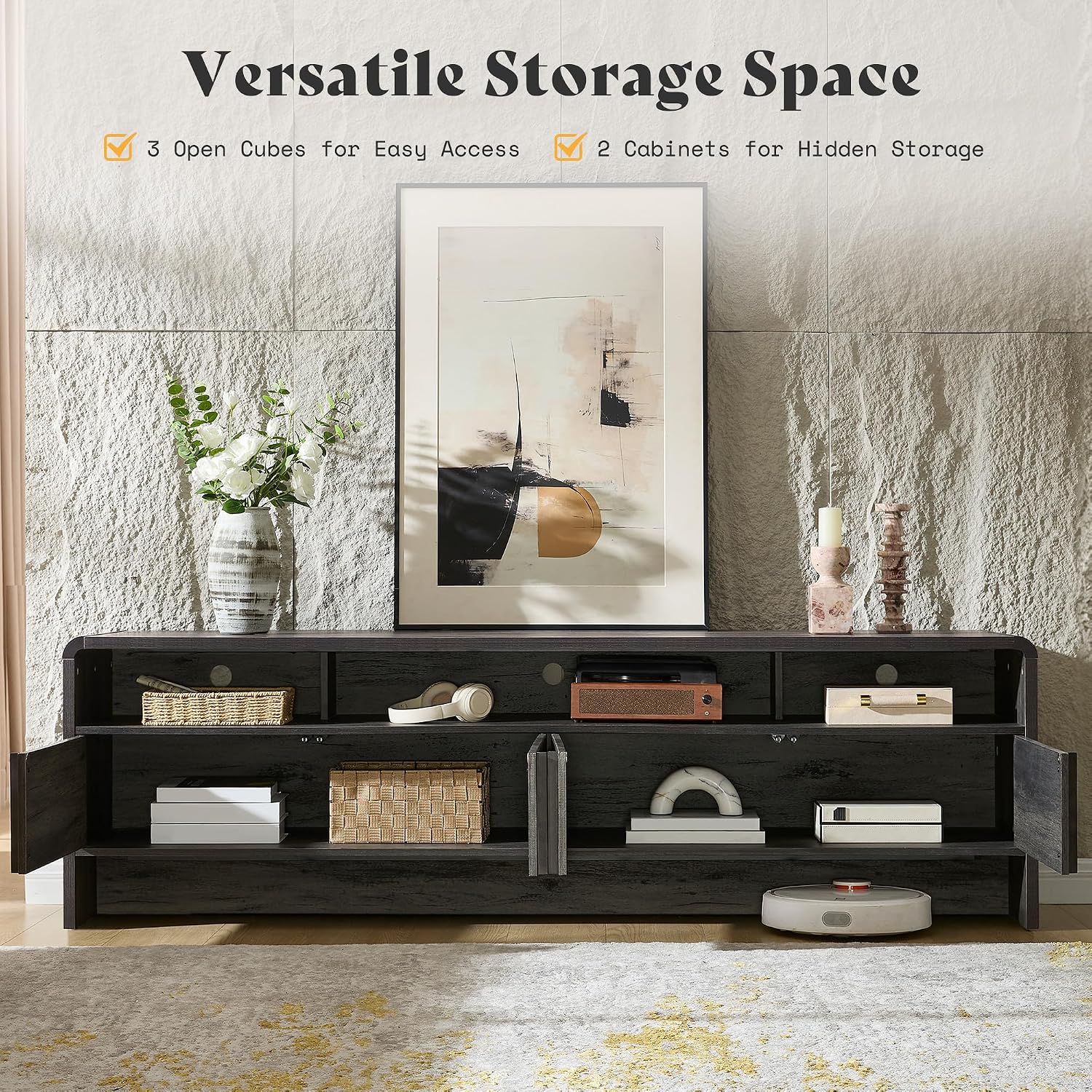
Image 1.1: The Jocisland 70-inch Fluted TV Stand (Model CTS112) in a typical living room setup, showcasing its design and functionality.
2. Safety Information
Please read all instructions carefully before assembly and use. Keep this manual for future reference.
- Weight Capacity: Do not exceed the maximum weight capacity of 250 lbs (113 kg) for the tabletop. Ensure the TV stand is placed on a level and stable surface.
- Anti-Tip Kit: An anti-tip kit is included to prevent accidental tipping. It is highly recommended to install this kit, especially in households with children or pets. Follow the specific instructions provided with the kit.
- Assembly: Assembly should be performed by two adults. Ensure all parts are correctly installed and fasteners are tightened securely before use.
- Placement: Do not place heavy objects on shelves or in cabinets that exceed their individual weight limits. Distribute weight evenly.
- Ventilation: Ensure adequate ventilation for electronic devices placed in compartments to prevent overheating.
- Rounded Edges: While designed with rounded edges for safety, exercise caution to prevent bumps or falls.

Image 2.1: Key safety and design features, including the anti-tip mechanism, P2 eco-friendly material, stable structure, and easy-to-clean surface.
3. Assembly and Setup
This TV stand is designed for straightforward assembly. All parts are pre-drilled, and clear instructions are provided. Assembly typically takes approximately 30 minutes with two adults.
3.1 Package Contents
Before beginning assembly, verify that all components are present and undamaged. If any parts are missing or damaged, please contact customer support.
- TV Stand Panels (various sizes)
- Fluted Cabinet Doors
- Pine Wood Handles
- Hardware Pack (screws, dowels, cam locks, hinges, door magnets, anti-tip kit)
- Assembly Instructions Manual
3.2 Assembly Steps
- Unpack and Identify: Carefully unpack all components and lay them out on a clean, soft surface to prevent scratches. Identify each part using the provided diagrams.
- Assemble Frame: Begin by connecting the main frame panels according to the numerical sequence in the instruction manual. Ensure all cam locks and screws are securely tightened.
- Install Shelves: Insert the fixed and adjustable shelves into their designated slots.
- Attach Back Panel: Secure the back panel to the frame. This adds stability and helps with cable management.
- Install Cabinet Doors: Attach the hinges to the cabinet doors and then to the main frame. When installing the door latches (magnets), ensure the magnet component is positioned correctly for proper door closure.
- Attach Handles: Secure the pine wood handles to the cabinet doors.
- Install Anti-Tip Kit: Follow the separate instructions for installing the anti-tip kit to a wall stud. This is a critical safety step.
- Final Check: Ensure all connections are tight and the stand is stable before placing any items on it.

Image 3.1: An exploded diagram illustrating the various components and their assembly sequence.
4. Operating and Usage
The Jocisland TV Stand is designed for versatile use in your living room, bedroom, or entertainment area.
- TV Placement: The tabletop can accommodate TVs up to 80 inches and supports a maximum weight of 250 lbs. Center your television for optimal balance and viewing.
- Storage: Utilize the three open compartments for media devices such as soundbars, gaming consoles, or streaming boxes. The two spacious cabinets with fluted doors provide hidden storage for books, DVDs, or other items you wish to keep out of sight.
- Cable Management: The stand includes built-in cable management cutouts to help organize and conceal wires, maintaining a clean and clutter-free entertainment area.

Image 4.1: The TV stand with its cabinets open, demonstrating the versatile storage options including three open cubbies and two closed cabinets.

Image 4.2: A top-down view highlighting the spacious tabletop, providing ample surface space for devices and other essentials.
5. Care and Maintenance
Proper care will ensure the longevity and appearance of your TV stand.
- Cleaning: The smooth, stain-resistant surface is easy to clean. Wipe with a soft, damp cloth. Avoid harsh chemicals or abrasive cleaners, which can damage the finish.
- Spills: Immediately wipe up any spills to prevent staining or damage to the engineered wood.
- Sunlight: Avoid prolonged exposure to direct sunlight, which can cause fading or discoloration over time.
- Heat: Do not place hot items directly on the surface. Use coasters or protective pads.
- Inspections: Periodically check all fasteners and connections to ensure they remain tight. Re-tighten if necessary.
6. Troubleshooting
If you encounter any issues with your TV stand, refer to the following common solutions:
- Wobbly Stand: Ensure the stand is on a level surface. Check all screws and cam locks for tightness. Re-tighten any loose fasteners.
- Cabinet Doors Not Closing Properly: Adjust the hinges on the cabinet doors. Ensure the door magnets are correctly aligned and securely installed.
- Missing Parts: If any parts were missing upon delivery, contact customer support with your purchase information and the specific part numbers from the manual.
- Scratches/Minor Damage: For minor scratches, a furniture repair marker or wood filler matching the finish may be used.
7. Product Specifications
| Feature | Detail |
|---|---|
| Model Number | CTS112 |
| Brand | Jocisland |
| Colour | Black |
| Material | Engineered Wood |
| Style | Modern Minimalist Style |
| Overall Dimensions (W x D x H) | 70.1" x 15.7" x 19.7" (178 x 40 x 50 cm) |
| Item Weight | 35.38 kg (78 lbs) |
| Tabletop Weight Capacity | 250 lbs (113 kg) |
| Max TV Size Supported | Up to 80 inches |
| Special Features | 3 Open Cubbies, 2 Storage Cabinets, Elegant Curved Edge Design, Fluted Doors, Cable Management, Anti-Tip Safety Design |

Image 7.1: Detailed dimensions of the TV stand, including overall width, depth, height, and internal compartment measurements.
8. Warranty and Support
Jocisland products are manufactured with quality and customer satisfaction in mind.
- Manufacturer Warranty: This product comes with a standard manufacturer's warranty. Please refer to your purchase documentation or contact your retailer for specific warranty terms and duration.
- Customer Support: For assistance with assembly, missing parts, or any other inquiries, please contact the retailer or manufacturer directly. Have your model number (CTS112) and purchase date ready.