
WAMPAT W03F3140W-VD
WAMPAT Farmhouse Vanity Desk Instruction Manual
Model: W03F3140W-VD
Brand: WAMPAT
Introduction
This manual provides detailed instructions for the assembly, operation, and maintenance of your WAMPAT Farmhouse Vanity Desk, Model W03F3140W-VD. Please read all instructions carefully before beginning assembly and retain this manual for future reference.

Image: The WAMPAT Farmhouse Vanity Desk in Off White, showcasing its overall design and five drawers.
Setup and Assembly
The WAMPAT Farmhouse Vanity Desk is designed for quick assembly. Each component is numbered for easy identification. It is recommended to assemble the desk on a soft, clean surface to prevent scratches.
Assembly Video Guide
Video: A detailed assembly guide for the WAMPAT Farmhouse Desk, demonstrating step-by-step installation of components.
Key Assembly Steps
- Unpack Components: Carefully remove all parts from the packaging. Verify that all components listed in the assembly manual are present.
- Attach Legs: Secure the solid wood gourd legs to the main desk frame using the provided hardware. Ensure they are tightened firmly for stability.
- Install Drawers: Assemble the five drawers according to the instructions. Install the drawer slides into the desk frame and then insert the assembled drawers.
- Connect Charging Station: The desktop features a pre-installed charging station. Ensure the power cable is accessible for connection to a wall outlet.
- Secure Anti-tip Kit: For safety, attach the anti-tip kit to the desk and secure it to a wall, especially if the desk will be used in a high-traffic area or with heavy items.
Refer to the included assembly manual for detailed diagrams and specific hardware requirements for each step.
Operation
Drawer Usage
The vanity desk features five smooth-gliding drawers for organized storage. To open, gently pull the knob. To close, push until the drawer is fully seated. Avoid overloading drawers to ensure smooth operation and prevent damage.
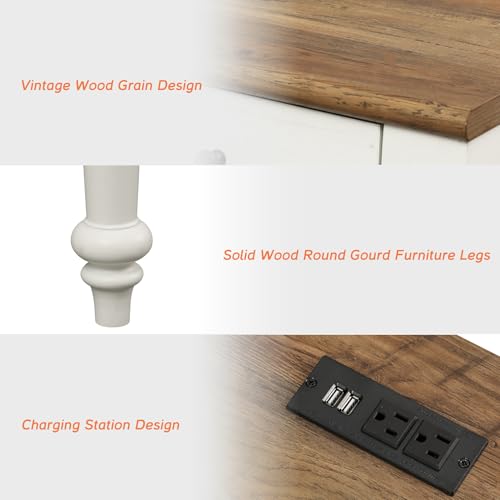
Image: A close-up view of the desk's drawers, highlighting their design and functionality.
Charging Station
The integrated charging station includes two standard AC outlets and two USB ports. Connect the desk's 6.5 ft power cable to a wall outlet. You can then power or charge mobile phones, tablets, laptops, and other electronic devices directly from the desktop.
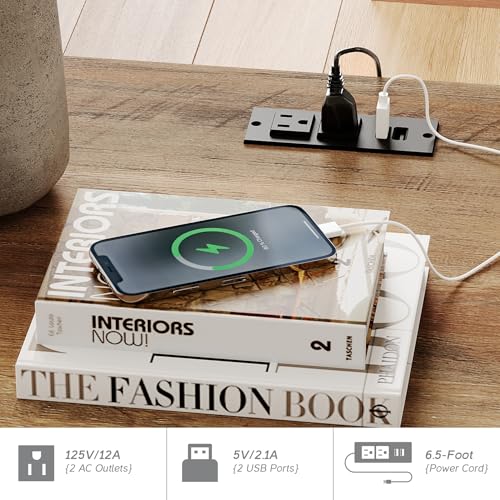
Image: The built-in charging station on the desk, showing two AC outlets and two USB ports in use.
Rear Storage Cabinets
Two rear storage cabinets provide additional space for items you wish to keep out of sight or for organizing cables. Access these by opening the cabinet doors located at the back of the desk.

Image: The rear storage cabinets of the WAMPAT Vanity Desk, demonstrating their capacity for books and other items.
Maintenance and Care
To maintain the appearance and longevity of your WAMPAT Farmhouse Vanity Desk, follow these care instructions:
- Cleaning: The desk features a smooth, waterproof surface. Wipe clean with a soft, damp cloth. Avoid abrasive cleaners or harsh chemicals, which can damage the finish.
- Spills: Promptly wipe up any spills to prevent water damage or staining.
- Heat Protection: Use coasters or protective pads under hot items to prevent heat marks on the desktop.
- Sunlight Exposure: Avoid prolonged direct sunlight exposure, which can cause fading or discoloration over time.
- Weight Capacity: Do not exceed the recommended weight capacity of 130 lbs for the tabletop.
Troubleshooting
If you encounter any issues with your vanity desk, consider the following common solutions:
- Wobbly Desk: Ensure all screws and fasteners are securely tightened. Check that the desk is on a level surface. Adjust leg levelers if present.
- Drawers Not Sliding Smoothly: Check for obstructions in the drawer slides. Ensure the slides are properly aligned and lubricated if necessary. Verify that the drawers are not overloaded.
- Charging Station Not Working: Confirm the power cable is fully plugged into a functional wall outlet. Check for any tripped circuit breakers. Ensure devices are properly connected to the USB ports or AC outlets.
- Missing Parts: If any parts were missing upon delivery, refer to the "Support" section for assistance.
Specifications
| Feature | Detail |
|---|---|
| Model Number | W03F3140W-VD |
| Color | Off White |
| Material | Engineered Wood |
| Product Dimensions (L x W x H) | 55.9" x 22.8" x 30.9" |
| Item Weight | 115 pounds |
| Number of Drawers | 5 |
| Number of Shelves | 2 (in rear cabinets) |
| Charging Station | 2 AC Outlets, 2 USB Ports |
| Power Cable Length | 6.5 ft |
| Included Components | Anti-tip Kit, Assembly Manual, Hardware Pack, Vanity Desk with Drawers |
Warranty and Support
Warranty Information
This WAMPAT product comes with a 2-Year Support period. WAMPAT takes full responsibility for any quality issues that may arise during this period. Please retain your proof of purchase for warranty claims.
Customer Support
For any questions, concerns, or assistance with assembly, missing parts, or product issues, please contact WAMPAT customer service. Refer to the contact information provided in your product packaging or visit the official WAMPAT website for support details.
When contacting support, please have your model number (W03F3140W-VD) and purchase date readily available.
Ask a question about this manual
Ask about setup, troubleshooting, compatibility, parts, safety, or missing instructions. Manuals+ will review the question and use this page’s manual context to help answer it.