
Introduction
Welcome to the iRobot Roomba Plus 416 Combo Robot Vacuum and Mop. This advanced cleaning system is designed to provide comprehensive floor care, combining powerful vacuuming with effective mopping. Featuring the AutoWash Base, your robot will automatically empty its dustbin, wash its mops, and refill its water tank, offering up to 90 days of autonomous cleaning. This manual provides essential information for setting up, operating, and maintaining your robot to ensure optimal performance.
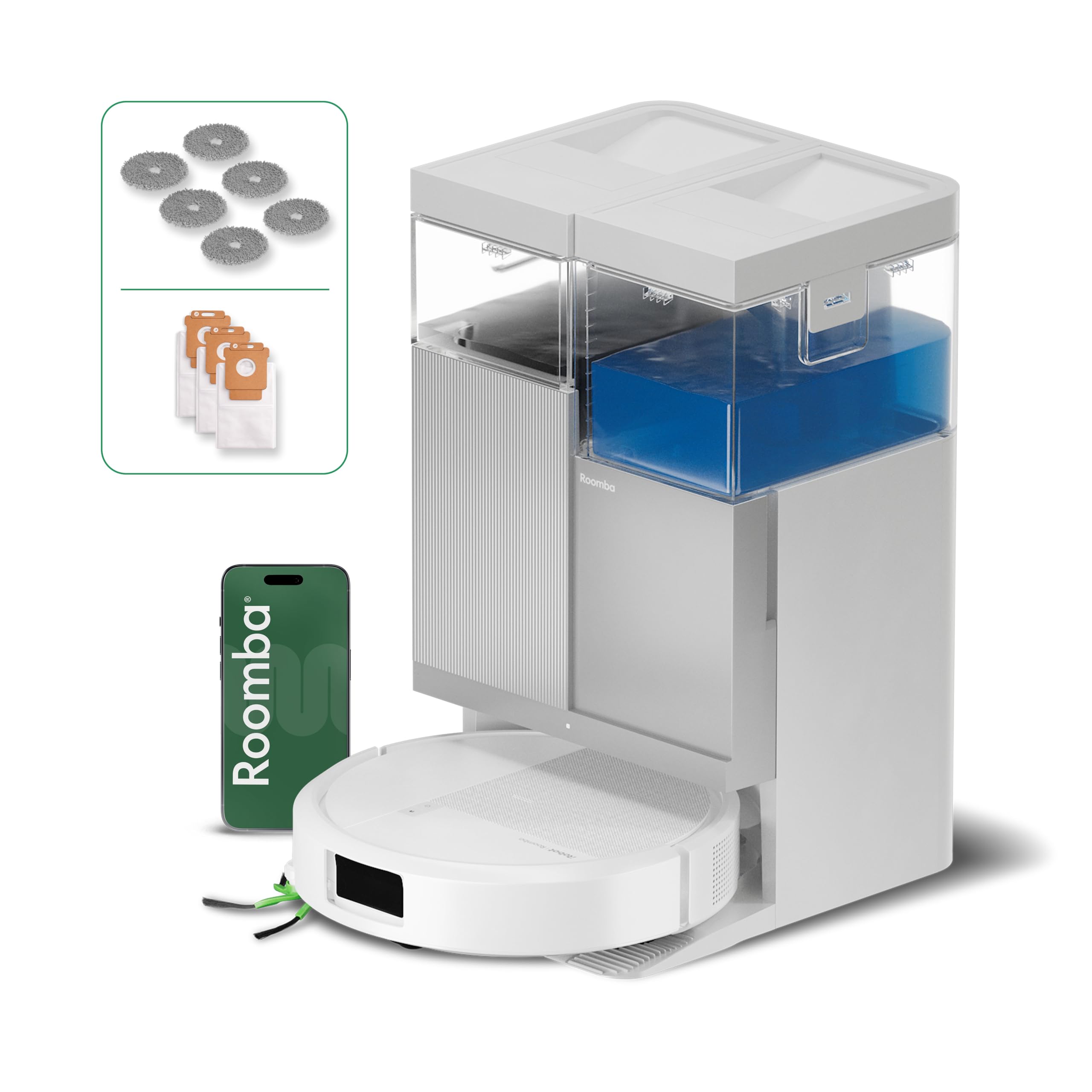
Image: The iRobot Roomba Plus 416 Combo robot vacuum and mop with its AutoWash base, ready for operation.
What's in the Box
Verify that all components are present in the packaging:
- iRobot Roomba Plus 416 Combo Robot
- AutoWash Base
- Charging Adapter
- Battery (pre-installed)
- Side Brushes
- Filter
- 3 Dirt Disposal Bags
- 3 Sets of DualClean Rotating Mops

Image: A visual representation of the components included in the iRobot Roomba Plus 416 Combo package, including the robot, AutoWash base, mop pads, side brush, and disposal bags.
Setup
- Unpack the Robot and Base: Carefully remove all packaging materials from the robot and the AutoWash Base.
- Place the AutoWash Base: Position the base against a wall in an open, uncluttered area. Ensure there is at least 0.5 meters (1.5 feet) of clear space on either side of the base and 1.2 meters (4 feet) in front of it. Plug the charging adapter into a wall outlet and connect it to the base.
- Charge the Robot: Place the Roomba robot onto the AutoWash Base. Ensure the charging contacts on the robot align with those on the base. The robot will begin charging automatically. Allow the robot to fully charge before its first use (approximately 3-4 hours).
- Install the Roomba Home App: Download the iRobot Home app from your device's app store. Follow the in-app instructions to connect your Roomba Plus 416 Combo to your Wi-Fi network and complete the initial setup. This app allows for advanced control, scheduling, and mapping features.
- Initial Mapping Run: Once charged, initiate a mapping run through the app. The robot will explore your home to create a detailed map, which is essential for efficient cleaning and navigation. Ensure all doors are open and obstacles are minimized during this first run.

Image: A smartphone displaying the iRobot Home app interface, showing a floor plan and cleaning schedule, demonstrating app control capabilities.
Operating Instructions
Starting a Cleaning Cycle
- Via iRobot Home App: Open the app, select your robot, and tap the "Clean" button. You can also customize cleaning preferences, select specific rooms, or set up cleaning schedules.
- Via Robot Button: Press the large "CLEAN" button on top of the robot to start a standard cleaning cycle. Press it again to pause, and once more to send the robot back to its base.
- Via Voice Control: If connected to a compatible smart home assistant (Amazon Echo, Google Home, Siri), use voice commands such as "Alexa, tell Roomba to start cleaning."
Vacuuming and Mopping
The Roomba Plus 416 Combo performs both vacuuming and mopping simultaneously. Its powerful 20,000 Pa suction removes debris, while the DualClean rotating mops scrub floors effectively. For deeper cleaning, the SmartScrub feature applies additional pressure to tackle stubborn stains.

Image: The Roomba robot actively vacuuming and mopping a tiled floor, illustrating its dual cleaning function.
Carpet Detection and Mop Lifting
The robot automatically detects carpets and rugs. When a carpet is detected, the mopping pads are automatically lifted by 10mm to prevent wetting the carpet while vacuuming continues.

Image: The Roomba robot transitioning from a hard floor to a carpet, with arrows indicating the automatic lifting of its mop pads to keep them dry.
LiDAR Navigation and Obstacle Avoidance
Equipped with ClearView LiDAR and PrecisionVision AI technology, the robot intelligently navigates your home, avoiding common obstacles like cables, shoes, and toys. This allows for cleaning without needing to pre-clear the area.
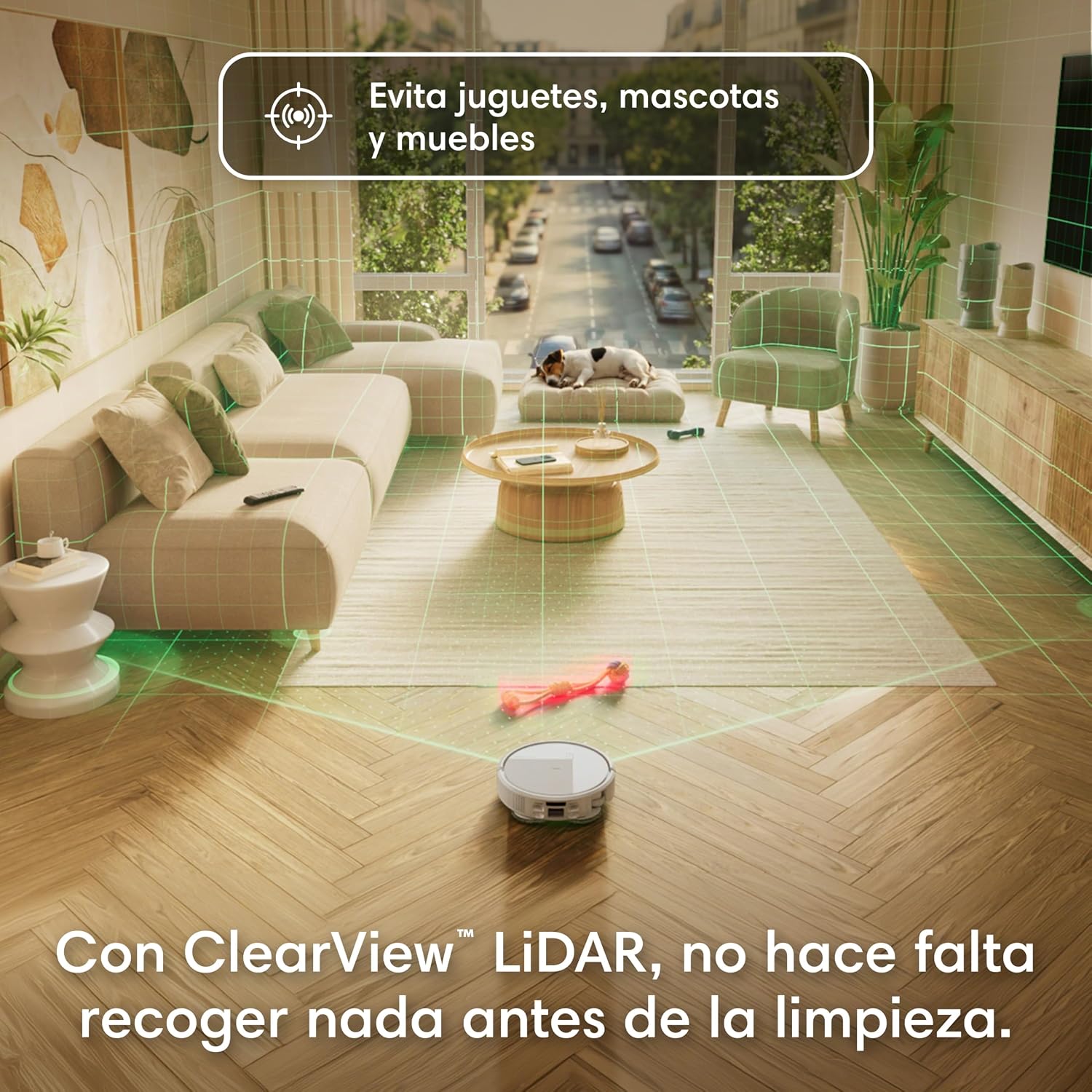
Image: The Roomba robot navigating a living room, with green lines illustrating its LiDAR mapping and obstacle avoidance capabilities, bypassing toys and furniture.
Edge and Corner Cleaning
The robot features an extensible mop and a side brush designed to reach deep into corners and along edges, ensuring thorough cleaning where dirt and dust often accumulate.

Image: A close-up view of the Roomba robot cleaning a room corner, highlighting its side brush and extensible mop for effective edge cleaning.
Maintenance
Regular maintenance ensures your Roomba Plus 416 Combo operates efficiently and extends its lifespan.
AutoWash Base Maintenance
- Automatic Dirt Disposal: The AutoWash Base automatically empties the robot's dustbin into a sealed bag, requiring replacement only about every 90 days.
- Mop Washing and Drying: The base washes and hot-air dries the DualClean mops at 45°C after each cleaning cycle, preventing odors and ensuring clean mops for every use.
- Water Tank Refill: The base automatically refills the robot's water tank for continuous mopping. Ensure the clean water tank in the base is filled.

Image: The iRobot AutoWash Base with the robot docked, illustrating the automatic dirt disposal and mop washing/drying processes.
Robot Component Cleaning
- DualClean Mops: While the base washes them, periodically inspect and replace the mop pads as needed.
- Anti-Tangle Rubber Brushes: These brushes are designed to prevent tangles from pet hair. Regularly remove and clean them to maintain optimal vacuuming performance.
- Filter: The filter should be cleaned weekly and replaced every 2-3 months, or more frequently if you have pets.
- Sensors: Wipe the robot's sensors (cliff sensors, wall-following sensor, charging contacts) with a clean, dry cloth to ensure proper navigation and charging.

Image: A detailed view of the Roomba's unique anti-tangle brush design, shown alongside a dog, emphasizing its effectiveness with pet hair.
Troubleshooting
If your Roomba Plus 416 Combo encounters an issue, refer to the following common solutions:
- Robot Not Charging: Ensure the AutoWash Base is plugged in and the robot is properly docked with charging contacts aligned. Clean the charging contacts on both the robot and the base with a dry cloth.
- Robot Not Starting: Check if the battery is charged. If using the app, ensure the robot is connected to Wi-Fi. If using the button, press it firmly.
- Poor Cleaning Performance: Clean the main brushes, side brush, and filter. Ensure the mop pads are clean and properly attached. Check if the water tank in the base is filled.
- Robot Getting Stuck: Clear the cleaning area of excessive clutter, loose cables, or small objects. Clean the cliff sensors and other navigation sensors.
- App Connectivity Issues: Restart your Wi-Fi router, your smartphone, and the Roomba robot. Ensure the robot is within range of your Wi-Fi network.
- Error Messages: Refer to the iRobot Home app for specific error codes and troubleshooting steps.
For persistent issues, consult the iRobot Home app's help section or contact iRobot customer support.
Specifications
| Brand | iRobot |
| Model Name | Roomba Plus 416 Combo robot + AutoWash™ dock |
| Model Number | G282240 |
| Dimensions (L x W x H) | 33 cm x 33 cm x 48.5 cm |
| Color | White |
| Battery Composition | Lithium Ion |
| Power Source | Corded Electric |
| Control Type | App, Buttons, Voice |
| Compatible Devices | Amazon Echo, Google Home, Siri, Smartphones, Tablets |
| Special Features | Self-refilling, Self-emptying, App/Voice Control, Zone Exclusion, Automatic Mopping, Corner Cleaning, Multi-floor Mapping, Smart Mapping, LiDAR Navigation, Room-by-room Navigation, Obstacle Prevention, Programmable, Pet Hair Collection, Hot Air Drying, Dirt Detection Sensor, Continuous Suction |
| Recommended Surface | Carpet, Hard Floors |
Warranty and Support
iRobot is committed to providing reliable robots and excellent service. Our specially trained customer service agents are ready to assist you whenever needed. Your privacy is our priority, and we utilize the highest encryption standards to ensure your data is secure and protected.
To protect your investment, iRobot does not certify the quality or authenticity of products purchased from unauthorized distributors on Amazon. Warranty claims, service, or replacements will only be covered for products acquired from authorized distributors.
For support, please visit the official iRobot website or contact customer service through the iRobot Home app.


