
Anona Anona Orbis Solar Security Camera 1 Pack
Anona Orbis Solar Security Camera Wireless Outdoor - User Manual
Model: Anona Orbis Solar Security Camera 1 Pack
Introduction
This manual provides detailed instructions for the installation, operation, and maintenance of your Anona Orbis Solar Security Camera. This wireless outdoor camera features 2.5K 4MP resolution, 360° pan-tilt-zoom (PTZ) coverage, 24/7 Always-On Video (AOV) recording, color night vision, AI human detection with auto-tracking, and IP66 weather resistance. Please read this manual thoroughly before use to ensure proper functionality and safety.
What's in the Box
Verify that all components are present before proceeding with installation.
- Anona Solar Security Camera Wireless Outdoor
- Forever Power Solar Panel
- Mounting sticker (for camera)
- Mounting sticker (for solar panel)
- Solar panel bracket
- Screws and wall anchors
- USB charging cable
- User Manual (this document)
Key Product Features
The Anona Orbis Solar Security Camera offers a robust set of features for comprehensive outdoor surveillance:
- 2.5K 4MP QHD Resolution: Captures clear and detailed video footage day and night.
- 360° PTZ Coverage: Offers 355° horizontal pan and 95° vertical tilt for comprehensive area monitoring.
- Solar Powered with 10400mAh Battery: Ensures continuous operation with minimal manual charging, utilizing a 7W solar panel.
- 24/7 Always-On Video (AOV) Recording: Provides uninterrupted time-lapse recordings without requiring AC power.
- Full-Color Night Vision: Delivers clear, colored images in low-light conditions, enhancing detail recognition.
- AI Human Detection & Auto Tracking: Intelligently identifies human movement and tracks subjects, reducing false alarms.
- Local & Cloud Storage Options: Supports microSD cards up to 128GB (not included) and optional cloud storage without mandatory subscription fees.
- IP66 Weatherproof: Designed to withstand various outdoor conditions including rain, dust, heat, and snow.
- Two-Way Audio: Allows for real-time communication with delivery personnel, visitors, or to verbally deter unwanted individuals.
- Motion-Activated Spotlight & Siren: Enhances security by activating light and sound upon detection.
- 2.4GHz Wi-Fi Connectivity: Connects to your home network for remote access and control via a mobile app.
Video: Anona Orbis Solar Security Camera Wireless Outdoor, 24/7 AOV. This video provides an overview of the camera's main features and capabilities, including its 24/7 Always-On Video recording.
Setup Guide
1. Charging the Camera
Before initial use, fully charge the camera's built-in 10400mAh battery using the provided USB cable. This ensures the camera has sufficient power for setup and operation before the solar panel takes over.
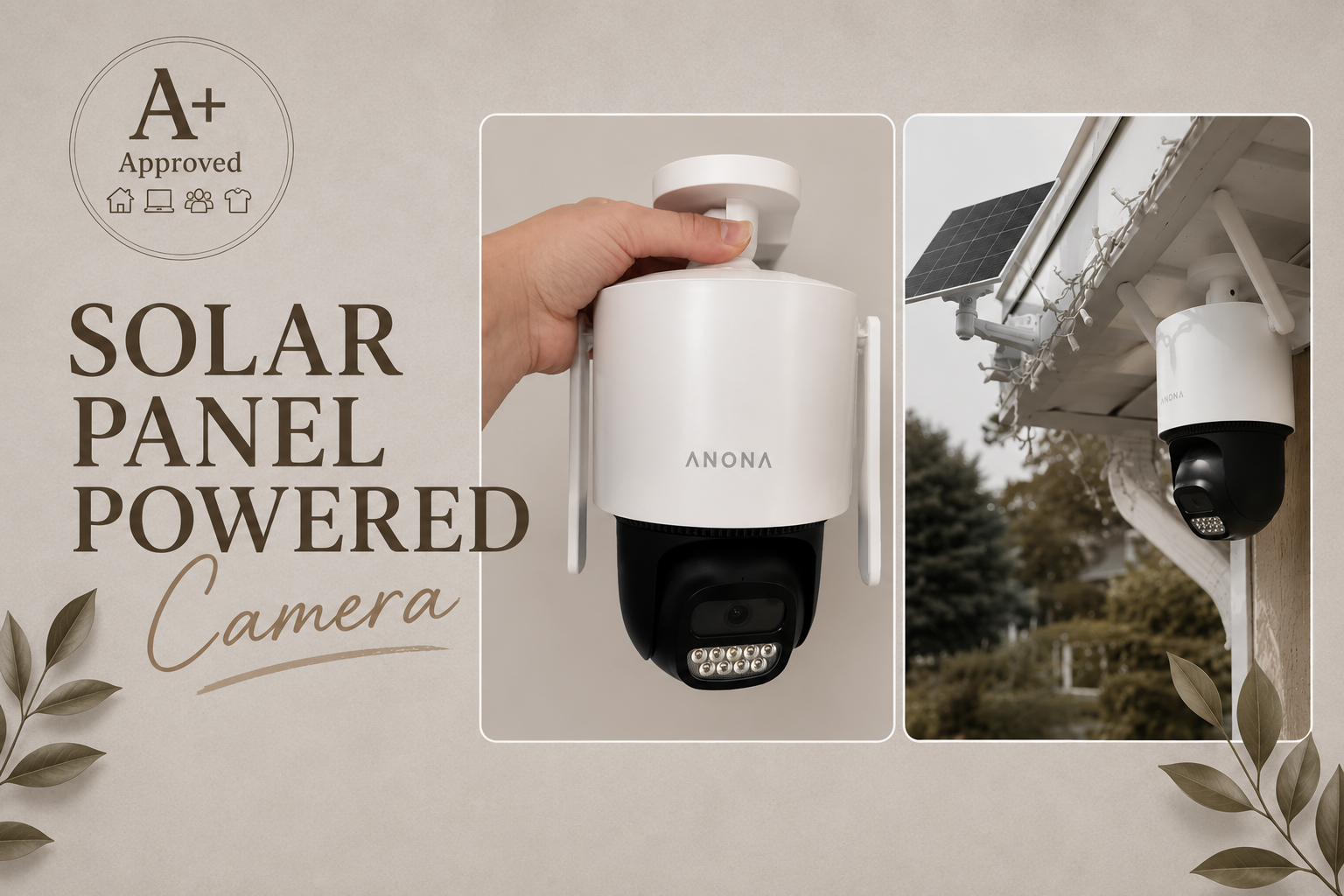
Image: A hand connecting a USB cable to the Anona Orbis camera for initial charging.
2. App Installation and Account Creation
Download the official Anona Security app from your smartphone's app store (iOS or Android). Follow the on-screen instructions to create an account and log in.
3. Connecting the Camera to the App
Open the Anona Security app. Tap the "+" icon to add a new device. The app will search for nearby devices. Select your Anona Orbis camera from the list or add it manually. Follow the in-app prompts to connect the camera to your 2.4GHz Wi-Fi network. Ensure your phone is connected to the same 2.4GHz Wi-Fi network during this process.
Video: Anona Orbis Solar Security Camera App Connection Guide. This video demonstrates the step-by-step process of connecting the camera to the Anona Security mobile application, including device discovery and Wi-Fi setup.
4. Mounting the Camera and Solar Panel
Choose a location for your camera that provides optimal viewing and strong Wi-Fi signal. The solar panel should be mounted in a location that receives direct sunlight for several hours each day to ensure continuous charging. Use the provided mounting stickers as guides, drill pilot holes, and secure the camera and solar panel brackets with the included screws and wall anchors.

Image: The Anona Orbis camera and its solar panel are shown mounted on an exterior wall, illustrating a typical installation setup.
Operating Instructions
Live View and PTZ Control
Access the live feed from your camera through the Anona Security app. Use the on-screen joystick or swipe gestures to pan (355° horizontally) and tilt (95° vertically) the camera, allowing you to monitor different areas of your property.

Image: A graphic illustrating the 360° panoramic view capability of the Anona Orbis camera, showing its wide coverage area.
AI Human Detection and Auto Tracking
Enable AI human detection in the app settings to receive alerts only when a person is identified. The auto-tracking feature will automatically follow detected human movement within the camera's field of view, ensuring continuous monitoring of the subject.

Image: A person walking into the camera's view, with blue boxes indicating AI person detection and arrows showing auto-tracking functionality.
Night Vision Modes
The camera supports full-color night vision, providing clear and detailed color images even in low-light conditions. You can switch between color night vision and infrared (IR) night vision via the app settings based on your preference and environmental lighting.

Image: A split image demonstrating the difference between full-color night vision and standard IR black and white night vision, highlighting the enhanced detail of color night vision.
Two-Way Audio
Utilize the two-way audio feature to speak through the camera's built-in speaker and listen through its microphone. This is useful for communicating with delivery personnel, visitors, or to verbally deter unwanted individuals.

Image: A man speaking into his phone, with a speech bubble indicating two-way audio communication with someone at the door, as seen through the Anona Orbis camera.
Recording and Storage
The Anona Orbis camera supports 24/7 Always-On Video (AOV) recording, capturing continuous time-lapse footage. You can store recordings locally on a microSD card (up to 128GB, not included) or opt for cloud storage services (optional, no monthly fees required for basic functionality).

Image: A visual representation of 24/7 AOV recording, showing a day-night cycle over a property, indicating continuous monitoring.

Image: A close-up of the camera's microSD card slot, alongside icons representing cloud storage and local storage options.
Smart Assistant Integration
The camera is compatible with Amazon Alexa and Google Assistant. Link your Anona Security account to your smart home platform to enable voice commands for live viewing and other functions.

Image: A person interacting with a smart display, showing the Anona Orbis camera feed, demonstrating Alexa and Google Assistant compatibility.
Maintenance
- Solar Panel Cleaning: Regularly wipe the solar panel surface with a soft, damp cloth to remove dust, dirt, or debris that may obstruct sunlight and reduce charging efficiency.
- Lens Cleaning: Gently clean the camera lens with a microfiber cloth to ensure clear image quality. Avoid abrasive materials or harsh chemicals.
- Firmware Updates: Check the Anona Security app periodically for firmware updates. Keeping your camera's firmware updated ensures optimal performance and security.
- Battery Health: While the solar panel maintains the battery, it is recommended to occasionally check the battery level in the app, especially during prolonged periods of low sunlight.
Troubleshooting
Camera Not Connecting to Wi-Fi
- Ensure your Wi-Fi network is 2.4GHz. The Anona Orbis camera does not support 5GHz Wi-Fi.
- Verify the Wi-Fi password is entered correctly in the app.
- Place the camera closer to your Wi-Fi router during initial setup to ensure a strong signal.
- Restart your Wi-Fi router and the camera.
- If issues persist, try resetting the camera to factory defaults (refer to the app for specific instructions) and attempt the connection process again.
Poor Video Quality or Lag
- Check your Wi-Fi signal strength in the camera's location via the app. A weak signal can cause poor performance.
- Ensure your internet connection speed is adequate for streaming video.
- Clean the camera lens if it appears dirty or smudged.
Battery Not Charging or Draining Quickly
- Confirm the solar panel is installed in a location receiving ample direct sunlight throughout the day.
- Clean the solar panel surface to remove any obstructions.
- Ensure the solar panel cable is securely connected to the camera.
- Frequent motion detections and live view access can increase battery consumption. Adjust sensitivity settings if necessary.
False Motion Alerts
- Adjust the motion detection sensitivity settings in the app.
- Utilize the AI human detection feature to filter out non-human movements.
- Set up activity zones to focus detection on specific areas and ignore irrelevant movements (e.g., trees swaying).
Specifications
| Feature | Detail |
|---|---|
| Model Name | Anona Orbis Solar Security Camera 1 Pack |
| Resolution | 2.5K 4MP (2560 x 1440p) |
| Pan/Tilt Range | Pan 355°, Tilt 95° |
| Power Source | Solar Powered, Rechargeable Battery (10400mAh) |
| Solar Panel Wattage | 7W |
| Connectivity | 2.4GHz Wi-Fi |
| Night Vision | Full Color Night Vision, IR Night Vision (50 ft range) |
| Storage Options | MicroSD Card (up to 128GB, not included), Cloud Storage (optional) |
| Weather Resistance | IP66 Weatherproof |
| Audio | Two-Way Audio |
| Smart Home Compatibility | Amazon Alexa, Google Assistant |
| Detection Features | AI Person Detection, Auto Tracking, Motion-Activated Spotlight & Siren |
| Dimensions | 8.15 x 5.98 x 11.5 inches |
Warranty and Support
Anona products are designed for reliability and performance. For specific warranty details, please refer to the warranty card included with your product or visit the official Anona website.
For technical support, troubleshooting assistance, or any inquiries regarding your Anona Orbis Solar Security Camera, please contact Anona Customer Service through the following channels:
- Official Website: www.anona.com (Please check for the most current contact information)
- In-App Support: Access support options directly within the Anona Security mobile application.
Please have your product model name and purchase date ready when contacting support.
Related documentsAnona Orbis Solar Security Camera 1 Pack


Ask a question about this manual
Ask about setup, troubleshooting, compatibility, parts, safety, or missing instructions. Manuals+ will review the question and use this page’s manual context to help answer it.