
1. Introduction
This manual provides comprehensive instructions for the safe and effective installation, operation, and maintenance of your new Generic Refrigerator Freezer Light Socket, model PLHT219TCBN. This replacement part is designed to restore lighting functionality within your refrigerator or freezer compartment. Please read this manual thoroughly before attempting any installation or maintenance.
2. Safety Information
WARNING: Risk of Electric Shock. Always disconnect power to the appliance before servicing.
- Ensure the refrigerator or freezer is unplugged from the electrical outlet before beginning any work.
- Wear appropriate personal protective equipment, such as gloves, if necessary.
- If you are unsure about any step, consult a qualified appliance technician.
- Do not attempt to modify the light socket or use it for purposes other than its intended function.
- Keep children and pets away from the work area.
3. Package Contents
Verify that all components are present and undamaged before proceeding with installation.
- 1 x Generic Refrigerator Freezer Light Socket (Model: PLHT219TCBN)
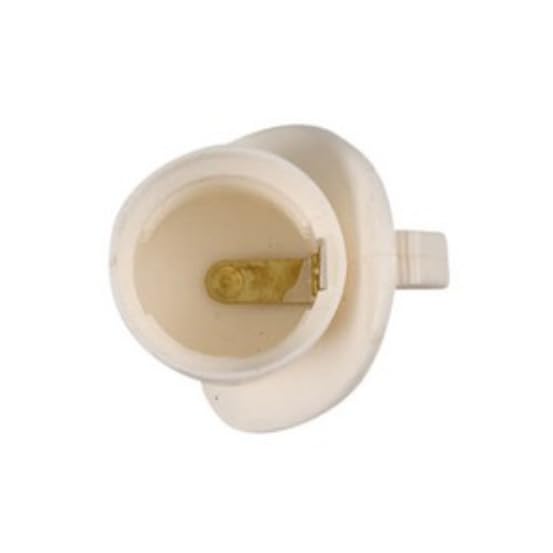
Image 1: Generic Refrigerator Freezer Light Socket. This image displays the light socket, which is typically a small, cylindrical component with electrical contacts and a bulb receptacle, designed for appliance interior lighting.
4. Setup and Installation
Follow these steps carefully to replace the refrigerator or freezer light socket.
- Disconnect Power: Unplug the refrigerator or freezer from the electrical outlet. This is a critical safety step.
- Access the Light Socket:
- Open the refrigerator or freezer door.
- Locate the light bulb and its housing. Depending on your appliance model, you may need to remove a light cover. This cover is often held by clips, screws, or tabs. Gently pry or unscrew to remove it.
- Remove the Old Light Bulb: Unscrew the existing light bulb from the socket.
- Disconnect the Old Socket:
- The light socket is usually held in place by clips, screws, or a friction fit. Carefully examine how it is secured.
- Disconnect any wiring connected to the old socket. Note the orientation of the wires if they are not color-coded or uniquely shaped. Taking a photo with your phone can be helpful.
- Remove the old light socket from its housing.
- Install the New Light Socket:
- Connect the wires to the new light socket, ensuring they are securely attached and match the original configuration.
- Insert the new light socket into the housing, ensuring it clicks or fastens securely into place.
- Install New Light Bulb: Screw in a new, compatible light bulb (not included) into the newly installed socket.
- Reassemble: Replace the light cover (if applicable) and ensure it is securely fastened.
- Restore Power: Plug the refrigerator or freezer back into the electrical outlet.
- Test Functionality: Open the appliance door to confirm that the new light bulb illuminates.
5. Operating Instructions
The light socket functions automatically with the opening and closing of the refrigerator or freezer door. No manual operation is required for the socket itself.
- Light Activation: The light should turn on when the appliance door is opened.
- Light Deactivation: The light should turn off when the appliance door is closed.
If the light does not operate as expected, refer to the Troubleshooting section.
6. Maintenance
Regular maintenance helps ensure the longevity and proper function of your light socket.
- Cleaning: Periodically, with the power disconnected, gently wipe the light socket and surrounding area with a dry, soft cloth to remove dust or debris. Do not use liquid cleaners directly on electrical components.
- Bulb Replacement: When the light bulb burns out, replace it with a new bulb of the correct wattage and type as specified by your appliance manufacturer. Always disconnect power before replacing the bulb.
- Inspection: Occasionally inspect the wiring connections to the socket to ensure they remain secure.
7. Troubleshooting
If you encounter issues with your light socket, consult the following table before contacting a service technician.
| Problem | Possible Cause | Solution |
|---|---|---|
| Light does not turn on. |
|
|
| Light flickers or is dim. |
|
|
8. Specifications
- Model Number: PLHT219TCBN
- Part Type: Refrigerator Freezer Light Socket
- Manufacturer: Generic
- Product Dimensions: 1 x 1 x 1 inches (Approximate)
- Included Components: Light Socket
- ASIN: B0GX7QHRYV
9. Warranty and Support
Information regarding product warranty and customer support is not provided within this manual. Please refer to the product packaging or contact the seller directly for details on warranty coverage and technical assistance.