
AERMOTOR V410
AERMOTOR V410 OBD2 Scanner User Manual
Model: V410
Brand: AERMOTOR
1. Introduction
The AERMOTOR V410 OBD2 Scanner is a professional diagnostic tool designed to quickly identify and resolve issues indicated by the Check Engine Light. This device supports all 10 OBD2 test modes, offering comprehensive vehicle health monitoring, live data graphing, I/M readiness checks, and battery voltage testing. It is an essential tool for both DIY enthusiasts and professional mechanics.
Note: Always repair the root cause before clearing codes. Error codes cannot be cleared if hardware problems persist.
2. What's in the Box
- AERMOTOR V410 OBD2 Car Scanner
- User Manual
- Integrated OBD2 Cable (No separate charger/adapter needed)
3. Product Overview
The V410 features a compact and durable design with a 2.8-inch backlit display for clear visibility in various lighting conditions. Its intuitive interface and well-labeled buttons ensure ease of use for all skill levels.
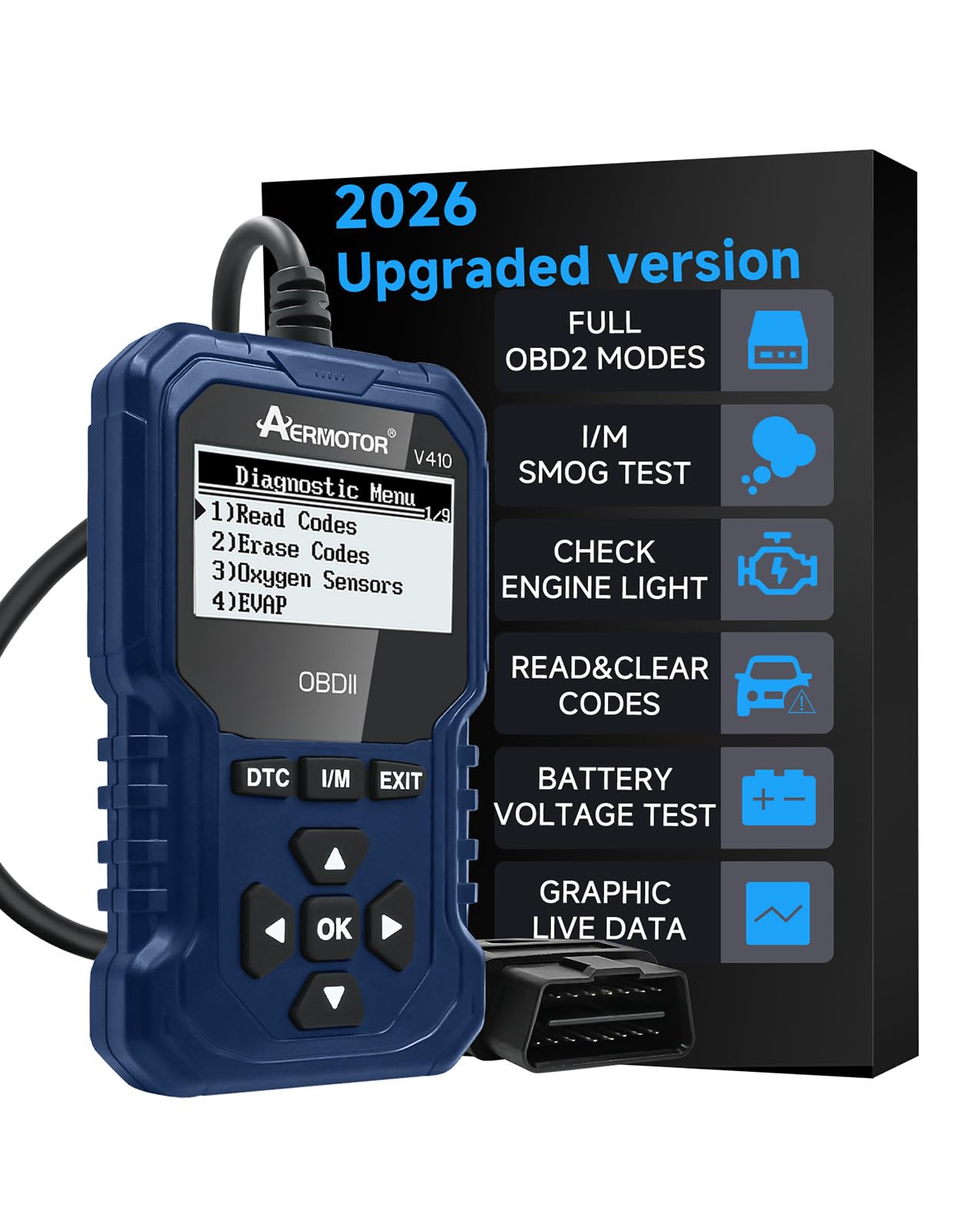
Image: The AERMOTOR V410 OBD2 Scanner, showcasing its display and buttons.

Image: Detailed dimensions of the AERMOTOR V410 OBD2 Scanner, showing its compact size and integrated cable length.
4. Setup
The V410 is designed for plug-and-play operation, requiring no batteries or external power. Simply connect it to your vehicle's OBD2 port.
- Locate your vehicle's OBD2 port. This is typically found under the dashboard on the driver's side.
- Ensure the vehicle's ignition is in the 'ON' position (engine can be off or running, depending on the test).
- Plug the V410's integrated cable into the OBD2 port. The device will power on automatically.

Image: Visual guide demonstrating the simple plug-and-play connection of the V410 scanner to a vehicle's OBD2 port.
5. Operating Instructions
The V410 supports all 10 OBD2 test modes, allowing for comprehensive vehicle diagnostics.
5.1. Full OBD2 Functions
The V410 can perform the following OBD2 functions:
- Read and Clear Diagnostic Trouble Codes (DTCs)
- View Live Data Stream
- View Freeze Frame Data
- I/M Readiness Status (Emissions Test)
- O2 Sensor Test
- On-Board Monitor Test
- Component Test
- Vehicle Information (VIN, CIN, CVN)
- Modules Present
- DTC Lookup Library

Image: Overview of the V410's capabilities, including automotive engine troubleshooting, reading/erasing codes, O2 sensor test, I/M readiness, vehicle information, real-time data, fault freeze frame, battery voltage, and EVAP system test.
5.2. Reading and Clearing Codes
To read diagnostic trouble codes (DTCs) and clear the Check Engine Light:
- Navigate to the 'Read Codes' option on the main menu. The scanner will display any active or pending DTCs.
- Consult the built-in DTC library or an external resource to understand the meaning of the codes.
- After addressing the underlying issue, navigate to the 'Erase Codes' option. Confirm the action to clear the codes and turn off the Check Engine Light.
5.3. Live Data Graphing
The V410 displays real-time sensor data in an easy-to-read graphical format, allowing you to monitor critical engine parameters and identify intermittent issues.
- Monitor parameters such as vehicle speed, RPM, coolant temperature, fuel system status, intake air temperature, and more.
- The graphical display helps in detecting trends and anomalies instantly.

Image: The V410 screen showing real-time live data, including MIL status, misfire monitor, fuel system monitor, and component status, along with vehicle info and data stream values.
5.4. I/M Readiness Test
Check your vehicle's emissions system readiness with a single click to ensure it's prepared for annual smog tests.
- Press the dedicated I/M Readiness button.
- The screen will display the status of each emissions monitor as "Complete" or "Not Ready."
- If any monitor is "Not Ready," follow the on-screen prompts or perform a drive cycle to complete the monitoring.

Image: The V410 displaying the I/M Readiness status, indicating whether various monitors are complete or incomplete for emissions testing.
5.5. Battery Voltage Test
The V410 can also function as a battery voltage tester, helping you identify weak batteries or charging system issues.
- Connect the V410 to the OBD2 port.
- Select the 'Battery Voltage' option from the menu.
- The device will display the current battery voltage in real-time.
Voltage Guidelines:
- Below 10.8V: Too low to start the vehicle.
- 10.8V - 11.8V: Difficulty starting may occur.
- 11.8V - 12.8V: Normal voltage (before starting).
- 12.8V - 13.2V: Charging might be insufficient (after starting).
- 13.2V - 14.8V: Normal voltage (after starting).
- Above 14.8V: Risk of battery damage due to overvoltage.

Image: The V410 displaying a battery voltage reading of 13.6V, along with a guide for interpreting voltage levels before and after starting the vehicle.
5.6. Powerful DTC Lookup
The V410 includes a built-in library of over 10,000 Diagnostic Trouble Codes (DTCs), eliminating the need to search online for code definitions. This feature provides accurate and simple diagnosis, helping you troubleshoot car malfunctions efficiently.

Image: The V410 screen showing the diagnostic menu with options to read/erase codes and access oxygen sensors, alongside a DTC lookup result for P0195, indicating an Engine Oil Temperature Sensor issue.
6. Compatibility
The AERMOTOR V410 is compatible with all OBDII vehicles, including American, European, and Asian cars, light trucks, and SUVs manufactured after 1996. It supports all standard OBDII protocols:
- SAE J1850 PWM (41.6 Kbaud)
- SAE J1850 VPW (10.4 Kbaud)
- ISO9141-2 (5 baud init, 10.4 Kbaud)
- ISO14230-4 KWP (5 baud init, 10.4 Kbaud)
- ISO14230-4 KWP (fast init, 10.4 Kbaud)
- ISO15765-4 CAN (11bit ID, 500 Kbaud)
- ISO15765-4 CAN (29bit ID, 500 Kbaud)
- ISO15765-4 CAN (11bit ID, 250 Kbaud)
- ISO15765-4 CAN (29bit ID, 250 Kbaud)
The device also supports 8 languages: English, Spanish, German, Russian, French, Dutch, and Italian.

Image: The V410 scanner connected to a vehicle, illustrating its wide compatibility with OBDII cars made after 1996 and listing the 9 supported OBDII/EOBD standard protocols and 8 supported languages.
7. Maintenance
To ensure the longevity and optimal performance of your AERMOTOR V410 OBD2 Scanner:
- Keep the device clean by wiping it with a soft, dry cloth. Avoid using abrasive cleaners or solvents.
- Store the scanner in a dry, cool place, away from direct sunlight and extreme temperatures.
- Avoid dropping the device or subjecting it to strong impacts.
- Regularly check the integrated cable for any signs of damage or wear.
8. Troubleshooting
If you encounter issues with your V410 scanner, consider the following:
- Device Not Powering On: Ensure the OBD2 cable is securely connected to the vehicle's OBD2 port and the vehicle's ignition is in the 'ON' position. The device draws power directly from the vehicle.
- Communication Error: Verify that your vehicle is OBDII compliant (generally 1996 and newer for US vehicles, later for European/Asian). Check the connection to the OBD2 port. Try the scanner on another OBDII compliant vehicle if possible to rule out a vehicle-specific issue.
- Codes Cannot Be Cleared: If the underlying hardware issue causing the Diagnostic Trouble Code (DTC) has not been resolved, the code will reappear immediately or cannot be cleared. Address the root cause of the problem before attempting to clear codes.
- Incorrect Readings: Ensure the vehicle's engine is running or the ignition is on, as required for certain tests. Refer to the specific function's instructions.
9. Specifications
| Feature | Specification |
|---|---|
| Model Number | V410 |
| Display Size | 2.8 inches |
| Power Source | Vehicle OBD2 Port (Cable Electric) |
| Product Dimensions (L x W x H) | 8.9 x 2.4 x 15.2 cm (3.5 x 0.94 x 5.98 inches) |
| Cable Length | 72.7 cm (28.42 inches) |
| Weight | 281 g |
| Supported Protocols | KWP2000, J1850 VPW, ISO9141, J1850 PWM, CAN |
| Supported Languages | English, Spanish, German, Russian, French, Dutch, Italian |
| Operating System | Built-in system |
| Vehicle Fit Type | Universal Fit |
10. Warranty and Support
The AERMOTOR V410 OBD2 Scanner comes with a 1-year warranty and lifetime technical support. For any questions, issues, or technical assistance, please contact AERMOTOR customer service through the retailer where you purchased the product.
Related documentsV410


Ask a question about this manual
Ask about setup, troubleshooting, compatibility, parts, safety, or missing instructions. Manuals+ will review the question and use this page’s manual context to help answer it.