
1. Introduction
This manual provides detailed instructions for the assembly, installation, and maintenance of your Lian Li B4-mATX 21.3L PC Case. Designed for compact yet powerful builds, this case offers versatile configuration options and efficient cooling. Please read this manual thoroughly before beginning your PC build to ensure proper installation and optimal performance.

Image 1.1: Lian Li B4-mATX PC Case (Mesh Black) in horizontal orientation.
2. Product Overview
The Lian Li B4-mATX is a 21.3-liter small form factor case engineered for mATX motherboards and GPUs up to 358mm in length. Its full mesh panels ensure optimal ventilation, and it comes with two pre-installed slim 120mm fans. The case supports both horizontal and vertical orientations, adapting to various setups. Key features include:
- Compact Design: 21.3-liter volume, ideal for space-saving builds.
- Versatile Orientation: Supports horizontal or vertical placement.
- Enhanced Airflow: Full mesh panels for superior cooling.
- Pre-installed Fans: Two slim 120mm non-RGB fans included.
- Easy Cable Management: Rotatable AC inlet and ample rear clearance.
- Broad Compatibility: Supports up to 360mm AIOs (with SFX PSU) and GPUs up to 358mm.
3. Safety Information
Always exercise caution when handling computer components. Disconnect the power supply from the wall outlet before performing any installation or maintenance. Avoid touching electronic components directly to prevent electrostatic discharge. Keep small parts away from children. Refer to your component manuals for specific safety guidelines.
4. Setup and Installation
4.1. Case Dimensions and Component Compatibility
The B4-mATX case offers a compact footprint while accommodating significant hardware. Understanding the dimensions is crucial for component selection.

Image 4.1: Case dimensions (W: 191mm, D: 420mm, H: 288mm) and hardware compatibility.
- Motherboard Support: Micro-ATX, Mini ITX
- GPU Length Clearance: Up to 358mm (4-slot thick)
- CPU Cooler Height Clearance: 162mm (with side fan bracket), 168mm (without side fan bracket)
- PSU Support: ATX (up to 140mm), SFX
4.2. Fan Installation and Airflow Configuration
The case includes two pre-installed 120x120x15mm slim fans on the top panel. These fans operate up to 1800 RPM, providing 64.2 CFM airflow with 2.4mmH2O static pressure at 30.3dBA noise level. They are daisy-chained for simplified cable management.
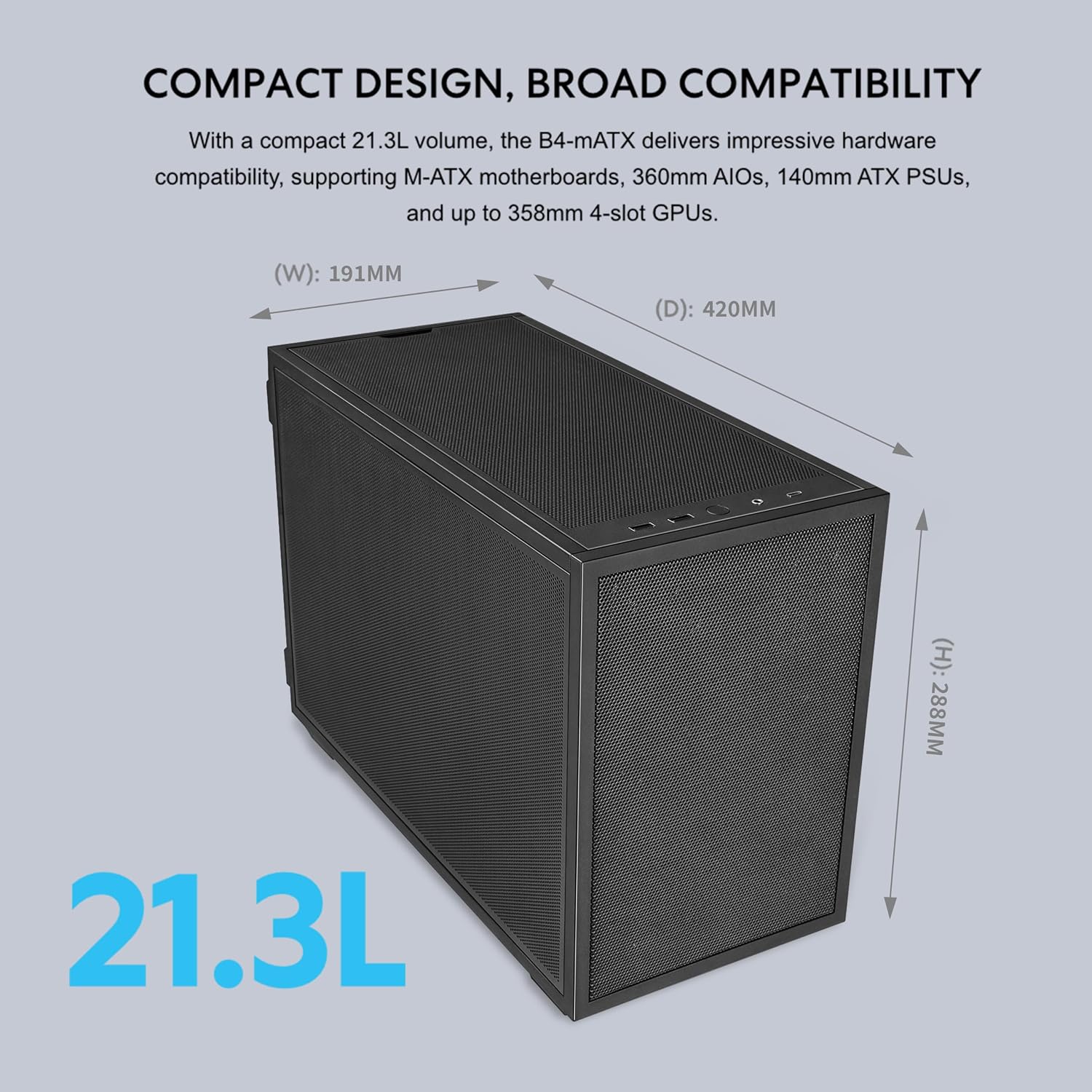
Image 4.2: Detail of pre-installed slim fans and their specifications.
The B4-mATX offers flexible cooling configurations:

Image 4.3: Diagram illustrating flexible cooling configurations, including fan and radiator placements.
- Top: 2x 120mm (pre-installed)
- Side (with SFX PSU): 2x 120mm / 2x 140mm
- Side (with ATX PSU): 2x 120mm
- Front (SFX PSU only): 1x 120mm slim fan
- Bottom: 3x 120mm / 2x 140mm
- Rear: 1x 120mm
For optimal liquid cooling, consider the following configurations:

Image 4.4: Recommended liquid cooling setups, including 360/280mm AIO with SFX PSU and 240mm AIO with 140mm ATX PSU.
For air cooling, the case supports various setups:

Image 4.5: Recommended air cooling setups, detailing fan placements for 162mm and 168mm CPU coolers.
4.3. GPU Installation
The B4-mATX case simplifies GPU installation with a removable front fan bracket, allowing large graphics cards to slide in from the front of the chassis.

Image 4.6: Illustration of the easy GPU installation method.
A dedicated anti-sag bracket is pre-installed to support GPUs up to 4 slots thick and 358mm long, ensuring stability and preventing sagging over time.

Image 4.7: Close-up of the pre-installed GPU anti-sag bracket.
4.4. Power Supply Unit (PSU) Compatibility
The choice of PSU affects available space for other components, especially for front fans and AIOs. The case supports both ATX (up to 140mm) and SFX PSUs.

Image 4.8: PSU hardware compatibility chart detailing AIO support, motherboard type, GPU length, and fan options based on PSU type.
4.5. Cable Management
The B4-mATX features a rotatable AC inlet and ample rear clearance to facilitate tidy cable organization. The removable top fan bracket also provides easier access for routing and managing CPU 8-pin cables.

Image 4.9: Removable top fan bracket for improved access to CPU power cables and fan configuration.
For improved intake airflow, the case supports a 120x120x15mm slim front fan when using an SFX PSU and a GPU under 343mm long.

Image 4.10: Illustration of installing an extra slim front fan to enhance intake airflow.
5. Operating Instructions
Once all components are installed and connected, ensure all cables are securely fastened. Connect the power cable to the PSU and a wall outlet. Press the power button located on the front I/O panel to start your system.
5.1. Orientation
The Lian Li B4-mATX case can be used in both horizontal and vertical orientations. Choose the orientation that best suits your workspace and aesthetic preferences. Ensure stable placement in either configuration.
5.2. Front I/O Ports
The front I/O panel provides convenient access to:
- 2x USB 3.0 Type A ports
- 1x USB 3.2 Type C port
- 1x Audio port
- Power Button
6. Maintenance
Regular maintenance helps ensure the longevity and performance of your PC. Keep the case clean and free of dust.
- Dust Filters: The case includes a bottom magnetic dust filter and a PVC dust filter. Regularly remove and clean these filters to maintain optimal airflow and prevent dust buildup inside the case.
- General Cleaning: Use a soft, dry cloth to wipe down the exterior of the case. For mesh panels, a soft brush or compressed air can be used to remove dust.
- Internal Cleaning: Periodically open the case and use compressed air to clear dust from internal components, especially fans and heatsinks. Ensure the system is powered off and unplugged before internal cleaning.
7. Troubleshooting
If you encounter issues during or after your build, consider the following common troubleshooting steps:
- No Power: Ensure the PSU is switched on and all power cables (24-pin, CPU 8-pin, GPU power) are securely connected. Check the front panel power switch connection to the motherboard.
- No Display: Verify that the GPU is correctly seated in the PCIe slot and connected to the monitor. Ensure the monitor is on and set to the correct input.
- Component Clearance: Double-check component dimensions against case specifications, especially for large GPUs, CPU coolers, and ATX PSUs, as space can be limited.
- Cable Management: While the case offers features for cable management, tight spaces can make it challenging. Ensure no cables are obstructing fans or preventing panels from closing properly.
- Overheating: Confirm all fans are spinning and oriented correctly for optimal airflow. Ensure CPU cooler and GPU fans are functioning. Check thermal paste application on the CPU.
- Loose Connections: Re-seat all components (RAM, GPU, storage drives) and re-check all power and data cables.
For more specific issues, consult the manuals for your individual components (motherboard, GPU, PSU) or seek assistance from Lian Li customer support.
8. Specifications
Below is a detailed table of the Lian Li B4-mATX case specifications:

Image 8.1: Detailed specifications for the B4-mATX case.
| Feature | Specification |
|---|---|
| Brand | Lian Li |
| Model Name | B4X |
| Color | Black |
| Dimensions (D x W x H) | 16.02"D x 7.52"W x 11.34"H (420 x 191 x 288mm) |
| Material | Mesh, Steel 4.0mm |
| Motherboard Support | Micro-ATX, Mini ITX |
| Expansion Slots | 4 |
| Storage | Front: 2.5" SSD x 1; Bottom: 3.5" HDD x 1 or 2.5" SSD x 1 |
| GPU Length Clearance | 358mm |
| CPU Cooler Height Clearance | 162mm (with side fan bracket), 168mm (without side fan bracket) |
| PSU Support | ATX (Up to 140mm) / SFX |
| Radiator Support | Side (With SFX PSU): 360mm / 280mm / 240mm; Side (With ATX PSU): 240mm |
| Fan Support | Top: 2x 120mm (pre-installed); Side (With SFX PSU): 2x 120mm / 2x 140mm; Side (With ATX PSU): 2x 120mm; Front (SFX PSU ONLY): 1x 120mm slim fan; Bottom: 3x 120mm / 2x 140mm; Rear: 1x 120mm |
| Included Fans | Top: 2x 120x120x15mm |
| Dust Filter | Bottom Magnetic Filter x 1, PVC Dust Filter x 1 |
| I/O Ports | USB 3.0 Type A x 2, USB 3.2 Type C x 1, Audio x 1, Power Button x 1 |
| Item Weight | 11 pounds |
9. Warranty and Support
The Lian Li B4-mATX PC Case comes with a 1-Year Manufacturer Warranty. For warranty claims, technical support, or further inquiries, please visit the official Lian Li website or contact their customer service department. Keep your proof of purchase for warranty validation.
Lian Li Official Website: www.lian-li.com


