
Product Overview
The Brightown Solar Flood Outdoor Light is a solar-powered lighting solution designed for outdoor use. It features a motion sensor, three adjustable heads for wide-angle illumination, and remote control operation. The unit is built to withstand various weather conditions.
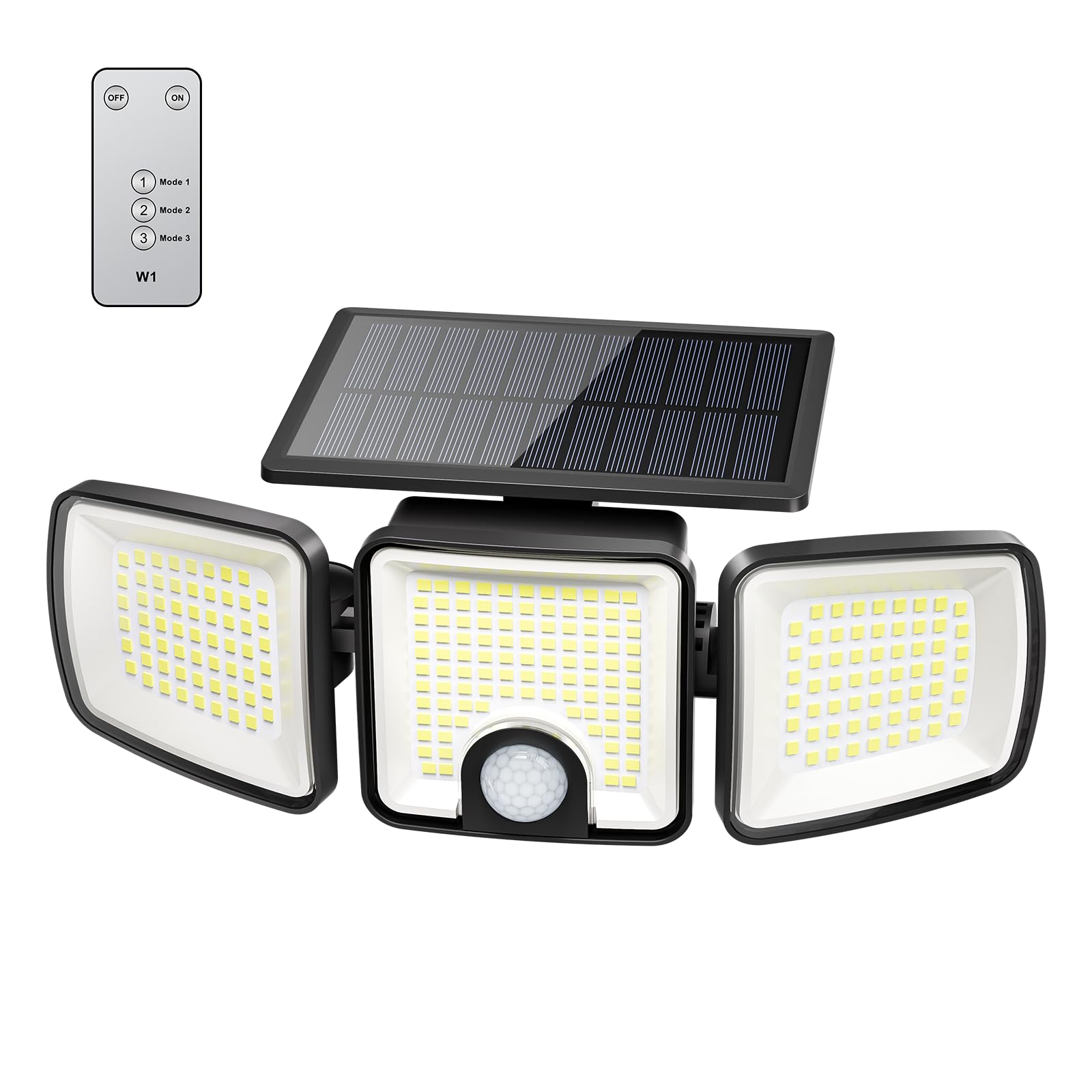
Image: Brightown Solar Flood Outdoor Light, showcasing its three adjustable heads and solar panel.
What's in the Box
- Solar Light (1 unit)
- Remote Control (1 unit)
- Wall Bracket (1 unit)
- Plastic Anchors (2 units)
- Screws (2 units)
- Instruction Manual (1 unit)

Image: Diagram showing the solar light, remote control, and mounting hardware included in the package.
Setup and Installation
- Choose a Location: Select an outdoor area that receives sufficient direct sunlight for the solar panel to charge effectively. The recommended installation height is 6.5 to 8 feet (approximately 2 to 2.4 meters) from the ground. Ensure there are no obstructions blocking sunlight to the solar panel.
- Mark Screw Points: Use the wall bracket to mark the desired screw points on the installation surface.
- Install Wall Bracket: Drill holes at the marked points, insert the plastic anchors, and then secure the wall bracket using the provided screws.
- Attach Light Unit: Hang the solar light unit onto the installed wall bracket, ensuring the solar panel faces upwards to maximize sun exposure. Confirm the product's unfolding angle before final installation.

Image: Visual guide demonstrating the four installation steps: choosing location, marking, installing bracket, and attaching the light.
Video: Official Brightown USA video demonstrating the installation process of the 223 LED Solar Outdoor Lights with Motion Sensor.
Operating Instructions
The solar light features an efficient solar panel for daytime charging and an automatic turn-on function at night. It is equipped with a motion sensor and can be controlled via the included wireless remote.
Automatic Operation
The solar panel charges the internal battery during the day. At night, the light automatically turns on based on the selected mode.

Image: Illustration showing the solar light charging during the day and automatically turning on at night.
Remote Control and Lighting Modes
Use the wireless remote control to select one of the three available lighting modes. The built-in AI PIR motion sensor detects movement up to 26 feet (approximately 8 meters) within a 180° range.
- Mode 1: Strong Light Sensor Mode
The light remains off until motion is detected. Upon detection, it turns on at high brightness for approximately 20 seconds, then turns off when motion ceases. - Mode 2: Dim Light + Motion-activated High Light Mode
The light stays on at a dim brightness. When motion is detected, it switches to high brightness for approximately 20 seconds, then returns to dim light when motion ceases. - Mode 3: Dim Long Light Mode (Dusk to Dawn)
The light automatically turns on at a continuous dim brightness at dusk and remains on until dawn.

Image: Visual representation of the three distinct operating modes: Motion-Activated High brightness, Dim light + Motion-Activated High Light, and Dusk to Dawn (Dim light).

Image: The wireless remote control with buttons for ON/OFF and selecting Mode 1, Mode 2, or Mode 3.
Video: Official Brightown USA video demonstrating how to use the remote control to operate the solar outdoor lights.
Maintenance
- Solar Panel Cleaning: Regularly wipe the solar panel with a soft, damp cloth to remove dust, dirt, or debris. A clean solar panel ensures optimal charging efficiency.
- Battery Charging: For initial use or after prolonged storage, ensure the solar panel is exposed to direct sunlight for 2-3 days with the light button set to the OFF state to allow for a full charge.
- Environmental Considerations: While the light is IP65 waterproof, extreme temperatures or heavy snowfall may temporarily affect performance. Ensure snow or ice is cleared from the solar panel.
Troubleshooting
- Light Not Turning On:
- Ensure the solar panel has received adequate direct sunlight for charging (at least 6-8 hours).
- Verify the light is not in the 'OFF' state via the remote control.
- Check for any obstructions blocking the solar panel or the motion sensor.
- If the light has been stored or is new, allow 2-3 days of charging with the light off before use.
- Motion Sensor Not Activating:
- Confirm the light is installed at the recommended height of 6.5-8 ft. Installing too high or too low can affect sensor performance.
- Ensure the motion sensor is not obstructed.
- Check the selected lighting mode; some modes require motion for activation.
- Reduced Brightness or Short Working Time:
- Clean the solar panel to ensure maximum sunlight absorption.
- Ensure the solar panel is positioned to receive direct sunlight without shade.
- Prolonged cloudy or rainy weather can reduce battery charge. Allow for several sunny days to fully recharge.
Specifications
| Feature | Specification |
|---|---|
| Brand | Brightown |
| Model Number | SLF09223 |
| Light Source | LED (223 beads) |
| Brightness | 2500 lumens |
| Color Temperature | 6500 Kelvin (Cold White) |
| Motion Sensor Detection Angle | 180° |
| Motion Sensor Detection Distance | Up to 26 ft (8 meters) |
| Illumination Angle | 270° (with 3 adjustable heads) |
| Control Method | Remote |
| Power Source | Solar Powered |
| Water Resistance Level | IP65 Waterproof |
| Material | High-strength ABS Plastic |
| Dimensions (L x W x H) | 9.94" x 4.8" x 4.17" (25.25 cm x 12.19 cm x 10.59 cm) |

Image: Graphic illustrating the IP65 waterproof rating and resistance to heat, cold, frost, and snow, with temperature range -20°C to 40°C.
Warranty and Support
This Brightown product comes with a 30-day manufacturer warranty. For any questions or assistance, 24-hour customer service support is available.
Please refer to the contact information provided on the product packaging or the official Brightown website for customer service inquiries.
Usage Scenarios
The Brightown Solar Flood Outdoor Light is suitable for various outdoor applications, providing illumination and security.

Image: Examples of the solar light installed in different outdoor settings such as a patio, garage, backyard, and house exterior.

Image: Further examples of the solar light's utility, including lighting for pets, gift-giving, camping, and garbage areas.