
1. Introduction
Thank you for choosing the Jugeman P131 Smartwatch. This device is designed to enhance your daily life with features for health monitoring, fitness tracking, and convenient communication. This manual provides essential information for setting up, operating, and maintaining your smartwatch to ensure optimal performance and longevity.
2. What's in the Box
Please check the contents of your package. If any items are missing or damaged, please contact customer support.
- Jugeman P131 Smartwatch
- Charging Cable
- User Manual
3. Setup
3.1 Charging the Smartwatch
Before first use, fully charge your smartwatch. Connect the magnetic charging cable to the charging contacts on the back of the watch and plug the USB end into a power adapter (5V/1A recommended) or a computer's USB port.
Charging time: Approximately 2.5 hours for a full charge.
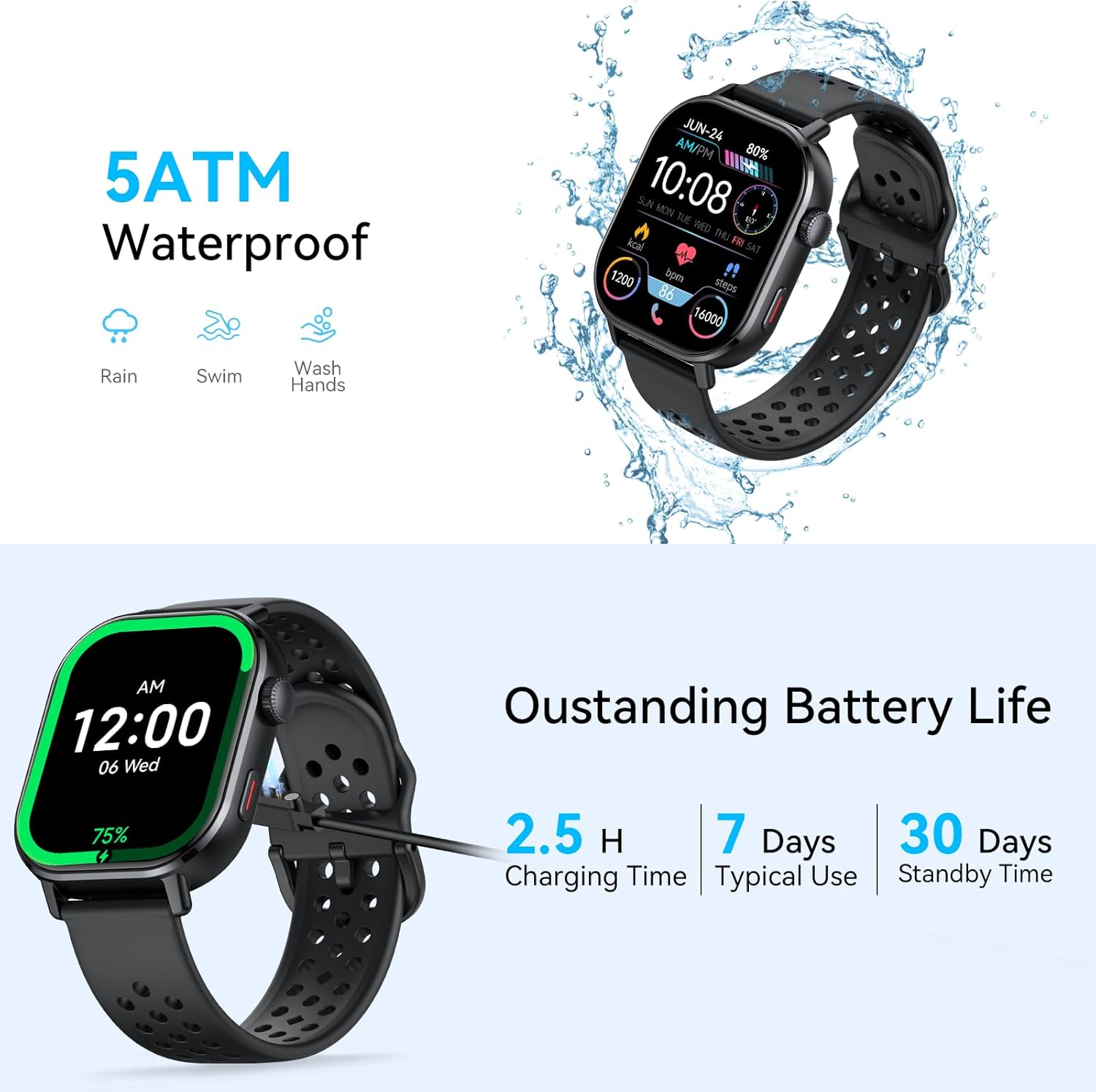
Image: The smartwatch connected to its charging cable, illustrating the charging process. The image also highlights the 5ATM waterproof rating and battery life information: 2.5 hours charging time, 7 days typical use, and 30 days standby time.
3.2 App Installation and Pairing
To unlock the full functionality of your smartwatch, download and install the companion application on your smartphone. Search for the app name (usually mentioned in the quick start guide or on the watch screen during initial setup) in your phone's app store (Google Play Store or Apple App Store).
- Download and install the app on your smartphone.
- Ensure Bluetooth is enabled on your smartphone.
- Open the app and follow the on-screen instructions to create an account or log in.
- In the app, navigate to the device pairing section and select your smartwatch (e.g., "P131" or similar Bluetooth name).
- Confirm the pairing request on both your phone and the smartwatch.
4. Operating Instructions
4.1 Basic Navigation
- Touch Screen: Swipe left, right, up, or down to navigate through menus and features. Tap to select an item.
- Side Button(s): Typically, a short press returns to the previous screen or watch face, a long press may power on/off or access a quick menu.
4.2 Bluetooth Calls and Message Alerts
Once paired with your smartphone, the smartwatch can make and receive calls directly, and display notifications for messages and other app alerts.
- Making Calls: Access the dial pad or contact list on the watch to initiate a call. The watch uses its built-in microphone and speaker.
- Receiving Calls: When a call comes in, you can answer or reject it directly from the watch screen.
- Message Alerts: Notifications from various apps (e.g., SMS, WhatsApp, Facebook, Instagram) will be displayed on the watch screen.

Image: The smartwatch showing an incoming call from 'Vivina' and a user interacting with the call function. Below, another user is shown receiving various social media and message notifications on the watch, illustrating the Bluetooth call and message alert features.
4.3 Health Monitoring
The P131 Smartwatch offers comprehensive health tracking features.
- Heart Rate Monitoring: Continuously or on-demand, monitor your heart rate.
- Blood Oxygen (SpO2) Monitoring: Measure your blood oxygen saturation levels.
- Sleep Monitoring: Tracks sleep stages (deep sleep, light sleep, wake up) and provides insights into your sleep quality.
- Breath Training: Guided breathing exercises to help reduce stress.

Image: The top part of the image shows the smartwatch displaying sleep stage data, indicating deep sleep, light sleep, and wake-up times. The bottom part illustrates the health monitoring features, including heart rate, blood oxygen (SpO2), and breath training, with a visual representation of heart rate measurement.
4.4 Sports Modes and GPS Tracking
The smartwatch supports over 110 sports modes to accurately track your workouts. It features built-in GPS for high-precision positioning during outdoor activities.
- Activity Tracking: Records step count, distance, and calories burned for various activities.
- GPS Tracking: For outdoor sports like running or cycling, the built-in GPS tracks your route and provides detailed statistics.
- 110+ Sports Modes: Select from a wide range of activities including running, walking, cycling, swimming, yoga, football, basketball, and more for tailored tracking.

Image: The smartwatch screen showing a map with a tracked route and real-time workout data such as distance, duration, calories, and pace. This demonstrates the built-in GPS for high-precision positioning and activity tracking.

Image: A visual representation of various sports icons, indicating the 110+ built-in sports modes available on the smartwatch, including running, swimming, cycling, yoga, and more.
4.5 Outdoor Adventure Features
The P131 Smartwatch is equipped with features beneficial for outdoor enthusiasts.
- Compass: Provides directional guidance.
- Barometric Altimeter: Displays current altitude.
- Air Pressure Monitor: Shows real-time barometric pressure dynamics.

Image: The smartwatch screen showing a compass with directional information, a barometric altimeter displaying current altitude, and a graph illustrating barometric pressure over time, suitable for outdoor adventures.
4.6 Other Smart Features
The smartwatch integrates several convenient tools for daily use.
- Message Reminder
- Call Reminder
- Camera Control
- Music Control
- Stopwatch & Timer
- Exercise Records
- Sedentary Notification
- Find Phone
- Voice Assistant
Image: The smartwatch displaying a grid of icons representing various functionalities such as message reminder, call reminder, heart rate monitoring, camera control, music control, stopwatch & timer, sleep tracker, exercise records, breathing training, sedentary notification, find phone, and voice assistant.
4.7 Customizable Watch Faces
Personalize your smartwatch with over 100 built-in watch faces or create your own custom designs.

Image: The smartwatch showcasing its 2.06" HD color screen with a dynamic watch face featuring a snowboarder. The image also highlights the watch's dustproof, scratch-resistant, and drop-resistant qualities.
5. Maintenance
5.1 Water Resistance
The Jugeman P131 Smartwatch has an IP68 rating and is 5ATM waterproof, meaning it can withstand splashes, rain, and is suitable for swimming and washing hands. It is not recommended for hot showers, saunas, or diving.
Caution: Water resistance is not a permanent condition and may decrease over time with normal wear and tear. Avoid exposing the watch to high-velocity water or extreme temperatures.
5.2 Care and Cleaning
- Regularly clean the watch and strap with a soft, damp cloth.
- Ensure the charging contacts are clean and dry before charging.
- Avoid using harsh chemicals or abrasive materials for cleaning.
- Store the watch in a cool, dry place when not in use.
5.3 Battery Life Optimization
To maximize battery life:
- Adjust screen brightness to a lower setting.
- Disable unnecessary notifications.
- Limit continuous heart rate monitoring if not required.
- Turn off Bluetooth when not actively using connected features.
6. Troubleshooting
If you encounter issues with your smartwatch, please refer to the following common solutions:
| Problem | Solution |
|---|---|
| Smartwatch won't turn on | Ensure the watch is fully charged. Connect it to the charger for at least 30 minutes. |
| Cannot pair with smartphone | Check if Bluetooth is enabled on your phone. Ensure the watch is discoverable. Restart both the watch and phone. Try resetting the watch to factory settings. |
| Notifications not received | Verify app permissions on your phone. Ensure the watch is connected via Bluetooth. Check notification settings within the companion app. |
| Inaccurate health data | Ensure the watch is worn snugly on your wrist, about one finger's width above the wrist bone. Clean the sensor on the back of the watch. |
| Screen unresponsive | Restart the smartwatch. If the issue persists, contact customer support. |
7. Specifications
| Feature | Detail |
|---|---|
| Model Number | P131 |
| Screen Size | 1.96 inches |
| Connectivity | Bluetooth |
| Battery Type | Lithium-polymer |
| Water Resistance | IP68, 5ATM |
| Input | Microphone, Touch Screen |
| Sports Modes | 110+ |
| Health Monitoring | Heart Rate, SpO2, Sleep, Breath Training |
8. Warranty and Support
Your Jugeman P131 Smartwatch comes with a standard manufacturer's warranty. Please refer to the warranty card included in your package for specific terms and conditions.
For technical support, troubleshooting assistance, or warranty claims, please contact Jugeman customer service through the official website or the contact information provided in your product packaging.
Online Resources: For the latest updates, FAQs, and additional support, please visit the official Jugeman website.
