
1. Important Safeguards
When using electrical appliances, basic safety precautions should always be followed to reduce the risk of fire, electric shock, and/or injury to persons, including the following:
- Read all instructions before using the coffee maker.
- Do not touch hot surfaces. Use handles or knobs.
- To protect against fire, electric shock, and injury to persons, do not immerse cord, plugs, or the appliance in water or other liquid.
- Close supervision is necessary when any appliance is used by or near children.
- Unplug from outlet when not in use and before cleaning. Allow to cool before putting on or taking off parts, and before cleaning the appliance.
- Do not operate any appliance with a damaged cord or plug or after the appliance malfunctions, or has been damaged in any manner. Return appliance to the nearest authorized service facility for examination, repair, or adjustment.
- The use of accessory attachments not recommended by the appliance manufacturer may result in fire, electric shock, or injury to persons.
- Do not use outdoors.
- Do not let cord hang over edge of table or counter, or touch hot surfaces.
- Do not place on or near a hot gas or electric burner, or in a heated oven.
- Always attach plug to appliance first, then plug cord into the wall outlet. To disconnect, turn any control to 'off', then remove plug from wall outlet.
- Do not use appliance for other than intended use.
2. Product Overview
The Horavie KC101C is a versatile single-serve coffee maker designed for both K-Cup pods and ground coffee. It features multiple brew sizes and modes to suit your preference.
Components:
- Coffee Maker Unit
- 50 oz Removable Water Tank
- K-Cup Pod Holder
- Reusable Filter Basket for Ground Coffee
- Removable Drip Tray
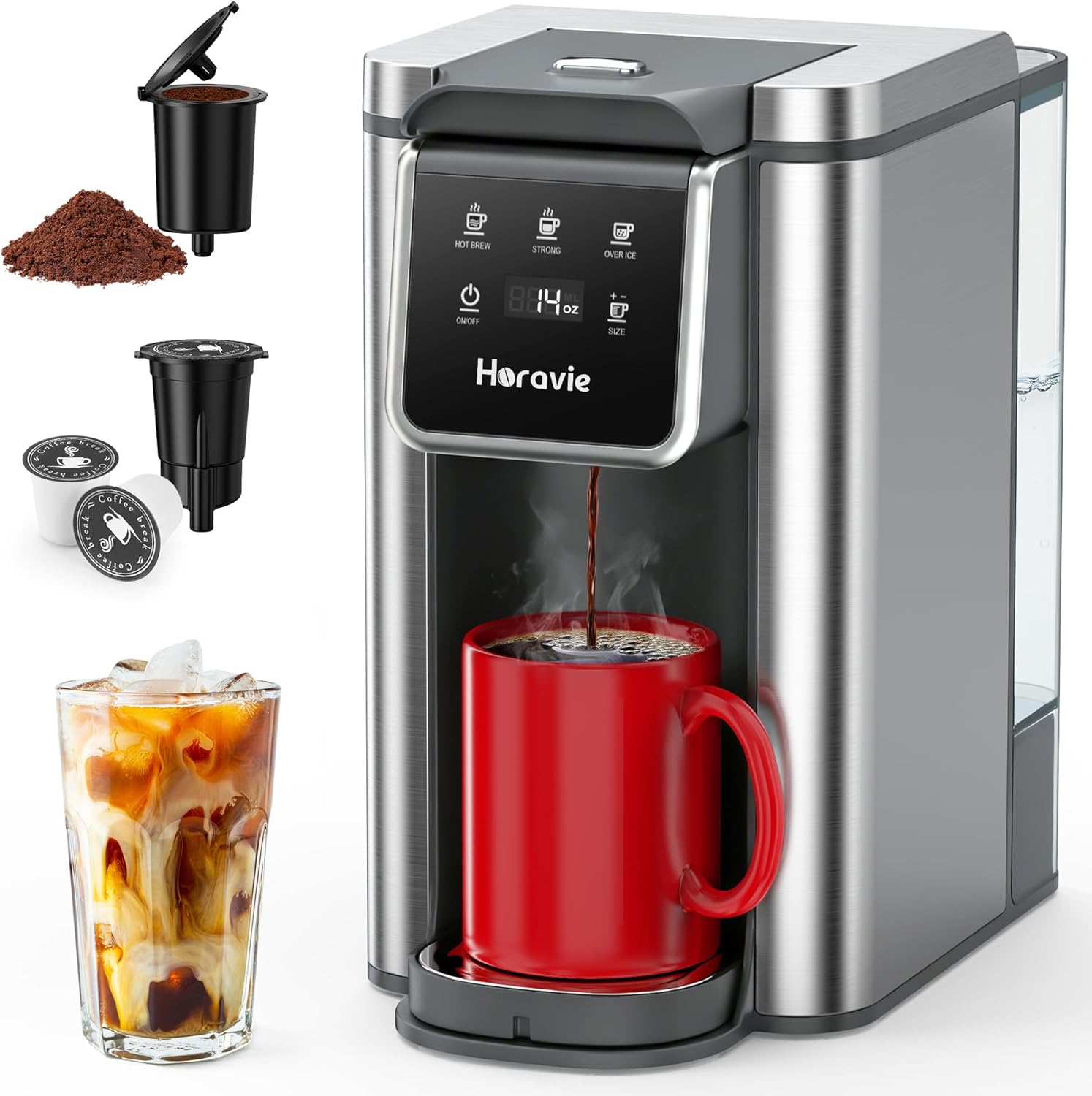
Image: Horavie KC101C Single Serve Coffee Maker, showcasing its sleek design and a brewed cup of coffee.
3. Setup
3.1 Unpacking
- Carefully remove all packaging materials from the coffee maker.
- Place the coffee maker on a clean, flat, and stable surface.
- Ensure all components listed in the Product Overview are present.
3.2 Initial Cleaning
- Remove the water tank, K-Cup pod holder, reusable filter basket, and drip tray.
- Wash these removable parts in warm, soapy water. Rinse thoroughly and dry.
- Wipe the exterior of the coffee maker with a damp cloth.
3.3 First Use (Cleaning Cycle)
Before brewing coffee for the first time, run a cleaning cycle to flush out any manufacturing residues.
- Fill the water tank with fresh water up to the 'MAX' line.
- Place an empty mug on the drip tray.
- Ensure no K-Cup pod or ground coffee is in the holder.
- Press the 'ON/OFF' button to power on the machine.
- Select the largest brew size (14 oz) and the 'HOT BREW' mode.
- Press the 'BREW' button to start the cycle.
- Discard the hot water. Repeat this process 2-3 times.
4. Operating Instructions
4.1 Filling the Water Tank
- Remove the 50 oz removable water tank from the back of the coffee maker.
- Fill the tank with fresh, cold water up to the 'MAX' fill line. Do not overfill.
- Place the water tank back onto the coffee maker, ensuring it is securely seated.
- Water Shortage Alert: If the water level is too low, the 'SIZE' button will flash and the machine will beep. Refill the tank to continue brewing.

Image: The 50oz removable water tank, highlighting its capacity and ease of access for refilling.
4.2 Brewing with K-Cup Pods
- Lift the handle to open the brew head.
- Insert a K-Cup pod into the K-Cup pod holder. Close the handle firmly.
- Place your mug on the drip tray.
- Press the 'ON/OFF' button to power on.
- Select your desired brew size (6, 8, 10, 12, or 14 oz) using the 'SIZE' button.
- Choose your brew mode: 'HOT BREW' (standard), 'STRONG' (bolder flavor), or 'OVER ICE'.
- Press the 'BREW' button to start. The machine will automatically stop when brewing is complete.
4.3 Brewing with Ground Coffee
- Lift the handle to open the brew head.
- Insert the reusable filter basket into the K-Cup pod holder.
- Fill the reusable filter basket with your preferred medium-coarse ground coffee. Do not overfill.
- Close the handle firmly.
- Place your mug on the drip tray.
- Press the 'ON/OFF' button to power on.
- Select your desired brew size (6, 8, 10, 12, or 14 oz) using the 'SIZE' button.
- Choose your brew mode: 'HOT BREW' (standard), 'STRONG' (bolder flavor), or 'OVER ICE'.
- Press the 'BREW' button to start. The machine will automatically stop when brewing is complete.

Image: The K-Cup pod holder and reusable filter basket, demonstrating the dual brewing compatibility.
4.4 Brew Modes
The Horavie KC101C offers three distinct brewing modes:
- Hot Brew: Standard brewing for a classic cup of hot coffee.
- Strong: Brews a bolder, more intense coffee flavor.
- Over Ice: Designed for iced coffee. This mode dispenses 6 or 8 oz of coffee. For best results, add 1:1 ice to your cup first, then brew the coffee over it. Allow it to cool and dilute naturally for a balanced flavor.

Image: Display panel illustrating the three brewing styles: Hot Brew, Strong, and Over Ice.
4.5 Brew Sizes
Choose from five different brew sizes to match your cup and preference:
- 6 oz
- 8 oz
- 10 oz
- 12 oz
- 14 oz

Image: Close-up of the control panel showing the selection for 5 different brew sizes.
4.6 Fast Brewing
The Horavie KC101C is designed for quick brewing:
- A 6 oz cup of coffee brews in as little as 1 minute.
- A 14 oz cup of coffee brews in approximately 2 minutes.

Image: The coffee maker actively brewing, with an indicator showing fast brewing times.
4.7 Product Video
Video: An official product video from Horavie Direct demonstrating the features and operation of the Horavie KC101C Single Serve Coffee Maker, including its K-Pod and ground coffee compatibility.
5. Maintenance
5.1 Daily Cleaning
Regular cleaning ensures optimal performance and taste.
- After each use, remove and empty the K-Cup pod holder or reusable filter basket. Rinse with warm water.
- Empty and rinse the drip tray.
- Wipe down the exterior of the machine with a damp, soft cloth.
5.2 Descaling
Descaling helps remove mineral buildup and maintain brewing efficiency. The frequency depends on water hardness and usage.
- Ensure the water tank is empty.
- Fill the water tank with a descaling solution (e.g., white vinegar or a commercial descaling agent) mixed with water according to the solution's instructions.
- Place a large mug or container on the drip tray.
- To enter descaling mode, press and hold the 'HOT BREW' and 'OVER ICE' buttons simultaneously for 2 seconds.
- The machine will begin the descaling cycle, dispensing the solution.
- Once the cycle is complete, discard the solution.
- Rinse the water tank thoroughly and fill it with fresh water.
- Run 2-3 full water-only cycles to rinse out any remaining descaling solution.

Image: The control panel indicating how to activate the descaling mode by pressing 'HOT BREW' and 'OVER ICE' buttons.
6. Troubleshooting
| Problem | Possible Cause | Solution |
|---|---|---|
| Coffee maker does not turn on. | Not plugged in; power outlet malfunction. | Ensure the power cord is securely plugged into a working outlet. |
| Coffee is not brewing. | Water tank empty; brew head not closed properly; descaling needed. | Fill water tank. Ensure brew head is firmly closed. Perform descaling if necessary. |
| Coffee tastes weak. | Incorrect coffee-to-water ratio; 'STRONG' mode not selected; coffee grounds too coarse. | Use appropriate amount of coffee. Select 'STRONG' mode. Use finer ground coffee. |
| Water leakage. | Water tank not seated correctly; drip tray full. | Ensure water tank is properly installed. Empty the drip tray. |
| Water shortage alert (flashing 'SIZE' button and beeping). | Water level in tank is too low. | Refill the water tank to the appropriate level. |
7. Specifications
- Brand: Horavie
- Model Name: Hot & Iced for K-Cups & Ground
- Model Number: KC101C
- Capacity: 50 Fluid Ounces (Water Tank)
- Product Dimensions: 10.7"D x 6.3"W x 11.2"H
- Wattage: 1150 watts
- Voltage: 120 Volts
- Material: Plastic, Stainless Steel
- Compatible Coffee Pods: K-Cup
- Coffee Input Type: Ground, Pod
- Special Features: Adjustable Brew Strength, Auto Shut-Off, Removable Tank, Single Cup Brew

Image: The compact size of the Horavie KC101C coffee maker, with dimensions indicated, showing compatibility with various cup sizes.
8. Warranty and Support
Horavie products are manufactured to high-quality standards. For specific warranty information, please refer to the warranty card included with your product or contact Horavie customer support.
For technical assistance, troubleshooting, or to inquire about replacement parts, please visit the official Horavie website or contact their customer service department. Contact details are typically found in the packaging or on the brand's official online presence.