
Introduction
This manual provides detailed instructions for the operation and maintenance of your Volorful V68 Digital Voice Recorder. Please read this manual carefully before using the device to ensure proper functionality and to maximize its features.
Package Contents
- 1 x Volorful V68 Digital Voice Recorder
- 1 x USB-C Data Cable
- 1 x 3.5mm Transcription Cable
- 1 x USB-C Charging Cable
- 1 x Lanyard
- 1 x User Manual

Image: Contents of the Volorful V68 package, including the digital voice recorder, various cables, a lanyard, and the manual.
Setup
1. Charging the Device
Before first use, fully charge the voice recorder. Connect the provided USB-C charging cable to the device and a power source (e.g., computer USB port or a USB wall adapter). The device features a built-in 580 mAh battery that fully charges in approximately 2 hours and provides up to 70 hours of continuous recording at 512Kbps.

Image: The voice recorder connected to a laptop via a USB-C cable, indicating charging and file transfer capabilities.
2. Powering On/Off
- To power on: Press and hold the PLAY/PAUSE/OK button until the screen illuminates.
- To power off: Press and hold the PLAY/PAUSE/OK button until the screen turns off.
3. Inserting a Memory Card (Optional)
The device comes with 16GB of internal storage. If more storage is needed, you can insert a microSD card (8GB to 512GB, not included). Locate the memory card slot on the side of the device. Gently insert the card until it clicks into place. After insertion, format the memory card through the device's settings to ensure compatibility.

Image: The voice recorder highlighting its 16GB internal memory and the option for an expandable card slot, capable of storing up to 1200 hours of recording or 4000 MP3 songs.
Operating Instructions
1. Basic Recording
- To start recording: Press the REC button. The recording indicator will light up.
- To save and stop recording: Press the SAVE button. The recording will be saved as a file.
- The device supports recording quality up to 1536Kbps and offers MP3 (32-160Kbps) and WAV (256-1536Kbps) formats.
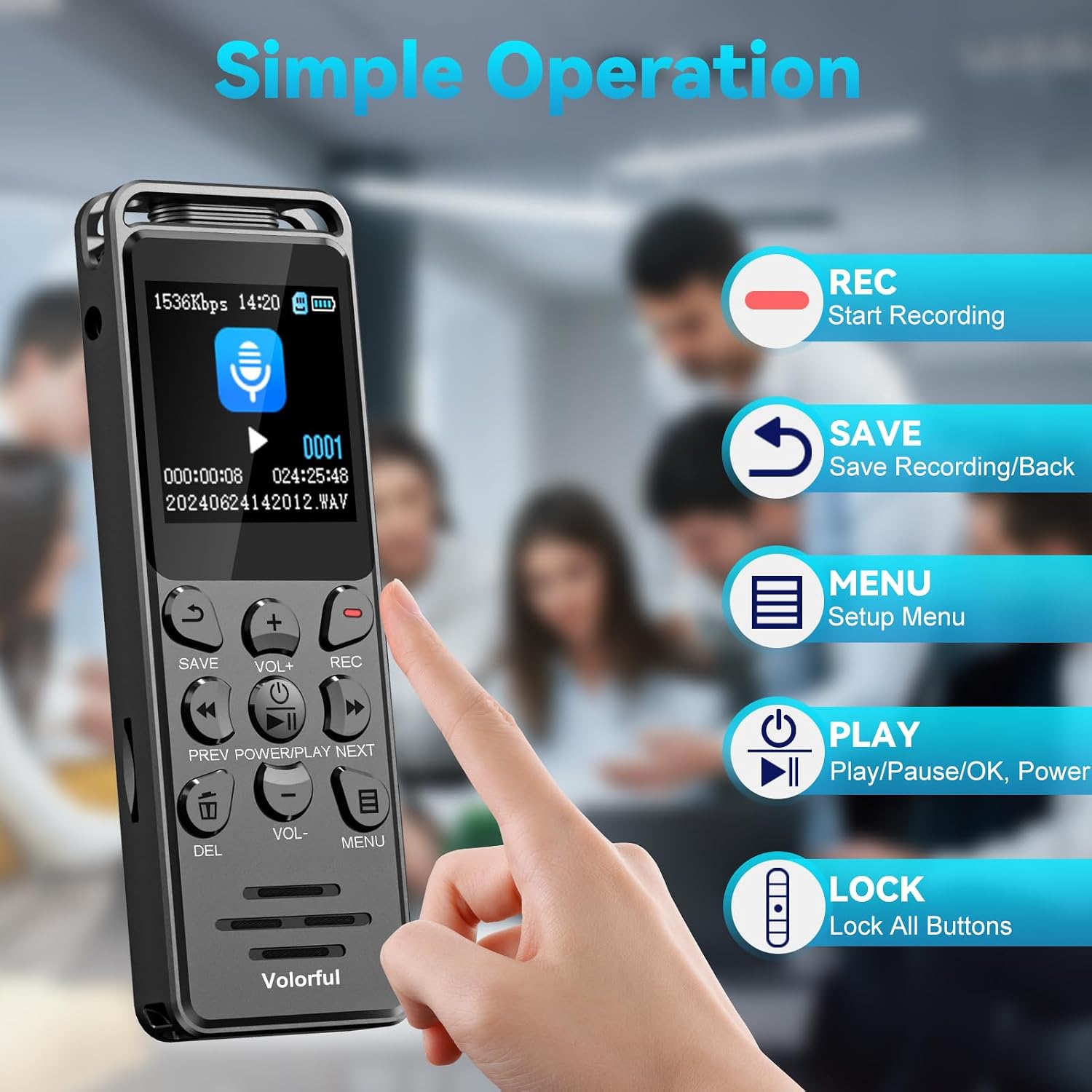
Image: A hand interacting with the voice recorder, illustrating the functions of the REC, SAVE, MENU, PLAY, and LOCK buttons for simple operation.

Image: The voice recorder displaying its 1536 Kbps PCM recording capability, powered by a 2159 Pro chip, featuring 7 levels of noise reduction and recording gain for clear stereo sound.
2. Playback
- To play a recording: Navigate to the file list using the PREV/NEXT buttons and press PLAY/PAUSE/OK to start playback.
- To adjust volume: Use the VOL+ and VOL- buttons.
- To fast forward/rewind: During playback, press and hold NEXT or PREV.
- The device supports variable speed playback and functions as an MP3 player.
3. Menu Navigation
Press the MENU button to access settings. Use PREV/NEXT to navigate options and PLAY/PAUSE/OK to confirm selections. The 1.44-inch color screen provides an intuitive user interface.
4. Voice Activated Recording (VOR)
Enable Voice Activated Recording in the menu. The device will automatically start recording when sound is detected and pause when silence occurs. There are 6 adjustable sensitivity levels (e.g., Level 1 for 60dB, Level 6 for 85dB) to suit different environments.

Image: The voice recorder illustrating its voice-activated recording feature, showing different decibel levels for sensitivity adjustment.
5. Password Protection
Set a 6-digit password to protect your recordings. This feature offers up to 9260 password combinations to secure your audio files.

Image: The voice recorder's screen showing a password input interface, emphasizing the 6-digit password protection feature.
6. A-B Repeat Function
During playback, use the A-B repeat function to loop a specific segment of an audio file. This is useful for studying or transcribing important sections.

Image: The voice recorder demonstrating the A-B repeat feature, useful for repeating important content for better learning and memorization.
7. Line-in Recording
The device supports line-in recording. You can connect the voice recorder to an MP3 player, smartphone, or computer via the 3.5mm audio jack to record audio directly from the connected device's output. Note: Only 3.5mm 4-pole plug (TRRS) external microphones are supported; Bluetooth microphones are not compatible.

Image: The voice recorder connected to an external microphone and a smartphone, demonstrating its line-in recording capability via the 3.5mm jack.
8. File Management
Recorded files are automatically named with the format YYYY-MM-DD-HH-MM-SS. You can connect the device to a computer via USB-C to transfer, organize, or delete files. The device supports segmented recording, automatically splitting long recordings into smaller files.
Maintenance
- Cleaning: Use a soft, dry cloth to clean the device. Do not use liquid cleaners or solvents.
- Storage: Store the device in a cool, dry place away from direct sunlight and extreme temperatures.
- Battery Care: To prolong battery life, avoid fully discharging the battery frequently. Charge the device regularly, even if not in use for extended periods.
- Avoid Impact: The device has a durable metal casing, but avoid dropping or subjecting it to strong impacts.
Troubleshooting
| Problem | Solution |
|---|---|
| Device does not power on. | Ensure the battery is charged. Connect the device to a power source using the USB-C cable and try again. |
| Cannot record. | Check if there is sufficient storage space (internal or external memory card). Ensure the device is not in playback mode. |
| Poor recording quality. | Check recording settings (bitrate, noise reduction, recording gain). Ensure the microphone is not obstructed. Record in a quieter environment. |
| Device is unresponsive. | Try resetting the device. Locate the small reset hole (often on the side or back) and gently press it with a thin object (e.g., a paperclip). |
| Cannot transfer files to computer. | Ensure the USB-C cable is securely connected to both the device and the computer. Try a different USB port or cable. The device should appear as a removable disk. |
| External microphone not working. | Ensure the external microphone is a 3.5mm 4-pole (TRRS) type. Bluetooth microphones are not supported. Check the connection. |
Specifications
| Feature | Detail |
|---|---|
| Model Number | V68 |
| Internal Storage | 16 GB |
| Expandable Memory | Supports 8GB to 512GB microSD card (not included) |
| Recording Formats | MP3 (32~160Kbps), WAV (256~1536Kbps) |
| Battery Capacity | 580 mAh |
| Battery Life (Recording) | Up to 70 hours (at 512Kbps) |
| Charging Time | Approximately 2 hours |
| Display | 1.44-inch Color Screen |
| Interface | USB-C |
| Headphone Jack | 3.5 mm |
| Microphone | Built-in stereo microphone |
| Dimensions (L x W x H) | 99 x 33 x 12 mm (3.9 x 1.3 x 0.5 inches) |
| Weight | 65 grams |
| Compatible Devices | Personal Computer, MP3 Player, Smartphone |
Warranty and Support
Warranty Information
The Volorful V68 Digital Voice Recorder comes with a 2-year warranty from the date of purchase. This warranty covers manufacturing defects and malfunctions under normal use. It does not cover damage caused by misuse, accidents, unauthorized modifications, or natural disasters.
Customer Support
For technical assistance, troubleshooting, or warranty claims, please contact Volorful customer support. You can find contact information and additional resources by visiting the official Volorful store page:
Please have your product model number (V68) and purchase details ready when contacting support.


