
1. Introduction
Thank you for choosing the Dreamzie 65-inch Convertible Sleeper Sofa Bed. This manual provides essential information for the safe assembly, operation, and maintenance of your new furniture. Please read these instructions carefully before use and retain them for future reference.
2. Safety Information
- Ensure all components are securely fastened before use.
- Do not exceed the maximum weight capacity of 500 lbs (227 kg).
- Keep children and pets away from moving parts during conversion.
- Avoid standing or jumping on the sofa or bed.
- Place the sofa on a level surface to prevent tipping.
- Do not use abrasive cleaners or harsh chemicals on the fabric or frame.
3. Package Contents
Verify that all parts are present before beginning assembly. The package typically includes:
- Sofa frame components
- Seat and back cushions
- Swivel side table
- Assembly hardware (screws, bolts, tools)
- Instruction manual
4. Setup and Assembly
Assembly of the Dreamzie Convertible Sleeper Sofa Bed is required. Follow the included step-by-step instructions for proper setup. It is recommended to have two people for assembly.
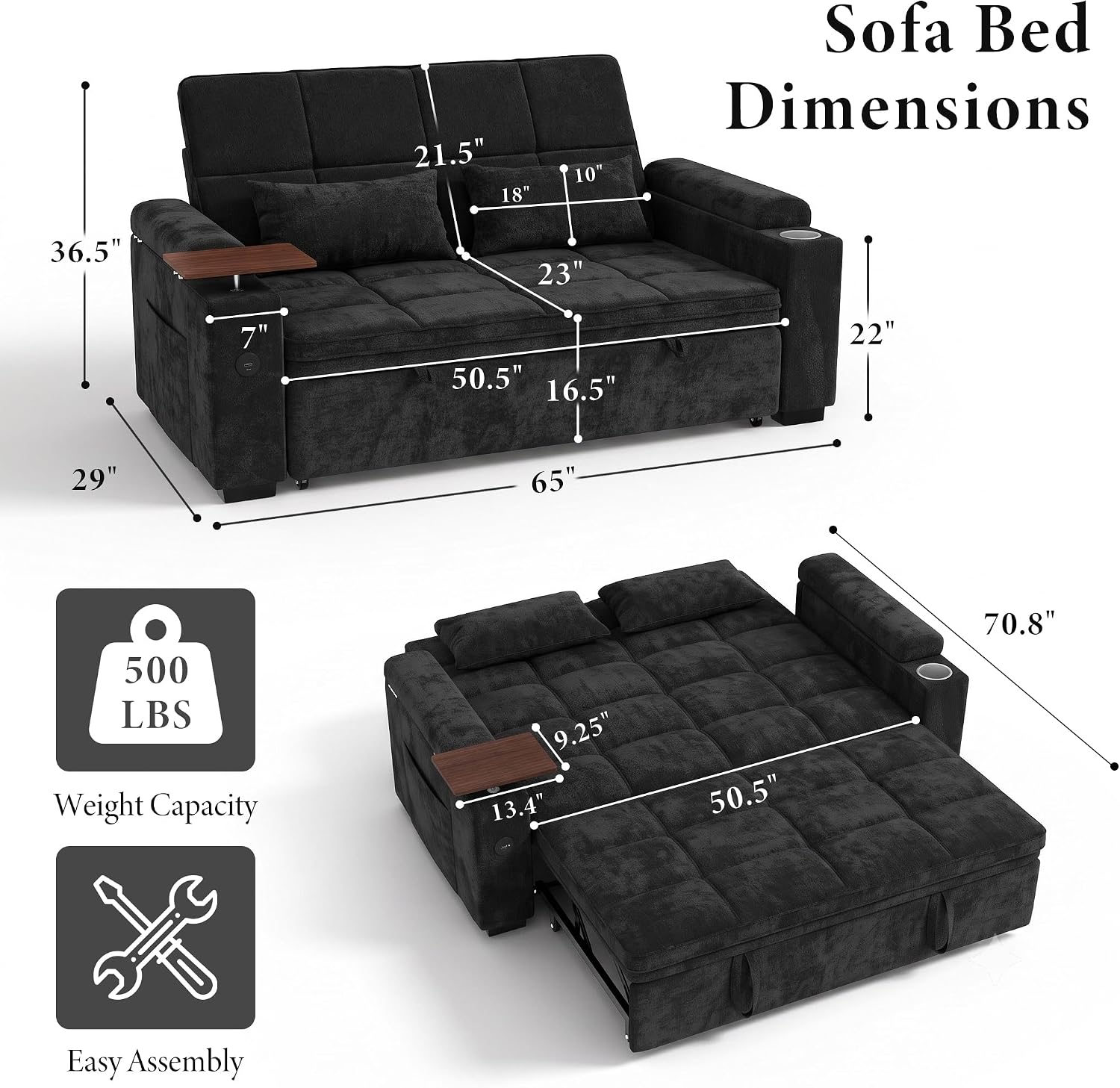
Figure 4.1: Sofa Bed Dimensions and Key Features. This image illustrates the overall dimensions of the sofa in both its upright and extended bed forms, highlighting its 500 lbs weight capacity and indicating easy assembly.
Assembly Tips:
- Unpack all components and lay them out on a clean, soft surface to prevent scratches.
- Identify all hardware and match them to the assembly diagram.
- Do not overtighten screws during initial assembly; tighten fully once all parts are aligned.
5. Operating Instructions
5.1 Converting to a Sleeper Bed
The sofa easily converts into a bed. To convert:
- Ensure there is sufficient clear space in front of the sofa.
- Locate the pull straps at the front base of the sofa.
- Gently pull the straps outwards and upwards to extend the bed mechanism.
- Push down firmly to lock the extended section into place.

Figure 5.1: Pull-Out Sofa Bed Conversion. This image demonstrates the simple three-step process to convert the sofa into a bed using the convenient pull straps.
5.2 Adjusting the Backrest
The backrest features a 5-position adjustment for personalized comfort:
- 105° (Chatting): Upright position for conversation or reading.
- 120°: Slightly reclined for relaxed seating.
- 140° (Watching TV): Comfortable recline for viewing.
- 160°: Deeper recline for lounging.
- 180° (Napping): Fully flat position for sleeping.
To adjust, gently push the backrest forward until it clicks into the desired position, then release.

Figure 5.2: 5-Position Adjustable Backrest. This diagram shows the different recline angles available for the backrest, from upright to fully flat.
5.3 Using Integrated Features
The sofa bed includes several convenient features:
- Swivel Side Table: Located on one armrest, this table can be rotated for easy access to drinks, snacks, or a laptop.
- Cup Holders: Integrated into the armrests to securely hold beverages.
- Hidden Storage: Lift the armrest tops to reveal storage compartments for books, remotes, or blankets.
- Side Pockets: External pockets on the armrests provide quick access storage for magazines or small items.
- USB-A & Type-C Charging Ports: Located on the side of the armrest, these ports allow you to charge your electronic devices. Connect your device using a compatible USB cable.

Figure 5.3: Smart Details for Everyday Comfort. This image showcases the integrated side table, cup holder, side pocket, and hidden armrest storage.

Figure 5.4: Swivel Side Table. A detailed view of the convenient swivel side table.

Figure 5.5: USB Charging Ports. This image shows the USB-A and Type-C ports for charging devices.

Figure 5.6: Hidden Storage. A view of the spacious storage compartment within the armrest.

Figure 5.7: Cup Holder. This image highlights the secure built-in cup holder.

Figure 5.8: Side Pocket. A view of the convenient side pocket for storing magazines or remotes.
6. Maintenance
6.1 Fabric Care (Chenille)
The sofa is upholstered in durable chenille fabric, which is resistant to wear, tear, and light stains. To maintain its appearance:
- Regular Cleaning: Vacuum regularly using an upholstery attachment to remove dust and debris.
- Spot Cleaning: For spills, blot immediately with a clean, dry cloth. For tougher stains, use a mild fabric cleaner specifically designed for chenille, testing on an inconspicuous area first. Do not rub vigorously.
- Avoid Direct Sunlight: Prolonged exposure to direct sunlight can cause fading.

Figure 6.1: Upgraded Chenille Fabric. This image details the texture and qualities of the chenille upholstery.
6.2 General Care
- Periodically check and tighten all bolts and screws to ensure stability.
- Avoid placing hot items directly on the side table without a coaster.
- Do not drag the sofa; lift it when moving to prevent damage to the legs and floor.
7. Troubleshooting
If you encounter any issues with your Dreamzie sofa bed, please refer to the following common solutions:
- Difficulty converting to bed: Ensure no obstructions are present and that the mechanism is clean. Apply gentle, even pressure when pulling the straps.
- Backrest not locking: Check for any debris or obstructions in the adjustment mechanism. Ensure you push the backrest fully forward until it clicks into place.
- Charging ports not working: Verify that the sofa is properly connected to a power source (if applicable, check the power cord connection). Test with a different USB cable and device.
- Squeaking noises: Check all assembly bolts and screws and tighten any that are loose.
If problems persist, please contact customer support.
8. Specifications
| Brand | Dreamzie |
| Model Number | SOFABED-65-BK |
| Product Dimensions (Sofa) | 34"D x 65"W x 31"H (86.4cm D x 165.1cm W x 78.7cm H) |
| Product Dimensions (Bed) | Approx. 70.8"L x 50.5"W (179.8cm L x 128.3cm W) |
| Item Weight | 118 pounds (53.5 kg) |
| Weight Capacity | 500 pounds (227 kg) |
| Seating Capacity | 2 |
| Upholstery Material | Chenille Fabric |
| Frame Material | Wood |
| Backrest Positions | 5 (105°, 120°, 140°, 160°, 180°) |
| Special Features | Adjustable Backrest, Convertible, Hidden Storage, Swivel Side Table, Cup Holders, USB-A & Type-C Charging Ports, Side Pockets |
9. Warranty Information
Specific warranty details for your Dreamzie product may vary. Please refer to the warranty card included with your purchase or contact Dreamzie customer support for information regarding warranty coverage and terms.
10. Customer Support
For any questions, assistance with assembly, or troubleshooting not covered in this manual, please contact Dreamzie customer support. Have your model number (SOFABED-65-BK) and purchase information ready when you call or email.
You can typically find contact information on the Dreamzie official website or through your retailer.