
1. Introduction
The GIDIGI 4-in-1 Water Tester is a versatile digital instrument designed to accurately measure four key water quality parameters: pH, Total Dissolved Solids (TDS), Electrical Conductivity (EC), and Temperature. This device provides simultaneous display of these parameters, making it suitable for a wide range of applications including hydroponics, aquariums, drinking water, swimming pools, tap water, well water, spas, and brewing.
2. Package Contents
- 1 x GIDIGI 4-in-1 Water Tester
- 1 x Instruction Manual
- 6 x pH Buffer Powders (for calibration)
3. Product Overview
The GIDIGI 4-in-1 Water Tester features a compact, handheld design with a clear digital display for easy reading of multiple parameters. It includes a sensitive probe at the bottom for immersion into water samples and control buttons below the screen for operation.
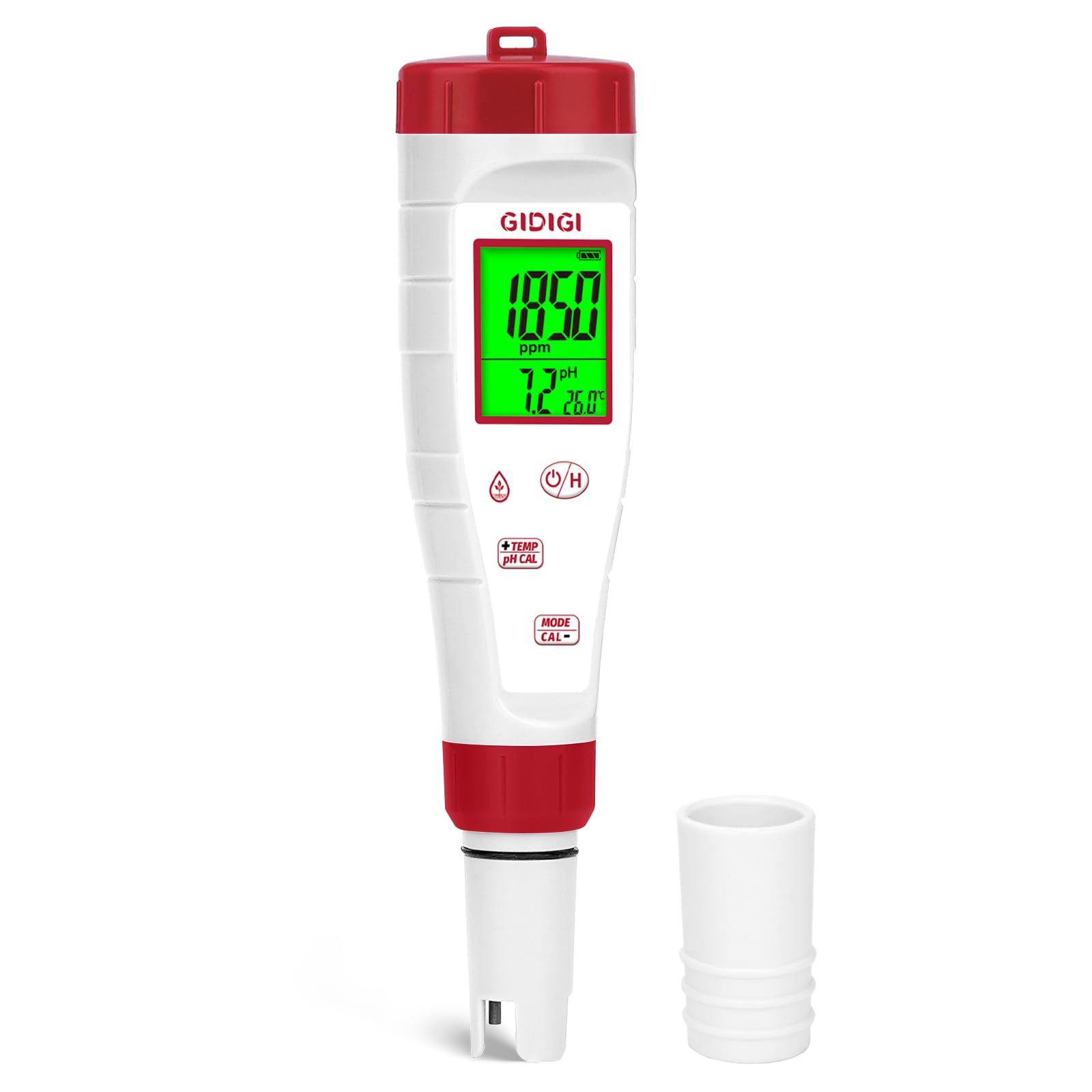
Image: GIDIGI 4-in-1 Water pH, TDS, EC, Temperature Tester. This image shows the handheld device with its digital screen displaying various readings and the probe extending from the bottom.
4. Setup
4.1 Battery Installation
The device comes with alkaline button batteries pre-installed. To begin operation, ensure the battery compartment is securely closed. If battery replacement is necessary, open the compartment, insert new alkaline button cells according to polarity markings, and close the compartment firmly.
5. Calibration
Calibration is crucial for maintaining the accuracy of your GIDIGI 4-in-1 Water Tester. The device includes 6 pH buffer powders for this purpose. Follow these general steps for pH calibration:
- Prepare calibration solutions: Dissolve the pH buffer powders (e.g., pH 6.86, pH 4.00, pH 9.18) in distilled water according to the instructions provided with the powders.
- Rinse the probe: Before calibration, rinse the electrode with distilled water and blot it dry.
- Perform calibration: Immerse the electrode into the first buffer solution (e.g., pH 6.86). Follow the specific calibration procedure outlined in the included manual, which typically involves pressing a calibration button until the reading stabilizes and is automatically recognized.
- Repeat for other pH values: Rinse the electrode and repeat the process for the second (e.g., pH 4.00) and third (e.g., pH 9.18) buffer solutions if performing a multi-point calibration.
Regular calibration ensures reliable pH, EC, and TDS measurements. Refer to the detailed instructions in your product manual for specific calibration steps for pH, EC, and TDS.
6. Operating Instructions
6.1 Taking a Measurement
- Remove the protective cap from the probe.
- Rinse the probe with distilled water and gently blot it dry with a clean, soft cloth.
- Turn on the device using the power button.
- Immerse the probe into the water sample, ensuring the sensor is fully submerged. Do not immerse above the indicated water level.
- Gently stir the probe to remove any air bubbles.
- Wait for the readings (pH, TDS, EC, Temperature) to stabilize on the digital display. The device provides simultaneous readings for convenience.
- If desired, press the 'HOLD' button (if available) to lock the current readings for easier viewing.
- After measurement, turn off the device.
6.2 Switching Measurement Modes (if applicable)
Some models may have a 'MODE' button to cycle through different display units or specific parameter views. Consult your manual for specific button functions.
7. Maintenance
7.1 Cleaning the Probe
After each use, rinse the probe thoroughly with distilled water to prevent contamination and residue buildup from the sample. Gently blot dry with a clean, soft cloth. Avoid wiping the sensor vigorously, as this can damage the sensitive membrane.
7.2 Storage
Always replace the protective cap on the probe when not in use. Store the device in a cool, dry place, away from direct sunlight and extreme temperatures. For extended storage, it is recommended to add a few drops of storage solution or distilled water to the protective cap to keep the probe moist, which helps maintain its sensitivity and lifespan.
8. Troubleshooting
- Inaccurate or Unstable Readings:
- Ensure the device is properly calibrated. Recalibrate if necessary.
- Clean the probe thoroughly to remove any residue or contamination.
- Ensure the probe is fully submerged in the sample and free from air bubbles.
- Check battery levels; low batteries can affect accuracy. - Device Not Turning On / No Display:
- Check battery installation and ensure batteries are correctly oriented.
- Replace depleted batteries with new alkaline button cells. - Slow Readings:
- Allow sufficient time for the readings to stabilize, especially in samples with varying temperatures.
- Ensure the probe is clean and not damaged.
9. Specifications
| Model Number | GX-pET04EU |
| Measurement Accuracy | +/-0.1pH |
| pH Range | 0.1 - 14.0 pH |
| EC Range | 0 - 9990 µS/cm, 10.01 - 19.99 mS/cm |
| TDS Range | 0 - 9990 ppm |
| Temperature Range | 0 - 60 °C (32 - 140 °F) |
| Batteries Included | Yes |
| Battery Type | Alkaline Button Cells |
| Package Dimensions | 23.9 x 9.6 x 5.8 cm |
| Weight | 270 grams |
| Manufacturer | Jinan jixin dianzi youxiangongsi |
10. Safety Information
- Keep the device out of reach of children.
- Do not attempt to disassemble or modify the device.
- Avoid exposing the device to extreme temperatures, direct sunlight, or corrosive liquids.
- Handle the probe with care to prevent physical damage to the sensitive sensor.
- Ensure the battery compartment is sealed to prevent water ingress.
11. Warranty and Support
GIDIGI is committed to customer satisfaction. For technical support, warranty inquiries, or questions regarding your GIDIGI 4-in-1 Water Tester, please contact GIDIGI customer service. The GIDIGI team is available to answer your questions within 12 hours. Compatible accessories, including pH calibration powder, pH calibration solution, EC calibration solution, and replacement probes, are available through the official GIDIGI store.
Refer to the official GIDIGI website or the contact information provided in your product packaging for the most current support details.