
Introduction
This manual provides instructions for the safe and effective use of your TEMOLA 12V 10A Smart Battery Charger. This device is designed for charging and maintaining 12V batteries, including AGM, GEL, SLA, Flooded, and LiFePO4 types. Please read this manual thoroughly before operation to ensure proper use and to prevent damage to the charger or battery.
Key Features
- Smart Fast Charging: Automatically detects battery status and delivers optimized charging current for faster recovery and longer battery life.
- 3-in-1 Functionality: Integrates charging, battery maintenance, and trickle charging for versatile use.
- Pulse Repair Technology: Rejuvenates old, idle, and sulfated lead-acid batteries to improve performance.
- Intelligent Safety Protection: Features reverse polarity, overcharge, short circuit, overheat, and spark-proof protection.
- LCD Display with Temperature Compensation: Provides real-time charging status, voltage, current, and battery mode, with automatic voltage adjustment based on ambient temperature.
Important Safety Instructions
Read all instructions before using this product. Failure to follow these instructions may result in electric shock, fire, or serious injury.
- Always wear eye protection and protective clothing when working with batteries.
- Ensure adequate ventilation during charging to prevent accumulation of explosive gases.
- Never smoke or allow a spark or flame in the vicinity of the battery or engine.
- Connect the charger to the battery before plugging it into a power outlet. Disconnect from power before disconnecting from the battery.
- Do not charge frozen batteries.
- Do not use the charger if it has been dropped or damaged.
- Keep out of reach of children.
- This charger is designed for 12V batteries only. Do not attempt to charge other voltage systems.
- The repair mode may improve battery status, but it cannot repair batteries that are completely damaged, have 0 voltage, or are LiFePO4 batteries.

Image: The TEMOLA Smart Battery Charger features multiple safety protections including over-discharge, reverse polarity, overload, overcharge, undervoltage, overvoltage, overtemperature, and short circuit protection.
Product Overview
The TEMOLA 12V 10A Smart Battery Charger features an intuitive LCD display and robust construction for reliable performance.
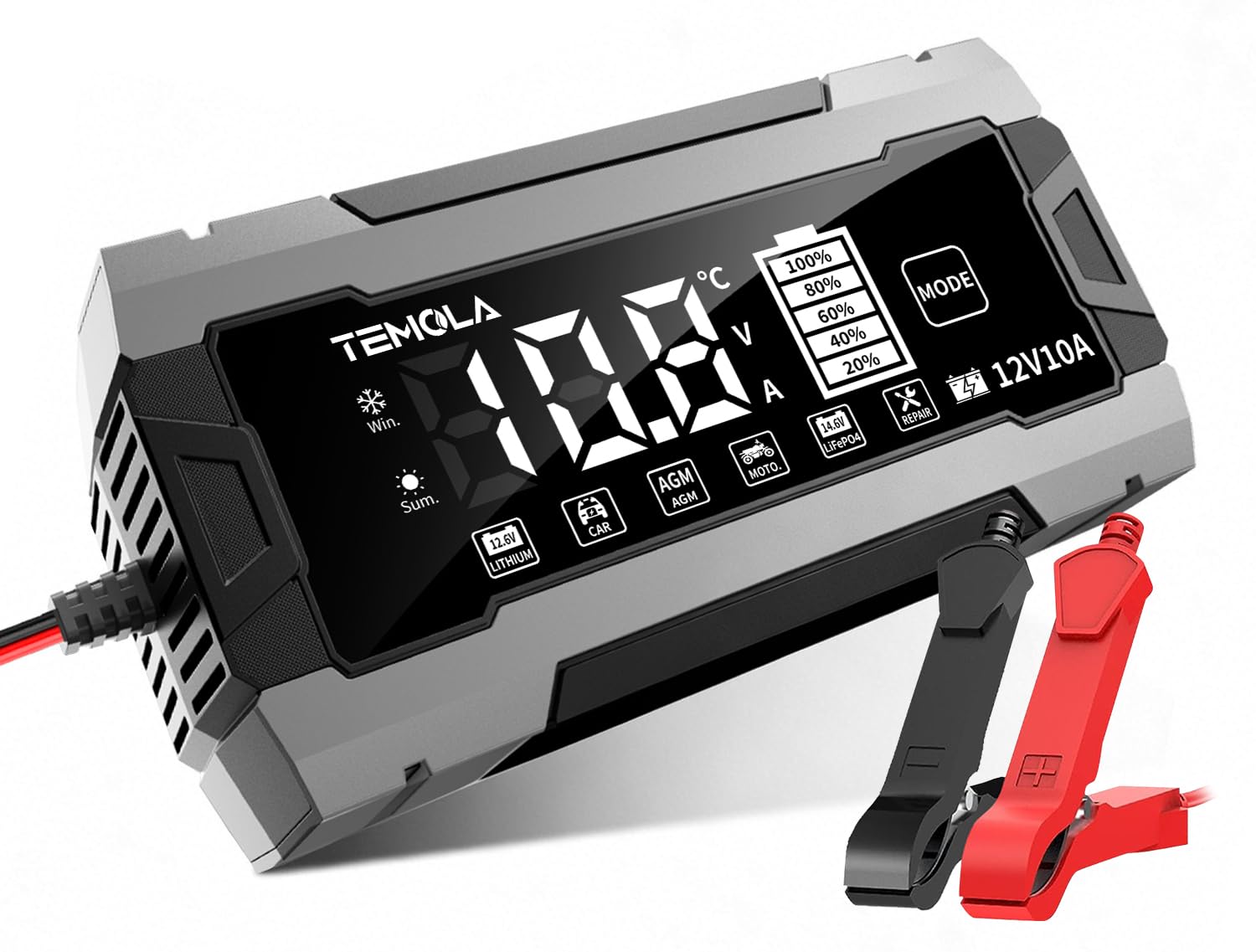
Image: Front view of the TEMOLA 12V 10A Smart Battery Charger, showing its compact design and LCD screen.
LCD Display Indicators

Image: Detailed view of the charger's LCD display, illustrating real-time charging status, voltage, current, and battery level indicators.
- Temperature: Displays the ambient temperature, influencing the charging voltage.
- Voltage: Shows the current battery voltage.
- Current: Indicates the charging current being delivered.
- Battery Level: A 5-level indicator showing the approximate charge percentage (20%, 40%, 60%, 80%, 100%).
- Charging End (FUL): Indicates that the battery is fully charged.
- Repair: Illuminates when the pulse repair mode is active.
- Reverse/Abnormal Connection (ERL): Warns of incorrect battery connection or other errors.
Selectable Modes
The charger offers 6 selectable modes to optimize charging for different battery types and conditions. Press the 'MODE' button to cycle through them.

Image: Diagram illustrating the six selectable charging modes available on the TEMOLA battery charger.
- Lithium: For 12V Lithium (LiFePO4) batteries.
- Car: For 12V standard lead-acid batteries (e.g., automotive batteries).
- AGM: For 12V AGM and GEL batteries.
- Moto: For 12V motorcycle batteries.
- LiFePO4: Specific mode for 12V Lithium Iron Phosphate batteries.
- Repair: Pulse repair mode for desulfation and rejuvenation of old, idle, or sulfated lead-acid batteries.
Setup
Follow these steps to set up your TEMOLA Smart Battery Charger for use.

Image: Visual guide demonstrating the three simple steps to connect and operate the battery charger.
Step 1: Power Connection
Insert the battery charger's AC plug into a standard power outlet (100-240V AC). The LCD display will illuminate.
Step 2: Battery Connection
Connect the red positive (+) alligator clip to the positive terminal of the battery. Connect the black negative (-) alligator clip to the negative terminal of the battery. Ensure a secure connection. If connected incorrectly, the charger will display "ERL" and will not charge.
Step 3: Mode Selection
Press the "MODE" button on the charger to select the appropriate charging mode for your battery type (Lithium, Car, AGM, Moto, LiFePO4, or Repair). The charging process will begin automatically after mode selection.
Operating Instructions
Once connected and a mode is selected, the charger will automatically detect the battery status and begin the 3-stage charging process.
Understanding the Charging Process

Image: A graph depicting the three stages of the charging process: constant current, constant pressure (voltage), and floating charge.
- Stage 1: Constant Current - The charger delivers a steady, high current to rapidly charge the battery until it reaches a predetermined voltage level.
- Stage 2: Constant Voltage - As the battery approaches full charge, the charger switches to a constant voltage, gradually reducing the current to prevent overcharging.
- Stage 3: Floating Charge - Once fully charged, the charger maintains a low, constant voltage to keep the battery at optimal capacity, acting as a maintainer.
Temperature Compensation
The built-in intelligent temperature compensation automatically adjusts the charging voltage based on ambient temperature. This prevents undercharging in cold climates (Winter Mode, <10°C) and overcharging under high-temperature conditions (Summer Mode, >28°C), optimizing battery life and performance.

Image: The charger's display showing automatic adjustment for Winter Mode (below 10°C) and Summer Mode (above 28°C) for precise charging.
Pulse Repair Function
The "Repair" mode uses pulse technology to rejuvenate old, idle, or sulfated lead-acid batteries. This can improve battery performance and extend its lifespan. To use, select the "Repair" mode after connecting the battery. The process may take several hours.
Note: This mode cannot repair completely damaged batteries, batteries with 0 voltage, or LiFePO4 batteries.

Image: The charger's capabilities including Repair (restores poor battery performance), Activate (revives old & unchargeable batteries), and Charge (stable charging even in cold winter).
Maintenance
Proper care and maintenance will ensure the longevity and optimal performance of your TEMOLA Smart Battery Charger.
- Keep the charger clean and dry. Wipe with a soft, damp cloth. Do not use harsh chemicals or solvents.
- Store the charger in a cool, dry place when not in use, away from direct sunlight and moisture.
- Regularly inspect the charging cables and alligator clips for any signs of damage, such as cuts, fraying, or corrosion. Replace damaged components immediately.
- For long-term battery maintenance, ensure the charger is connected and set to the appropriate maintenance mode (e.g., floating charge) to keep the battery topped off.
Troubleshooting Guide
If you encounter issues with your charger, refer to the table below for common problems and solutions.
| Problem | Possible Cause | Solution |
|---|---|---|
| Charger does not turn on | No power to the unit, faulty outlet, damaged power cable | Check power connection, try a different power outlet, inspect the power cable for damage. |
| "ERL" displayed on LCD | Reverse polarity connection, abnormal battery connection | Disconnect the charger immediately. Reconnect the red clip to the positive (+) terminal and the black clip to the negative (-) terminal. Ensure connections are secure. |
| Battery not charging | Incorrect mode selected, battery severely discharged or damaged, poor connection | Ensure the correct charging mode is selected for your battery type. For very low lead-acid batteries, try the "Repair" mode. Check all connections for security. If the battery is completely dead (0V) or severely damaged, it may be beyond repair. |
| Charger gets warm during operation | Normal operation, or insufficient ventilation | It is normal for the charger to get warm during operation. Ensure adequate ventilation around the unit. If it becomes excessively hot, disconnect and allow it to cool before resuming use. |
Video: A demonstration of the TEMOLA Car Battery Charger, showing its automatic smart trickle charging capabilities and ease of use. This video is provided by JPTECH US, the seller.
Product Specifications
| Feature | Detail |
|---|---|
| Brand | TEMOLA |
| Model Number | SWT-3830 |
| Color | Gray-Black |
| Product Dimensions (D x W x H) | 9.05" x 2.67" x 4.52" |
| Output Voltage | 12 volts |
| Input Voltage | 100-240 volts AC |
| Current Rating | 10 A |
| Compatible Devices | Cars, SUVs, trucks, motorcycles, boats, RVs, lawn mowers |
| Compatible Battery Types | AGM, GEL, SLA, Flooded, LiFePO4 (12V) |
| UPC | 797541314856 |
Warranty Information
This TEMOLA product comes with a 1-Year Manufacturer's Warranty. This warranty covers defects in materials and workmanship under normal use. Please retain your proof of purchase for warranty claims.
The warranty does not cover damage caused by misuse, accident, unauthorized modification, or failure to follow the instructions in this manual. For full details and terms, please refer to the warranty card included with your product.
Customer Support
Should you require technical assistance, encounter issues not covered in this manual, or need to make a warranty claim, please contact TEMOLA customer support.
You can typically find contact information through the retailer where you purchased the product or by visiting the official TEMOLA website. Please have your product model number (SWT-3830) and proof of purchase ready when contacting support.