
1. Introduction
Thank you for choosing the VECHTEL Android Car Radio. This manual provides detailed instructions for the installation, operation, and maintenance of your new car radio. Please read this manual thoroughly before use to ensure proper functionality and to maximize your user experience.
2. Product Overview
The VECHTEL Android Car Radio is a modern infotainment system designed to upgrade your vehicle's multimedia capabilities. It features a 9-inch IPS HD touchscreen, runs on Android 15, and offers a range of connectivity options including Wireless CarPlay, Android Auto, GPS navigation, Bluetooth 5.0, and 5G Wi-Fi.

Image: The main unit of the VECHTEL Android Car Radio, showcasing its 9-inch display.
3. Vehicle Compatibility
This Android car radio is specifically designed for:
- Suzuki SX4 models manufactured between 2006 and 2013.
- Fiat Sedici models manufactured between 2005 and 2014.
Before installation, it is recommended to verify compatibility by comparing your vehicle's dashboard and wiring harness with the provided diagrams. If you have any doubts, consult a professional installer.

Image: Comparison of a car dashboard before and after the VECHTEL car radio installation, showing seamless integration.
4. What's in the Box
Please check the package contents upon receipt to ensure all items are present:
- VECHTEL Android Car Radio Unit
- User Manual
- Power Cable
- RCA Cable
- USB Adapter Cable (2x)
- GPS Antenna
- External Microphone
- Rear Camera Input Cable
- Reversing Camera
- Installation Tools (e.g., screwdriver, plastic pry tool)

Image: Diagram illustrating the dimensions of the car radio and a visual representation of all included accessories in the packing list.
5. Setup and Installation
Installation of the VECHTEL Android Car Radio requires basic automotive electrical knowledge. If you are unsure, it is recommended to seek professional installation.
5.1 Wiring Connections
Refer to the wiring diagram for correct connections. Ensure all cables are securely connected to prevent malfunctions.
- Power Cable: Connect to your vehicle's power supply according to the diagram.
- RCA Cable: For audio output to external amplifiers or subwoofers.
- USB Adapter Cable: Connect to the rear USB ports for media playback or device charging.
- GPS Antenna: Mount in a location with a clear view of the sky for optimal signal reception.
- External Microphone: Connect for improved hands-free call quality.
- Rear Camera Input Cable: Connect the reversing camera.
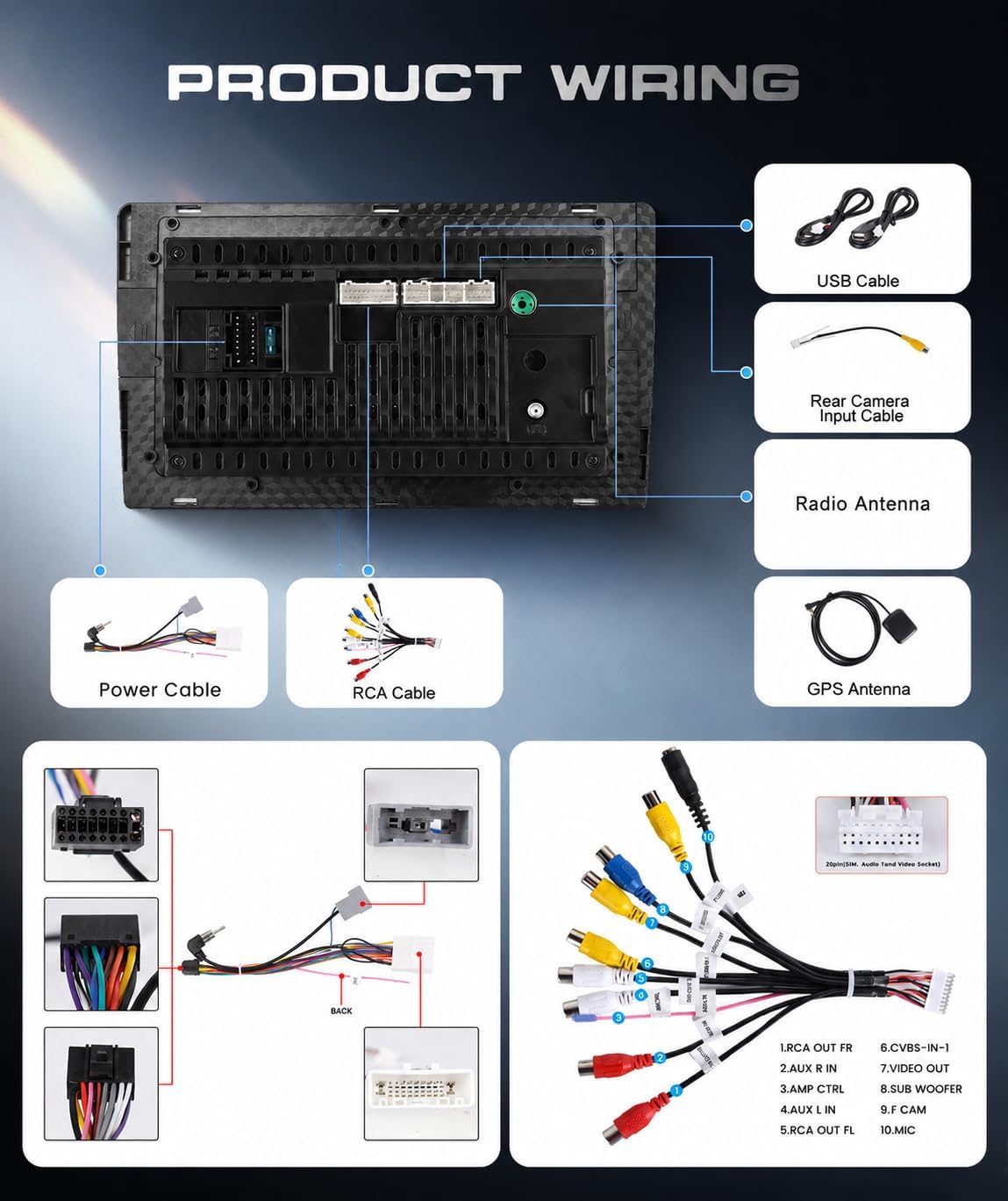
Image: A comprehensive diagram showing all wiring connections for the car radio, including power, USB, camera, and antenna inputs.
5.2 Reversing Camera Wiring
To connect the reversing camera:
- Connect cable 3 and cable 4 to the positive pole of the car's reversing light.
- Connect cable 2 to the negative pole of the power supply of the car's reversing light.
- Connect cable 3 and cable 5 together.

Image: Diagram showing the wiring for the HD reversing camera and an example of the camera's view on the display.
6. Operating Instructions
6.1 Power On/Off
The unit will power on automatically when the vehicle's ignition is turned on. To manually power off, press and hold the power button (if available) or turn off the vehicle's ignition.
6.2 Touchscreen Operation
The 9-inch IPS HD touchscreen provides a responsive interface. Tap, swipe, and pinch gestures are supported for navigation and control. The display is designed to be scratch-resistant and heat-resistant.

Image: Visual representation of the 9-inch IPS HD touchscreen, highlighting its 1280x720P resolution and touch sensitivity.
6.3 Android 15 System
The car radio runs on Android 15, offering a familiar and customizable user interface. You can download and install various applications from the Google Play Store (requires internet connection).
6.4 Steering Wheel Control
The unit supports original steering wheel controls, allowing you to manage audio, calls, and other functions without taking your hands off the wheel. Configuration may be required in the system settings.

Image: A collage showing Bluetooth 5.0, FM/RDS Radio interface, steering wheel control setup, and the view from the reversing camera.
7. Connectivity Features
7.1 Wireless CarPlay & Android Auto
Connect your smartphone wirelessly via Bluetooth to access CarPlay or Android Auto. This allows for hands-free navigation, calls, and music control using Siri or Google Assistant.
7.2 Mirror Link (Wi-Fi)
Mirror your smartphone's entire display to the car radio via Wi-Fi. This feature enables you to view apps, videos, and audio from your phone directly on the larger screen.

Image: Illustration of wireless CarPlay, Android Auto, and Mirror Link connections with a smartphone and the car radio display.
7.3 Bluetooth 5.0
Integrated Bluetooth 5.0 ensures stable device pairing for hands-free calling, contact/call list synchronization, and wireless music playback.
7.4 5G Wi-Fi & Hotspot
The unit supports 5G Wi-Fi for faster internet speeds, up to 300% faster than conventional 2.4G Wi-Fi. You can use your mobile phone as a hotspot for online navigation, streaming, browsing, and app downloads.
7.5 GPS Navigation
The integrated GPS module supports online and offline maps, providing real-time voice navigation for accurate route planning. Ensure the GPS antenna is properly installed for optimal signal.

Image: Depiction of GPS navigation on the car radio screen and the Wi-Fi function with various streaming app icons.
8. Display and Audio Features
8.1 IPS HD Display
The 9-inch IPS screen offers a 1280*720P resolution, a 178° viewing angle, 72% NTSC color space, and 16.7 million color tones for a vibrant and clear visual experience.
8.2 Split Screen Function
The device supports split-screen functionality, allowing you to run two applications simultaneously, such as navigation and music playback.
8.3 FM/RDS Radio
Enjoy your favorite radio stations with the integrated FM/RDS tuner. RDS (Radio Data System) provides additional information like station names and traffic announcements.
8.4 32-Band EQ Equalizer
Customize your audio experience with the 32-band EQ equalizer, allowing for precise sound adjustments to achieve immersive surround sound.
9. Maintenance
To ensure the longevity and optimal performance of your VECHTEL Android Car Radio, follow these maintenance guidelines:
- Screen Cleaning: Use a soft, lint-free cloth to gently wipe the touchscreen. Avoid abrasive cleaners or solvents that could damage the display.
- Software Updates: Periodically check for and install system software updates to ensure the latest features and security patches.
- Cable Connections: Ensure all cables remain securely connected. Loose connections can lead to intermittent issues.
- Temperature: Avoid exposing the unit to extreme temperatures for extended periods.
10. Troubleshooting
If you encounter issues with your car radio, refer to the following common problems and solutions:
| Problem | Possible Cause | Solution |
|---|---|---|
| Unit does not power on | Incorrect power wiring, blown fuse | Check power cable connections. Inspect vehicle's fuse box for blown fuses. |
| No sound output | Speaker wiring issues, volume too low, mute activated | Verify speaker connections. Increase volume. Check if mute function is active. |
| GPS signal lost or inaccurate | GPS antenna improperly installed or obstructed | Ensure GPS antenna is mounted in a clear, unobstructed location. |
| Bluetooth connection issues | Device not paired, Bluetooth off, interference | Ensure Bluetooth is enabled on both devices. Re-pair the device. Move away from sources of interference. |
| Touchscreen unresponsive | System freeze, temporary software glitch | Restart the unit (if possible) or turn off and restart the vehicle. |
If the problem persists after attempting these solutions, please contact customer support.
11. Specifications
| Feature | Detail |
|---|---|
| Brand | VECHTEL |
| Model | 4 CORE 2G+64G |
| Operating System | Android 15 |
| RAM | 2 GB |
| Internal Storage (ROM) | 64 GB |
| Screen Size | 9 inches |
| Display Type | IPS HD Touchscreen |
| Resolution | 1280*720P |
| Viewing Angle | 178° |
| Color Space | 72% NTSC |
| Connectivity | Bluetooth 5.0, 5G Wi-Fi, USB |
| Navigation | Integrated GPS Module (Online/Offline Maps) |
| Car Integration | Wireless CarPlay, Wireless Android Auto, Mirror Link, Steering Wheel Control |
| Audio Features | 32-Band EQ Equalizer, FM/RDS Radio, Stereo Audio Output |
| Video Encoding | MKV/RMVB/AVI/MP4 |
| Digital Media Format | .gif, .jpg, AIFF, AVI, MP3-Audio, MVI, WAV, WMA |
| Output Power | 45 Watts x 4 Channels |
| Product Dimensions (T x W x H) | 4T x 29.6W x 14.2H cm |
| Item Weight | 1 Milligram |
| Included Accessories | Reversing Camera, External Microphone, USB Adapter Cables, GPS Antenna |
12. Warranty and Support
12.1 Product Warranty
This VECHTEL Android Car Radio comes with a 2-year warranty from the date of purchase. This warranty covers manufacturing defects and malfunctions under normal use. Please retain your proof of purchase for warranty claims.
12.2 Customer Support
For technical assistance, troubleshooting, or warranty inquiries, please contact VECHTEL customer support through the platform where you purchased the product. Provide your model number and a detailed description of the issue for prompt assistance.
