
Product Overview
The MINISO Portable Handheld Fan Model C300 is a versatile 3-in-1 personal cooling device. It integrates an ice-cooling plate, a powerful brushless motor with 5 adjustable speeds, and a foldable design, allowing it to function as a handheld, desk, or neck fan. This USB rechargeable fan provides extended cooling for various environments.
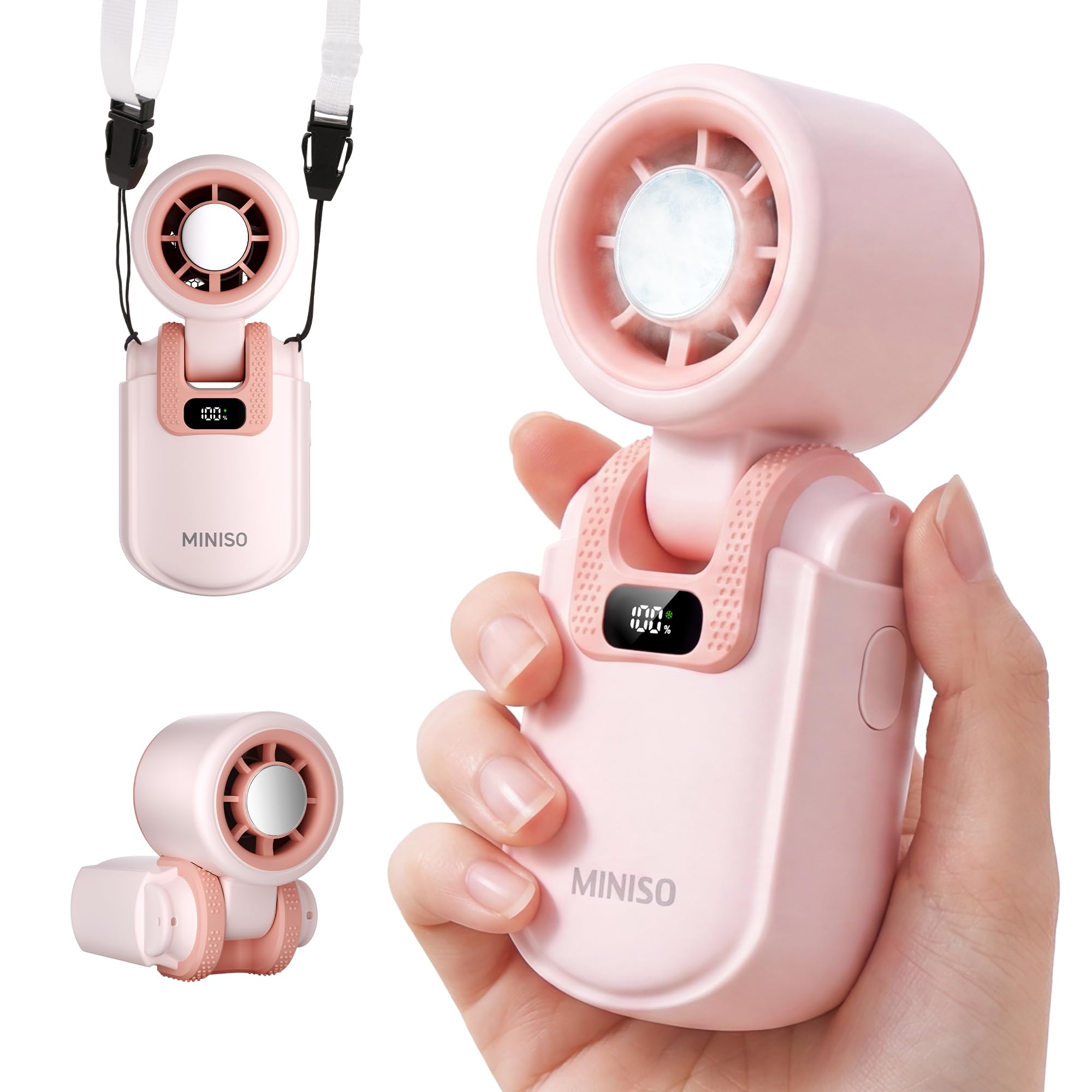
Image: The MINISO Portable Handheld Fan Model C300 in pink, shown in its handheld configuration.
Package Contents
- MINISO Portable Handheld Fan C300
- USB Charging Cable
- Neck Lanyard
- Instruction Manual

Image: The MINISO Portable Handheld Fan, USB charging cable, and neck lanyard, laid out next to the product box.
Setup
Charging the Fan
- Connect the provided USB charging cable to the fan's charging port.
- Plug the other end of the USB cable into a standard USB adapter, wall outlet, power bank, or any USB-compatible device.
- The battery display on the fan will indicate the charging status. A full charge takes approximately 3.5 hours.
- Ensure the fan is fully charged before initial use for optimal battery performance.

Image: The MINISO Portable Handheld Fan connected to a USB-C charging cable, illustrating the charging process and battery capacity.
Operating Instructions
Power On/Off and Speed Adjustment
- To power on the fan, press the power button. The fan will start at the lowest speed setting.
- Press the power button repeatedly to cycle through the 5 available speed settings.
- To power off the fan, continue pressing the power button until it turns off, or press and hold the power button for a few seconds.
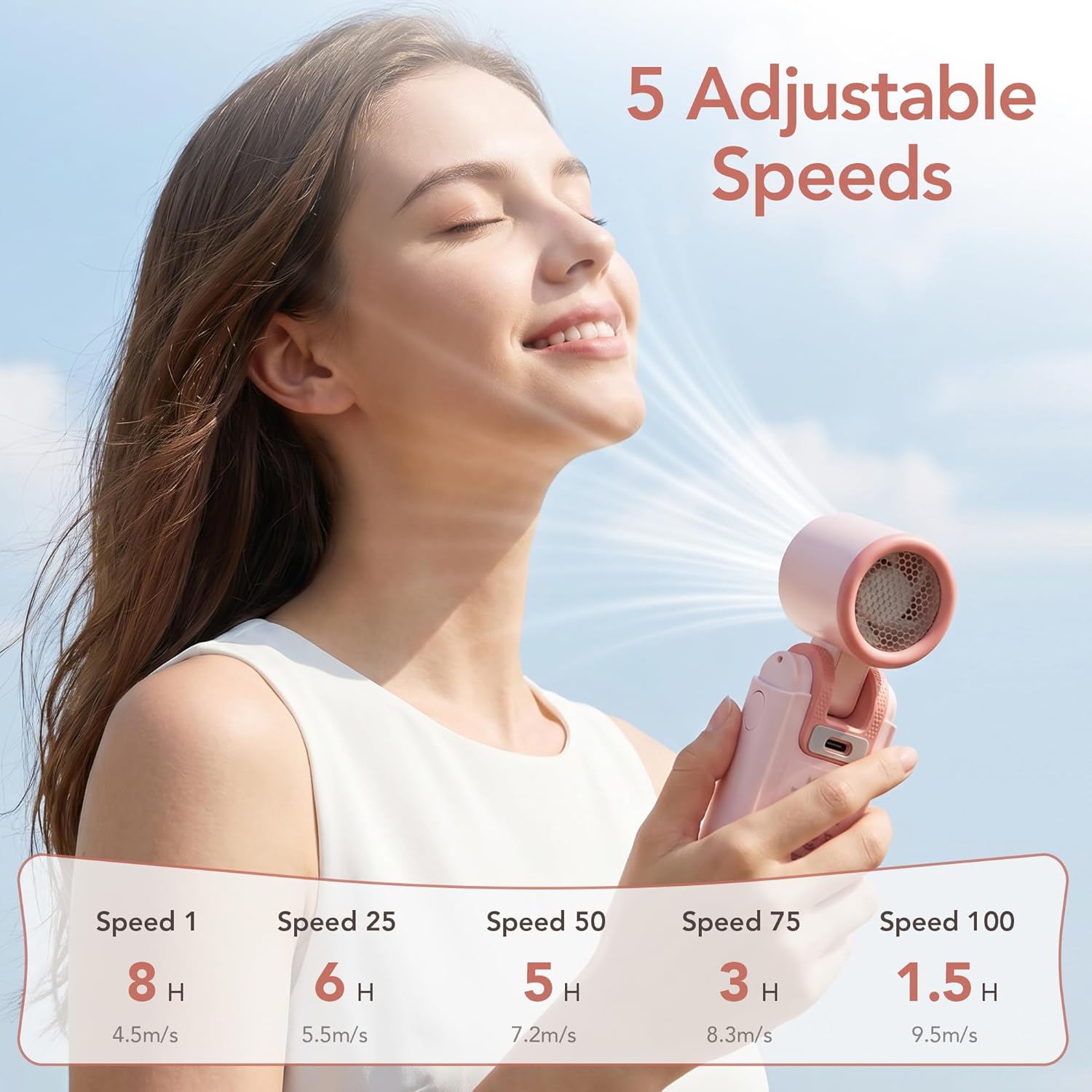
Image: A person using the MINISO Portable Handheld Fan, demonstrating the airflow and indicating the 5 adjustable speed settings and corresponding battery life.
Using the Ice-Cooling Plate
- The fan features a built-in ice-cooling metal plate.
- To activate the cooling plate, ensure the fan is powered on. The cooling function operates independently or in conjunction with the fan.
- Place the metal plate directly on your skin (e.g., face, forehead, neck) for an instant cooling sensation.

Image: The MINISO Portable Handheld Fan demonstrating the ice-cooling plate being applied to the face, forehead, and neck for instant chill.
Fan Modes (3-in-1 Functionality)
- Handheld Mode: Use the fan in its compact form for direct personal cooling.
- Desk Fan Mode: Fold the handle to create a stable base, allowing the fan to stand on a flat surface.
- Neck Fan Mode: Attach the provided neck lanyard to the designated slot on the fan for hands-free cooling.

Image: A collage showing the MINISO Portable Handheld Fan used in handheld, desk, and neck fan modes, highlighting its versatility.
Maintenance
Cleaning
- Ensure the fan is powered off and disconnected from any power source before cleaning.
- Wipe the exterior of the fan with a soft, dry cloth.
- Do not use abrasive cleaners or immerse the fan in water.
- Gently clean the fan grille with a soft brush or cotton swab to remove dust.
Storage
- Store the fan in a cool, dry place away from direct sunlight and extreme temperatures.
- If storing for an extended period, ensure the battery is partially charged (around 50%) to prolong its lifespan.
Troubleshooting
| Problem | Possible Cause | Solution |
|---|---|---|
| Fan does not turn on. | Battery is depleted. | Charge the fan using the provided USB cable. |
| Weak airflow. | Fan is on a low speed setting; battery is low; fan grille is obstructed. | Increase the speed setting; charge the fan; clean the fan grille. |
| Cooling plate not cold. | Cooling function not activated or fan not powered on. | Ensure the fan is powered on. The cooling plate activates with the fan. |
| Fan makes unusual noise. | Obstruction in fan blades. | Power off the fan and carefully check for any obstructions. Do not force removal. |
Specifications
| Feature | Detail |
|---|---|
| Model Name | C300 |
| Brand | MINISO |
| Power Source | Battery Powered (USB Rechargeable) |
| Number of Speeds | 5 |
| Battery Capacity | 2400mAh |
| Max Runtime | Up to 8 hours (lowest speed) |
| Charging Time | Approx. 3.5 hours |
| Motor Type | Brushless |
| Max Speed | 17000 RPM |
| Airflow Velocity | 4.5 to 9.5 m/s |
| Special Features | Ice-Cooling Plate, Foldable, Lightweight |
| Product Dimensions | 3"D x 5"W x 10"H |
| Material | Plastic |
Warranty and Support
For warranty information or technical support, please refer to the contact details provided on the product packaging or visit the official MINISO website. Keep your purchase receipt for warranty claims.
Additional Resources
Product Videos
Video: An official product video from Xuan Sen HK (MINISO seller) demonstrating the MINISO Mini Portable Handheld Fan's features and usage.


