
1. Product Overview
The TESMEN TLP-528A is a versatile network cable tester designed to efficiently check the continuity and quality of RJ45 network cables and RJ11 telephone lines. It features a detachable design for testing installed cables and includes a Quality Control (QC) test function for crimped connectors. This device is suitable for home network maintenance, professional wiring projects, and general cable sorting.
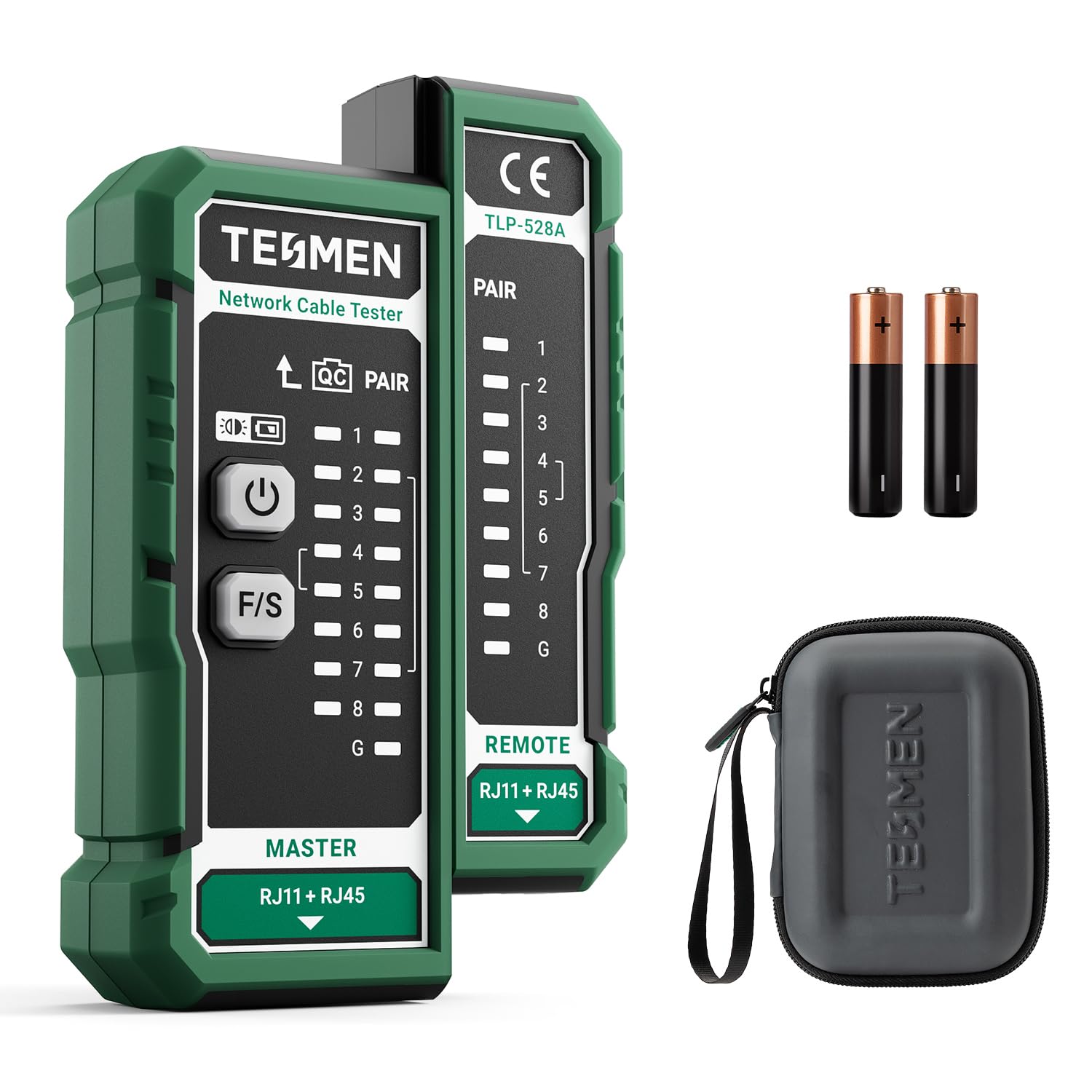
Image: The TESMEN TLP-528A Network Cable Tester, illustrating its ability to detect various cable faults.
2. Package Contents
Please verify that all items are present in the package:
- 1 x TESMEN TLP-528A Network Cable Tester (Master and Remote units)
- 1 x User Manual
- 2 x AAA Batteries
- 1 x Storage Box
3. Key Components
Familiarize yourself with the main parts of the TESMEN TLP-528A tester:

Image: Labeled diagram of the TESMEN TLP-528A tester highlighting its various ports and indicators.
- QC Port: Used for testing the crimping quality of RJ45 connectors.
- Power Button: Turns the device on/off.
- F/S Button (Test Mode): Switches between Fast and Slow test modes.
- Crimping Serial Indicator: LEDs that illuminate during QC testing.
- Wire Sequence Indicator: LEDs (1-8, G) that show the status of each wire pair.
- RJ11 + RJ45 Ports: Connectors for RJ11 and RJ45 cables on both Master and Remote units.
4. Getting Started (Setup)
4.1 Battery Installation
- Locate the battery compartment on the back of the Master unit.
- Open the battery compartment cover.
- Insert two (2) AAA batteries, ensuring correct polarity (+/-).
- Close the battery compartment cover securely.
4.2 Device Assembly
The TESMEN TLP-528A consists of a Master unit and a Remote unit. For testing short cables or for storage, the two units can be slid together to form a single compact device. For testing installed or long cables, the units can be separated.

Image: The TESMEN TLP-528A tester in its protective case, demonstrating its compact and separable design.
5. Operating Instructions
5.1 Pair Mode (Continuity Test)
This mode is used to test the continuity and wiring sequence of network (RJ45) and telephone (RJ11) cables.
- Connect one end of the cable to the RJ45 or RJ11 port on the Master unit.
- Connect the other end of the cable to the corresponding RJ45 or RJ11 port on the Remote unit.
- Slide the power switch on the Master unit to the 'ON' position. The LED indicators will begin to sequence.
- Observe the LED indicators on both the Master and Remote units.
Interpreting LED Indicators:
- Correct Wiring: The indicator lights on both the Master and Remote units will illuminate in sequence from 1 to 8 (and 'G' for shielded cables). Example: 1-2-3-4-5-6-7-8 (G).
- Open Circuit (Broken Wire): If a specific wire (e.g., wire NO.2) is open-circuited, neither the NO.2 indicator on the Master unit nor the Remote unit will illuminate. If three or more wires are disconnected, none of the indicators may illuminate.
- Reversed Wires: If cable ends are reversed (e.g., NO.1 and NO.2 swapped), the display will show a different sequence. For example, Master: 1-2-3-4-5-6-7-8 / Remote: 2-1-3-4-5-6-7-8.
- Short Circuit: If two or more wires are short-circuited, the corresponding LEDs will light up simultaneously or in an abnormal pattern.

Image: The TESMEN TLP-528A performing a continuity test, with LEDs indicating proper wire sequence.
5.2 QC Mode (Crimping Test)
This mode allows you to check the quality of the crimping on an RJ45 crystal head.
- Insert the RJ45 crystal head of the cable into the dedicated QC Port located at the top of the Master unit.
- Observe the QC lights on the Master unit.
- If all the QC lights illuminate, it indicates that the crystal head is crimped correctly. If any lights do not illuminate, there is a crimping fault.

Image: The TESMEN TLP-528A performing a QC test on an RJ45 connector.
5.3 Fast/Slow Test Modes
Press the F/S button on the Master unit to switch between fast and slow test modes. This changes the speed at which the LED indicators sequence, allowing for more flexible observation of test results.
6. Applications
The TESMEN TLP-528A is suitable for various applications:
- Home Networking: Ideal for DIY enthusiasts and homeowners to troubleshoot or install network cables.
- Engineering Line: Assists engineers in maintaining and organizing cables efficiently during installation.
- Office Server Rooms: Useful for IT professionals to quickly diagnose cable issues in complex server environments.

Image: Examples of the TESMEN TLP-528A's wide range of applications.
7. Care and Maintenance
- Cleaning: Wipe the device with a soft, dry cloth. Do not use abrasive cleaners or solvents.
- Storage: Store the tester in its provided storage box when not in use to protect it from dust and physical damage. Remove batteries if storing for extended periods to prevent leakage.
- Durability: The tester features a robust plastic shell with non-slip silicone for enhanced durability and drop resistance. However, avoid excessive force or dropping the device from significant heights.

Image: The TESMEN TLP-528A's durable construction with ABA rubber for drop resistance.
8. Troubleshooting
- Device does not power on: Check if the AAA batteries are correctly installed and have sufficient charge. Replace batteries if necessary.
- No LED indicators light up during continuity test: Ensure the cable is securely connected to both the Master and Remote units. Verify the cable itself is not severely damaged or has multiple open circuits.
- Inconsistent LED sequence: This indicates a wiring fault such as reversed pairs, split pairs, or short circuits. Refer to section 5.1 for interpreting specific patterns.
- QC test fails (not all lights illuminate): This suggests a poor crimp on the RJ45 connector. Re-crimp the connector or replace the cable end.
9. Technical Specifications
| Model | TLP-528A |
| Supported Cable Types | RJ45 (CAT5/CAT6/CAT7), RJ11 |
| Test Functions | Continuity Test (Pair Mode), Crimping Quality Control (QC Mode), Shielding Status |
| Test Modes | Fast, Slow |
| Power Source | 2 x AAA Batteries (included) |
| Design | Detachable Master and Remote units |
| Material | High-quality plastic shell, non-slip silicone |
10. Warranty and Support
For warranty information and technical support, please refer to the documentation included with your purchase or contact TESMEN customer service directly. Contact details can typically be found on the manufacturer's official website or on the product packaging.