
Introduction
This manual provides detailed instructions for the setup, operation, and maintenance of your Vehipa 2.4 Gallon Smart Aquarium. This comprehensive kit includes a 3-in-1 water pump, a 50W heater, decorative plants, and a 7-color LED light system with a temperature display and humidifier function. Please read this manual thoroughly before use to ensure proper function and longevity of your aquarium.
Package Contents
Verify that all items listed below are included in your package:
- 2.4 Gallon HD Glass Fish Tank with Lid
- 3-in-1 Water Pump (Filtration, Oxygenation, Circulation)
- 50W Aquarium Heater
- 3 x Plastic Plant Decorations
- Reusable Filter Cotton
- Oxygen Tube
- 2 x USB Adapters
- User Manual (this document)

Image: Overview of the Vehipa 2.4 Gallon Smart Aquarium kit components, including the tank, pump, heater, and decorative plants.
Safety Information
- Before plugging in the power supply, ensure the pump and heater are 100% submerged in water.
- Always unplug the power supply and allow the heater to cool for 10-20 minutes before removing it for cleaning or water changes.
- Do not operate the pump or heater dry.
- Keep electrical connections dry.
- This product is for indoor use only.
Setup Instructions
- Unpack Components: Carefully remove all items from the packaging. Inspect for any damage.
- Clean the Tank: Rinse the glass tank and all accessories (pump, heater, decorations) with clean water. Do not use soap or detergents.
- Install the Pump: Assemble the 3-in-1 water pump according to the diagram. Securely attach it inside the tank. Ensure the oxygen tube is properly connected.
- Place Decorations: Arrange the plastic plants and any other desired substrate or decorations in the tank.
- Install the Heater: Place the 50W aquarium heater inside the tank, ensuring it is fully submerged. The temperature sensor line should be positioned correctly.
- Fill with Water: Slowly fill the tank with conditioned water, leaving a small gap from the top. Ensure the pump and heater are completely submerged before proceeding.
- Connect Power: Plug in the USB adapters for the pump, heater, and lighting system.
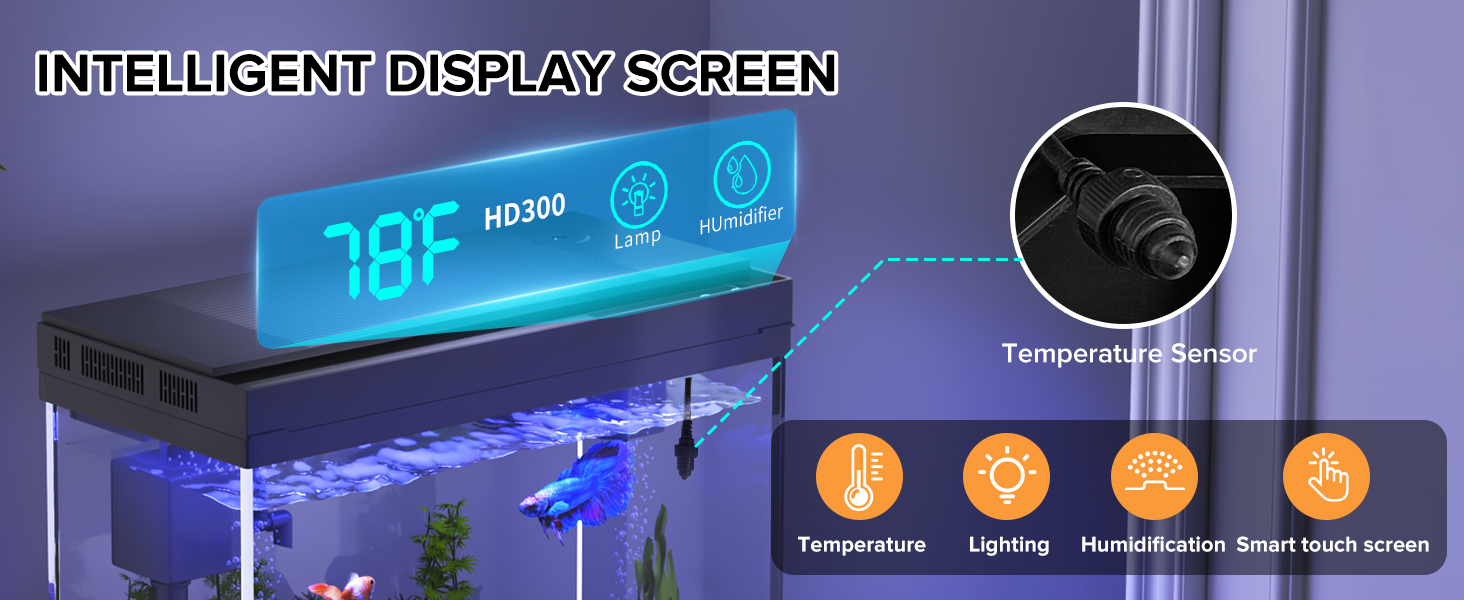
Image: Step-by-step visual guide for installing the water pump and filter system.
Video: A demonstration of setting up the Vehipa Smart Fish Tank, including the digital display and 3-in-1 pump installation.
Operating Instructions
Smart Water Circulation System
The integrated 3-in-1 pump provides filtration, oxygenation, and water circulation. It operates quietly (below 30 dB) to maintain optimal water quality and oxygen levels for your aquatic life.
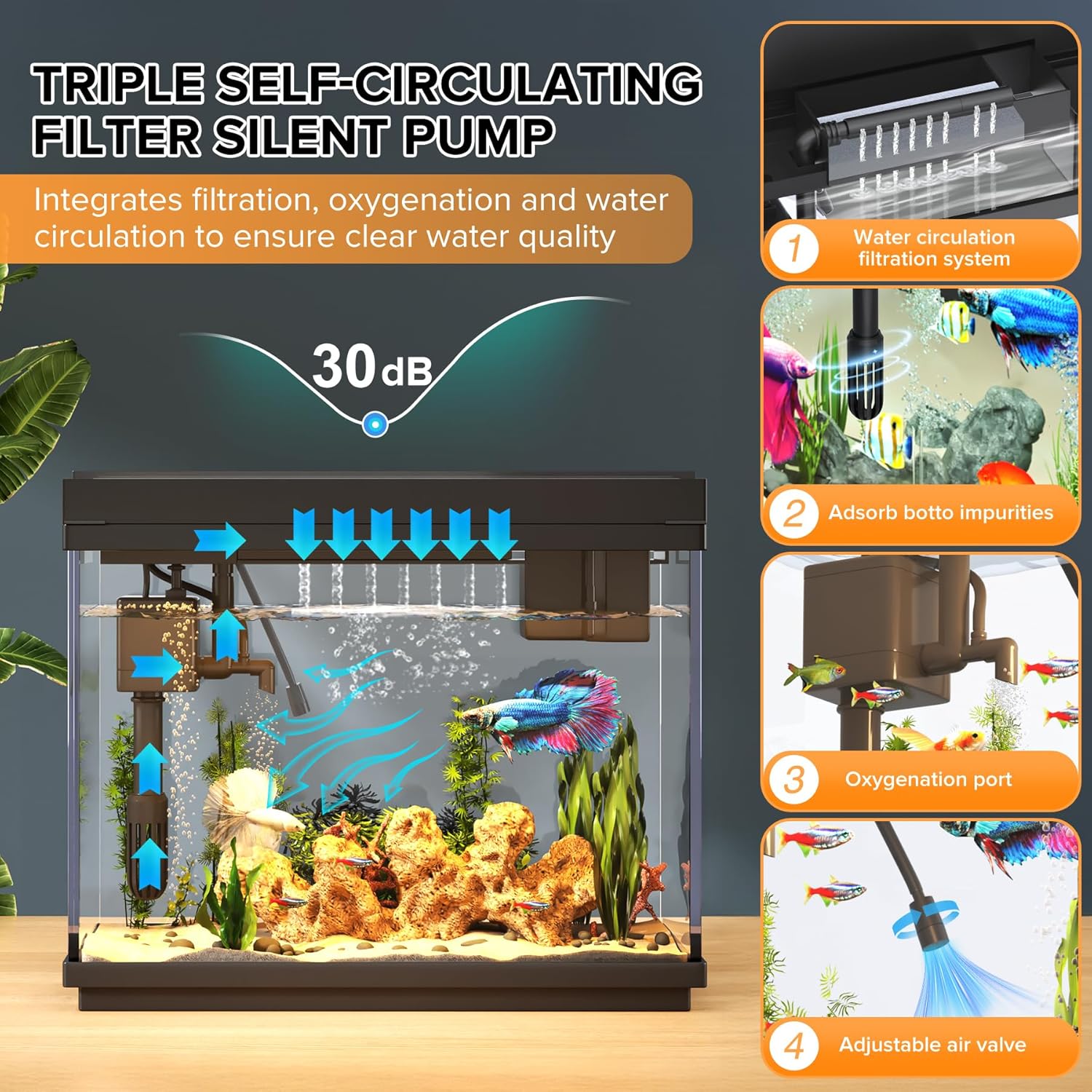
Image: Visual explanation of the 3-in-1 pump's functions: water circulation, impurity adsorption, and oxygenation.
50W Aquarium Heater & Temperature Display
The built-in temperature display shows the real-time water temperature. The 50W heater automatically maintains a stable preset temperature of 78°F (25.5°C). A red light indicates heating, and a green light indicates the target temperature has been reached and heating has stopped.

Image: Close-up of the 50W heater, showing red light for heating and green light for target temperature reached.

Image: The intelligent display screen on the aquarium lid, showing temperature and control icons.
7-Color Auto-Cycling LED Light
The aquarium features an advanced 8-mode LED lighting system with adjustable brightness and a 7-color auto-cycling function. You can customize your lighting schedule with 0-23 hour programmable timers to automate day/night cycles.
- Changing Colors: Press the "Lamp" button to cycle through the 7 colors or activate the auto-cycling mode.
- Adjusting Brightness: Long press the "Lamp" button to adjust the brightness level.
- Setting Timer:
- Press and hold the "Humidifier" button to enter the lighting timer setting function.
- Press the "Lamp" button to select the desired time (0-23 hours).
- Press and hold the "Humidifier" button again to confirm the settings.
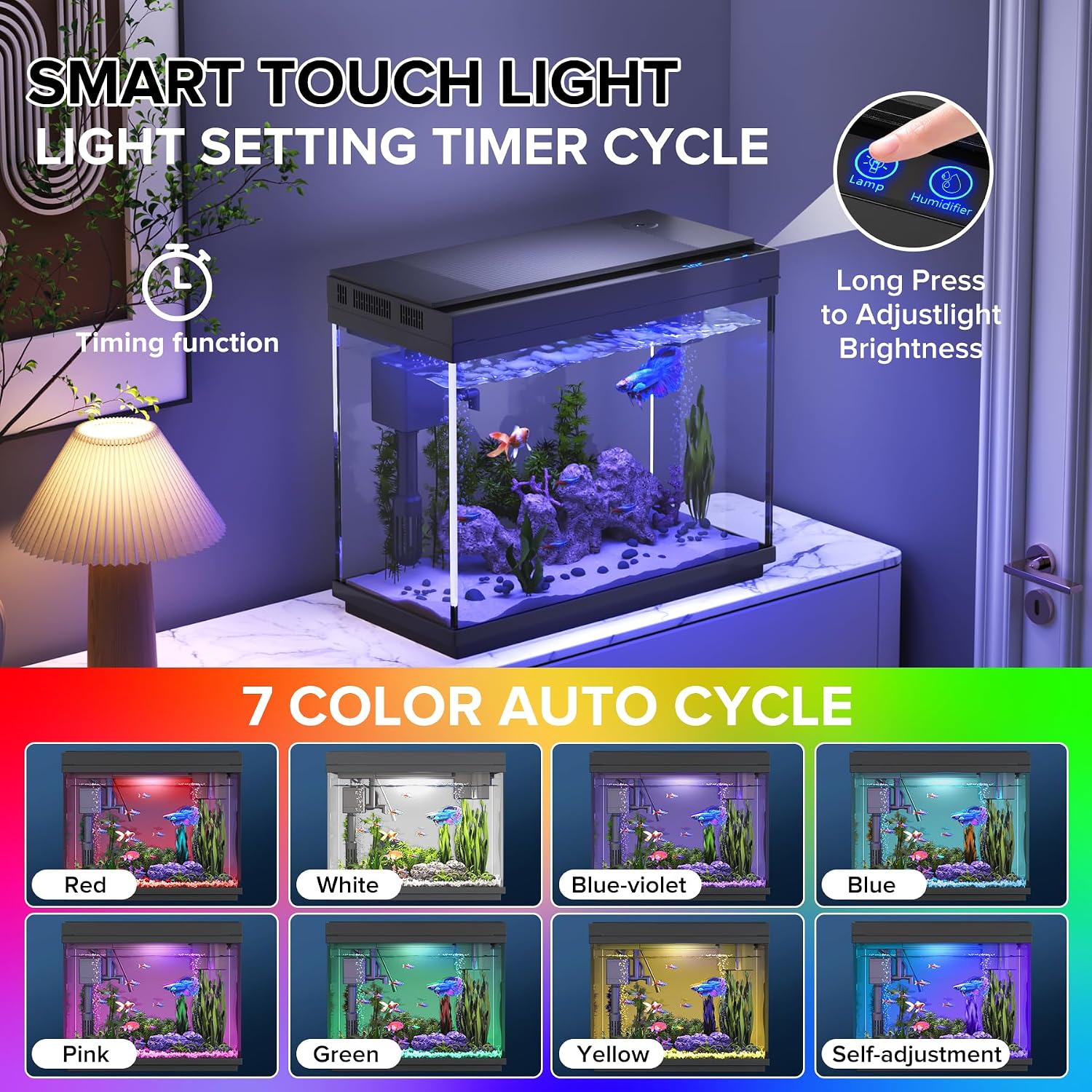
Image: Display of the smart touch light controls and various color options for the LED lighting.

Image: Detailed steps for programming the 0-23 hour timed lighting feature.
Aromatherapy Humidifier
The built-in essential oil diffuser allows you to add calming fragrances to your space. You can customize the misting intervals and intensity levels.
- Activating Humidifier: Press the "Humidifier" button to turn the humidifier on/off.
- Adjusting Mist: Long press the "Humidifier" button to cycle through misting intervals (e.g., 2-second interval, 1-second interval, continuous spray).
- Adding Essential Oils: Carefully add a few drops of water-soluble essential oil to the designated humidifier reservoir. Do not add oil directly to the fish tank water.

Image: The intelligent display screen highlighting the humidifier function and different spray intervals.
Video: A demonstration of the VEHIPA Smart Aquarium's humidifier and water circulation features.
Maintenance
Regular maintenance is crucial for a healthy aquatic environment.
- Water Changes: Perform partial water changes (25-30%) weekly or bi-weekly, depending on your tank's inhabitants and bioload. Always use a water conditioner.
- Filter Cleaning: Rinse the reusable filter cotton with old tank water during water changes. Replace the filter cotton as needed, typically every 2-4 weeks.
- Heater Cleaning: Unplug the heater and allow it to cool completely before gently wiping off any algae or debris.
- Tank Cleaning: The flip-top, detachable lid allows for easy access for cleaning. Use an aquarium-safe scraper or magnet cleaner to remove algae from the glass.
- Humidifier Cleaning: Periodically clean the humidifier reservoir to prevent mineral buildup.

Image: The thoughtful design of the flip-up and removable lid, facilitating easy feeding and tank cleaning.
Troubleshooting
| Problem | Possible Cause | Solution |
|---|---|---|
| Pump not working | Not plugged in; insufficient water level; clogged impeller; faulty power adapter. | Ensure pump is fully submerged and plugged in. Check water level. Clean impeller. Try a different USB power adapter. |
| Heater not heating / Overheating | Not plugged in; insufficient water level; faulty heater; sensor issue. | Ensure heater is fully submerged and plugged in. Check water level. If overheating, unplug immediately and contact support. Ensure temperature sensor is correctly positioned. |
| Lights not working | Not plugged in; faulty LED unit. | Ensure power is connected. Check connections. |
| Humidifier not producing mist | No water in reservoir; clogged mist outlet. | Refill humidifier reservoir. Clean mist outlet. |
| Water cloudy | New tank syndrome; overfeeding; insufficient filtration; too many fish. | Perform partial water changes. Reduce feeding. Clean/replace filter media. Ensure appropriate fish stocking. |
Specifications
| Feature | Detail |
|---|---|
| Model Number | HD300-BH |
| Tank Volume | 2.4 Gallons (approx. 9 Liters) |
| Product Dimensions (L x W x H) | 11.81" x 5.83" x 9.53" |
| Material | HD Glass |
| Heater Power | 50W |
| Lighting | 7-Color Auto-Cycling LED with adjustable brightness and 0-23H timer |
| Pump Type | 3-in-1 Silent Pump (Filtration, Oxygenation, Circulation) |
| Special Features | Temperature Display, Aromatherapy Humidifier, Flip-top Detachable Lid |
Warranty and Support
For warranty information or technical support, please refer to the contact details provided with your purchase documentation or visit the official Vehipa website. Keep your purchase receipt as proof of purchase.