
Product Overview
The ULANZI MT55 SnapGo is a versatile 4-in-1 mini tripod and selfie stick designed for various shooting scenarios. It features Mantis Mode, Backpack Strap Mount Mode, Selfie Stick Mode, and Tripod Mode. The device includes a 360° ball head, a 4-section extendable pole, and universal 1/4" screw threads for compatibility with phones, action cameras, and compact cameras.
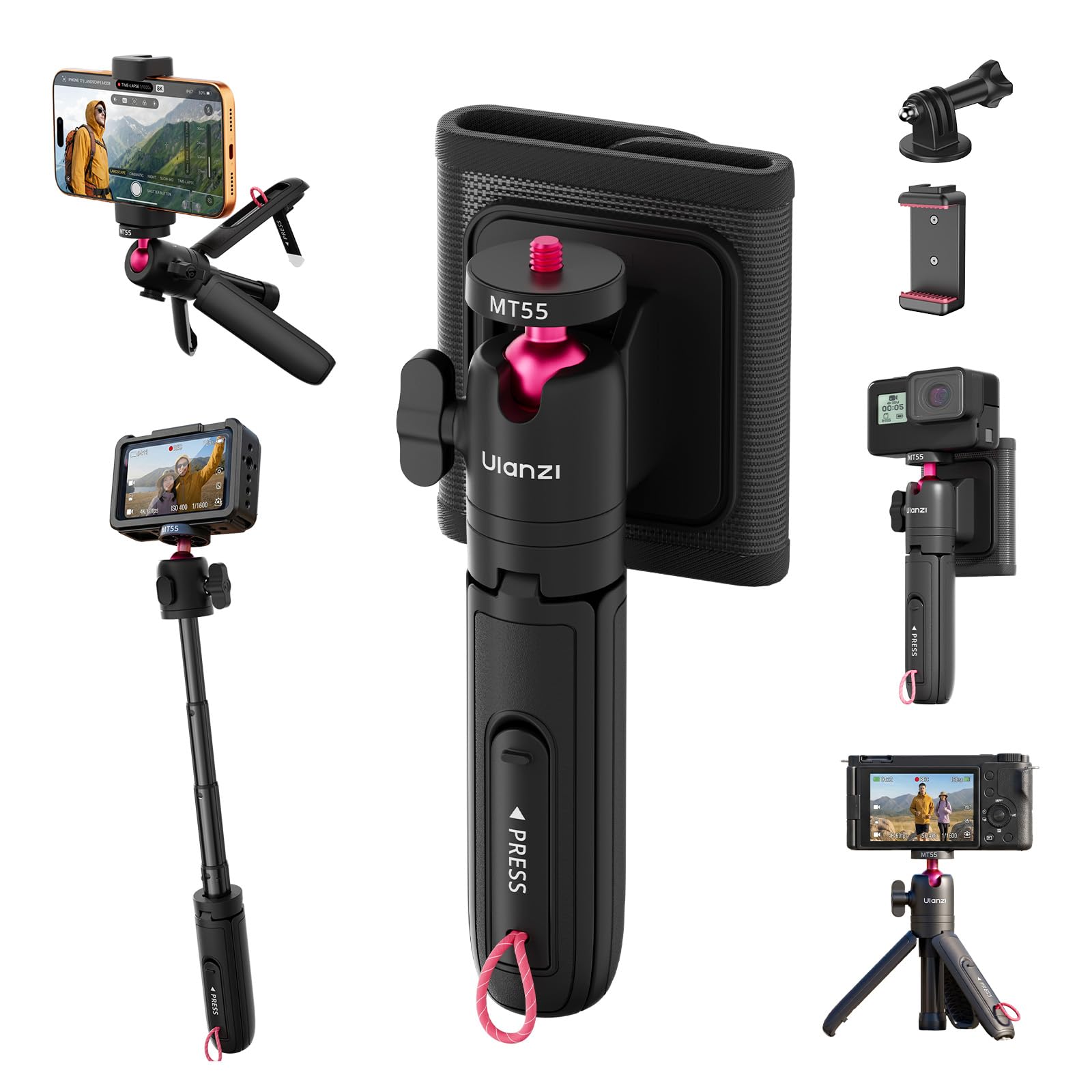

What's Included
- ULANZI MT55 SnapGo Mini Tripod & Selfie Stick
- Backpack Strap Mount
- Action Camera Adapter
- Phone Clamp

Setup Instructions
1. Attaching Your Device
The MT55 features a standard 1/4" screw mount. To attach your device:
- For cameras (action cameras, compact cameras): Screw the camera directly onto the 1/4" screw thread on the ball head.
- For smartphones: Attach the included phone clamp to the 1/4" screw thread, then secure your smartphone within the clamp.
- For action cameras requiring an adapter: Use the provided action camera adapter to connect your camera to the 1/4" screw thread.

2. Adjusting the Ball Head
The 360° ball head allows for flexible positioning. Loosen the control knob to adjust the angle of your device. Tighten the knob to secure it in place. A dedicated 90° vertical notch is available for portrait orientation.

3. Extending the Pole
The MT55 features a 4-section telescoping pole. Gently pull the sections to extend the pole to your desired length, up to 31cm. Ensure all sections are fully extended and locked for maximum stability.

Operating Modes
1. Tripod Mode
To use as a stable tabletop or ground-level tripod:
- Fold out the legs of the tripod completely.
- Place the tripod on a flat, stable surface.
- Adjust the ball head to achieve the desired camera angle.

2. Selfie Stick Mode
For vlogging and group selfies:
- Ensure the tripod legs are folded and secured.
- Extend the telescoping pole to your preferred length.
- Hold the handle firmly and position your device for shooting.

3. Mantis Mode
For high-angle or top-down shots:
- Locate the hidden fold-out hook on the tripod.
- Extend the legs and push the hook outward until it clicks into place.
- Hook the tripod onto a stable edge or surface. Ensure the base feet are fully supported.
- Extend the final column segment to avoid interference.

4. Backpack Strap Mount Mode
For hands-free POV footage:
- Attach the included hook-and-loop strap mount to a backpack shoulder strap (compatible with straps 6-8cm wide and >1cm thick). Ensure the anti-slip silicone lining provides a firm grip.
- Align the tripod with the strap mount and pull down to lock it in place.
- To release, press the side button and slide the tripod upward.


Maintenance
- Keep the tripod clean and free from dust and debris. Use a soft, dry cloth for cleaning.
- Avoid exposing the tripod to extreme temperatures or harsh chemicals.
- Ensure all moving parts, especially the ball head and telescoping sections, operate smoothly. Do not force any components.
- Store the tripod in a dry place when not in use.
Troubleshooting
Device Not Stable on Tripod
- Ensure the 1/4" screw mount is securely tightened to your device.
- Verify the ball head control knob is fully tightened after adjusting the angle.
- In Tripod Mode, ensure the legs are fully spread and on a flat, stable surface.
- Check that your device's weight does not exceed the 1kg (2.2lb) load capacity.
Telescoping Pole Does Not Extend/Retract Smoothly
- Check for any obstructions or debris in the pole sections.
- Avoid applying excessive force. If resistance is met, gently clean the sections.
Backpack Strap Mount Not Secure
- Ensure the backpack strap is within the recommended width (6-8cm) and thickness (>1cm).
- Verify the hook-and-loop strap is tightly secured around the backpack strap.
- Confirm the tripod is fully snapped into the mount until it locks.
Specifications
| Brand | ULANZI |
| Model Name | MT55 |
| Compatible Devices | Camera, GoPro, Insta360, DJI, Smartphone |
| Material | Aluminum, Plastic |
| Item Weight | 123 Grams |
| Weight Limit | 1 Kilogram (2.2 lbs) |
| Maximum Height | 31 Centimeters (12.2 inches) |
| Minimum Height | 15.8 Centimeters (6.2 inches) |
| Folded Size | 15.8 × 4.3 × 3.5cm |
| Tripod Head Type | Ball Heads |
| Shooting Modes | Mantis Mode, Strap Mount Mode, Selfie Stick Mode, Tripod Mode |
Official Product Video
Video: An official product video from ULANZI demonstrating the features and various modes of the MT55 SnapGo Mini Tripod & Selfie Stick.
Warranty Information
The ULANZI MT55 SnapGo Mini Tripod & Selfie Stick comes with a 3-month warranty from the date of purchase. This warranty covers manufacturing defects and material flaws under normal use. Please retain your proof of purchase for warranty claims.
For warranty service or inquiries, please contact ULANZI customer support.
Customer Support
If you have any questions, require assistance, or encounter issues with your ULANZI MT55 SnapGo, please refer to the official ULANZI website for support resources or contact their customer service department.
For the most up-to-date contact information, visit the ULANZI Official US Store on Amazon.


