
GLIDEZONE GD83
GLIDEZONE GD83 Electric Scooter User Manual
Model: GD83
Introduction
This manual provides essential instructions for the safe operation, assembly, maintenance, and troubleshooting of your GLIDEZONE GD83 Electric Scooter. Please read this manual thoroughly before using the scooter to ensure proper function and safety.
The GLIDEZONE GD83 is an electric scooter designed for adults, featuring a 5600W peak dual motor, a 60V/30AH battery, and 11-inch off-road tires. It includes a quick-release spare tire and an aluminum alloy single swing arm design.
Important Safety Warnings
- Always wear a helmet and appropriate protective gear when riding.
- Familiarize yourself with local laws and regulations regarding electric scooter use.
- Do not ride in adverse weather conditions, including heavy rain, snow, or ice.
- Avoid riding on slippery surfaces, loose gravel, or excessively rough terrain.
- Ensure all bolts and fasteners are securely tightened before each ride.
- Do not exceed the maximum weight limit of 264 pounds (120 kg).
- Maintain a safe distance from other vehicles and pedestrians.
- Regularly inspect tires, brakes, and lights for proper function.
- Keep hands and feet on the designated areas of the scooter while operating.
- Do not attempt to perform stunts or dangerous maneuvers.
What's in the Box
Upon opening your GLIDEZONE GD83 package, verify that all components are present:
- 1 x GLIDEZONE GD83 Electric Scooter
- 2 x Charger
- 1 x Tool Kit
- 1 x Instruction Manual (this document)

Image: The GLIDEZONE GD83 Electric Scooter with its main features highlighted, including max speed, peak power, net weight, max range, and maximum load capacity.
Video: An unboxing video of the GLIDEZONE GD83 Electric Scooter, demonstrating the contents of the package and initial presentation.
Setup and Initial Assembly
1. Unfolding the Scooter
Carefully remove the scooter from its packaging. The scooter is designed to fold for transport. Locate the folding mechanism, typically near the base of the steering column, and release it to raise the handlebar stem into the upright position. Secure the locking mechanism firmly.
2. Handlebar Installation (if required)
Some assembly may be required for the handlebars. Attach the handlebars to the stem, ensuring all cables are routed correctly and not pinched. Tighten all bolts securely using the provided tool kit.
3. Initial Charging
Before first use, fully charge the scooter's battery. Connect the charger(s) to the charging port(s) on the scooter and then to a power outlet. The charging indicator will show the charging status. A full charge typically takes approximately 7 hours with dual fast charging ports.
4. Attaching the Spare Tire (Optional)
The GD83 includes a quick-release spare tire. To attach it, align the spare tire with the front mounting bracket and secure it using the single-bolt quick fastening system. Ensure it is firmly attached before riding.

Image: Front view of the GLIDEZONE GD83 Electric Scooter, showcasing the front wheel, suspension, and lighting system.

Image: Diagram illustrating the quick-access mount for the spare tire, highlighting the high-strength aluminum alloy bracket and single-bolt quick fastening system.
Operating Instructions
1. Powering On/Off
Press and hold the power button on the display to turn the scooter on or off.
2. Riding Modes
The GD83 features multiple riding modes to suit different conditions:
- Eco Mode (Commute): Optimized for maximum range (up to 62 miles theoretical max).
- Comfort Mode (Explore): Provides a balance of speed and range (approx. 48+ miles with a 132 lb rider).
- Sport Mode (Off-Road): Unleashes full power (2x2800W) for maximum speed and acceleration (approx. 30+ miles range).

Image: Visual comparison of Eco, Comfort, and Sport riding modes, showing estimated range for each. Note that actual range depends on rider weight, battery state, terrain, and weather conditions.
3. Activating Performance Mode (Speed Limiter Release)
To unlock the full performance of the GD83 and release the speed limiter:
- Turn off the scooter completely.
- Hold the brake lever with your right hand.
- While holding the brake, press and hold the throttle with your thumb.
- While still holding both the brake and throttle, turn the scooter back on.
- You will hear a "beep" sound.
- Unlock the scooter using your NFC card.
- The display will flash "E2" for approximately 10 seconds, indicating the speed limiter is being released. After this, the scooter is ready for full performance.
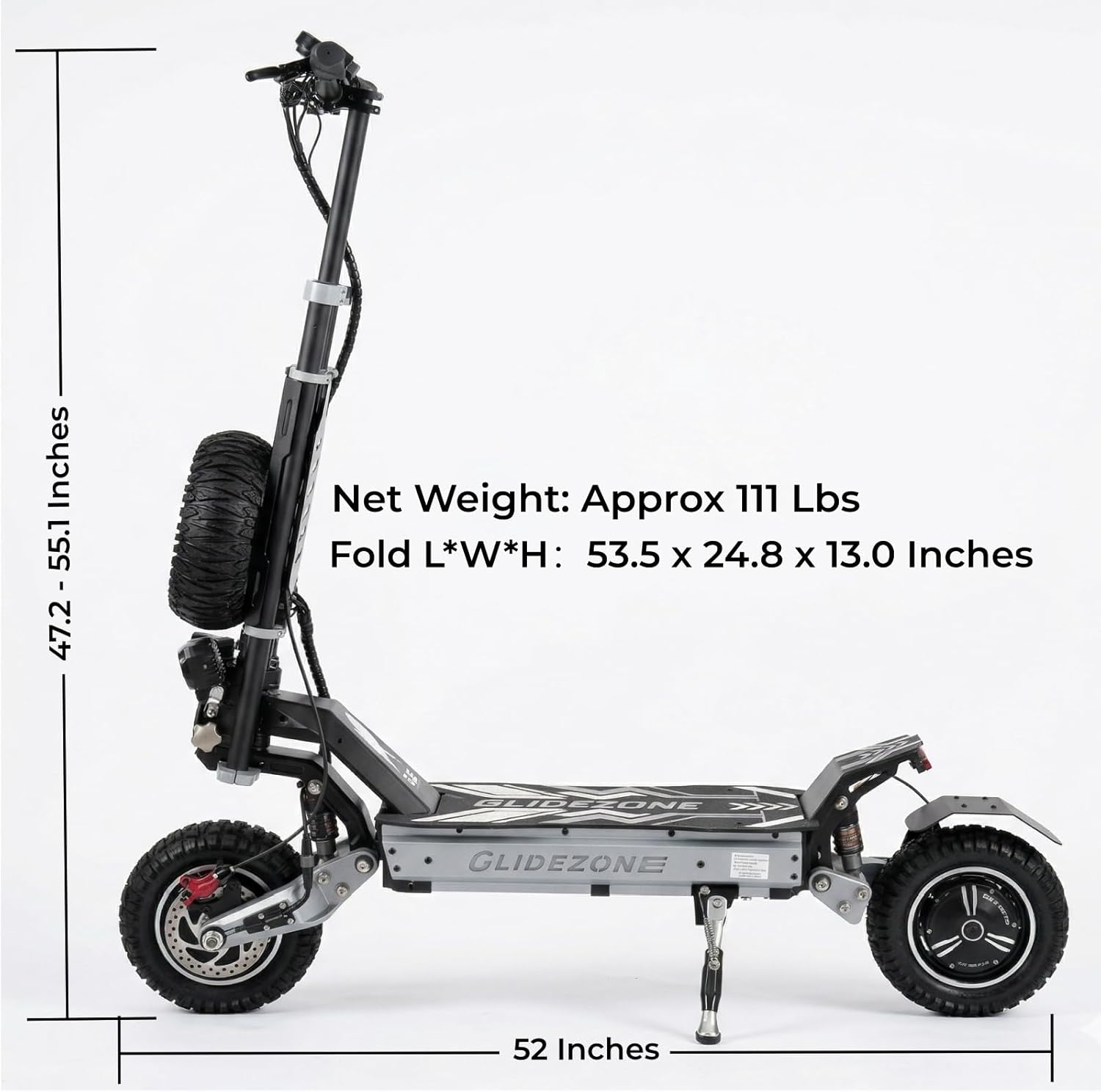
Image: Step-by-step visual guide on how to unlock the scooter using NFC to restore full performance, including the sequence of button presses and NFC card usage.
Video: A demonstration on how to enter "Performance Mode" on the GLIDEZONE GD83 Electric Scooter, showing the button sequence and NFC activation.
4. Safe Mode
For safety reasons, the GD83 is equipped with a Safe Mode. Pressing the power button twice consecutively will activate Safe Mode, limiting the maximum speed to approximately 18-20 mph.
5. Braking
The scooter is equipped with front and rear dual hydraulic disc brakes for responsive and short-distance braking. Apply both brake levers smoothly to slow down or stop. Avoid sudden, harsh braking, especially at high speeds, to prevent loss of control.
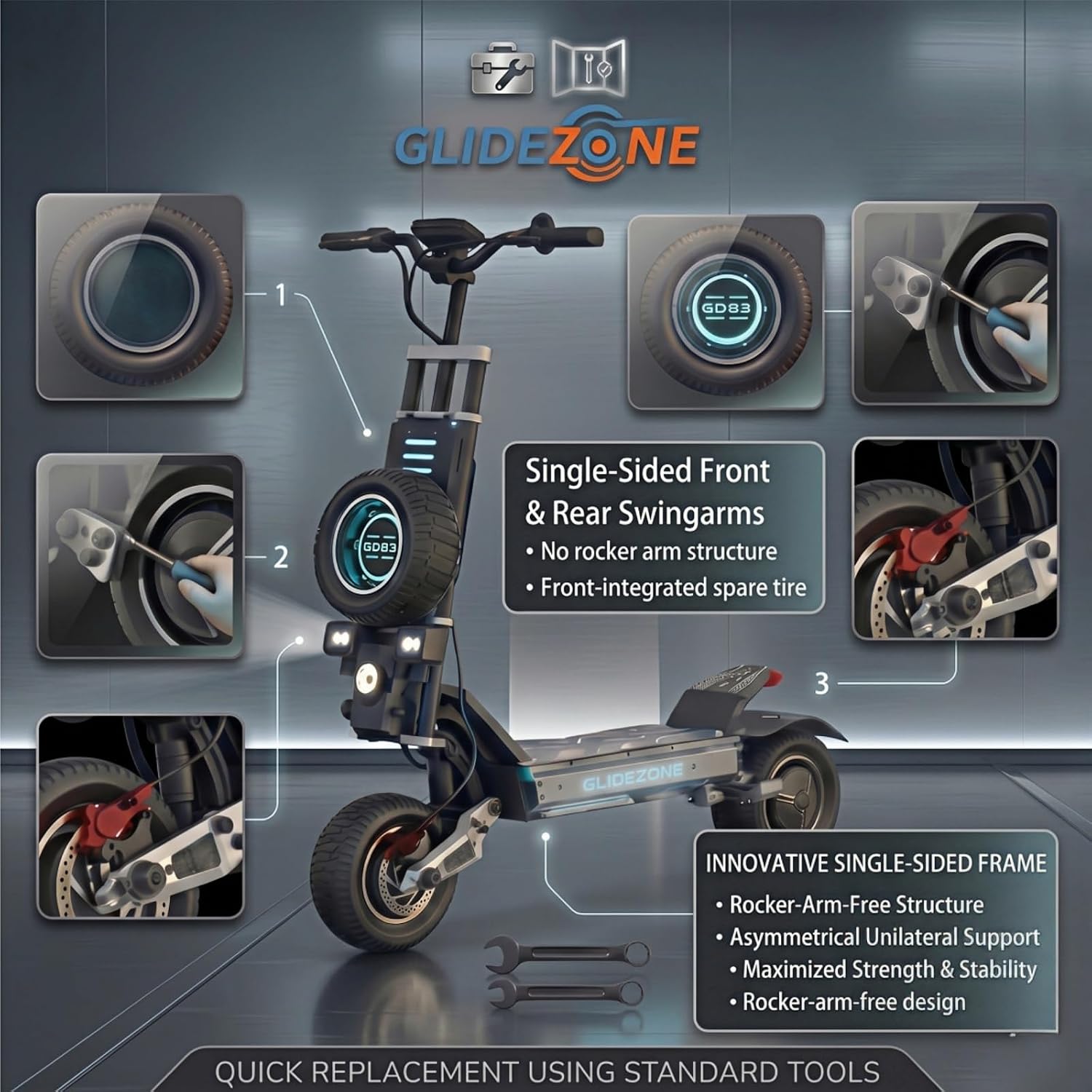
Image: Close-up view of the GD83's hydraulic braking system, highlighting the short braking distance, hydraulic disc brakes, and ventilated disc rotor.
6. Unit Switching (km/h to mph)
To switch between kilometers per hour (km/h) and miles per hour (mph) on the display:
- With the scooter powered on, press the power button to cycle through display options until you see "P1". This option is for switching units.
- Use the "+" or "-" buttons to toggle between km/h and mph.
- Press the power button again to confirm your selection and exit the settings.
Video: A demonstration of how to switch unit settings (km to miles, km/h to mph) on the GD83 display.
Maintenance
1. Tire Care and Replacement
The GD83 is equipped with 11-inch off-road pneumatic tires. Regularly check tire pressure and inspect for wear or damage. The quick-release spare tire feature allows for rapid tire changes with simple lug nut removal.

Image: Diagram illustrating the single-sided front and rear swingarms and the front-integrated spare tire, emphasizing quick replacement using standard tools.
Video: A detailed video demonstrating the process of tire removal and installation on the GLIDEZONE GD83 Electric Scooter.
2. Brake System Check
Periodically inspect the hydraulic disc brakes for wear on the pads and proper fluid levels. Ensure brake levers provide firm and consistent resistance.
3. General Cleaning and Storage
Clean the scooter with a damp cloth. Avoid using high-pressure water jets directly on electrical components. Store the scooter in a dry, cool place away from direct sunlight and extreme temperatures. For long-term storage, ensure the battery is charged to approximately 50-70%.
Troubleshooting
| Problem | Possible Cause | Solution |
|---|---|---|
| Scooter does not power on | Low battery, loose connections, power button issue. | Charge the battery. Check all visible cable connections. Ensure the power button is pressed firmly. |
| Limited speed (e.g., 18-20 mph) | Scooter is in Safe Mode or speed limiter is active. | If in Safe Mode, press the power button twice consecutively to exit. To release the speed limiter for full performance, follow the "Activating Performance Mode" steps in the Operating Instructions section. |
| Display shows "E2" | Indicates speed limiter release process. | This is normal during the Performance Mode activation. Wait approximately 10 seconds for the process to complete. |
| Reduced range or power | Low battery charge, extreme temperatures, heavy load, uphill riding, tire pressure. | Ensure battery is fully charged. Check tire pressure. Range and speed vary by load and conditions. |
| Brakes feel weak or inconsistent | Worn brake pads, low hydraulic fluid, air in the brake lines. | Inspect brake pads for wear and replace if necessary. Consult a qualified technician for hydraulic system issues. |
Specifications
| Feature | Detail |
|---|---|
| Brand | GLIDEZONE |
| Model Name | GD83 |
| Motor Power | 5600W Peak Dual Motor |
| Battery | 60V 30Ah Lithium Battery |
| Max Speed (No-load) | Up to 56 MPH |
| Max Range (Laboratory Data) | Up to 62 Miles |
| Max Climbing Slope | 45° |
| Weight Limit | 264 pounds (120 kg) |
| Tire Size | 11 inches |
| Tire Type | Pneumatic Off-Road |
| Brake Style | Hydraulic Disc (Front & Rear) |
| Product Dimensions (L x W x H) | 51.6"L x 25.6"W x 52.4"H |
| Folded Dimensions (L x W x H) | 53.5"L x 24.8"W x 13.0"H (Approximate) |
| Net Weight | Approx. 111-113 lbs |
| Special Features | Dual Braking System, Foldable, Quick-release Spare Tire, Aluminum Alloy Single Swing Arm, Quick-release Motor Head, 360° Safety Lighting (LED headlights, brake lights, turn signals, ambient light) |

Image: Side view of the GLIDEZONE GD83 Electric Scooter with key dimensions and approximate net weight indicated.

Image: Detailed diagram showcasing the 5600W peak dual motors, max speed, max climbing slope, and 0-30 mph acceleration time of the GD83.

Image: Diagram illustrating the 60V 30Ah premium lithium battery with intelligent BMS, 1000+ charge cycles, and dual-port fast charging capability.
Warranty Information
The GLIDEZONE GD83 Electric Scooter comes with a 1-year factory warranty. This warranty covers core mechanical and electrical components. Additionally, GLIDEZONE offers 360-Day Hassle-Free After-Sales Support and Lifetime Maintenance & Repair Guidance to help keep your scooter running at peak performance.
For specific warranty claims or detailed information, please refer to the official GLIDEZONE warranty policy or contact customer support.
Customer Support
For quality support, questions regarding the 5600W Peak Power system, 60V 30Ah battery, Quick-release Spare Tire, or any other inquiries, please contact GLIDEZONE directly.
- Contact: Use the "Contact Seller" feature on Amazon.
- Local Service Center & Warehouse: GLIDEZONE maintains a dedicated Local Service Center & Warehouse in California for fast dispatch, genuine parts, and expert maintenance.

Image: Overview of GLIDEZONE's support infrastructure, including their California hub for rapid dispatch, 1-year comprehensive support, and lifetime engineering support.
Related documentsGD83

Ask a question about this manual
Ask about setup, troubleshooting, compatibility, parts, safety, or missing instructions. Manuals+ will review the question and use this page’s manual context to help answer it.