
Important Safety Information
Please read and understand all instructions before assembly and use. Keep this manual for future reference.
- Anti-Tipping Device: Always install the included anti-tipping device to prevent accidental tipping, especially in households with children or pets.
- Weight Capacity: Do not exceed the maximum weight capacity of 88 lbs on the tabletop. Overloading can cause instability and damage.
- Assembly: Ensure all parts are securely fastened before use. Do not use power tools for assembly unless specifically instructed, as this may overtighten screws and damage the wood.
- Placement: Place the cabinet on a flat, stable surface.

Package Contents
Before beginning assembly, verify that all parts listed below are present and undamaged. If any parts are missing or damaged, please contact customer support.
- Cabinet Panels (labeled parts)
- Hardware Pack (screws, dowels, cam locks, etc.)
- Anti-Tipping Device
- Dual Metal Hooks
- Instruction Manual
Setup and Assembly
Assembly of the Jocoevol Tilt Out Trash Can Cabinet is designed to be straightforward. All parts are labeled, and necessary tools are included. Follow the step-by-step instructions provided in the manual and refer to the assembly videos for visual guidance.
Assembly Steps Overview:
- Unpack all components and lay them out on a clean, soft surface to prevent scratches.
- Identify each part using the labels and the parts list in the included manual.
- Follow the numerical sequence of steps in the manual to connect panels using the provided hardware. Pre-drilled holes ensure accurate alignment.
- Attach the drawer slides and assemble the pull-out drawer.
- Install the tilt-out mechanism for the trash bin compartment.
- Secure the push-to-open cabinet door.
- Mount the anti-tipping device to the back of the cabinet and to a wall stud for safety.
- Attach the dual metal hooks to the side of the cabinet.
Assembly Videos:
Video: Step-by-Step Setup: Real Home Demo! This video provides a comprehensive, real-world demonstration of the assembly process for the Jocoevol Tilt Out Trash Can Cabinet, guiding you through each step.
Video: 3D Assembly Guide: See How Parts Fit Together This animated 3D video illustrates how individual components of the cabinet connect, offering a clear visual aid for understanding the assembly process.
Operating Instructions
The Jocoevol Tilt Out Trash Can Cabinet is designed for versatile use in your kitchen or home, offering hidden waste disposal and additional storage.
Hidden Double Bins (Left Compartment):
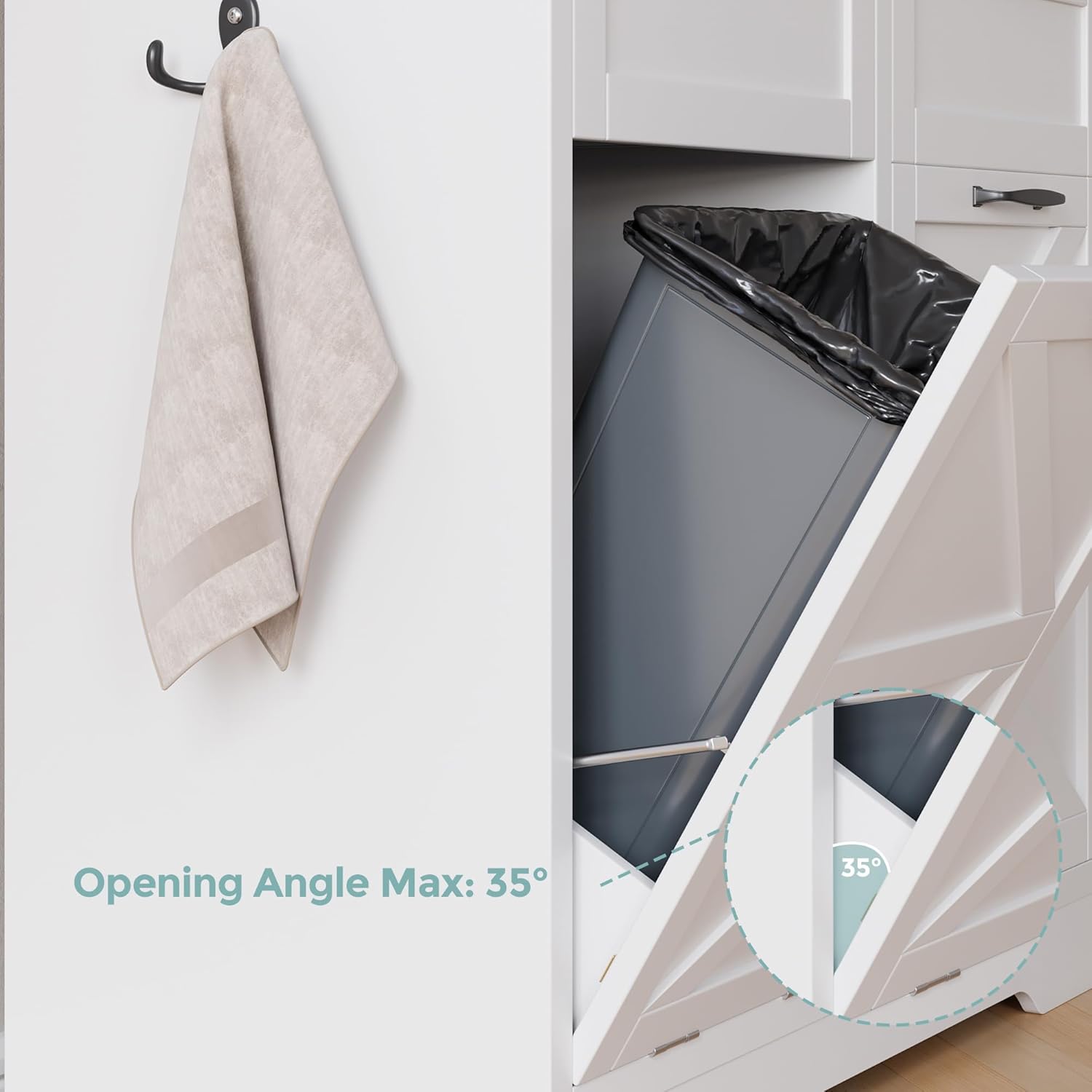
- The left compartment features a tilt-out mechanism. Gently pull the top of the panel outwards to reveal the hidden trash bin (bins not included).
- Insert a standard 10-gallon trash bin into the compartment.
- This design helps contain odors and prevents pets from accessing the trash.
Pull-Out Drawer (Left Top):
- The top left section includes a pull-out drawer. Use this for storing daily essentials, utensils, or small kitchen items.
Push-to-Open Cabinet (Right Compartment):
- The right compartment features a push-to-open door. Press gently on the door to release the latch and open it.
- This section is suitable for a standing trash bin or for storing larger kitchen items, cleaning supplies, or laundry.


Maintenance and Care
Proper care will ensure the longevity and appearance of your Jocoevol Tilt Out Trash Can Cabinet.
- Cleaning: The cabinet is constructed with waterproof materials, making it easy to clean. Wipe surfaces with a damp cloth and mild detergent. Avoid abrasive cleaners or harsh chemicals that could damage the finish.
- Spills: Promptly clean any spills to prevent staining or water damage.
- Hardware: Periodically check all screws and fasteners to ensure they remain tight. Retighten as necessary.
- Sunlight: Avoid prolonged exposure to direct sunlight to prevent fading or warping of the wood finish.
Troubleshooting
If you encounter any issues with your Jocoevol Tilt Out Trash Can Cabinet, refer to the following common solutions:
- Cabinet feels wobbly: Ensure all assembly screws are tightened. Verify the cabinet is placed on a level surface. Re-check the installation of the anti-tipping device.
- Drawer or tilt-out mechanism sticks: Check for any obstructions in the slides or hinges. Ensure the drawer/door is properly aligned. A small amount of silicone lubricant can be applied to metal slides if needed.
- Door not closing properly: Inspect hinges for damage or misalignment. Adjust hinge screws if necessary. Ensure the push-to-open latch is functioning correctly.
- Odors persist: Ensure trash bins are regularly emptied and cleaned. Consider using odor-absorbing products inside the bins.
If problems persist after attempting these solutions, please contact customer support for further assistance.
Specifications
Detailed specifications for the Jocoevol Tilt Out Trash Can Cabinet:
| Feature | Detail |
|---|---|
| Brand | Jocoevol |
| Model Number | B0GVNW8D68 |
| Color | White |
| Material | Wood |
| Overall Dimensions (L x W x H) | 39.3" x 13.8" x 35.9" |
| Item Weight | 57 Pounds |
| Capacity | 20 gallons (2 x 10-gallon bins, not included) |
| Opening Mechanism | Tilt-Out (left), Push-to-Open (right) |
| Special Feature | Dual Compartment, Storage Drawer, Anti-Tipping Device |
| Recommended Uses | Kitchen, Laundry Room, Home |

Customer Support
For any questions, concerns, or assistance with your Jocoevol Tilt Out Trash Can Cabinet, please contact our customer support team. Refer to your purchase documentation for specific contact details or visit the Jocoevol brand store online.
We are committed to providing support and ensuring your satisfaction with our product.