
1. Introduction
The TELESTAR SATPLUS 5 is a professional combined measurement device designed for precise signal analysis and alignment of satellite, cable, and terrestrial antenna systems. It supports DVB-S/S2, DVB-T/T2, and DVB-C/C2 standards, including DiSEqC 1.0/1.1/1.2, Unicable, and 0/22 kHz tone. Featuring a 5-inch high-resolution display and a robust design, it is ideal for installation, maintenance, and troubleshooting tasks.
2. Safety Information
- Read all instructions carefully before use.
- Do not expose the device to rain, moisture, or extreme temperatures.
- Avoid dropping the device or subjecting it to strong impacts.
- Use only the provided power adapter for charging.
- Do not attempt to open or repair the device yourself. Refer to qualified service personnel.
- Ensure proper ventilation during operation.
3. Package Contents
Verify that all items are present in the package:
- TELESTAR SATPLUS 5 Satellite Meter
- Power Adapter
- High-quality Carrying Bag
- USB Cable
- User Manual (this document)

Image: The included black carrying bag with a shoulder strap, designed for convenient transport and protection of the SATPLUS 5 device.
4. Product Overview
The TELESTAR SATPLUS 5 is a compact yet powerful device, measuring 22L x 16.8W x 4.4H cm and weighing 812g. It features a 5-inch high-resolution color TFT display for optimal viewing of measurement data and live TV.
4.1 Front View and Display
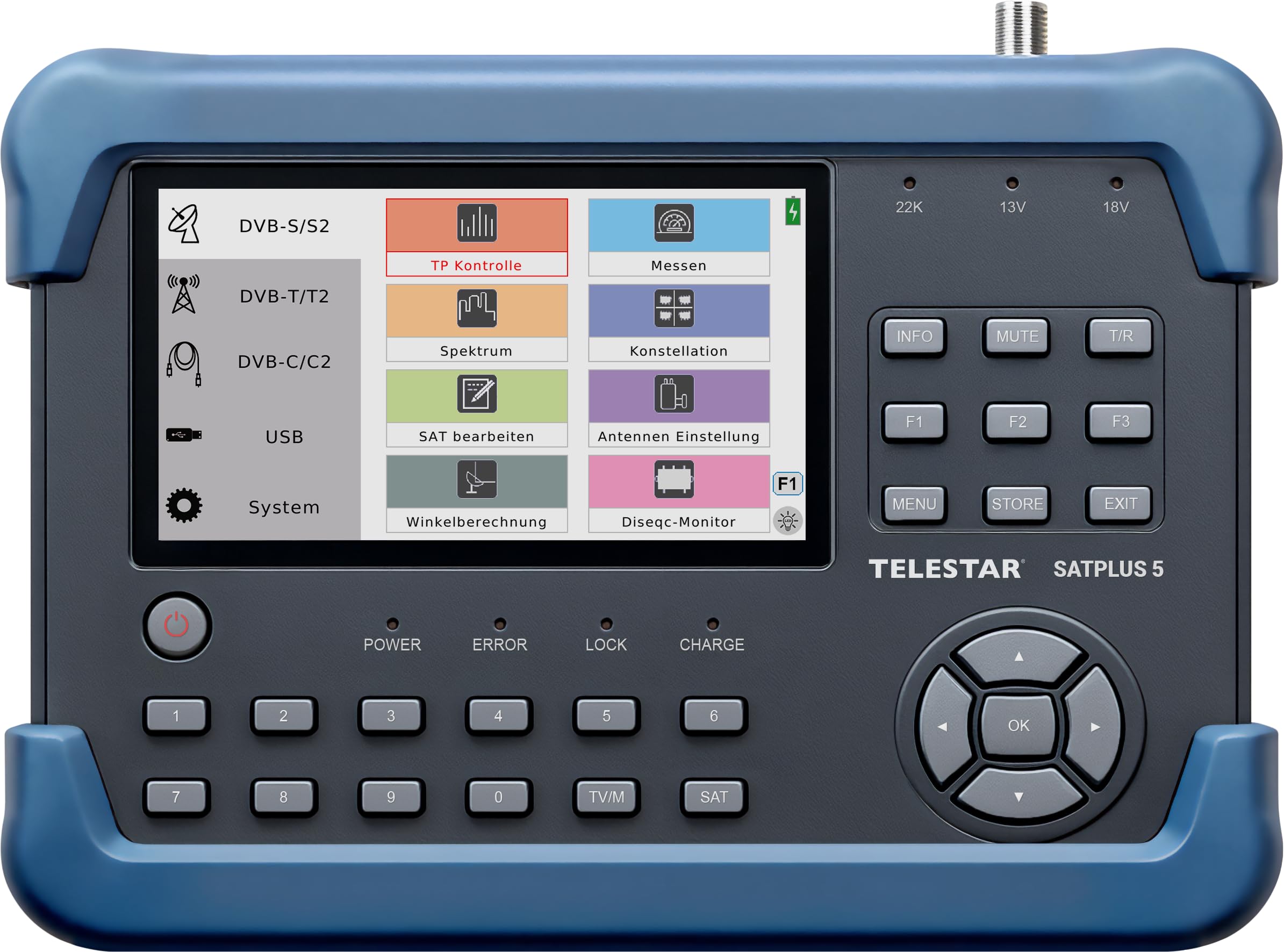
Image: Front view of the TELESTAR SATPLUS 5 device, showing the 5-inch color display, keypad, and control buttons.
The front panel includes the 5-inch display, a numeric keypad, and navigation buttons for intuitive menu operation. The display provides clear visuals for all measurement modes and live TV.
4.2 Rear View and Specifications Label

Image: Rear view of the TELESTAR SATPLUS 5, showing the product label with technical specifications such as DVB-S/S2, DVB-T/T2, DVB-C/C2 frequencies, power input, USB, and battery details.
The rear of the device features a label with detailed technical specifications, including frequency ranges for different broadcast systems, power input requirements (DC 12V, 2A), USB power (5V, 500mA), and battery capacity (3000 mAh @ 7.4V). It also includes an integrated LED light for working in low-light conditions.
4.3 Connections and Ports

Image: Top view of the TELESTAR SATPLUS 5, clearly labeling the power input, USB port, DV-Output (HDMI), Reset button, and RF connector.
The device is equipped with the following connections:
- Power Input: For connecting the power adapter to charge the device.
- USB Port: For software updates and data backup (e.g., screenshots).
- DV-Output (HDMI): For connecting to an external display.
- Reset Button: To restart the device if necessary.
- RF Connector (LNB-In): For connecting to satellite LNBs, terrestrial antennas, or cable signals.
5. Setup
5.1 Charging the Device
Before initial use, fully charge the integrated Li-ion battery using the provided power adapter. Connect the adapter to the Power Input port and plug it into a wall outlet. The charging indicator will show the charging status.
5.2 Initial Configuration
Upon first power-on, the device may prompt you to set up basic parameters such as language, region, and time zone. Follow the on-screen instructions using the navigation buttons and the OK button.
5.3 Connecting to an Antenna/LNB
Connect your satellite LNB, terrestrial antenna, or cable signal directly to the RF Connector (LNB-In) on the device. Ensure a secure connection.
5.4 DiSEqC and Unicable Settings
If using a DiSEqC switch or Unicable system, navigate to the system settings menu to configure the appropriate DiSEqC 1.0/1.1/1.2 or Unicable parameters. This ensures proper communication with your LNB setup.
6. Operating Instructions
The SATPLUS 5 offers a user-friendly interface for various measurement and analysis functions.
6.1 Main Menu Navigation

Image: The TELESTAR SATPLUS 5 display showing the main menu with options for DVB-S/S2, DVB-T/T2, DVB-C/C2, USB, and System settings.
Use the arrow keys to navigate through the main menu options and press OK to select. The menu provides access to different measurement modes and system settings.
6.2 Performing Measurements
Select the desired broadcast system (DVB-S/S2, DVB-T/T2, or DVB-C/C2) from the main menu. The device will display real-time signal strength and quality values, including MER, BER, and C/N. You can quickly switch between measurement modes.
6.3 Spectrum Analysis

Image: The TELESTAR SATPLUS 5 display showing a real-time spectrum analysis graph, allowing monitoring of the entire frequency range.
Access the Spectrum Analysis function to monitor the entire frequency range in real-time. This feature is crucial for identifying interference and optimizing signal reception.
6.4 Constellation Diagram
The Constellation Diagram provides a graphical representation of signal quality, helping to diagnose modulation errors and signal distortions. This is an advanced tool for fine-tuning antenna alignment.
6.5 Live TV Viewing

Image: The TELESTAR SATPLUS 5 display showing live television content, demonstrating its capability to display TV channels directly on the screen for verification.
The device supports live TV viewing, allowing you to visually verify the signal quality and channel reception directly on the 5-inch screen. This is particularly useful during antenna alignment.
6.6 Screenshot Function
Utilize the screenshot function to save measurement data for later analysis or documentation. Screenshots can be transferred to a computer via the USB port.
6.7 Angle Calculation (Azimuth and Elevation)

Image: The TELESTAR SATPLUS 5 display showing the integrated angle calculation feature, providing azimuth and elevation values for precise satellite dish alignment.
The integrated angle calculation feature assists in achieving perfect antenna alignment quickly. It provides precise azimuth and elevation values, often accompanied by an acoustic signal for support during adjustment.
7. Maintenance
7.1 Cleaning
Clean the device regularly with a soft, dry cloth. Do not use liquid cleaners or solvents, as they may damage the display or casing.
7.2 Battery Care
To prolong battery life, avoid fully discharging the device frequently. Store the device in a cool, dry place when not in use for extended periods. Charge the battery periodically if stored for a long time.
7.3 Software Updates
Periodically check the TELESTAR website for available software updates. Updates can be installed via the USB port, improving performance and adding new features.
8. Troubleshooting
If you encounter issues with your SATPLUS 5, refer to the following common problems and solutions:
| Problem | Possible Cause | Solution |
|---|---|---|
| No signal detected | Incorrect cable connection, LNB fault, incorrect settings. | Check all cable connections. Verify LNB functionality. Ensure correct DVB system and DiSEqC/Unicable settings. |
| Poor signal quality | Antenna misalignment, interference, damaged cable. | Use Spectrum Analysis and Constellation Diagram to identify issues. Adjust antenna alignment. Check cables for damage. |
| Device does not power on | Battery discharged, power adapter fault. | Charge the device fully. Ensure the power adapter is working correctly. |
| Screen frozen | Software error. | Press the Reset button on the top panel to restart the device. |
For further assistance, please contact TELESTAR support.
9. Specifications
| Feature | Detail |
|---|---|
| Brand | TELESTAR |
| Model Number | 5600001 |
| Compatible Devices | Television |
| Connectivity Technology | HDMI, USB |
| Product Dimensions (LxWxH) | 22L x 16.8W x 4.4H cm |
| Antenna Type | Satellite |
| Inputs/Outputs | LNB-In, USB, DV-Out (HDMI) |
| Broadcast System Support | DVB-S/S2, DVB-T/T2, DVB-C/C2 |
| DiSEqC Support | 1.0/1.1/1.2, Unicable, 0/22 kHz Tone |
| Display | 5-inch High-Resolution Color TFT |
| Battery | Integrated Li-ion (3000 mAh @ 7.4V) |
| Item Weight | 812 Grams |
| Remote Control Included | No |
| Country of Origin | China |
10. Warranty
The TELESTAR SATPLUS 5 comes with a 2-year legal conformity guarantee from the date of purchase. This warranty covers defects in materials and workmanship under normal use. It does not cover damage caused by misuse, accidents, unauthorized modifications, or improper installation. Please retain your proof of purchase for warranty claims.
11. Support
For technical support, service, or further inquiries regarding your TELESTAR SATPLUS 5, please visit the official TELESTAR website or contact their customer service department. Contact information can typically be found on the manufacturer's website or in the product packaging.
Website: www.telestar.de
For competent and proven assistance, TELESTAR offers a hotline with real operators ready to help quickly and efficiently, without artificial intelligence or automated voice menus.
