
Important Safety Instructions
When using electrical appliances, basic precautions should always be followed to reduce the risk of fire, electric shock, and personal injury. Read all instructions before using this product.
- Read the Manual: Familiarize yourself with the controls and proper use of the appliance.
- Wear Eye Protection: Always wear safety glasses or goggles when operating the blower.
- Wear Hearing Protection: Prolonged exposure to noise can cause hearing damage.
- Dress Properly: Do not wear loose clothing or jewelry that could get caught in moving parts. Wear sturdy footwear.
- Keep Area Clear: Ensure the operating area is clear of bystanders, children, and pets.
- Inspect Before Use: Check for damaged parts, loose connections, or any other condition that may affect operation.
- Avoid Wet Conditions: Do not operate the blower in rain or wet conditions.
- Unplug When Not in Use: Always disconnect the power cord before cleaning, servicing, or when not in use.
- Use Proper Extension Cord: Ensure any extension cord used is suitable for outdoor use and has adequate gauge for the appliance's power requirements.
Product Overview
The MZK Electric Leaf Blower & Mulcher is a versatile 2-in-1 tool designed for efficient yard and garden cleanup. It functions as both a powerful leaf blower and a vacuum mulcher with a 55L collection bag. It features 3-speed settings for various tasks.
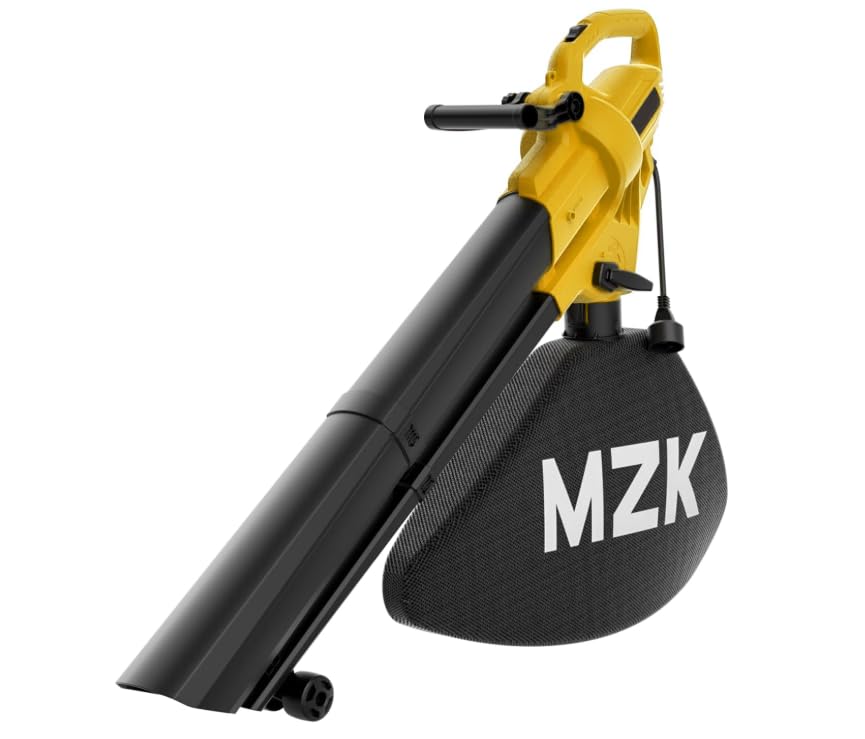
Image 1: MZK Electric Leaf Blower and Mulcher. This image displays the main unit with the vacuum tube and collection bag attached, illustrating its 2-in-1 functionality.
Components:
- Motor Housing with Handle
- Blower Tube
- Vacuum Tube (lower and upper sections)
- 55L Leaf Collection Bag
- Speed Control Switch
- Mode Selector Lever (Blower/Vacuum)
- Power Cord with Cord Retainer
Assembly and Setup
Before assembly, ensure the appliance is unplugged from the power source.
1. Attaching the Blower Tube:
- Align the blower tube with the outlet on the motor housing.
- Push the tube firmly until it clicks into place. Ensure it is securely locked.
2. Attaching the Vacuum Tube:
- For vacuum mode, remove the blower tube if attached.
- Connect the upper vacuum tube section to the intake opening on the motor housing, ensuring it locks securely.
- Attach the lower vacuum tube section to the upper section, aligning the tabs and pushing until it clicks.
3. Attaching the Collection Bag:
- Locate the bag attachment port on the motor housing.
- Slide the collection bag's collar onto the port and twist or push until it is firmly secured. Ensure the zipper is closed before operation.
4. Connecting to Power:
- Connect a suitable outdoor-rated extension cord to the appliance's power cord.
- Use the cord retainer to prevent accidental disconnection during operation.
- Plug the extension cord into a grounded electrical outlet.
Operation
Always ensure all tubes and the collection bag are correctly installed and secured before starting the unit.
1. Selecting Operating Mode:
- Blower Mode: Ensure only the blower tube is attached. Move the mode selector lever to the 'Blower' position.
- Vacuum/Mulcher Mode: Ensure the vacuum tubes and collection bag are attached. Move the mode selector lever to the 'Vacuum' position.
2. Starting and Stopping:
- To start, press the ON/OFF switch to the 'ON' position.
- To stop, press the ON/OFF switch to the 'OFF' position.
3. Adjusting Speed:
This unit features 3-speed settings. Use the speed control switch to select the desired airflow or vacuum power:
- Low Speed: For delicate areas or light debris.
- Medium Speed: For general yard cleanup.
- High Speed: For heavy, wet leaves or stubborn debris.
4. Operating Tips:
- Blowing: Sweep from side to side, moving debris into piles. Avoid directing airflow at people or loose objects.
- Vacuuming/Mulching: Move the vacuum tube slowly over the debris. The mulching impeller will reduce the volume of leaves before they enter the collection bag.
- Emptying the Collection Bag: When the bag is full, turn off and unplug the unit. Unzip the bag and empty its contents. Reattach securely before resuming operation.
Maintenance
Regular maintenance ensures optimal performance and extends the life of your appliance. Always unplug the unit before performing any maintenance.
1. Cleaning the Unit:
- Wipe the exterior of the unit with a damp cloth. Do not use harsh detergents or solvents.
- Clean the air intake vents to prevent overheating.
- Periodically inspect the blower/vacuum tubes for debris buildup and clear any blockages.
2. Collection Bag Care:
- Empty the collection bag regularly to prevent overfilling and maintain suction.
- The bag can be hand-washed with mild soap and water if heavily soiled. Allow it to dry completely before reattaching.
3. Storage:
- Store the appliance in a dry, well-ventilated area, away from direct sunlight and extreme temperatures.
- Ensure the power cord is neatly wrapped and secured to prevent damage.
- Keep out of reach of children.
Troubleshooting
If you encounter issues, refer to the following troubleshooting guide before seeking professional service.
| Problem | Possible Cause | Solution |
|---|---|---|
| Unit does not start | No power supply Power switch off Loose connection | Check power outlet and extension cord Ensure switch is in 'ON' position Verify all connections are secure |
| Low blowing/vacuum power | Blocked intake/outlet Full collection bag Incorrect speed setting | Clear any debris from tubes and vents Empty collection bag Adjust to a higher speed setting |
| Excessive vibration/noise | Debris in impeller Loose components | Unplug and carefully inspect impeller for debris; remove if found Check all tubes and bag for secure attachment |
Specifications
- Brand: MZK
- Model Name: ET1712-N
- Power Source: AC Corded
- Form Factor: Handheld
- Special Feature: 2-in-1 Leaf Blower & Vacuum Mulcher
- Speed Settings: 3-Speed
- Collection Bag Capacity: 55 Liters
- Product Dimensions (L x W x H): 17" x 8" x 15"
Warranty and Support
This MZK product is manufactured to high-quality standards. For warranty information or technical support, please refer to the warranty card included with your purchase or contact MZK customer service through the retailer where the product was purchased. Please have your model number (ET1712-N) and purchase date available when contacting support.