
1. Introduction
Thank you for choosing the JUMMICO Massage Office Chair Model 26OCBC1030. This ergonomic executive chair is designed to provide comfort and support for long hours of work or relaxation. It features a 6-point vibration massage system, soothing heat therapy, a 90°-150° recline function, and an extendable footrest. This manual provides essential information for assembly, operation, maintenance, and troubleshooting to ensure optimal performance and longevity of your chair.

Image 1.1: The JUMMICO Massage Office Chair in a reclined position with a user relaxing.
2. Safety Instructions
- Read all instructions before assembly and use.
- Do not stand on the chair. Use it only for seating one person.
- Ensure all bolts and screws are securely tightened before use. Re-tighten periodically.
- Keep children away from moving parts during assembly and adjustment.
- Do not use the massage or heat function if the power cord or plug is damaged.
- Avoid placing the chair near heat sources or in direct sunlight for extended periods.
- Do not use abrasive cleaners or harsh chemicals on the chair's upholstery.
- Maximum weight capacity for this chair is 400 lbs (181 kg). Do not exceed this limit.
3. Package Contents
Verify that all components are present before beginning assembly. If any parts are missing or damaged, contact customer support.
- Backrest
- Seat Cushion with Armrests
- Base (5-star)
- Casters (5 pcs)
- Gas Lift Cylinder
- Gas Lift Cover
- Mechanism Plate
- Footrest Assembly
- Massage Remote Control
- Hardware Pack (screws, washers, Allen wrench)
- User Manual (this document)
4. Assembly Instructions
Assembly typically takes 20-30 minutes. It is recommended to assemble the chair on a soft, clean surface to prevent damage.
- Attach Casters to Base: Insert each caster into the holes at the end of each leg of the 5-star base until it clicks securely into place.
- Insert Gas Lift: Place the gas lift cylinder into the center hole of the assembled base. Cover the gas lift with the telescopic plastic cover.
- Attach Mechanism Plate: Align the mechanism plate with the screw holes on the underside of the seat cushion. Ensure the front of the mechanism faces the front of the seat. Secure with screws provided in the hardware pack.
- Connect Seat to Base: Carefully place the assembled seat onto the gas lift cylinder, ensuring it is centered and stable.
- Attach Backrest: Align the backrest brackets with the corresponding holes on the seat cushion's rear. Secure with screws.
- Install Footrest: Attach the footrest assembly to the designated slots under the seat, securing it with the provided hardware.
- Connect Massage Unit: Plug the massage unit's power cord into a standard electrical outlet. Connect the remote control to the chair's designated port.
5. Operating Instructions
5.1 Chair Adjustments
- Height Adjustment: Pull the lever located under the right side of the seat upwards to raise or lower the chair. Release the lever at the desired height.
- Recline Function: Pull the lever on the left side of the seat upwards to unlock the recline mechanism. Lean back to your desired angle (90° to 150°) and push the lever down to lock it in place.
- Extendable Footrest: Pull the footrest handle located under the front of the seat to extend the footrest. Push it back in to retract.

Image 5.1: Illustration of the chair's recline angles and extendable footrest.
5.2 Massage and Heat Functions
The chair features a 6-point vibration massage system and a soothing heat function, controlled by the included remote.
- Power On/Off: Press the 'Power' button on the remote to activate or deactivate the massage and heat functions.
- Massage Modes: Select from 5 different massage modes (e.g., Pulse, Press, Wave, Auto, Normal) using the 'Mode' button.
- Intensity Adjustment: Use the '+' and '-' buttons to adjust the massage intensity.
- Targeted Massage Zones: The remote allows you to select specific massage zones: Back, Lumbar, Thigh, and Hips.
- Heat Function: Press the 'Heat' button to turn the lumbar heating on or off.
- Timer: Set the massage duration using the 'Timer' button (e.g., 15, 30, 60 minutes).

Image 5.2: Overview of the 6-point massage and heat therapy zones with remote control.
5.3 Side Pocket
A convenient side pocket is integrated into the chair's design, ideal for storing the massage remote control, your phone, or other small items.
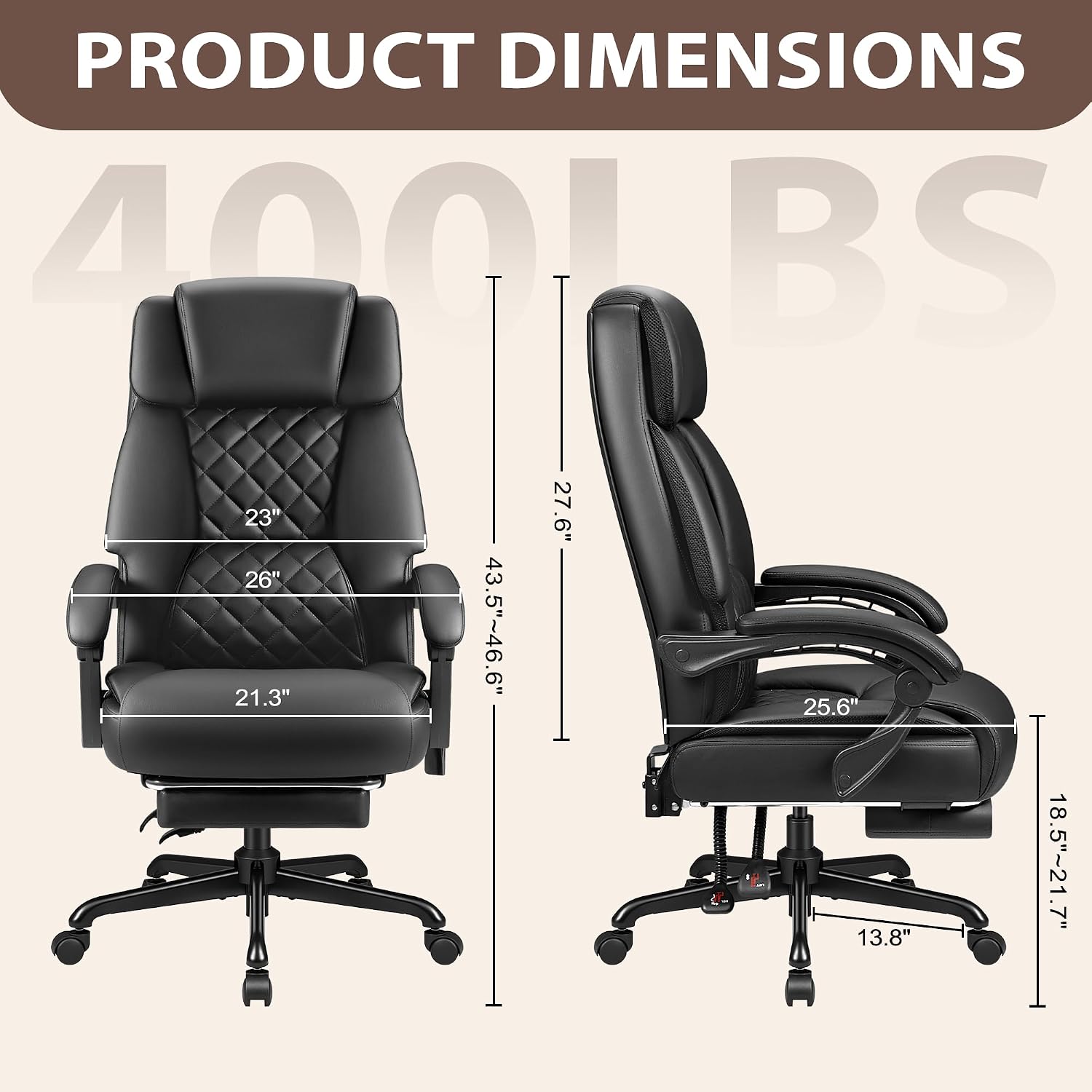
Image 5.3: Detail of the chair's integrated side pocket.
6. Maintenance
- Cleaning: Wipe the leather upholstery with a soft, damp cloth. For stubborn stains, use a mild leather cleaner and follow the product instructions. Do not use abrasive cleaners or solvents.
- Inspection: Periodically check all screws and bolts to ensure they are tight. Re-tighten as necessary to maintain stability and safety.
- Caster Care: Clean casters regularly to remove hair and debris that may hinder smooth movement.
- Electrical Components: Ensure the power cord and remote control are free from damage. Unplug the chair when not in use for extended periods.
7. Troubleshooting
| Problem | Possible Cause | Solution |
|---|---|---|
| Chair does not adjust height | Gas lift cylinder faulty or lever not engaged. | Ensure lever is fully pulled. If issue persists, contact support for gas lift replacement. |
| Chair wobbles or is unstable | Loose screws or uneven floor. | Check and tighten all assembly screws. Move chair to a level surface. |
| Massage/Heat function not working | Power cord unplugged, remote not connected, or remote batteries low (if applicable). | Ensure power cord is securely plugged in. Check remote connection. If remote uses batteries, replace them. |
| Footrest does not extend/retract smoothly | Mechanism obstructed or damaged. | Check for obstructions. Apply a silicone-based lubricant to the sliding mechanism if needed. |
8. Specifications
| Feature | Detail |
|---|---|
| Brand | JUMMICO |
| Model Number | 26OCBC1030 |
| Color | Black |
| Material | Metal Frame, Leather Upholstery, Foam Fill |
| Product Dimensions (D x W x H) | 25.59" x 25.98" x 43.5" (65cm x 66cm x 110.5cm) |
| Item Weight | 43 Pounds (19.5 kg) |
| Maximum Weight Recommendation | 400 Pounds (181 kg) |
| Back Style | High Back |
| Recline Angle | 90° to 150° |
| Massage Points | 6-point vibration (Back, Lumbar, Thigh, Hips) |
| Heat Function | Lumbar heating |

Image 8.1: Detailed product dimensions.
9. Warranty and Support
JUMMICO provides a limited warranty for this product. Please refer to the warranty card included in your package for specific terms and conditions. For technical support, missing parts, or warranty claims, please contact JUMMICO customer service through the retailer where the product was purchased or visit the official JUMMICO website.
When contacting support, please have your model number (26OCBC1030) and purchase information readily available.