
1. Product Overview
The HRVEOCEI Aquarium Stand is designed to provide a stable and functional base for aquariums ranging from 55 to 100 gallons. Constructed with high-density fiberboard and a heavy-duty steel frame, this stand supports up to 800 pounds. It features an integrated power hub, adjustable storage shelves, and sliding barn doors for convenient access and organization.
This stand is suitable for various aquatic setups, including fish tanks and reptile habitats, offering both durability and a farmhouse industrial aesthetic.

Figure 1: Overall view of the HRVEOCEI Aquarium Stand in Dark Brown, showcasing its design and features.
2. Safety Information
- Ensure the stand is assembled correctly and all fasteners are tightened before placing an aquarium on it.
- Place the stand on a level, stable surface to prevent wobbling or tipping.
- Do not exceed the maximum weight capacity of 800 pounds. Overloading can lead to structural failure and injury.
- Keep electrical components (power hub, cords) away from water to prevent electrical shock. Always unplug the power hub before performing maintenance on the aquarium or stand.
- Regularly inspect the stand for any signs of wear, damage, or instability.
- Keep children and pets away from the stand during assembly and when an aquarium is in place to prevent accidents.
3. Assembly Instructions
Assembly of the HRVEOCEI Aquarium Stand is designed to be straightforward. Follow the included step-by-step instructions carefully. No additional tools are required beyond what is provided or integrated into the parts.
- Unpack all components and verify against the parts list provided in the separate assembly guide.
- Begin by attaching the main structural elements, ensuring all connections are secure.
- Install the side panels and the back panel.
- Mount the sliding barn door hardware and attach the doors.
- Insert the adjustable shelves into the desired positions.
- Ensure the integrated power hub is securely in place and its cord is routed as instructed.
- Once fully assembled, gently test the stand for stability before placing any weight on it.
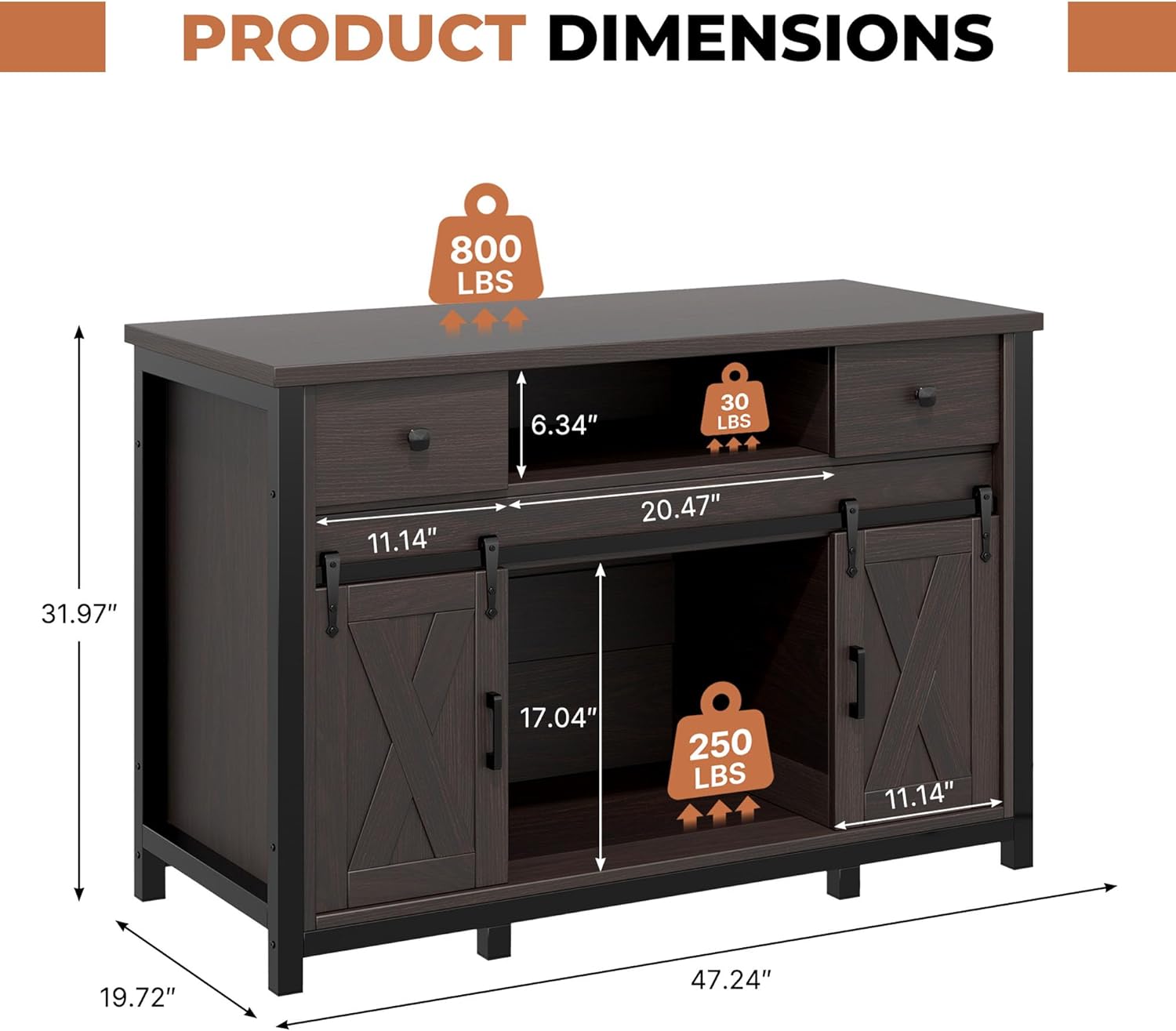
Figure 2: Product dimensions, illustrating the overall size and internal compartment measurements for assembly planning.
4. Operating Instructions
4.1 Aquarium Placement
This stand is designed to accommodate aquariums from 55 to 100 gallons on its top surface. The bottom storage area can also fit smaller 10-20 gallon fish tanks, providing flexibility for multi-tank setups.

Figure 3: Illustration showing the stand's capacity for 55, 75, and 100-gallon aquariums on the top surface.
4.2 Power Outlet Usage
The integrated power hub is located on the side of the stand. It includes 3 AC outlets, 1 USB-A port, and 1 USB-C port. Use these to power aquarium equipment such as filters, lights, and heaters, as well as other digital devices. The 6.72-foot power cord provides ample reach to a wall outlet. The back wiring design helps keep cables organized and out of sight.
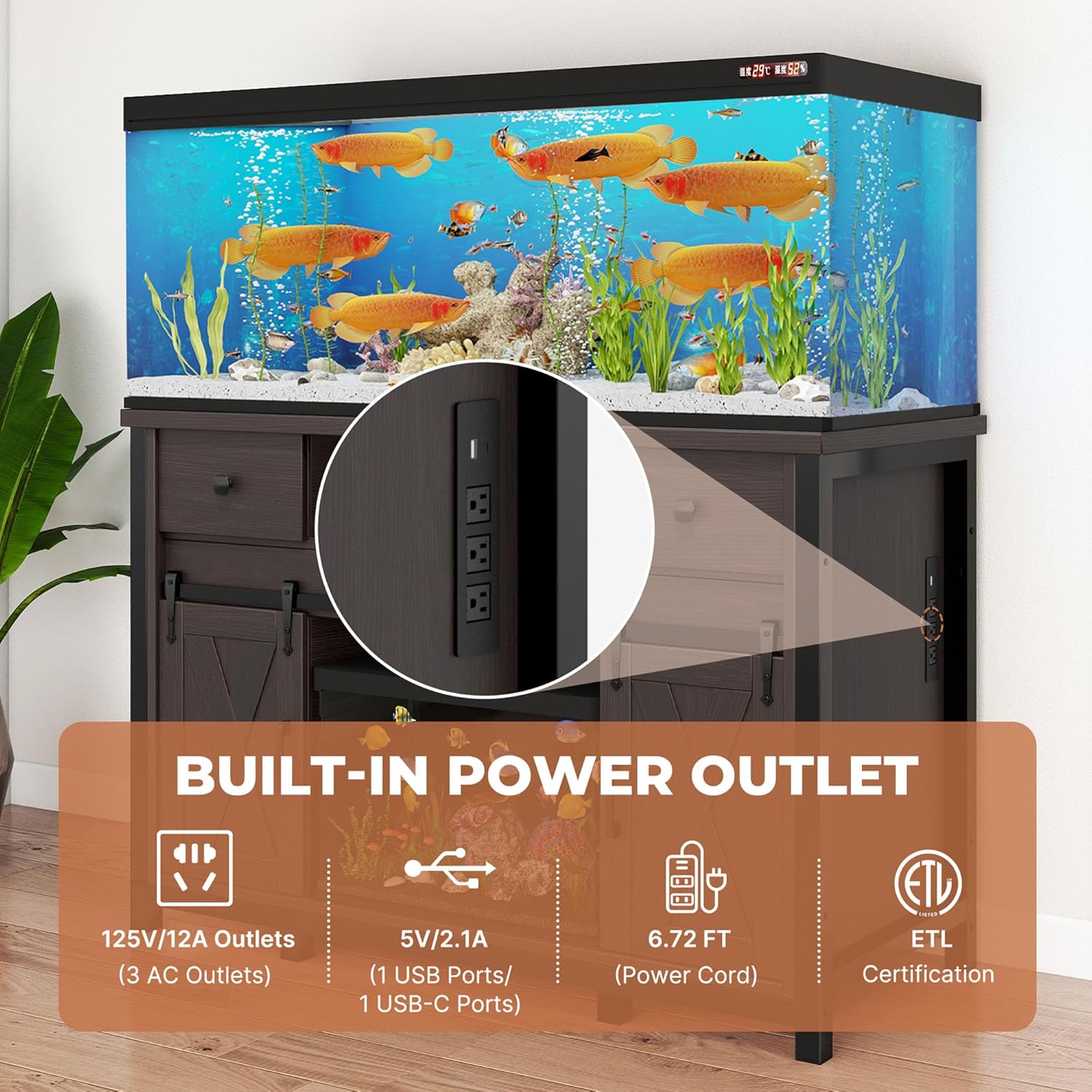
Figure 4: Close-up view of the integrated power hub with 3 AC outlets, 1 USB-A, and 1 USB-C port.
4.3 Storage and Organization
The stand features a storage cabinet with sliding barn doors. These doors allow access to the interior without requiring extra space for opening. Inside, there are 3 adjustable shelves that can be positioned at different heights to accommodate various items like fish food, water conditioners, and cleaning tools.
Additional storage is available in the top open area and side drawers for quick access to frequently used items.

Figure 5: Diagram illustrating the three adjustable shelf positions within the storage cabinet.

Figure 6: View of the sliding barn doors, demonstrating their operation and space-saving design.

Figure 7: Detailed view of the storage compartments, including the bottom area suitable for a small aquarium and the metal frame construction.
5. Maintenance
- Cleaning: Wipe the stand's surface with a soft, damp cloth. Avoid abrasive cleaners or harsh chemicals that could damage the finish.
- Moisture Resistance: The stand's surface is designed to resist moisture. However, promptly wipe away any spills or condensation to prevent long-term damage.
- Structural Integrity: Periodically check all screws and connections to ensure they remain tight. Re-tighten if necessary.
- Electrical Components: Ensure the power hub and its cord are free from damage. Do not attempt to repair electrical components yourself.
6. Troubleshooting
6.1 Stability Concerns
Issue: The stand appears wobbly or unstable after assembly or when loaded.
Solution:
- Ensure the stand is placed on a completely level floor. Use shims if necessary to level the base.
- Verify that all assembly screws and fasteners are fully tightened. Refer to the assembly guide for specific locations.
- Confirm that the total weight on the stand, including the aquarium, water, substrate, and decorations, does not exceed the 800-pound capacity.
6.2 Power Outlet Not Functioning
Issue: Devices plugged into the integrated power hub do not receive power.
Solution:
- Check if the main power cord of the stand is securely plugged into a functional wall outlet.
- Test the wall outlet with another device to ensure it is supplying power.
- Inspect the power hub and its cord for any visible damage. If damage is found, discontinue use and contact customer support.
- Ensure the devices you are trying to power are functioning correctly.
6.3 Sliding Doors Sticking
Issue: The barn doors do not slide smoothly.
Solution:
- Check the tracks for any obstructions or debris. Clean if necessary.
- Ensure the doors are properly seated on their tracks.
- Verify that the stand is level, as an uneven surface can affect door operation.
7. Specifications
| Brand | HRVEOCEI |
| Model Number | 2356123 |
| Color | Dark Brown |
| Material | High-density Fiberboard, Steel Frame |
| Item Weight | 140 Pounds |
| Load Capacity | 800 Pounds (Top Surface) |
| Aquarium Capacity | 55-100 Gallons (Top), 10-20 Gallons (Bottom Storage) |
| Power Outlet | 3 AC Outlets, 1 USB-A, 1 USB-C |
| Power Cord Length | 6.72 Feet |
| Special Features | Adjustable Shelves, Sliding Barn Doors, Integrated Power Outlet |
| Assembly Required | Yes |
8. Warranty and Support
For any inquiries regarding setup, operation, or troubleshooting, please contact our customer advisory team. Your satisfaction is our top priority. Refer to your purchase documentation for specific warranty details.
Please note: Colors may vary slightly due to screen settings. Dimensions are approximate due to manual measurement.