
1. Setup and Assembly
The Roinside Electric Scooter is designed for quick and easy setup. Follow these steps to prepare your scooter for use.
1.1 Unfolding the Scooter
To unfold the scooter, locate the latch mechanism near the base of the handlebar stem. Release the latch and carefully raise the handlebar stem until it locks securely into the upright position. Ensure the locking mechanism is fully engaged before use.

Figure 1: The scooter features a quick-fold mechanism, allowing it to be folded in approximately 3 seconds by lowering the handlebars backward and latching onto the rubber clamp.
1.2 Initial Charge
Before the first ride, fully charge the scooter's battery. Connect the provided charger to the charging port on the scooter and then to a power outlet. The charging indicator will show the charging status. A full charge typically takes 4-5 hours.

Figure 2: The scooter is equipped with a 36V 5.2Ah battery, providing a long range and supporting fast charging within 5 hours.
2. Operating Instructions
Familiarize yourself with the scooter's controls and riding modes for a safe and enjoyable experience.
2.1 Power On/Off and Mode Selection
Press and hold the power button on the handlebar display to turn the scooter on or off. Short press the power button to cycle through the three riding modes: Eco, Comfort, and Sport. Each mode offers different speed and power characteristics.

Figure 3: The Smart LED Display provides real-time information including speed, battery life, and current riding mode.
2.2 Riding Modes
- Eco Mode: For maximum range and energy efficiency, with a lower top speed.
- Comfort Mode: A balanced mode for everyday commuting, offering a good mix of speed and range.
- Sport Mode: Provides the highest speed and acceleration for dynamic riding.

Figure 4: Customize your ride experience with three distinct riding modes: Eco (8mph), Comfort (12mph), and Sport (19mph).
2.3 Starting and Accelerating
To start riding, place one foot on the deck and push off with the other foot a few times to gain initial momentum. Once moving, gently press the throttle lever on the right handlebar to engage the motor and accelerate. The scooter will not accelerate from a standstill for safety reasons.
2.4 Braking
The scooter is equipped with a dual braking system: a front regenerative brake and a rear disc brake. To brake, gently squeeze the brake lever on the left handlebar. Apply both brakes smoothly for controlled stopping. The LED taillight will illuminate when braking to alert others.
2.5 Kickstand
Use the integrated kickstand to park the scooter upright. Ensure the scooter is stable before dismounting.
2.6 Cruise Control
Activate cruise control for relaxed riding on long stretches. Maintain a consistent speed for a few seconds, and cruise control will engage automatically. To disengage, simply press the throttle or brake lever.
3. Maintenance
Regular maintenance ensures the longevity and optimal performance of your Roinside Electric Scooter.
3.1 Cleaning
Wipe the scooter clean with a damp cloth after each use. Avoid using high-pressure water jets or harsh chemicals, as this can damage electronic components. The scooter has an IP65 waterproof rating, protecting it against dust and splashing water from light rain, but it is not designed for submersion.
3.2 Tire Care
The scooter is equipped with solid rubber tires, which do not require inflation. Regularly inspect the tires for any signs of wear or damage. While solid tires are puncture-proof, excessive wear can affect traction.
3.3 Battery Care
- Charge the battery fully before long periods of storage.
- If storing for an extended time, charge the battery to approximately 50-70% every 2-3 months.
- Avoid completely draining the battery or overcharging it.
- Store the scooter in a cool, dry place away from direct sunlight and extreme temperatures.
3.4 Brake Adjustment
Periodically check the brake lever for proper tension and responsiveness. If the brakes feel loose or too tight, they may require adjustment. Consult a qualified technician if you are unsure how to perform brake adjustments.
4. Troubleshooting
This section addresses common issues you might encounter with your scooter.
4.1 Scooter Not Turning On
- Ensure the battery is charged. Connect the charger and check the indicator light.
- Press and hold the power button for a few seconds. A short press might only change modes if already on.
4.2 Reduced Range or Speed
- Check battery charge level.
- Ensure you are in the appropriate riding mode (e.g., not Eco mode if expecting high speed).
- Consider external factors like rider weight, terrain (hills), and wind resistance.
- Extreme temperatures can affect battery performance.
4.3 Brakes Not Responding Properly
- Inspect the brake lever and cables for any visible damage or looseness.
- If the brake lever feels too loose, it may need adjustment. Refer to the maintenance section or seek professional assistance.
4.4 Unusual Noises
- Check for loose components or debris caught in the wheels or braking system.
- If the noise persists, discontinue use and contact customer support.
5. Specifications
Detailed technical specifications for the Roinside Electric Scooter UP7G.

Figure 5: The scooter is powered by a 350W brushless hub motor, providing reliable performance for hills and daily rides, with a max speed of 19 MPH and a 20% hill climb capability.

Figure 6: Enjoy a smoother ride even on bumpy roads thanks to the scooter's advanced dual suspension system.
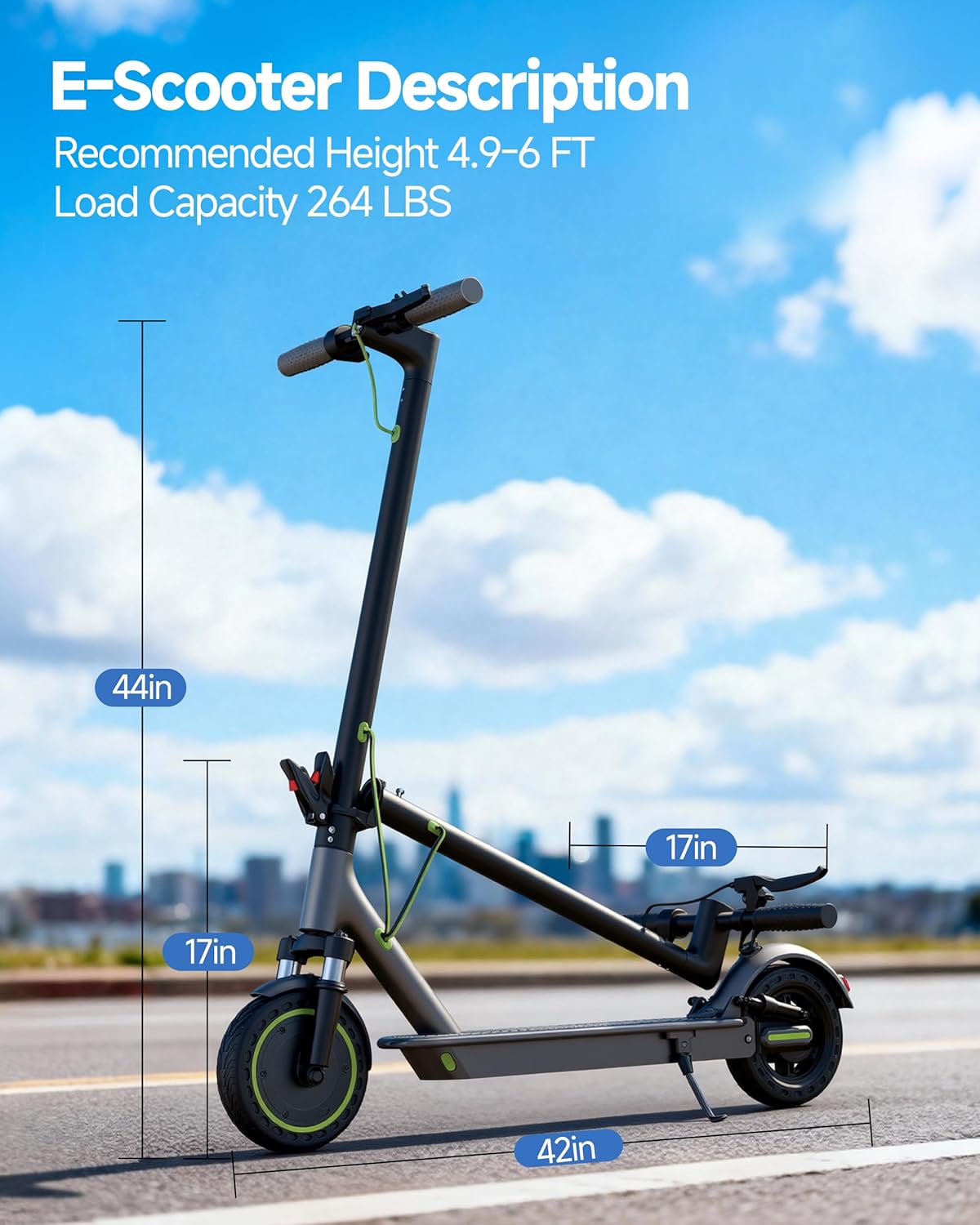
Figure 7: Key dimensions and capacity of the Roinside Electric Scooter. Recommended rider height is 4.9-6 feet, with a maximum load capacity of 265 lbs.
| Feature | Detail |
|---|---|
| Brand | Roinside |
| Model Name | UP7G |
| Motor Power | 350W Brushless Hub Motor |
| Max Speed | Up to 19 MPH |
| Battery Capacity | 7.8Ah (16.15 Miles) |
| Max Distance Range | 16 Miles |
| Battery Charge Time | 4-5 Hours |
| Weight Limit | 265 Pounds |
| Wheel Size | 8.5 Inches |
| Wheel Type | Solid Rubber |
| Suspension Type | Dual Suspension (Front and Rear Spring) |
| Brake Style | Dual Braking System (Front Regenerative, Rear Disc) |
| Frame Material | Aircraft-Grade Aluminum Alloy |
| Special Features | Digital Display, Cruise Control, LED Headlight/Taillight |
| Water Resistance | IP65 |
| Included Components | Charger |
6. Warranty Information
The Roinside Electric Scooter UP7G comes with a limited warranty. Please refer to the warranty card included in your product packaging for specific terms, conditions, and duration of coverage. This warranty typically covers manufacturing defects under normal use conditions.
7. Customer Support
For any questions, technical assistance, or warranty claims, please contact Roinside customer support. You can find contact information on the official Roinside website or through your purchase platform. Please have your model number (UP7G) and proof of purchase ready when contacting support.