
1. Introduction
This manual provides detailed instructions for the assembly, operation, maintenance, and troubleshooting of your HOSTACK 72-inch Tall Kitchen Pantry Cabinet. Please read this manual thoroughly before assembly and use to ensure proper functionality and safety.
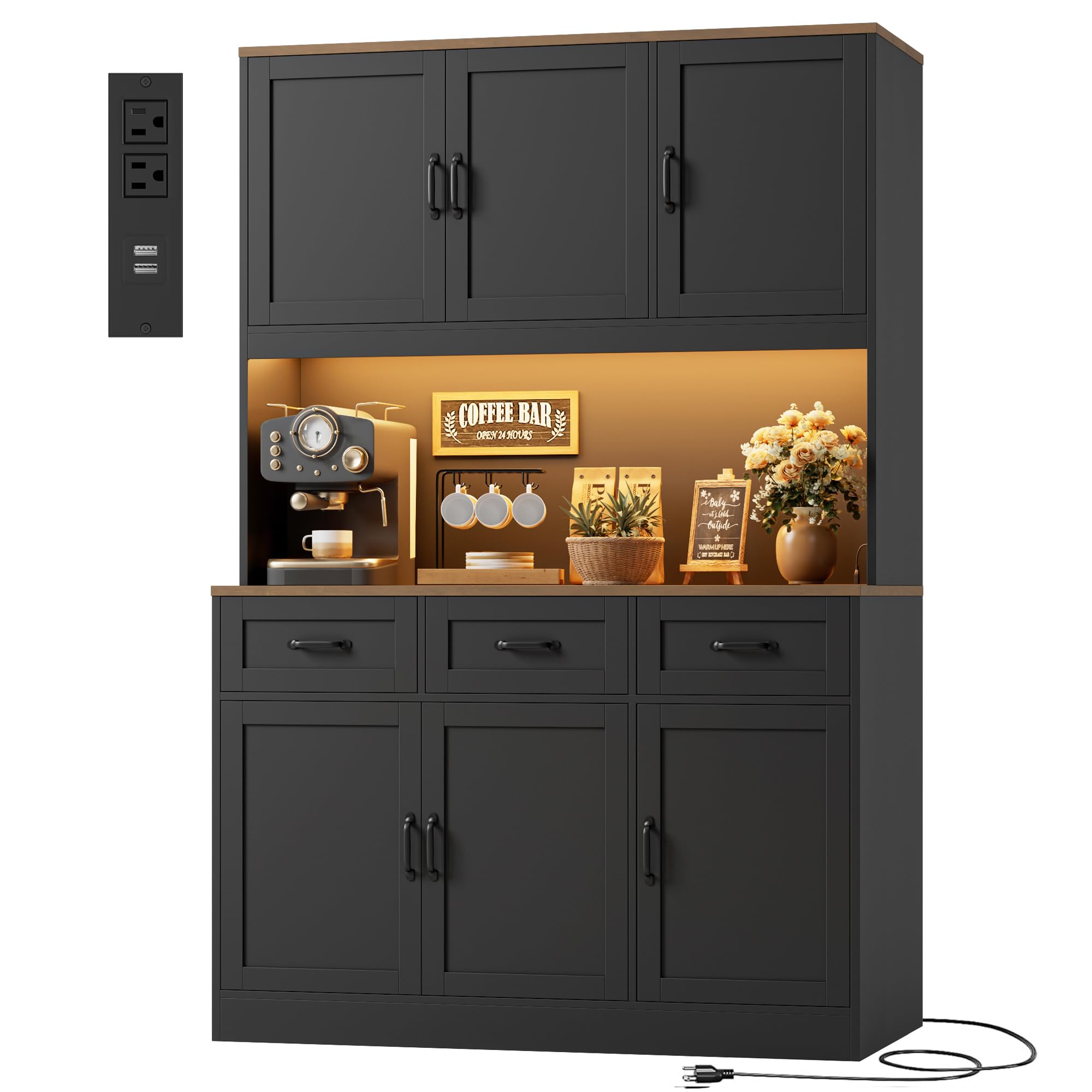
Figure 1: HOSTACK 72-inch Tall Kitchen Pantry Cabinet.
2. Safety Information
Please observe the following safety precautions during assembly and use:
- Keep all small parts and packaging materials away from children and pets to prevent choking hazards.
- Assemble the unit on a soft, clean surface to prevent scratches or damage.
- Ensure all connections are secure before using the cabinet. Periodically check and re-tighten fasteners as needed.
- Do not overload shelves or drawers. Distribute weight evenly to maintain stability.
- Use the included anti-tip hardware to secure the cabinet to a wall, especially if children are present.
- For electrical components (LED lights, charging station), ensure they are connected to a suitable power source and avoid exposing them to moisture.
3. Parts List and Included Components
Your HOSTACK Kitchen Pantry Cabinet is delivered in two packages. Please ensure both packages are received before beginning assembly. The following components are included:
- 1x Large Pantry Cabinet (all individual parts for assembly)
- 1x Step-to-step Instructions (detailed assembly guide)
- 1x Accessories Bag (containing hardware and small parts)
Refer to the separate step-by-step instructions for a complete list of individual parts and hardware.

Figure 2: Product dimensions and packaging information.
4. Setup and Assembly
Assembly of the HOSTACK Kitchen Pantry Cabinet requires following the detailed step-by-step instructions provided in the separate manual. Ensure you have adequate space and the necessary tools (typically a screwdriver) before starting.
General Assembly Tips:
- Identify all parts and hardware before assembly. Numbered parts and clear diagrams are provided in the instruction manual.
- It is recommended to assemble this unit with two people for ease and safety, especially when lifting the upper sections.
- Do not fully tighten all screws until the entire section is assembled, allowing for minor adjustments.
- Attach the anti-tip hardware to the wall as instructed to prevent accidental tipping.
5. Operating Instructions
5.1 RGB LED Lighting System
The cabinet features premium RGB LED strips for customizable ambiance. Control is available via a dedicated app remote and a physical switch.
- App Control: Download the specified app (refer to the LED light instructions for details) to access over 60,000 colors, adjustable brightness, and music synchronization features.
- Physical Switch: Use the inline physical switch to cycle through basic colors and turn the lights on/off.

Figure 3: RGB LED Dynamic Light features and control.
5.2 Built-in Charging Station
The cabinet includes a built-in charging station for convenient power access. It provides:
- 2 AC Outlets (120V/12A)
- 2 USB Ports (5V/2A)
- Maximum Power: 1500W
Plug the cabinet's power cord into a standard wall outlet to activate the charging station. Ensure devices connected do not exceed the maximum power rating.

Figure 4: Built-in Charging Station details.
5.3 Storage Features
The cabinet is designed with multiple storage options:
- Spacious Countertop: Ideal for appliances like microwaves and coffee makers, or for meal preparation. Dimensions: 15.7"D x 47.2"W x 15.7"H.
- Deep Drawers: Three deep drawers provide ample space for cutlery, dining essentials, and other small items.
- Adjustable Shelves: The 6-door cabinet sections include adjustable shelves, allowing you to customize storage space for items of various heights.

Figure 5: Multi-section design for organized storage.

Figure 6: Three spacious drawers for dining essentials.
5.4 Product Overview Video
Watch this video for a visual overview of the HOSTACK LED Kitchen Pantry Cabinet's features and functionality.
Video 1: Overview of the HOSTACK LED Kitchen Pantry Cabinet, showcasing its design, LED lights, and storage capabilities.
6. Maintenance
To ensure the longevity and appearance of your HOSTACK Kitchen Pantry Cabinet, follow these maintenance guidelines:
- Cleaning: Wipe surfaces with a soft, damp cloth. Avoid harsh chemicals or abrasive cleaners that may damage the finish.
- Spills: Clean up spills immediately to prevent staining or moisture damage to the engineered wood.
- Hardware: Periodically check all screws and fasteners to ensure they are tight. Re-tighten as necessary to maintain structural integrity.
- Environmental Conditions: Avoid placing the cabinet in direct sunlight or near heat sources, which can cause fading or warping. Maintain a stable room temperature and humidity.
7. Troubleshooting
7.1 Door Alignment Issues
If cabinet doors are misaligned, have gaps, or do not close properly, adjustments can be made using the hinges. Refer to the diagram and video below for guidance.

Figure 7: Step-by-step hinge adjustment for cabinet doors.
For a visual guide on adjusting door gaps, please watch the following video:
Video 2: Instructions on how to adjust cabinet door gaps and alignment.
7.2 Other Issues
If you encounter issues not covered in this manual, please refer to the contact information in the Warranty and Support section for assistance.
8. Specifications
| Feature | Detail |
|---|---|
| Brand | HOSTACK |
| Model | B0GVDS361H |
| Color | Black/Rustic Brown |
| Material | Engineered Wood |
| Overall Dimensions (D x W x H) | 15.8"D x 47.2"W x 71.7"H |
| Number of Doors | 6 |
| Number of Drawers | 3 |
| Number of Shelves | 2 (Adjustable) |
| Charging Station | 2 AC Outlets (120V/12A), 2 USB Ports (5V/2A), 1500W Max Power |
| LED Lights | RGB, App/Physical Switch Control, 60,000+ colors, Adjustable Brightness, Music Sync, Timing Function |
| Installation Type | Freestanding |
| Assembly Required | Yes |
9. Warranty and Support
For warranty information, product support, or to report missing/damaged parts, please contact HOSTACK customer service. Refer to the original purchase documentation or the HOSTACK official website for specific contact details and warranty terms.
Website: Visit the HOSTACK Store on Amazon