
1. Introduction
Thank you for choosing the HOSTACK Kitchen Pantry Storage Cabinet. This manual provides essential information for the safe assembly, operation, and maintenance of your new cabinet. Please read these instructions carefully before beginning assembly and retain them for future reference.
2. Safety Information
- Always assemble the cabinet on a soft, clean surface to prevent scratches.
- Ensure all parts are present and undamaged before assembly. Do not proceed with assembly if any parts are missing or damaged.
- For safety and ease of assembly, it is recommended that two adults assemble this unit.
- Do not overtighten screws, as this may damage the material.
- Securely attach the anti-tipping device to a wall stud to prevent accidental tipping, especially in households with children or pets.
- Keep small parts and packaging materials away from children.
3. Package Contents
Your HOSTACK Kitchen Pantry Storage Cabinet is shipped in two separate packages. Please ensure you have received both packages before starting assembly.
- 1x Large Pantry Cabinet (components distributed across two packages)
- 1x Hardware Bag (containing all necessary screws, dowels, and connectors)
- 1x User Manual (this document)
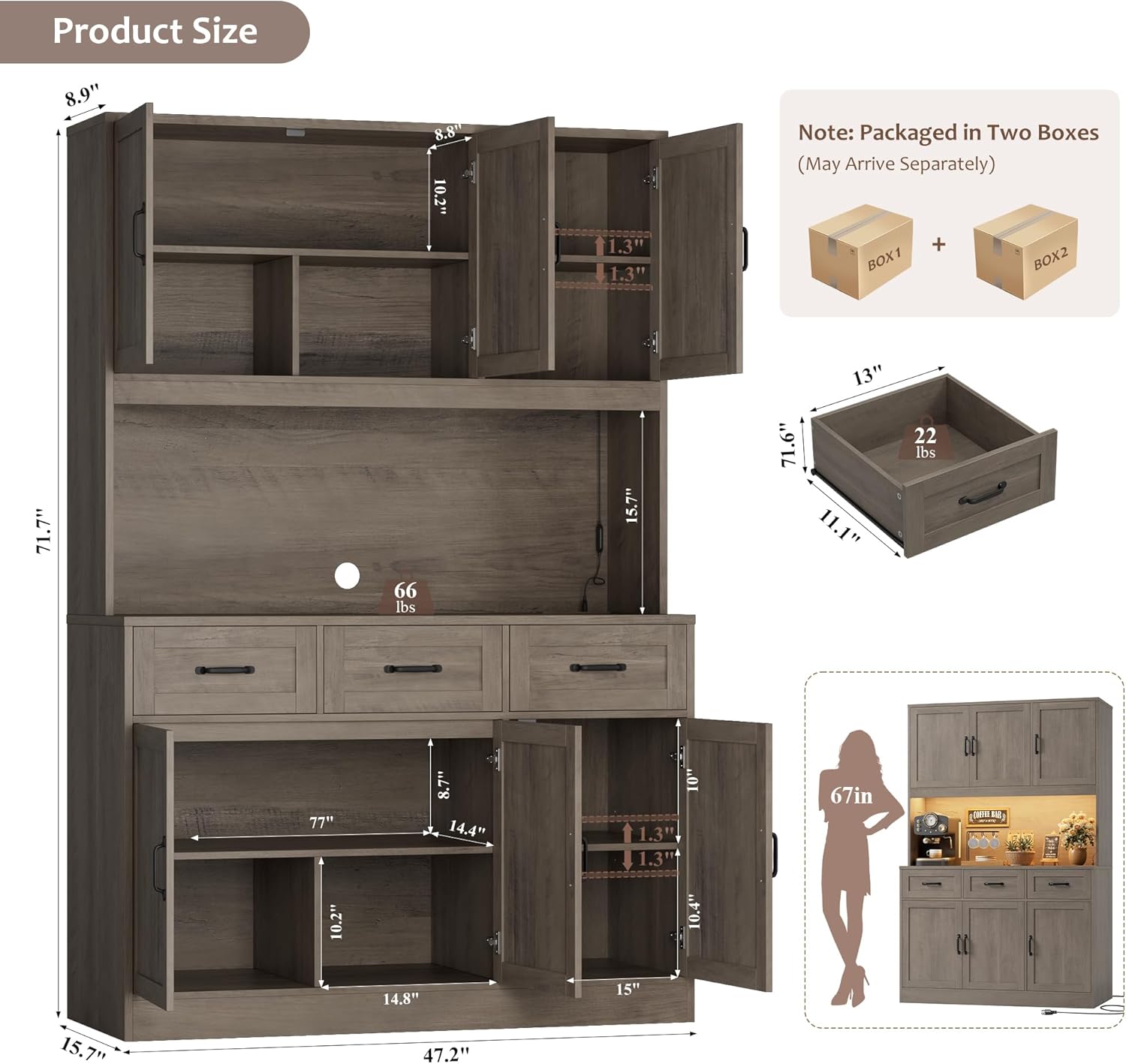
Image: Overview of product dimensions and note about two packages.
4. Setup and Assembly
Detailed step-by-step instructions are provided in the included assembly guide. Follow the numbered parts and diagrams carefully. Assembly is significantly easier with two people.
4.1. General Assembly Tips
- Unpack all components and verify against the parts list in the assembly guide.
- Organize hardware by type to streamline the process.
- Use hand tools only; power tools may cause damage.
- Ensure the anti-tipping device is installed as per instructions to secure the cabinet to a wall.
4.2. Hinge Adjustment
After assembly, if cabinet doors are misaligned, follow these steps to adjust the hinges:

Image: Visual guide for adjusting cabinet door hinges.
- Adjusting Door Gap (Side-to-Side): Loosen screw C. Turn screw C clockwise to reduce the gap between doors or counter-clockwise to increase it. Re-tighten screw C once adjusted.
- Adjusting Door Height (Up-and-Down): Loosen screws A and B. Move the door up or down to the desired height. Re-tighten screws A and B to secure the door.
- Adjusting Door Depth (In-and-Out): Loosen screw D. Push the door in or pull it out until it is flush with the cabinet frame. Re-tighten screw D.
Video: Detailed instructions on how to adjust the door gap and alignment for the cabinet.
5. Operating Instructions
5.1. RGB LED Dynamic Lighting System
Your cabinet features premium RGB LED strips to create a personalized ambiance. The lighting system can be controlled via a dedicated mobile application or the physical switch.
- App Control: Download the specified mobile application (refer to the LED light instruction sheet for app name and QR code). Connect the LED lights via Bluetooth or Wi-Fi as instructed in the app. The app allows access to over 60,000 colors, adjustable brightness, music synchronization, and timing functions.
- Physical Switch Control: Use the inline physical switch to turn the lights On/Off and cycle through basic color modes and brightness levels.

Image: Illustration of the RGB LED dynamic light features, including app and key control, color options, and music sync.
Video: Demonstrates the features of the HOSTACK LED Kitchen Pantry Cabinet, including the RGB LED lighting and spacious design.
5.2. Built-in Charging Station
The cabinet includes a built-in charging station for convenient power access.
- Specifications: The charging station provides 2 AC Outlets (120V/12A) and 2 USB Ports (5V/2A). The maximum power output is 1500W.
- Usage: Plug your appliances or devices into the available AC outlets or USB ports. Ensure that the total power consumption does not exceed 1500W to prevent overloading.

Image: Detailed view of the built-in charging station, highlighting the AC outlets and USB ports.
6. Storage Features
This pantry cabinet is designed with a multi-section layout to maximize storage efficiency.
- Upper Cabinets: Four storage cabinets are provided for organizing kitchenware, dishes, and other items.
- Spacious Countertop: A large central countertop area is suitable for placing small appliances like microwaves, coffee makers, or for food preparation.
- Deep Drawers: Three deep drawers offer convenient storage for tableware, utensils, or smaller pantry items.
- Lower Cabinets: Additional storage space in the lower section for larger items or bulkier goods.

Image: The cabinet's multi-section design, illustrating different storage areas for food, seasoning, kitchen utensils, and appliances.

Image: A close-up view of the three spacious drawers, demonstrating their capacity for storing various items.
7. Maintenance
Proper care will ensure the longevity and appearance of your HOSTACK cabinet.
- Cleaning: Wipe surfaces with a soft, damp cloth. Avoid harsh chemicals or abrasive cleaners, which can damage the engineered wood finish.
- Spills: Clean up spills immediately to prevent moisture damage.
- Dusting: Regularly dust with a dry, soft cloth.
- Hardware: Periodically check and tighten all screws and hardware to ensure stability.
- LED Lights: Ensure the LED strips and wiring are not exposed to excessive moisture.
8. Troubleshooting
- Misaligned Doors: Refer to Section 4.2 "Hinge Adjustment" for detailed steps to correct door alignment.
- Missing or Damaged Parts: If you receive packages with missing or damaged parts, please contact our customer service team immediately. Provide the specific part numbers or letters from the assembly manual for exact replacements.
- LED Lights Not Functioning Correctly: Ensure the power adapter is securely plugged in. If using app control, verify Bluetooth/Wi-Fi connection. If the physical switch is unresponsive, check for any loose connections in the wiring. Note that the LED system offers a wide range of colors and effects via the app, which may not be fully accessible through the physical switch alone.
- Cabinet Instability: Ensure all screws are tightened. Verify that the anti-tipping device is correctly installed and secured to a wall stud.
9. Specifications
| Feature | Specification |
|---|---|
| Brand | HOSTACK |
| Color | Ash Gray |
| Material | Engineered Wood |
| Product Dimensions (D x W x H) | 15.8"D x 47.2"W x 71.7"H |
| Number of Drawers | 3 |
| Number of Doors | 6 |
| Number of Shelves | 2 (adjustable) |
| LED Light Features | RGB, App/Physical Switch Control, 60,000+ Colors, Adjustable Brightness, Music Sync, Timing Function |
| Charging Station | 2 AC Outlets (120V/12A), 2 USB Ports (5V/2A), 1500W Max Power |
| Mounting Type | Freestanding (with anti-tipping device) |
10. Warranty and Support
For technical assistance, missing parts, or any product-related inquiries, please contact HOSTACK customer service. Refer to your purchase documentation or the HOSTACK official website for contact details. Please have your model number and purchase date available when contacting support.