
Introduction
Thank you for choosing the Adjustable Comfort Queen Premium Adjustable Bed Base. This manual provides essential information for the safe and efficient operation, assembly, and maintenance of your new adjustable bed base. This bed base is designed to enhance your sleep experience, offering customizable positions for various needs, such as alleviating mobility issues, sleep apnea, heartburn, acid reflux, or poor circulation.
Product Features
- Adjustable Comfort & Support: Customize your sleep with independent head and foot elevation.
- Smart Technology via Wireless Remote: Easily control and modernize your sleep experience. Use the wireless remote to create and save custom positions.
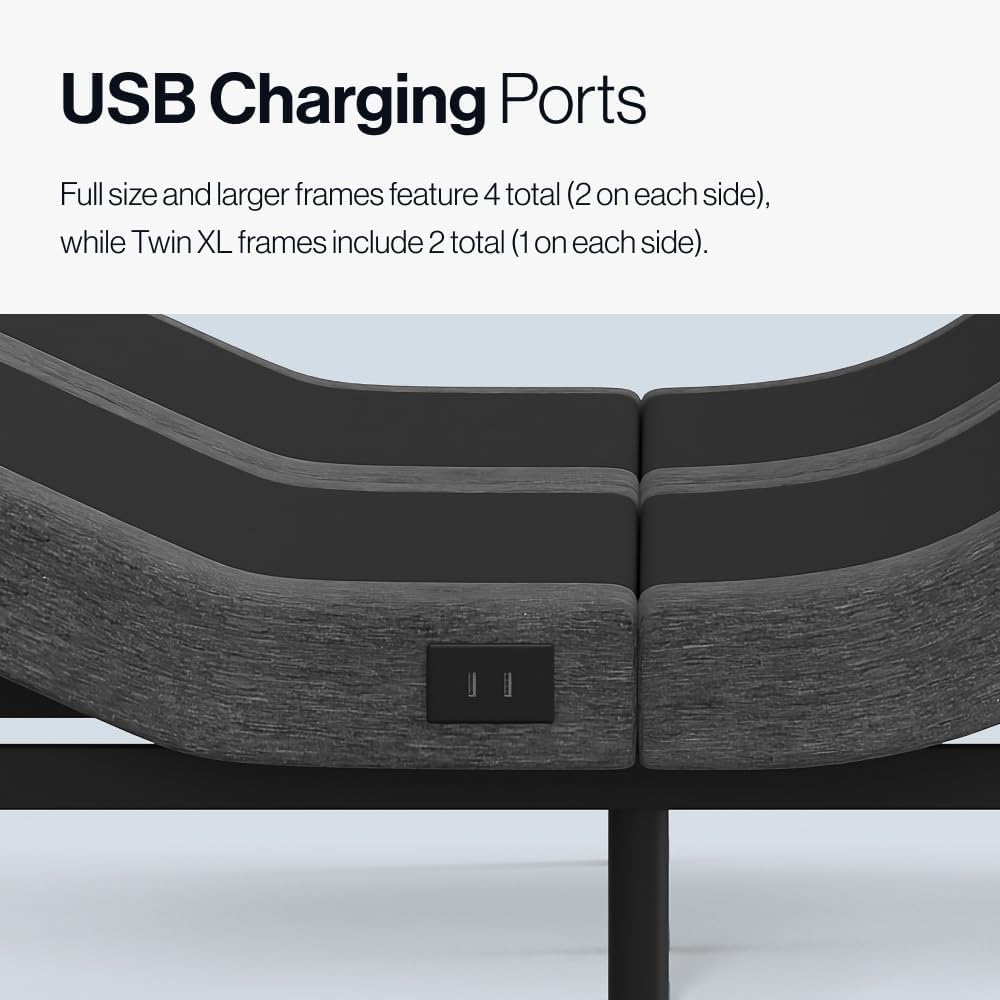
- Convenient USB Ports: Charge devices with built-in USB ports. Full size and larger frames feature 4 total (2 on each side), while Twin XL frames include 2 total (1 on each side).
- Soothing Massage Settings: Experience relaxation with customizable vibration and 3 intensity levels.
- Zero Gravity Position: Elevate your sleep with the Zero Gravity position, designed to improve breathing and reduce pressure.
- Anti-Snore Setting: Silence snoring with a dedicated anti-snore setting.
- Whisper Quiet Operation: Enjoy adjustments without disruptive noise.
- Easy Assembly: Setup requires no tools, and all necessary components, including batteries, are included. The zero clearance design works on most existing platform frames.
Included Components
Your Adjustable Comfort Queen Premium Adjustable Bed Base package includes:
- Adjustable Bed Frame
- Hardware for assembly
- Wireless Remote Control (with batteries)
- Assembly Instructions
Setup and Assembly
The Adjustable Comfort Premium Adjustable Bed Base is designed for easy, tool-free assembly. Please follow the detailed assembly instructions provided in your package. It is recommended to have two people for lifting and positioning the bed base.
Key Assembly Steps:
- Unpack all components and verify against the included components list.
- Attach the legs to the bed base.
- Connect the drive motors and power cables as indicated in the instructions.
- Insert batteries into the wireless remote control.
- Carefully flip the assembled base and place it in your desired location.

Image: A person demonstrating the easy assembly of the bed base by attaching one of the legs. The design allows for quick setup without specialized tools.
Operating Instructions
Your adjustable bed base is controlled by a wireless remote. Familiarize yourself with the remote's functions for optimal use.
Wireless Remote Functions:
- Head & Foot Elevation: Use dedicated buttons to raise or lower the head and foot sections independently.
- Zero Gravity (ZG): Press the ZG button to activate the Zero Gravity position, which elevates both the head and feet to promote circulation and reduce pressure on the lower back.
- Anti-Snore: Activate this preset position to slightly raise the head, which can help reduce snoring.
- Flat: Returns the bed base to a completely flat position.
- Programmable Memory Positions (M1, M2): Save your favorite head and foot positions for quick access. To program, adjust the bed to your desired position, then press and hold M1 or M2 until the remote confirms the setting is saved.
- Massage: Activate the massage function. Use the intensity buttons to cycle through 3 vibration levels.
- Timer: Set timers for automatic adjustments or massage duration.
- Convenient Flashlight: The remote includes a built-in flashlight for convenience in low light.

Image: The wireless remote control for the Adjustable Comfort bed base, highlighting buttons for head/foot elevation, Zero Gravity, massage, and programmable memory settings.
USB Charging Ports:
Locate the USB charging ports on the side(s) of your bed base. These ports allow you to conveniently charge your electronic devices while relaxing in bed.

Image: A close-up view of the USB charging ports integrated into the side of the adjustable bed base, providing convenient access for charging devices.
Product Images

The Adjustable Comfort Premium Adjustable Base showcasing its key features: head and foot elevation, whisper-quiet massage, under-bed lighting, and integrated USB charging ports.
A detailed view of the Adjustable Comfort bed base highlighting the whisper-quiet massage function, designed to provide soothing vibrations for relaxation.
Product Videos
Adjustable Comfort Classic Adjustable Base Overview
This video provides an overview of the Adjustable Comfort Classic Adjustable Base, demonstrating its features such as head and foot elevation, and ease of use with the wireless remote. It highlights how the bed moves with you to provide optimal comfort and support.
Maintenance
To ensure the longevity and optimal performance of your Adjustable Comfort bed base, follow these simple maintenance guidelines:
- Cleaning: Wipe the bed base with a damp cloth as needed. Avoid using harsh chemicals or abrasive cleaners, which can damage the finish.
- Regular Inspection: Periodically check all connections and hardware to ensure they are secure. Tighten any loose screws or bolts.
- Power Cord Care: Ensure the power cord is not pinched or tangled. Keep it away from heat sources and sharp objects.
- Weight Capacity: Do not exceed the maximum weight recommendation of 750 pounds for the Queen size.
Troubleshooting
If you encounter any issues with your adjustable bed base, please refer to the following common troubleshooting tips:
- No Power: Ensure the power cord is securely plugged into a working electrical outlet. Check if the circuit breaker has tripped.
- Remote Not Responding: Replace the batteries in the wireless remote. Ensure there are no obstructions between the remote and the bed base's receiver.
- Motor Noise: A slight hum from the motors during adjustment is normal. If you hear unusual or loud noises, check for any obstructions under the bed base.
- Uneven Movement: Ensure the bed base is placed on a flat, stable surface. Check that all legs are properly installed and tightened.
If the problem persists after attempting these steps, please contact customer support for further assistance.
Specifications
| Size | Queen |
| Material | Metal |
| Product Dimensions (L x W x H) | 79"L x 59"W x 14"H |
| Style | Premium Adjustable Base |
| Special Features | Adjustable, Remote Control, USB Port, Zero Gravity Mode, Massage |
| Included Components | Adjustable Bed Frame, Hardware, Assembly Instructions |
| Brand | Adjustable Comfort |
| Manufacturer | Resident Home |
| UPC | 810167468717 |
| Model Number | adjcomfgc-s |
| Item Weight | 130 Pounds |
| Maximum Weight Recommendation | 750 Pounds |
| Required Assembly | Yes |
Warranty and Support
Your Adjustable Comfort Queen Premium Adjustable Bed Base comes with a 3-year limited non-prorated warranty. This warranty covers manufacturing defects and ensures your product meets quality standards.
For warranty claims, technical support, or any questions regarding your product, please refer to the contact information provided in your product packaging or visit the official Adjustable Comfort website.


