
Introduction
Thank you for choosing the ModernMate L-Shaped Electric Standing Desk. This manual provides essential information for the safe assembly, operation, and maintenance of your new workstation. Please read these instructions carefully before use and retain them for future reference.
Safety Information
WARNING: Always ensure the desk is properly anchored to the floor. Do not exceed the maximum weight limit of 176 pounds (80 kg). Keep children and pets away from the desk when it is in motion to prevent injury.
- Ensure all connections are secure before operating the desk.
- Do not place liquids directly on the control panel or motor components.
- Avoid obstructing the desk's movement path during height adjustments.
- If any unusual noise or movement occurs, discontinue use immediately and consult the troubleshooting section or contact support.
Package Contents
Your ModernMate L-Shaped Electric Standing Desk ships in three separate packages. Please verify all components are present before beginning assembly.
- Desk components (desktop panels, frame, storage units)
- Hand Control unit
- Power Adapter
- Installation Instructions
- All necessary assembly tools (e.g., screwdriver)
Setup and Assembly
Assembly of the ModernMate L-Shaped Electric Standing Desk requires careful attention to detail. It is recommended that two people perform the assembly to ensure safety and ease. A detailed installation guide is included in your package.
- Unpack Components: Carefully remove all parts from the packaging. Lay them out on a clean, soft surface to prevent scratches.
- Identify Parts: Refer to the included installation guide for a complete list and diagram of all parts.
- Assemble Frame: Follow the step-by-step instructions in the guide to assemble the desk frame and motor mechanisms.
- Attach Desktop: Securely attach the one-piece L-shaped desktop to the assembled frame.
- Install Storage Units: Integrate the drawer units and open shelving as per the instructions.
- Connect Electronics: Connect the hand control unit and power adapter to the desk's motor system. Ensure all cables are properly routed and secured using the integrated cable management features.
- Final Check: Before first use, double-check all screws and connections to ensure they are tight and secure.
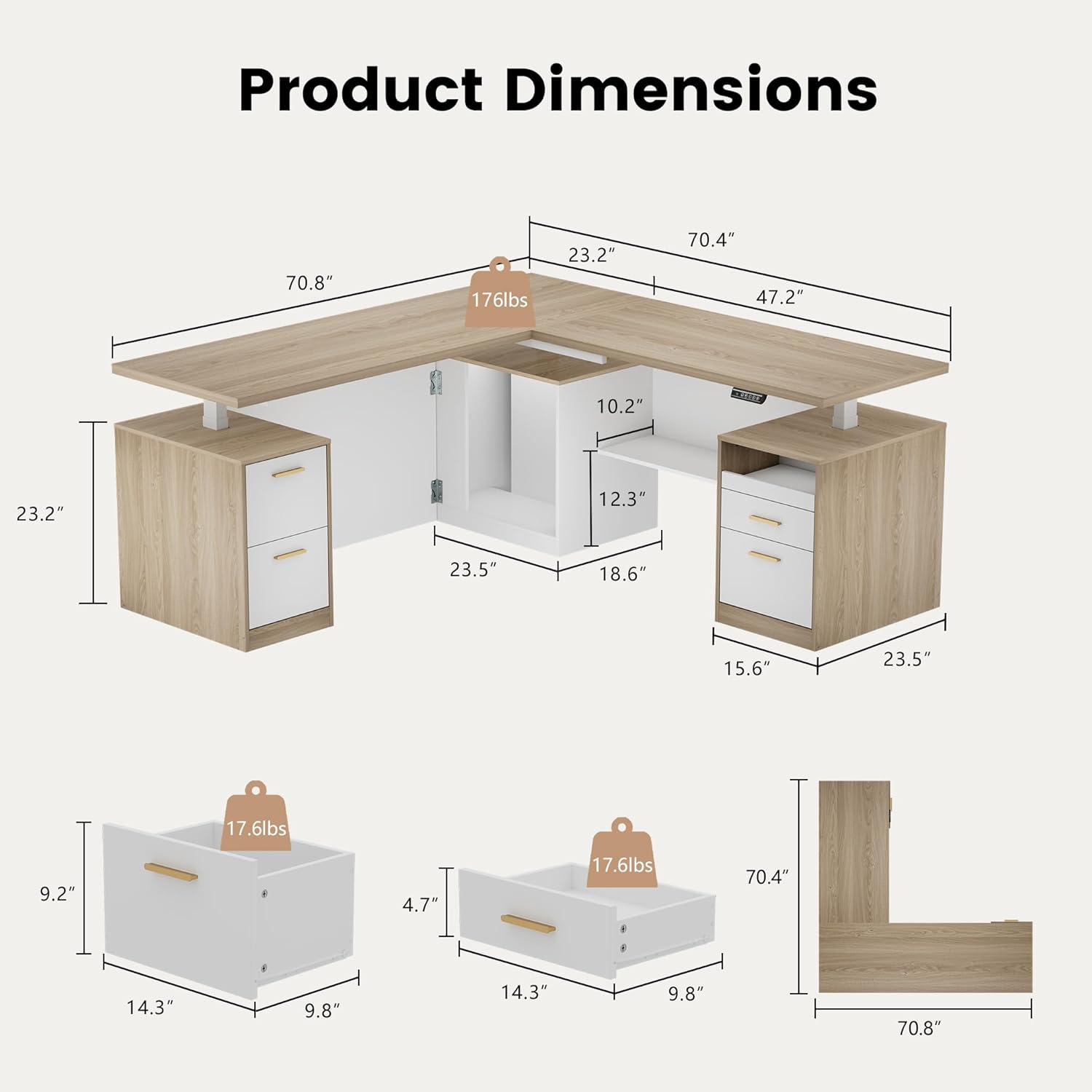
Image: Product Dimensions Diagram. This diagram illustrates the overall dimensions of the L-shaped desk, including the 70.8" and 70.4" lengths, 23.2" depth, and various internal measurements for storage compartments. It also shows the weight capacity of 176 lbs for the desktop and 17.6 lbs for individual drawers.

Image: ModernMate L-Shaped Desk Views. This image displays four different perspectives of the assembled desk: Front, Angled, Side, and Back. These views help in understanding the desk's complete structure and how it fits into a space.
Operating Instructions
Height Adjustment
Your electric standing desk features a smooth and quiet height adjustment mechanism, allowing you to transition between sitting and standing positions.
- Adjusting Height: Use the up and down arrows on the hand control unit to raise or lower the desk. The desk can be adjusted from a minimum height of 27.9 inches to a maximum height of 45.7 inches (excluding desktop thickness).
- Memory Presets: The hand control unit includes two memory buttons. To set a preferred height, adjust the desk to the desired level, then press and hold one of the memory buttons (e.g., '1' or '2') until the display flashes or a beep is heard. The desk will now move to this preset height with a single press.
- Quiet Operation: The lifting process operates quietly, with noise levels below 50 dB, ensuring minimal disruption to your work environment.

Image: Whisper-quiet Operation and Height Range. This image shows the desk in both its minimum (27.9") and maximum (45.7") height settings, highlighting the adjustable range. It also emphasizes the quiet operation feature.
Integrated Power and Cable Management
The desk is equipped with a built-in charging station and cable management features to keep your workspace organized and powered.
- Charging Station: Utilize the integrated AC and USB outlets for convenient power access for your devices.
- Cable Header: Route your cables through the designated cable header to maintain a tidy desktop and prevent tangles.

Image: Built-in Charging Station and Smart Panel. This image details the built-in charging station with AC and USB ports, the cable header for wire management, the powerful motor mechanism, and the smart control panel used for height adjustment and memory presets.
Features Overview
- L-Shaped Workstation: A spacious 71" x 70.4" one-piece desktop provides ample space for multiple monitors, gaming setups, or extensive work materials. The seamless design ensures a stable and wobble-free surface.
- Integrated Storage System: Features 4 smooth-glide drawers, 1 open drawer, and 1 open storage shelf to help organize office supplies and documents.
- Dedicated CPU Space: Includes a specific compartment for your computer tower, saving valuable desk and floor space.
- Privacy Panels: Equipped with privacy panels on the front and sides to create a focused and private workspace.
- Robust Construction: Made from cold-rolled steel, the desk frame supports up to 176 pounds (80 kg). The motor is tested for 50,000 lift cycles, ensuring long-term reliability.

Image: Integrated Storage System Details. This image showcases the various storage options, including the smooth-glide drawers, the dedicated CPU storage space, and the open storage shelves, illustrating how they contribute to an organized workspace.
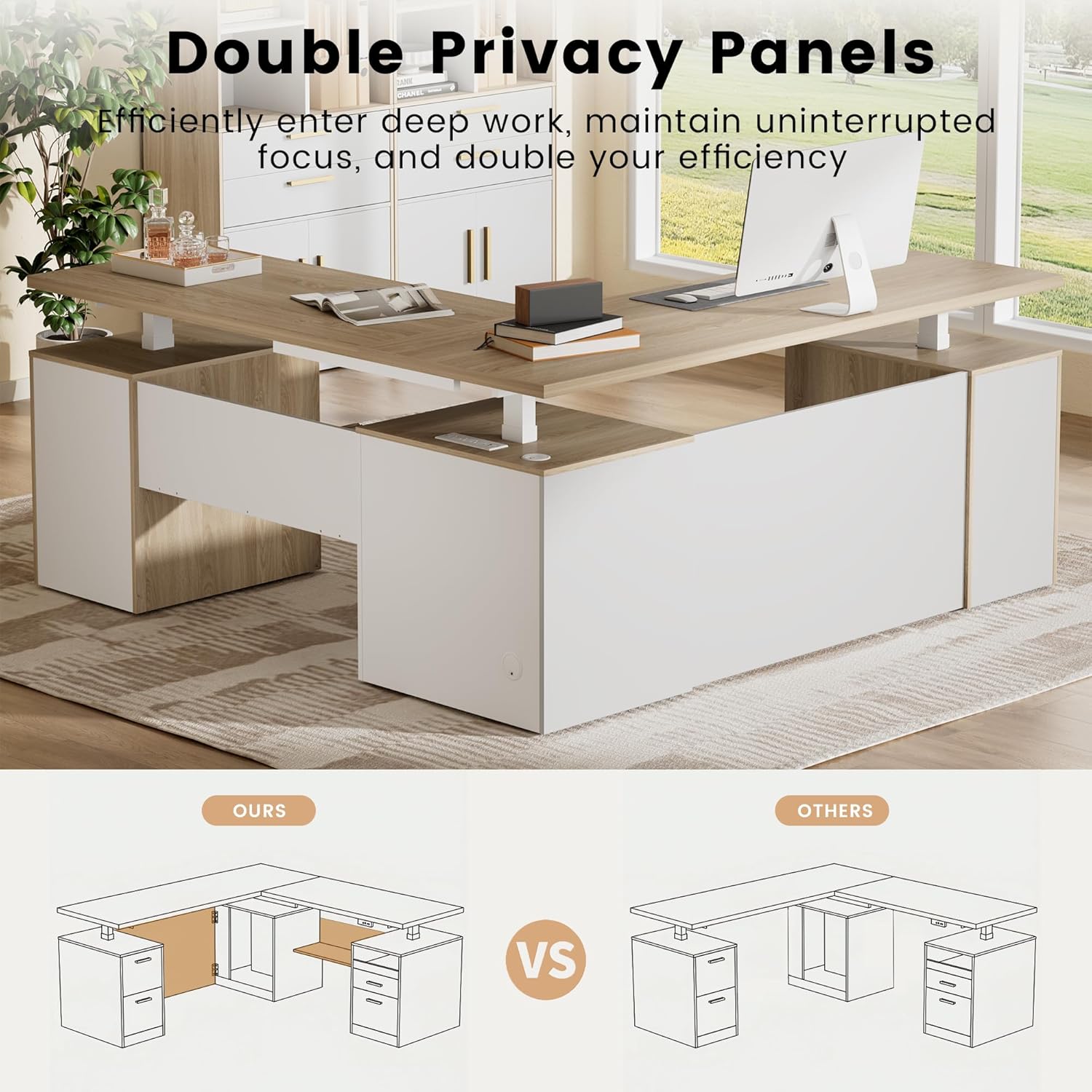
Image: Double Privacy Panels. This image highlights the privacy panels integrated into the desk design, which help create a more focused and private work area. It also includes a comparison graphic showing "Ours" (with privacy panels) vs. "Others" (without).

Image: Clutter-Free Storage with Drawers. This image focuses on the multiple drawers, demonstrating their capacity for storing various items and contributing to a tidy workspace.
Maintenance
Regular maintenance will help prolong the life and appearance of your ModernMate desk.
- Cleaning: Wipe surfaces with a soft, damp cloth. Avoid harsh chemicals or abrasive cleaners that may damage the finish.
- Motor and Moving Parts: Periodically check for any loose screws or connections. The motor is designed for durability (50,000 lift cycles) and generally requires no special maintenance.
- Cable Management: Ensure cables remain neatly organized and are not pinched or stressed by the desk's movement.
Troubleshooting
If you encounter issues with your desk, please refer to the following common troubleshooting steps.
- Desk Not Moving:
- Check if the power adapter is securely plugged into both the desk and a working wall outlet.
- Ensure all cables connecting the hand control and motor are firmly attached.
- Try unplugging the desk from the power source for 30 seconds, then plug it back in to reset the system.
- Uneven Movement or Noise:
- Verify that the desk is not overloaded and that the weight is evenly distributed.
- Inspect the desk legs and frame for any obstructions or loose components.
- Memory Presets Not Working:
- Re-program the memory presets by adjusting to the desired height and holding the memory button until confirmed.
If these steps do not resolve the issue, please contact ModernMate customer support for further assistance.
Specifications
| Feature | Detail |
|---|---|
| Model Number | JA-KJ-BK-05 |
| Brand | ModernMate |
| Desk Design | L-Shaped Electric Standing Desk |
| Product Dimensions (D x W x H) | 70.4"D x 71"W x 27.9"H |
| Height Adjustment Range | 27.9" to 45.7" |
| Maximum Weight Capacity | 176 lbs (80 kg) |
| Motor Lift Cycles Tested | 50,000 |
| Noise Level | Below 50 dB |
| Number of Drawers | 5 (4 smooth-glide, 1 open) |
| Storage Options | 5 drawers, open shelving, CPU storage |
| Top Material Type | Engineered Wood |
| Base Material | Alloy Steel |
| Color | Light Walnut (Desk Top Color: Black Walnut) |
| Special Features | Adjustable Height, Drawers, Power Outlets (AC/USB), Privacy Panel, Storage |
| Assembly Required | Yes (Recommended 2 people) |
| Included Components | Desk, Hand Control, Installation Instructions, Power Adapter |
Warranty and Support
ModernMate is committed to providing quality products and customer satisfaction.
- Customer Service: If you have any questions during assembly, operation, or encounter any issues, our professional support team is ready to assist you. Please refer to the contact information provided in your purchase documentation or visit the official ModernMate store for support.
- Warranty Information: Specific warranty details are typically provided with your purchase documentation. Please retain your proof of purchase for any warranty claims.
For more information and to explore other ModernMate products, visit the ModernMate Store.

