
Introduction
This manual provides comprehensive instructions for the ModernMate 71" L-Shaped Standing Desk, Model JA-KJ-BK-05. This electric height-adjustable desk features an L-shaped workstation, integrated storage with 5 drawers, a dedicated CPU compartment, and privacy panels, designed for home office and executive use. Please read this manual thoroughly before assembly and operation to ensure proper use and longevity of your desk.
Safety Information
Important Safety Precautions:
- Always ensure the desk is properly anchored to the floor if anchoring options are provided.
- Do not exceed the maximum weight capacity of 176 pounds (80 kg).
- Keep children and pets away from the desk when it is in motion to prevent injury.
- Ensure there are no obstructions in the desk's path during height adjustment.
- Use only the provided power adapter and hand control.
Package Contents
Your ModernMate L-Shaped Standing Desk ships in three separate packages. Please verify all components are present before beginning assembly.
Included Components:
- Desk components (desktop sections, frame, storage units)
- Hand Control unit
- Installation Instructions manual
- Power Adapter and cables
- All necessary assembly tools (e.g., screwdriver)
Setup and Assembly
Assembly of the ModernMate L-Shaped Standing Desk requires careful attention to the detailed installation guide provided. It is recommended that two people assemble the desk to ensure safety and ease.
Assembly Recommendations:
- Recommended Number of People: 2
- Tools Required: All necessary tools, including a screwdriver, are included.
- Estimated Assembly Time: While a detailed guide is provided for ease, assembly may take several hours. Follow the step-by-step instructions precisely.
Refer to the included installation guide for detailed, step-by-step assembly instructions and diagrams. Ensure all connections are secure before powering on the desk.
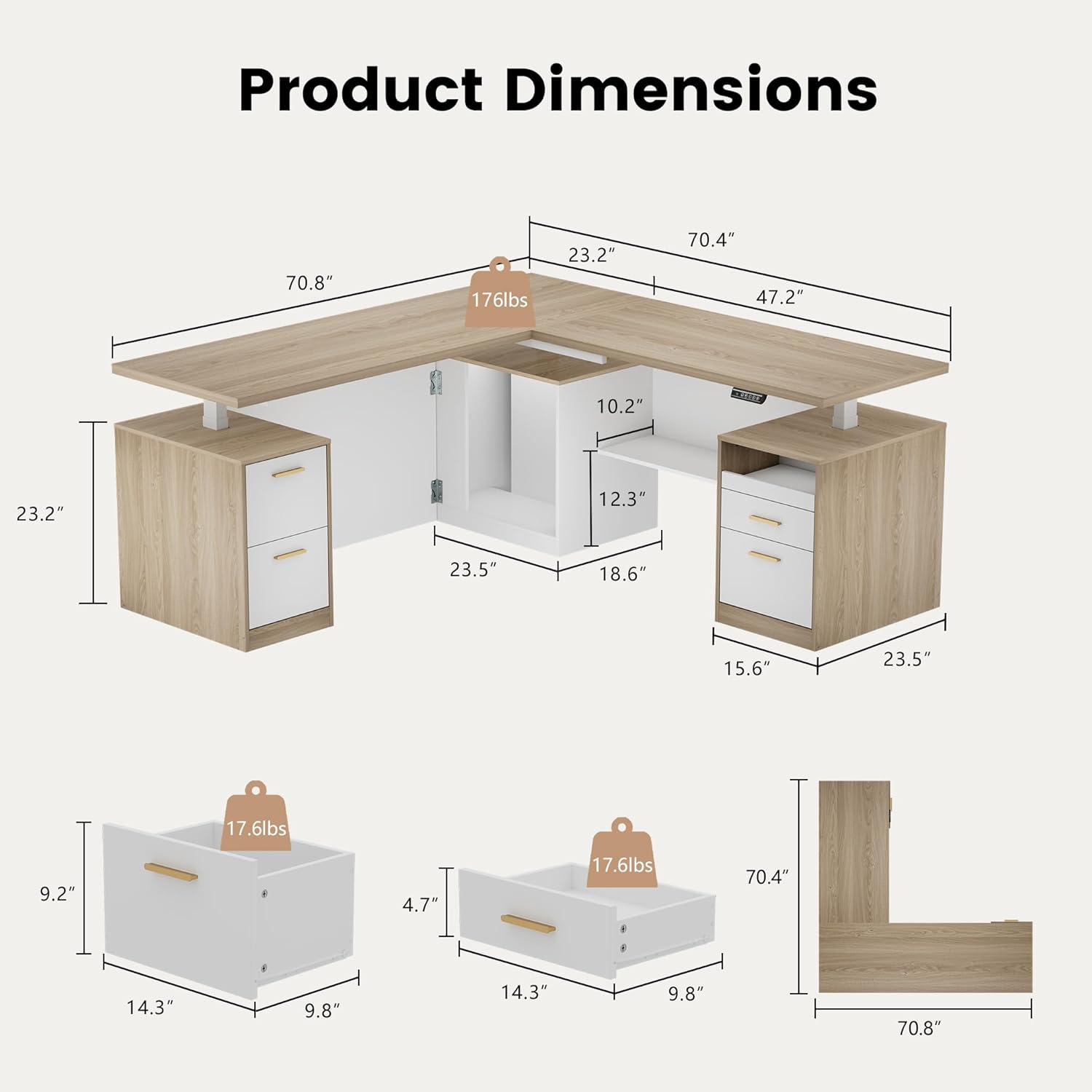
Image: Overview of desk components before assembly.
Operating Instructions
Your ModernMate L-Shaped Standing Desk features electric height adjustment and integrated power outlets.
Height Adjustment
The desk's height can be adjusted electrically from 27.9 inches (minimum) to 45.7 inches (maximum), excluding the desktop thickness. The lifting mechanism operates quietly, with noise levels below 50 dB.
- Adjusting Height: Use the up and down buttons on the hand control unit to raise or lower the desk to your desired height.
- Memory Presets: The hand control unit includes two memory buttons. To set a preset, adjust the desk to your preferred height, then press and hold a memory button (e.g., '1' or '2') until the display confirms the setting. You can then recall this height with a single press.

Image: Desk illustrating the whisper-quiet height adjustment feature and range.
Integrated Storage and Power
The desk includes an integrated storage system with 4 smooth-glide drawers, 1 open drawer, and 1 open storage shelf. A dedicated CPU storage compartment is also provided to save space. AC and USB power outlets are integrated for convenient device charging and power access.

Image: Detailed view of the integrated storage system, including drawers, open shelving, and CPU compartment.
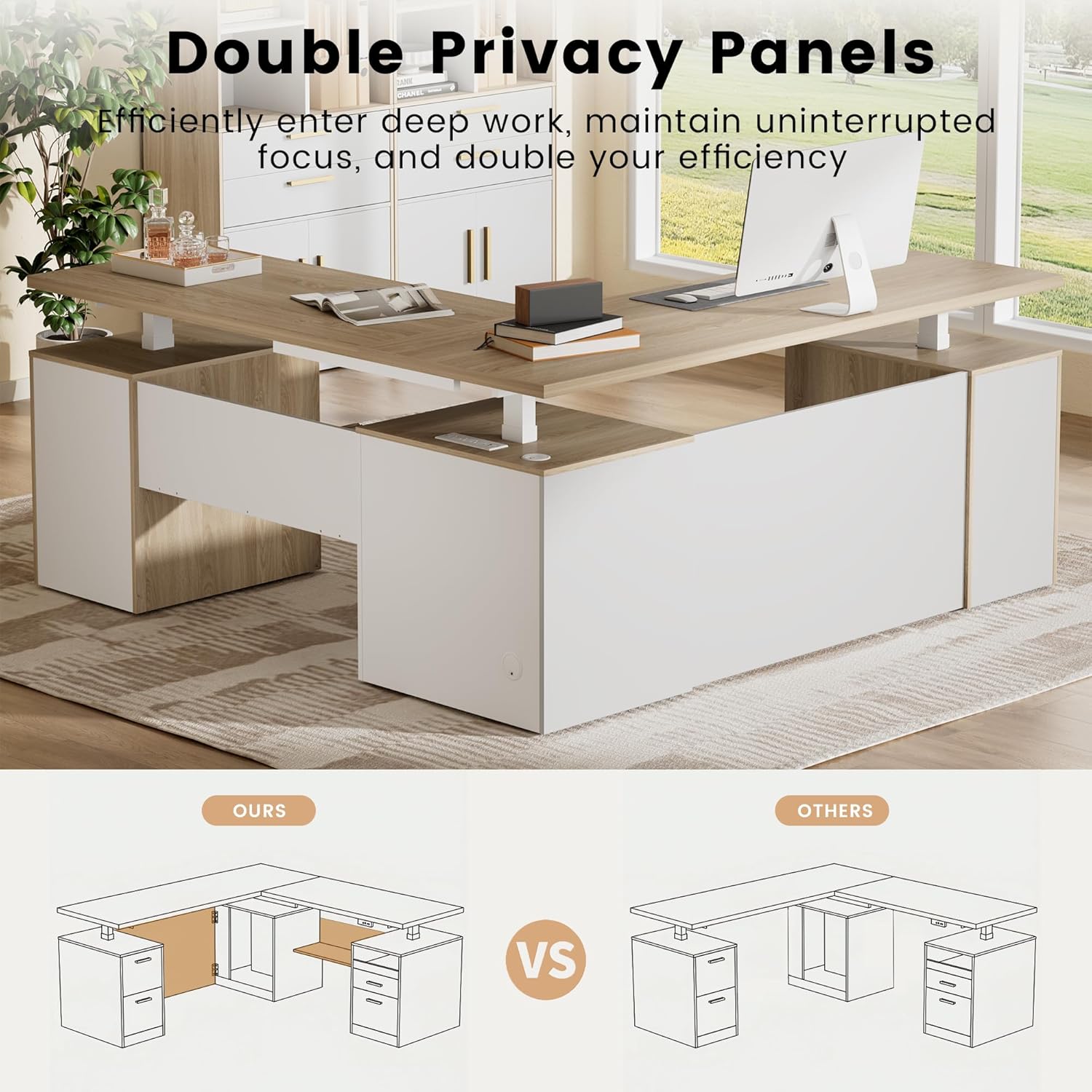
Image: Close-up of the desk's drawers, highlighting storage capacity.
Privacy Panels
The desk features privacy panels on the front and sides to create a more focused and private workspace.

Image: Desk showcasing the double privacy panels for enhanced focus.
Maintenance
Proper maintenance ensures the longevity and optimal performance of your ModernMate standing desk.
- Cleaning: Clean desk surfaces with a soft, damp cloth. Avoid using abrasive cleaners or harsh chemicals, which can damage the finish.
- Fasteners: Periodically check all screws and bolts to ensure they are tight. Loose fasteners can affect stability.
- Motor Care: Keep the motor and lifting mechanisms free from dust and obstructions. Do not attempt to lubricate the motor or internal components unless specifically instructed by ModernMate support.
- Cable Management: Ensure all cables are properly managed and do not interfere with the desk's movement.
Troubleshooting
If you encounter issues with your ModernMate standing desk, refer to the following common solutions:
| Problem | Possible Cause | Solution |
|---|---|---|
| Desk does not move or respond to controls. | Power cable disconnected, power outage, control unit malfunction. | Check if the power adapter is securely plugged into both the wall outlet and the desk. Verify the wall outlet has power. If the issue persists, contact customer support. |
| Desk stops mid-raise/lower. | Temporary obstruction, motor safety feature engaged. | Remove any obstructions. Press the adjustment button again to resume movement. If it repeatedly stops, check for excessive weight or damage. |
| Unusual noise during operation. | Loose components, motor issue. | Ensure all assembly screws are tightened. If the noise is from the motor and is persistent or loud, discontinue use and contact customer support. |
| Drawers are stiff or do not glide smoothly. | Dust or debris in glides, misaligned drawer. | Clean the drawer glides. Ensure drawers are properly aligned on their tracks. |
Specifications
Detailed specifications for the ModernMate 71" L-Shaped Standing Desk, Model JA-KJ-BK-05.
- Brand: ModernMate
- Model Number: JA-KJ-BK-05
- Product Dimensions (Overall): 70.4"D x 71"W x 27.9"H
- Adjustable Height Range: 27.9" to 45.7" (excluding desktop height)
- Maximum Weight Capacity: 176 Pounds (80 kg)
- Number of Drawers: 5
- Number of Shelves: 2 (open storage)
- Base Material: Alloy Steel
- Top Material Type: Engineered Wood
- Noise Level (Operation): Below 50 dB
- Motor Lift Cycles: Tested for 50,000 cycles
- Assembly Required: Yes
- Recommended Assembly People: 2
- Included Components: Desk, Hand Control, Installation Instructions, Power Adapter

Image: Diagram showing all key product dimensions.

Image: Various views of the desk, including front, angled, side, and back perspectives.
Official Product Video
Video: An official product collection video from ModernMate, showcasing the L-Shaped Standing Desk and its features. This video provides a visual overview of the desk's design, functionality, and storage solutions.
Warranty Information
ModernMate products are designed for quality and durability. For specific warranty terms and conditions applicable to your L-Shaped Standing Desk, please refer to the warranty card included in your product packaging. You may also contact ModernMate customer support for detailed information regarding warranty coverage and claims.
Customer Support
Should you have any questions regarding the assembly, operation, maintenance, or troubleshooting of your ModernMate L-Shaped Standing Desk, our professional support team is available to assist you.
Contact Information:
- For assistance, please refer to the contact details provided in your product packaging.
- You can also visit the official ModernMate Store on Amazon for additional support resources and contact options.
