
1. Introduction
Thank you for choosing the Vipdrive Defier 1.1 Electric Bike. This manual provides essential information for the safe assembly, operation, and maintenance of your new e-bike. Please read it thoroughly before your first ride to ensure optimal performance and safety.
The Vipdrive Defier 1.1 is a 26-inch electric mountain bike designed for adults, featuring a powerful 750W peak motor, a removable 48V battery, and a 7-speed gear system. It offers four riding modes and front fork suspension for a comfortable and versatile riding experience.
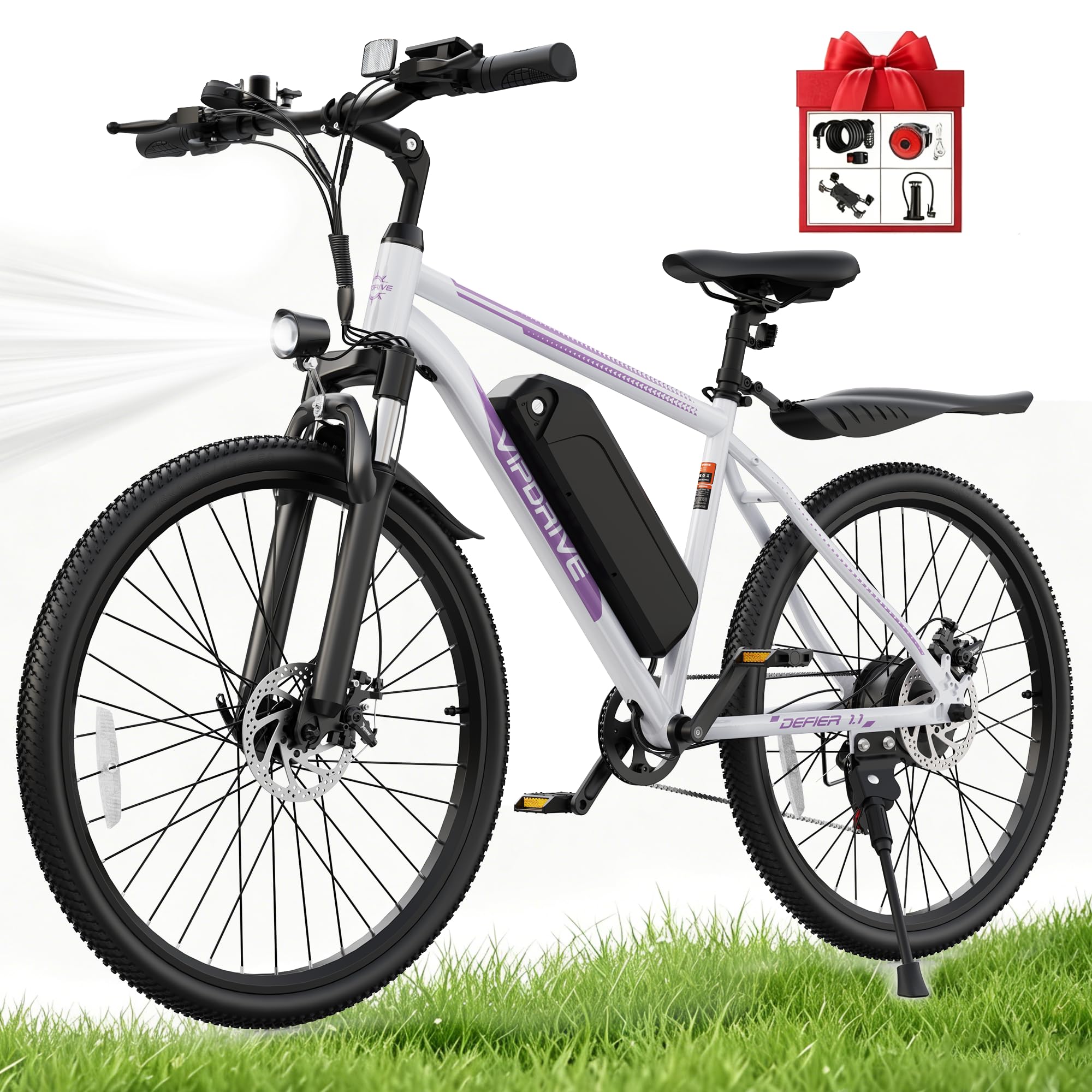
Image Description: The Vipdrive Defier 1.1 Electric Bike in White&Purple, showcasing its overall design and features.

Image Description: A detailed view of the 750W peak brushless motor and drivetrain components, highlighting its power capabilities including 20MPH max speed and 7-speed gearing.
2. Safety Information
Your safety is paramount. Always wear a helmet and appropriate safety gear when riding. Adhere to all local traffic laws and regulations.
2.1 General Safety Guidelines
- Always perform a pre-ride inspection, checking brakes, tire pressure, and battery charge.
- Ensure all quick releases and fasteners are securely tightened before each ride.
- Do not ride under the influence of alcohol or drugs.
- Be aware of your surroundings and ride defensively.
- Avoid riding in adverse weather conditions, especially heavy rain or snow, as this can affect braking and visibility.
- The maximum weight recommendation for this bike is 265 pounds (120 kg).
2.2 Battery Safety
- Use only the charger provided with your Vipdrive Defier 1.1 e-bike.
- Do not expose the battery to extreme temperatures or direct sunlight for extended periods.
- Do not attempt to open or modify the battery pack.
- Charge the battery in a well-ventilated area, away from flammable materials.
- If the battery is damaged or shows signs of overheating, discontinue use immediately and contact support.
- The battery is removable and lockable for security and convenient charging.

Image Description: The electric bike parked with its removable 48V battery being charged, illustrating both on-bike and off-bike charging methods.
3. Setup and Assembly
Your Vipdrive Defier 1.1 Electric Bike comes partially assembled. Follow these instructions carefully to complete the assembly process.
3.1 Unboxing and Inspection
- Carefully remove all components from the packaging.
- Inspect for any visible damage during shipping. If any damage is found, contact customer support immediately.
- Verify all included components are present: 1*Electric Bike, 1*Charger, 1*User Manual, 1*Tool Kit, 1*Air Pump, 1*Phone Holder, 1*Bike Lock.
3.2 Assembly Steps
For detailed visual instructions, please refer to the official installation video below.
Video Description: This video demonstrates the step-by-step installation process for the Vipdrive Electric Bike, including attaching the front wheel, handlebars, seat, pedals, and other accessories. It provides a visual guide to assist with assembly.
- Install the Front Wheel: Attach the front wheel to the fork, ensuring the disc brake rotor is correctly aligned with the caliper. Secure with the quick-release skewer.
- Install the Handlebars: Insert the handlebar stem into the fork steerer tube and tighten the bolts. Adjust the angle for comfortable riding posture.
- Install the Seat Post and Saddle: Insert the seat post into the frame and adjust the height. Secure with the quick-release lever.
- Attach the Pedals: Identify the left (L) and right (R) pedals. Thread the left pedal counter-clockwise and the right pedal clockwise into the crank arms. Tighten firmly.
- Install Fenders and Headlight: Attach the front and rear fenders and the LED headlight as per the instructions.
- Charge the Battery: Before your first ride, fully charge the 48V lithium battery using the provided charger. The removable design allows for charging on or off the bike.
Note: A tool kit and air pump are included to assist with assembly and initial setup.
4. Operating Instructions
Familiarize yourself with the controls and riding modes of your Vipdrive Defier 1.1 Electric Bike.
4.1 Powering On/Off
- To power on the bike, press and hold the power button on the LCD display.
- To power off, press and hold the power button again.
4.2 LCD Display

Image Description: A collage showing the smart LCD display with real-time data, front fork suspension, bright LED headlight, and dual disc brakes.
The smart LCD display provides real-time data including speed, battery level, assist level, and mileage. Use the control buttons to navigate through different display options and adjust settings.
4.3 Riding Modes

Image Description: An illustration showing a person riding the electric bike in a scenic outdoor setting, with icons representing the four riding modes: Pure Electric, Pedal-Assist, Normal Bike, and Walk Mode.
Your e-bike features four distinct riding modes to suit various preferences and conditions:
- Pure Electric Mode: Engage the throttle for motor-only propulsion. Provides an estimated range of 20-25 miles.
- Pedal-Assist Mode (PAS): The motor provides assistance as you pedal. This mode extends battery life, offering an estimated range of 30-50 miles. Adjust the assist level via the LCD display.
- Normal Bike Mode: Ride the bike like a traditional bicycle with no motor assistance. This mode offers unlimited range.
- Walk Mode Assist: Provides low-speed motor assistance to help you push the bike uphill or when walking alongside it.
4.4 Gear Shifting

Image Description: A detailed view of the 7-speed professional gear shifter and rear wheel cassette, highlighting the mechanism for changing gears.
- Use the trigger shifter on the handlebars to change gears.
- Shift to lower gears for easier pedaling uphill and higher gears for faster speeds on flat terrain.
- Avoid shifting gears while stationary or under heavy load to prevent damage to the drivetrain.
4.5 Braking System
The bike is equipped with front and rear mechanical disc brakes for reliable stopping power in various conditions.
- Apply both brake levers simultaneously for balanced and effective braking.
- The motor's automatic cut-off function activates when brakes are applied, enhancing safety.
4.6 Ergonomic Adjustments

Image Description: A rider on the electric bike demonstrating an upright ergonomic posture, with insets showing the adjustable handlebar stem and adjustable soft saddle for customized comfort.
Adjust the saddle height and handlebar angle to achieve a comfortable and ergonomic riding posture. This helps reduce strain on your back and shoulders during rides.
5. Maintenance
Regular maintenance ensures the longevity and safe operation of your Vipdrive Defier 1.1 Electric Bike.
5.1 Battery Care
- Charge the battery regularly, even if the bike is not in use, to maintain its health.
- Store the battery in a cool, dry place when not in use.
- Avoid fully discharging the battery frequently.
5.2 General Bike Maintenance
- Tires: Check tire pressure before each ride. Maintain recommended pressure for optimal performance and safety.
- Brakes: Regularly inspect brake pads for wear and ensure brake levers provide firm and responsive stopping power. Adjust or replace as needed.
- Chain: Keep the chain clean and lubricated to ensure smooth shifting and prevent premature wear.
- Fasteners: Periodically check all bolts, nuts, and quick releases for tightness.
- Cleaning: Clean the bike with a damp cloth. Avoid using high-pressure washers directly on electrical components.
6. Troubleshooting
This section addresses common issues you might encounter with your Vipdrive Defier 1.1 Electric Bike.
6.1 Common Issues and Solutions
| Problem | Possible Cause | Solution |
|---|---|---|
| Bike does not power on. | Battery not charged or not properly installed. | Ensure battery is fully charged and securely seated in its compartment. Check battery connection. |
| Motor not assisting in Pedal-Assist mode. | Pedal-Assist level set to zero; brake levers engaged; sensor issue. | Increase PAS level on the display. Release brake levers. Check for any obstructions around the pedal sensor. |
| Brakes feel weak or noisy. | Worn brake pads; misaligned caliper. | Inspect and replace brake pads if worn. Adjust caliper alignment. If issues persist, consult a bike mechanic. |
| Gears are not shifting smoothly. | Derailleur out of adjustment; dirty or dry chain; bent hanger. | Clean and lubricate the chain. Adjust derailleur tension. If problem persists, seek professional assistance. |
If you encounter issues not listed here or require further assistance, please contact Vipdrive customer support.
7. Specifications
Key technical specifications for the Vipdrive Defier 1.1 Electric Bike:
| Feature | Detail |
|---|---|
| Model | Defier 1.1 |
| Bike Type | Electric Mountain Bike |
| Motor | 750W Peak Brushless Motor |
| Max Speed | 20 MPH |
| Battery | 48V Lithium Battery (UL Certified, 0.72 kWh energy content) |
| Range (Pure Electric) | 20-25 miles |
| Range (Pedal-Assist) | 30-50 miles |
| Charging Time | 4-5 hours |
| Gears | 7-Speed (Trigger Shifter) |
| Wheel Size | 26 inches |
| Frame Material | Carbon Steel |
| Suspension | Front Fork Suspension |
| Brakes | Front and Rear Mechanical Disc Brakes |
| Display | LCD Display |
| Max Load Capacity | 265 pounds (120 kg) |
| Recommended Rider Height | 5'3" - 6'3" |
| Included Accessories | Charger, User Manual, Tool Kit, Air Pump, Phone Holder, Bike Lock |

Image Description: An illustration of the electric bike with key dimensions, recommended rider height (5'3"-6'3"), maximum load (265 lbs), and e-bike weight (58.8 lbs).
8. Warranty and Support
Vipdrive provides comprehensive support for your Defier 1.1 Electric Bike.
8.1 Warranty Information
Your Vipdrive Defier 1.1 Electric Bike comes with a Full 1-Year Warranty. This warranty covers manufacturing defects and ensures the quality of your product.
8.2 Customer Support
For any technical assistance, warranty claims, or questions, please contact Vipdrive customer support. We offer Lifetime 7*24 technical support and instructional video services to help you with any issues.
Please refer to the contact information provided with your purchase or visit the official Vipdrive website for support details.
