
1. Introduction
Welcome to the OPPO F33 5G Smartphone user manual. This guide provides essential information to help you get started with your new device, understand its features, and maintain its performance. The OPPO F33 5G combines a powerful 50MP AI Camera, a long-lasting 7000mAh battery with 80W SUPERVOOC charging, and a durable design, all powered by Android 15 and ColorOS 16.

Image: The OPPO F33 5G Smartphone in Forest Green, showcasing its sleek design.

Image: The OPPO F33 5G Smartphone in its Forest Green finish, highlighting its natural and refined aesthetic.

Image: A hand holding the OPPO F33 5G Smartphone, illustrating its slim profile and lightweight design (185g) with a 6.57-inch flat screen.
2. Setup
2.1 What's in the Box
Your OPPO F33 5G package includes the following items:
- OPPO F33 5G Smartphone
- Phone Case
- Power Adapter (80W SUPERVOOC compatible)
- SIM Tray Ejector
- Screen Protector (pre-applied or included)
- Quick Start Guide
2.2 Inserting SIM Cards
The OPPO F33 5G supports dual SIM cards. Follow these steps to insert your SIM cards:
- Locate the SIM card tray on the side of your phone.
- Insert the SIM tray ejector tool into the small hole next to the tray and press gently until the tray pops out.
- Place your Nano-SIM cards into the designated slots on the tray, ensuring the gold contacts face downwards.
- Carefully push the tray back into the phone until it clicks into place.
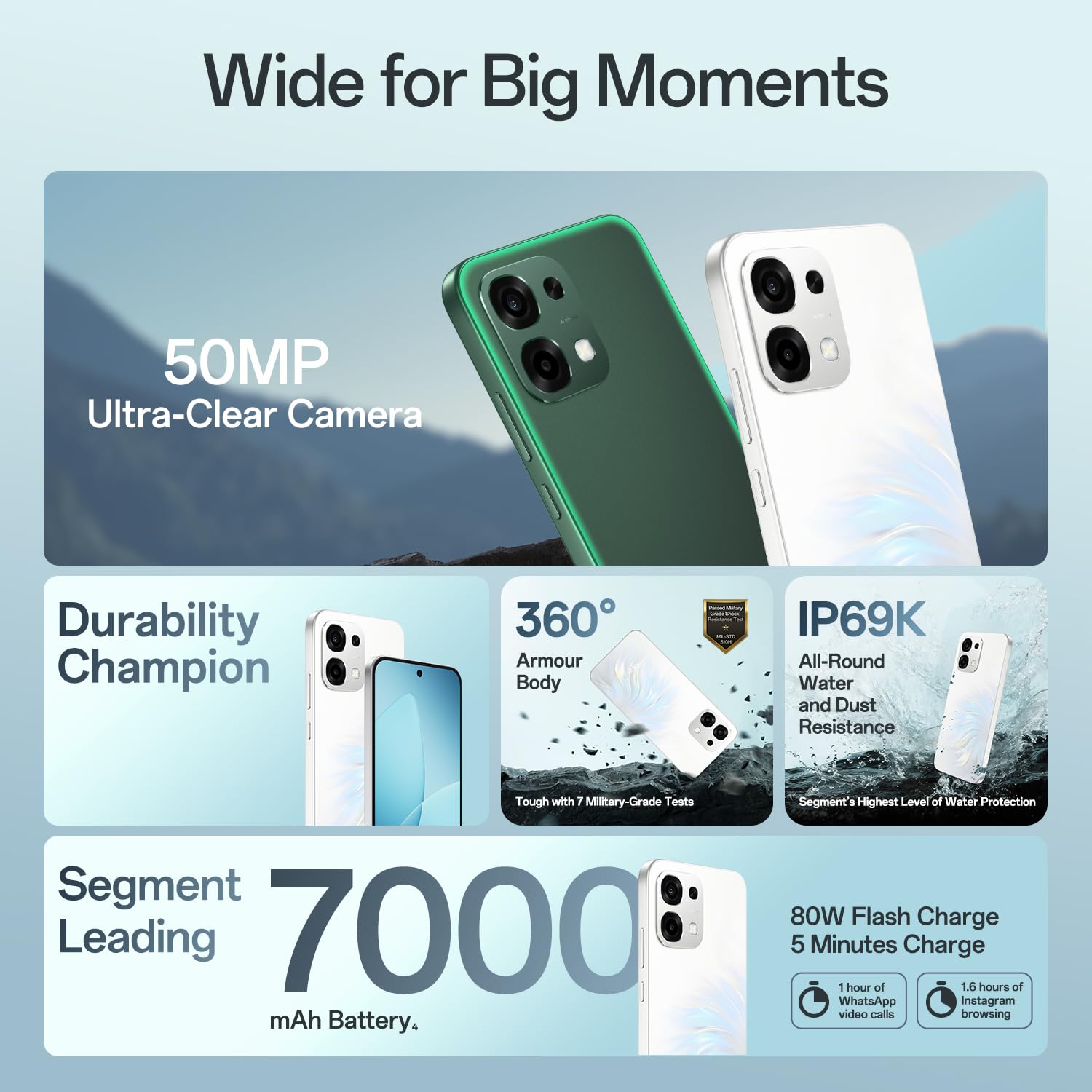
Image: Front view of the OPPO F33 5G Smartphone, showing the display and front camera.

Image: Back view of the OPPO F33 5G Smartphone, highlighting the camera module and OPPO branding.
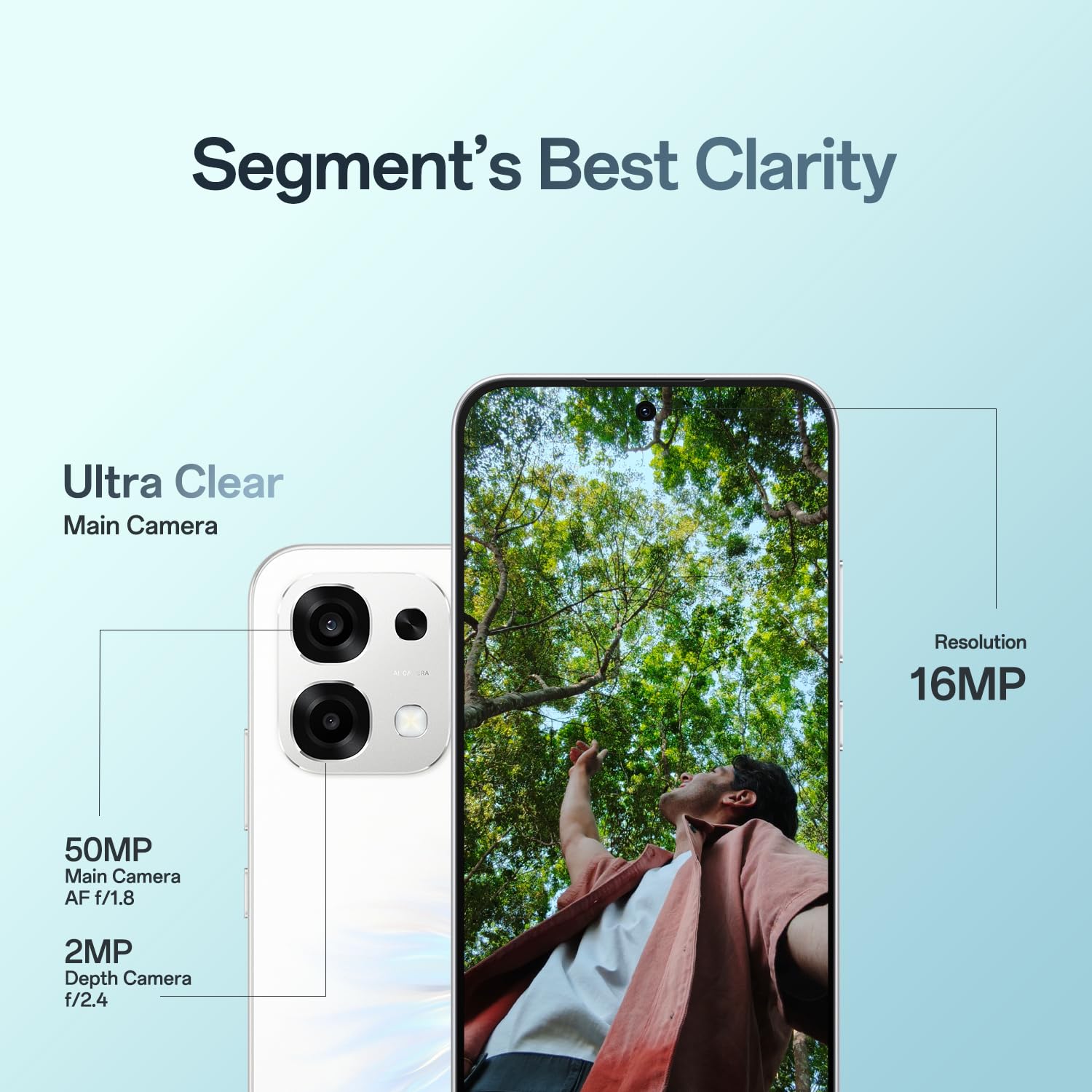
Image: Side view of the OPPO F33 5G Smartphone, showing the SIM card tray and volume buttons.
2.3 Initial Power On and Charging
To power on your device, press and hold the power button until the OPPO logo appears. Follow the on-screen instructions to complete the initial setup. For charging, connect the provided 80W SUPERVOOC power adapter and USB Type-C cable to your phone and a power outlet. The 80W fast charging allows for significant battery replenishment in minutes.
3. Operating Your Device
3.1 Basic Navigation
The OPPO F33 5G features a responsive touchscreen. Use gestures such as tapping, swiping, pinching, and spreading to navigate the interface. Physical buttons include the power button (right side) and volume buttons (left side).
3.2 Camera Features
Your OPPO F33 5G is equipped with a 50MP AI main camera and a 16MP front camera for high-quality photography. Explore various modes and AI enhancements:
- 50MP AI Main Camera: Captures ultra-clear, vibrant photos with enhanced detail.
- 16MP Front Camera: Designed for natural-looking selfies and clear video calls.
- AI Portrait Glow: Enhances portrait lighting for stunning results.
- AI Eraser 2.0: Intelligently removes unwanted objects from your photos.
- AI Pop Out: Allows for creative photo arrangements and effects.

Image: Overview of OPPO F33 5G features including 50MP Ultra-Clear Camera, Durability Champion, IP69K Water and Dust Resistance, and 7000mAh battery with 80W Flash Charge.

Image: Details on the OPPO F33 5G's camera system, highlighting the 50MP main camera (AF f/1.8) and 2MP depth camera (f/2.4), alongside a 16MP resolution for ultra-clear images.

Image: Demonstration of the AI Pop Out feature, showing how multiple images can be combined and arranged for creative effects.

Image: Examples of AI Portrait Glow for enhanced low-light portraits and AI Eraser 2.0 for removing unwanted elements from photos.
3.3 Battery Management
The 7000mAh battery provides extended usage. Utilize the 80W SUPERVOOC fast charging for quick power-ups. A 5-minute charge can provide 1 hour of WhatsApp video calls or 1.6 hours of Instagram browsing.

Image: Visual representation of the OPPO F33 5G's 7000mAh battery and 80W Flash Charge capabilities, detailing usage times for a 5-minute charge.
3.4 Connectivity
Your device supports 5G cellular technology for high-speed internet, along with Bluetooth and Wi-Fi for wireless connectivity. Ensure strong signal reception even in challenging environments like elevators, hills, and narrow lanes.

Image: Illustrates the OPPO F33 5G's strong signal performance in various challenging environments such as elevators, hills, and narrow lanes.
3.5 AI Features and Performance
The OPPO F33 5G integrates AI for enhanced productivity and a smoother user experience:
- AI Writer: Assists in drafting content and clarifying ideas.
- AI Ultra-clear Document: Helps organize tools and speeds up tasks by digitizing paper documents.
- Dual-Engine Smoothness System (ColorOS 16): Designed to eliminate lag, delay, screen flicker, crashes, screen jumps, and freezes for continuous rapid application launching.

Image: Shows the AI Writer feature for drafting and clarifying ideas, and AI Ultra-clear Document for organizing and digitizing documents.

Image: Explains the Dual-Engine Smoothness System powered by ColorOS 16, aiming for zero lag, delay, screen flicker, crash, screen jump, and freeze.

Image: Highlights the High-Performance 4289mm² VC Cooling System designed for Indian heat and the Quick Switch Bar for managing multiple open applications.
4. Maintenance
4.1 Cleaning Your Device
To clean your OPPO F33 5G, use a soft, lint-free cloth. Avoid abrasive materials or harsh chemicals. For the screen, a screen cleaner specifically designed for electronics can be used. Ensure all ports are dry before charging.
4.2 Software Updates
Regularly check for and install software updates to ensure optimal performance, security, and access to new features. You can usually find this option in the phone's settings under 'About phone' or 'Software update'.
4.3 Battery Care
To prolong battery life, avoid extreme temperatures. It is recommended to keep the battery charge between 20% and 80% for daily use. Use only the original or certified charging accessories.
4.4 Durability Features
The OPPO F33 5G is built with enhanced durability:
- IP69K Water and Dust Resistance: Provides a high level of protection against water and dust ingress. The device is tested for 10,000 times submerged, 12 hours continuous soak, and 36 daily liquids.
- Military-Grade Shock Resistance (MIL-STD 810H): Built to withstand accidental drops and impacts.
- 360° Armour Body: Features a solid metal body with anti-drop guard, airbag protection, and extra tough screen glass for all-round protection.

Image: A person holding the OPPO F33 5G Smartphone in the rain, demonstrating its IP69K water and dust resistance, with details on submersion, soak, and liquid resistance.

Image: The OPPO F33 5G Smartphone displayed in a split image, showing its resilience in both rainy and sunny conditions, emphasizing its 'Durable Champion' status.

Image: The OPPO F33 5G Smartphone on a rocky surface, illustrating its 360° Armour Body with military-grade shock resistance (MIL-STD 810H), solid metal body, anti-drop guard, airbag protection, and extra tough screen glass.
5. Troubleshooting
If you encounter issues with your OPPO F33 5G, consider the following common solutions:
- Phone not turning on: Ensure the battery is charged. Connect the charger and wait a few minutes before attempting to power on again.
- Charging issues: Check the charging cable and adapter for damage. Try a different power outlet.
- Network problems: Verify your SIM card is correctly inserted. Check network settings and ensure mobile data is enabled. If issues persist, contact your service provider.
- Performance slowdowns: Close unnecessary background applications. Clear cache regularly. The Dual-Engine Smoothness System is designed to minimize lag and delays.
- App crashes: Ensure apps are updated to their latest versions. Clear app data or reinstall the problematic application.
For more complex issues, refer to the support section or contact customer service.
6. Specifications
Below are the detailed specifications for the OPPO F33 5G Smartphone:
| Feature | Detail |
|---|---|
| Brand | OPPO |
| Model Name | F33 |
| Operating System | Android 15 |
| RAM Memory Installed Size | 6 GB |
| Memory Storage Capacity | 128 GB |
| Colour | Forest Green |
| SIM Card Slot Count | Dual SIM |
| Connector Type | USB Type C |
| Form Factor | Slate |
| Product Features | Dual SIM, Expandable Memory, Fast Charging Support, Rugged Body, Stereo Speakers |
| Camera Flash Type | LED |
| Battery Power | 7000 mAh |
| Item Weight | 204 Grams |
| Item Dimensions | 16.3 x 7.8 x 0.8 Centimeters |
| Display Type | AMOLED |
| Wireless Provider | Unlocked for All Carriers |
| Cellular Technology | 5G |
| Network Connectivity Technology | Bluetooth, Wi-Fi |
| Model Year | 2026 |
| Country of Origin | India |
7. Warranty & Support
7.1 Warranty Information
Your OPPO F33 5G Smartphone comes with a warranty of 12 Months on Handset and 6 Months on Adapter & Cable from the date of purchase. Please retain your proof of purchase for warranty claims.
7.2 Customer Support
For any inquiries, technical assistance, or service needs, OPPO provides comprehensive support:
- Hotline: 18001032777 (Available 9:00 - 22:00 Mon-Sun, including holidays)
- WhatsApp Support: +91-9871502777
- Authorized Service Centers: Over 580 authorized service centers are available to assist you with repairs, software updates, service inquiries, and device diagnosis.
Manufacturer Contact Information: OPPO Mobiles India Pvt Ltd, 5th FLOOR, Tower B, BUILDING, N-8, DLF Cyber City, DLF Phase 2, Gurugram, Haryana 122002.

Image: Overview of OPPO's trustworthy services, including 580+ authorized service centers, hotline, WhatsApp support, and services like repair, software updates, service inquiries, and device diagnosis.


