
1. Introduction
This manual provides essential information for the safe and effective operation of your ACMER K1 12W Laser Engraving Machine. Please read this manual thoroughly before using the device to ensure proper setup, operation, and maintenance. Retain this manual for future reference.
The ACMER K1 laser engraving machine features a Class 1 safety enclosure and an efficient smoke extraction system, making it suitable for safe use in homes, workshops, and commercial settings. Its lightweight and compact design allows for easy portability. The 150x150 mm working area is ideal for creative projects and on-site personalized item creation. With a repetition accuracy of 0.01 mm and a speed of 10000 mm/min, it can engrave various materials such as wood, bamboo, leather, and ceramic, and cut thin plywood and acrylic. Compatible with common operating systems and file formats, it ensures stable and versatile use.

Figure 1: ACMER K1 Laser Engraving Machine in a retail setting.
2. Safety Information
Your safety is paramount. The ACMER K1 is designed with a Class 1 safety enclosure to contain the laser and minimize potential hazards. Always adhere to the following safety guidelines:
- Eye Protection: Although the device has a Class 1 enclosure, never look directly into the laser beam.
- Ventilation: The integrated exhaust fan helps remove smoke and odors. For optimal air quality, especially when engraving materials that produce strong fumes, ensure the work area is well-ventilated or use an external air purifier (sold separately).
- Material Compatibility: Only engrave or cut materials listed as compatible. Engraving certain plastics or unknown materials can produce toxic fumes.
- Fire Safety: Keep a fire extinguisher nearby. Do not leave the machine unattended during operation, especially when cutting materials that may ignite.
- Stable Placement: Ensure the machine is placed on a stable, level surface. The machine features a tilt detection system that will shut down operation if the tilt angle exceeds 13 degrees to prevent accidents.
- Lid Safety: The machine is equipped with a lid induction design that stops operation when the lid is open and resumes when closed. Do not bypass this safety feature.
- Children and Pets: Keep children and pets away from the machine during operation.

Figure 2: Safety features including lid induction and tilt detection.

Figure 3: Integrated exhaust fan for smoke and odor removal.
3. Product Overview
3.1 Key Features
- 12W Diode Laser: Powerful laser module for efficient engraving and cutting.
- High Precision: 0.01 mm repetition accuracy and an ultra-fine 0.08 x 0.08 mm laser spot for detailed work.
- High Speed: Maximum engraving speed of 10000 mm/min.
- Compact and Portable: Weighs only 2.4 kg with dimensions of 286 x 273 x 190 mm.
- Class 1 Enclosure: Fully enclosed design for enhanced safety, odor isolation, and noise reduction.
- Integrated Exhaust System: Effectively removes smoke and odors during operation.
- Wide Material Compatibility: Engraves wood, bamboo, paper, glass, plastic, leather, PCBs, alumina, non-reflective coated metals, lacquered metals, ceramic. Cuts thin plywood and acrylic.
- Software Compatibility: Supports Windows, macOS, and Linux. Compatible with ACMER software, LaserGRBL, and LightBurn.
- File Format Support: NC, DXF, BMP, JPG, PNG.

Figure 4: Key features and capabilities of the ACMER K1.
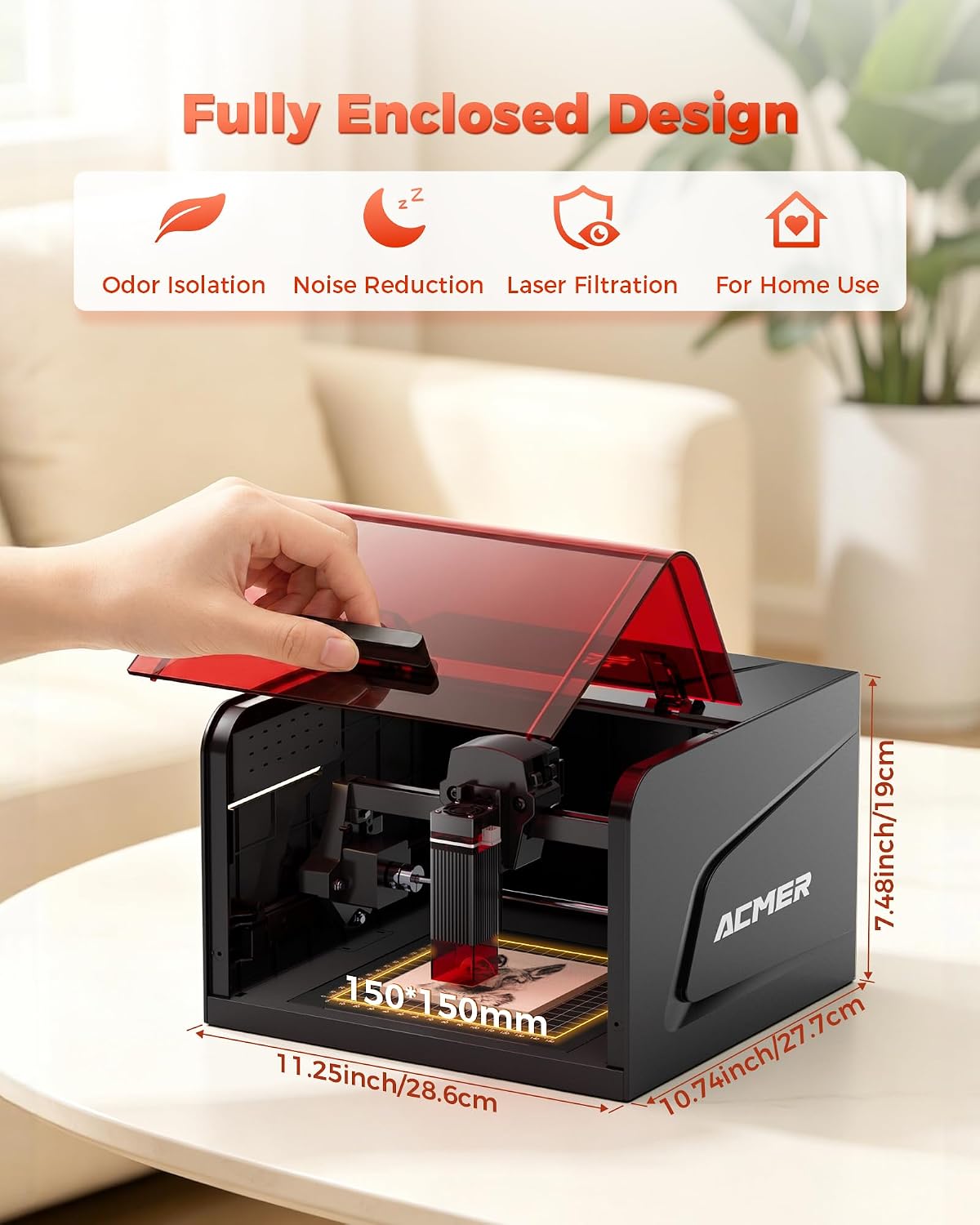
Figure 5: Fully enclosed design and compact dimensions.

Figure 6: Example of high-precision laser engraving.
4. Setup
The ACMER K1 comes largely pre-assembled. Follow these steps for initial setup:
- Unpacking: Carefully remove the machine and all accessories from the packaging.
- Placement: Place the machine on a stable, level, and heat-resistant surface in a well-ventilated area. Ensure there is sufficient space around the machine for air circulation and access.
- Power Connection: Connect the power adapter to the machine's power input and then plug it into a suitable electrical outlet (DC 12V, 4A).
- Software Installation: Install the necessary software (ACMER software, LaserGRBL, or LightBurn) on your computer. Drivers may be required for initial connection. Refer to the software's documentation for detailed installation instructions.
- Test Run: Perform a small test engraving on a scrap piece of material to familiarize yourself with the machine's operation and software settings.
5. Operating Instructions
5.1 Preparing for Engraving/Cutting
- Material Selection: Choose a compatible material for your project. Ensure it is clean and free of obstructions.
- Material Placement: Place the material securely on the working platform within the 150x150 mm area. Use the grid plate for precise alignment if needed.
- Focus Adjustment: The laser module typically has a fixed focus distance (2 mm). Ensure your material is at the correct height relative to the laser head.
- Software Settings: Open your chosen software (ACMER, LaserGRBL, or LightBurn). Import your design (NC, DXF, BMP, JPG, PNG). Adjust laser power, speed, and passes according to the material and desired effect. Start with lower power and higher speed for initial tests.
5.2 Starting Operation
- Close Lid: Ensure the safety lid is fully closed. The machine will not operate if the lid is open.
- Start Job: Initiate the engraving/cutting process from your software.
- Monitoring: Continuously monitor the machine during operation. Observe for any unusual smells, smoke, or signs of fire.
- Emergency Stop: In case of any emergency, immediately press the emergency stop button on the machine or disconnect power.

Figure 7: Software and operating system compatibility.
6. Maintenance
Regular maintenance ensures optimal performance and extends the lifespan of your ACMER K1. Always disconnect power before performing any maintenance.
- Cleaning the Lens: Periodically clean the laser lens with a soft, lint-free cloth and lens cleaning solution. A dirty lens can reduce laser power and engraving quality.
- Cleaning the Working Area: Remove debris and dust from the working platform and inside the enclosure after each use.
- Exhaust Fan: Check the exhaust fan for any blockages and clean it if necessary to maintain efficient smoke extraction.
- Lubrication: Inspect the guide rails and moving parts. Apply a small amount of lubricant if movement becomes stiff.
- General Inspection: Regularly check all cables and connections for wear or damage.
7. Troubleshooting
This section addresses common issues you might encounter.
| Problem | Possible Cause | Solution |
|---|---|---|
| Machine does not power on. | Power cable not connected, power outlet faulty. | Check power connections. Try a different outlet. |
| Laser not firing or weak. | Lid open, laser lens dirty, incorrect power settings, material out of focus. | Ensure lid is closed. Clean laser lens. Adjust power settings in software. Check material height. |
| Engraving quality is poor/blurry. | Incorrect focus, material movement, dirty lens, incorrect speed/power settings. | Verify focus. Secure material. Clean lens. Adjust speed and power settings. |
| Machine stops unexpectedly. | Lid opened, tilt detection triggered, software error, overheating. | Ensure lid is closed. Check machine stability. Restart software/machine. Allow machine to cool down. |
| Excessive smoke/odor. | Exhaust fan blocked, material type, poor ventilation. | Clean exhaust fan. Ensure proper ventilation. Consider an external air purifier. |
8. Specifications
| Feature | Detail |
|---|---|
| Model Number | K1 |
| Laser Power | 12W |
| Laser Type | Diode Laser |
| Wavelength | 455 ± 5 nm |
| Laser Spot Size | 0.08 × 0.08 mm |
| Repetition Accuracy | 0.01 mm |
| Working Area | 150 × 150 mm |
| Max Engraving Speed | 10000 mm/min |
| Safety Level | Class 1 Enclosure |
| Power Input | DC 12 V, 4 A |
| Total Power | 48 W |
| Product Dimensions (L x W x H) | 28.6 x 27.7 x 19 cm (approx. 11.25 x 10.74 x 7.48 inches) |
| Product Weight | 2.4 kg |
| Structure | Aluminum Profile |
| Movement System | Roller Guide |
| Compatible Materials | Wood, bamboo, paper, glass, plastic, leather, PCBs, alumina, non-reflective coated metals, lacquered metals, ceramic, thin plywood, acrylic. |
| Operating Systems | Windows, macOS, Linux |
| Supported File Formats | NC, DXF, BMP, JPG, PNG |
9. Warranty and Support
The ACMER K1 Laser Engraving Machine comes with a 12-month warranty from the date of purchase. This warranty covers manufacturing defects and malfunctions under normal use.
For technical assistance, troubleshooting, or warranty claims, please contact ACMER customer support. We offer 24/7 customer support to assist you with any inquiries.
Please have your model number (K1) and purchase information ready when contacting support.


