
Introduction
The ATOTO S8 Gen4 11.5'' 2K QLED Android Double DIN Car Stereo is an advanced in-car entertainment and navigation system designed to enhance your driving experience. It features a high-resolution 2K QLED display, intuitive dual knobs for control, and a powerful octa-core processor. This unit integrates wireless CarPlay and Android Auto, 4G LTE connectivity, ChatGPT-powered AI for intelligent assistance, DSP Hi-Fi audio for superior sound, and comprehensive driving protection capabilities. This manual provides essential information for setup, operation, maintenance, and troubleshooting.

Image: The ATOTO S8 Gen4 11.5-inch car stereo unit, showcasing its large display and dual knobs, integrated into a vehicle's dashboard.
Setup
Package Contents
Verify that all components are present in the package:
- ATOTO S8 Gen4 11.5" Head Unit
- 16 Pin Power Wire Harness
- GPS Antenna
- Rear View Camera Cable
- USB to 4 Pin Cable
- USB to 6 Pin Cable
- Mounting Brackets
- Mounting Screws
- 4G Antenna
- RCA Cable
- External Noise-Cancelling Microphone
- 2 Screen Protectors
- Rear L/R Audio Out Cable
- Online Resources Quick Guide
- Product Care Online Support Information

Image: A visual representation of all items included in the ATOTO S8 Gen4 product box, such as the main unit, wiring harnesses, antennas, and mounting hardware.
Installation Considerations
Before installation, carefully measure your vehicle's dashboard opening and ensure the 11.5-inch screen will not obstruct essential controls, vents, or the gear shifter. Sufficient clearance is necessary for safe and normal operation. The unit's bracket offers some adjustability to optimize screen positioning.

Image: A diagram illustrating the dimensions of the ATOTO S8 Gen4 unit and how to check for potential interference with vehicle controls or vents during installation.
Wiring Diagram
Refer to the detailed wiring diagram for proper connection of the power harness, speakers, antennas, and optional accessories. Incorrect wiring can damage the unit or vehicle electronics. Consult a professional if you are unsure about any connections.

Image: A comprehensive wiring diagram for the ATOTO S8 Gen4, showing connections for power, speakers, USB, cameras, and other inputs/outputs.
Initial Setup
After physical installation, power on the unit. Follow the on-screen prompts for initial system configuration. You may install a 4G SIM card for cellular connectivity and an SD card for additional storage. Connect to a Wi-Fi network to download updates and applications.
Operating Instructions
Display and User Interface
The 11.5-inch 2K QLED touchscreen (2000x1200 resolution) provides a clear and vibrant display. The custom user interface allows for a large main display with customizable side widgets for navigation, DVR, speed, music, and daily applications. Dual physical knobs offer convenient control for volume and track changes, reducing driver distraction.

Image: A visual comparison highlighting the superior detail and clarity of the 2K QLED display compared to a standard LCD screen.

Image: A detailed view of the dual knob design on the ATOTO S8 Gen4, illustrating their function for volume adjustment and track navigation.
Connectivity
The S8 Gen4 supports wireless CarPlay and Android Auto for seamless smartphone integration. It offers multiple ways to stay online, including built-in 4G LTE (SIM card required), USB tethering, and Bluetooth tethering. This ensures uninterrupted access to online features, navigation, and streaming services.

Image: The ATOTO S8 Gen4 display showing the interface for Wireless CarPlay and Android Auto, with popular application icons.
Audio Features
Experience enhanced audio quality with the integrated Digital Signal Processor (DSP) and 32-band Equalizer (EQ). The built-in amplifier delivers clear sound to factory speakers, while 4V pre-outs provide a stronger, cleaner signal for external amplifiers. Optical and Coaxial digital outputs are available for connecting to external DSPs or high-fidelity systems.

Image: An infographic detailing the immersive sound features of the S8 Gen4, including the 32-band EQ, time alignment, high/low-pass filters, 4V RCA pre-amp output, and optical/coaxial output.
AI Features (DriveChat & Agentic AI)
The unit incorporates ChatGPT 5.2 and Gemini 3.0 powered AI for intelligent assistance. DriveChat allows for natural language Q&A, providing routes, live information, and reminders. This feature is designed to minimize distractions by keeping your hands on the wheel and can function even offline.

Image: The ATOTO S8 Gen4 screen showing the DriveChat AI interface, demonstrating its ability to answer questions and provide contextual information.
Driving Protection
The S8 Gen4 supports front and rear dash recording (cameras sold separately) with features like automatic emergency recording, loop recording, and up to 24-hour parking recording. It also offers live rear view and parking guard functions to provide evidence and enhance safety while driving and parked. TrackHU GPS tracking provides vehicle location monitoring.

Image: An illustration of the 1080P dash cam capabilities, including automatic emergency recording, loop recording, and 24-hour parking recording, with examples of accident and parking scenarios.

Image: A diagram explaining the All-Day Parking Guard feature, which records parking-related footage, offers voltage cutoff protection, and supports event review.
Bluetooth IoT Hub & Privacy Protection
The Bluetooth IoT Hub allows you to connect and control various compatible in-car accessories, such as ambient lights or interactive displays. For privacy, the unit features automatic Bluetooth lock and unlock, securing your account information when you leave the vehicle and unlocking it upon your return.
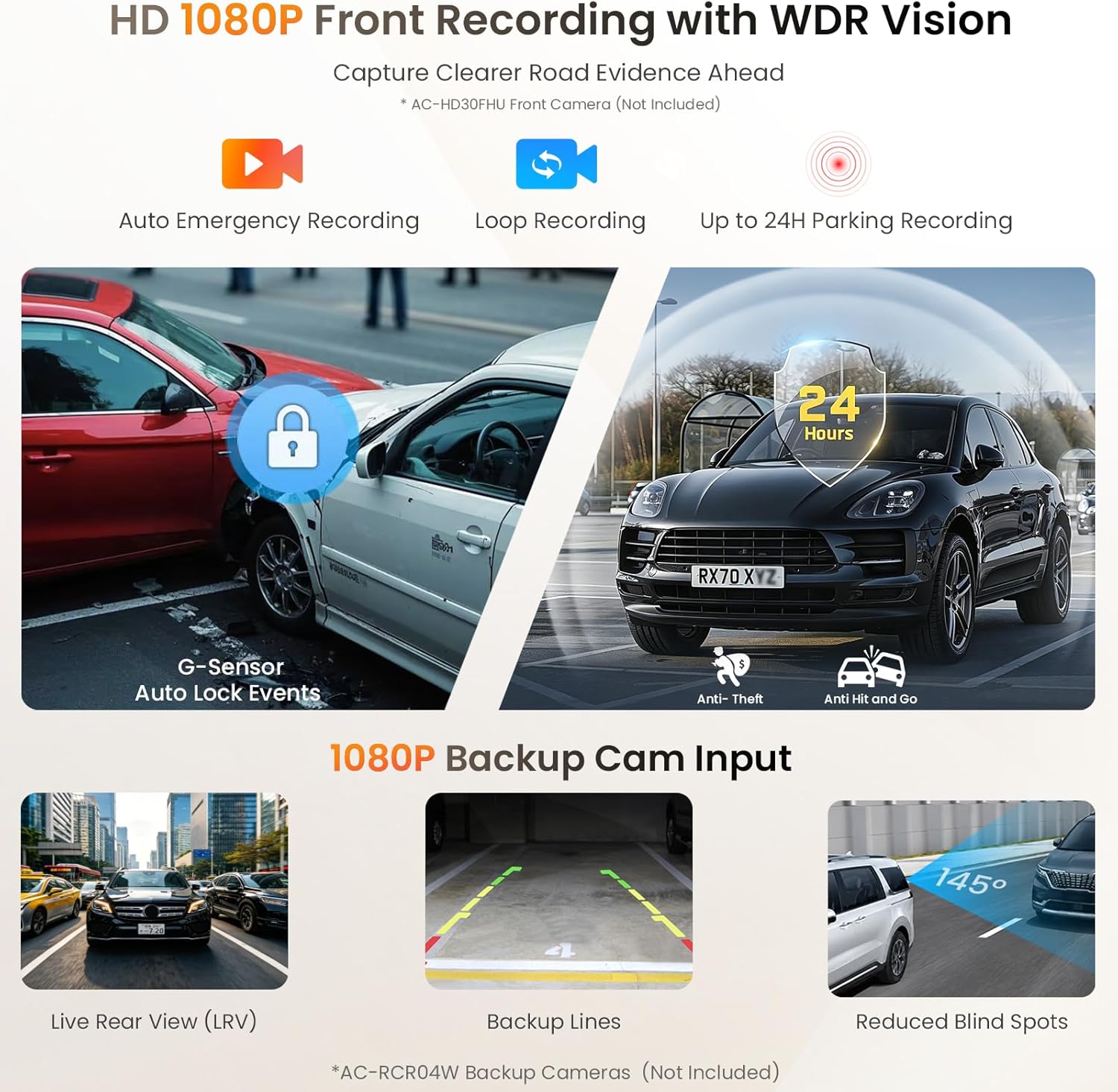
Image: The ATOTO S8 Gen4 screen displaying the Bluetooth IoT Hub control panel and the Bluetooth Screen Lock feature, which automatically locks and unlocks the unit based on phone proximity.
OBD Scanner Integration
When connected to an optional OBD2 scanner (e.g., ATOTO AC-4450), the unit can display real-time vehicle status data, including fuel insights, OBD code interpretation, live engine parameters, and clear diagnostic codes. Speed threshold notifications are also available via OTA updates.

Image: The ATOTO S8 Gen4 display showing vehicle status data from an OBD scanner, with an illustration of the OBD2 scanner device.
Official Product Video
Video: An official product video from AutoSmartHK demonstrating the 11.5-inch Android Radio, highlighting its dual DVR inputs and 24-hour parking recording capabilities.
Maintenance
Software Updates
The ATOTO S8 Gen4 supports Over-The-Air (OTA) updates to enhance system stability, functionality, and introduce new features. Connect the unit to a Wi-Fi network to check for and install available updates directly on the device. No additional tools are required.
Cleaning the Screen
To clean the 2K QLED touchscreen, gently wipe it with a soft, lint-free cloth. For stubborn smudges, slightly dampen the cloth with water or a screen-safe cleaning solution. Avoid using harsh chemicals, abrasive materials, or excessive moisture, as these can damage the display.
General Care
Protect the unit from extreme temperatures and direct sunlight for prolonged periods. Ensure proper ventilation around the unit to prevent overheating. Avoid placing heavy objects on the screen or applying excessive pressure.
Troubleshooting
Common Issues and Solutions
- Screen Blocking Controls: If the screen obstructs vehicle controls, re-evaluate the installation position. The included bracket offers some adjustability. Ensure sufficient clearance during initial installation.
- Wireless Android Auto/CarPlay Glitches: If wireless connectivity is inconsistent, ensure a strong Wi-Fi signal. Restarting both the head unit and your smartphone can often resolve temporary issues. Verify that the head unit's software is up to date.
- Low Subwoofer Output: If the subwoofer output lacks power, consider adding an external line driver to amplify the signal before it reaches the subwoofer amplifier.
- Screen Fogging/Stripes: If the screen develops fogging or stripes, this may indicate a hardware issue. Contact ATOTO customer service for assistance.
- SIM Card Activation Issues: Some carriers may have specific requirements for activating SIM cards in non-phone devices. If you encounter activation problems, contact your cellular provider for support.
- Google Maps Outdated: Ensure the Google Maps application is updated to the latest version via the Google Play Store or ATOTO's FindApps store.
- Speed-Dependent Volume Control Not Working: Verify that the GPS antenna is properly connected and receiving a signal. This feature relies on accurate speed data from GPS.
- Bluetooth Audio Behavior: If Bluetooth audio does not automatically resume or lacks a dedicated widget, check the system settings for customization options. Some behaviors may be fixed by design and not user-configurable.
For more detailed troubleshooting or issues not covered here, please refer to the comprehensive online manual or contact ATOTO customer support.
Specifications
| Brand | ATOTO |
| Model Number | S84G215PB |
| Display | 11.5" 2K QLED Touchscreen (2000x1200 resolution) |
| Processor | Octa-core 12nm SoC (up to 2.2GHz) |
| Memory | 4GB RAM + 64GB ROM |
| Operating System | Android 13 |
| Connectivity Technology | 4G LTE, Auxiliary, Bluetooth, USB, Wi-Fi |
| Controller Type | Android |
| Audio Features | 32 Band EQ DSP, Premium Audio with 4V Pre-Outs, Optical/Coaxial Out |
| Special Features | Dual Knobs, Driverchat AI & AI Vision, Supports Front/Rear Dash Recording, TrackHU GPS Tracking |
| Compatible Devices | Amplifier, Smartphone, Speaker |
| Supported Internet Services | Hulu, Netflix, Pandora, Prime Video, YouTube |
Warranty and Support
Warranty Coverage
The ATOTO S8 Gen4 comes with a standard 12-month warranty from the date of purchase. An additional 6 months of coverage can be obtained by communicating with ATOTO within 30 days of purchase, extending the total warranty period to 18 months. This warranty covers manufacturing defects and ensures product care.
Customer Support
ATOTO provides a responsive support team available around the clock on workdays. For assistance, you can refer to the online manual quick guide by scanning the QR code on the product box or visiting the eproductcare platform. You can also contact support directly via email at support@atotoglobal.com or through your order center.


