
Introduction
Welcome to the user manual for your Fastrack StreetStyle 6.0 Analog-Digital Watch, Model 38134PP03W. This timepiece combines classic analog timekeeping with modern digital functionalities, designed for durability and comfort. Please read these instructions carefully to understand the features and ensure proper use and maintenance of your watch.
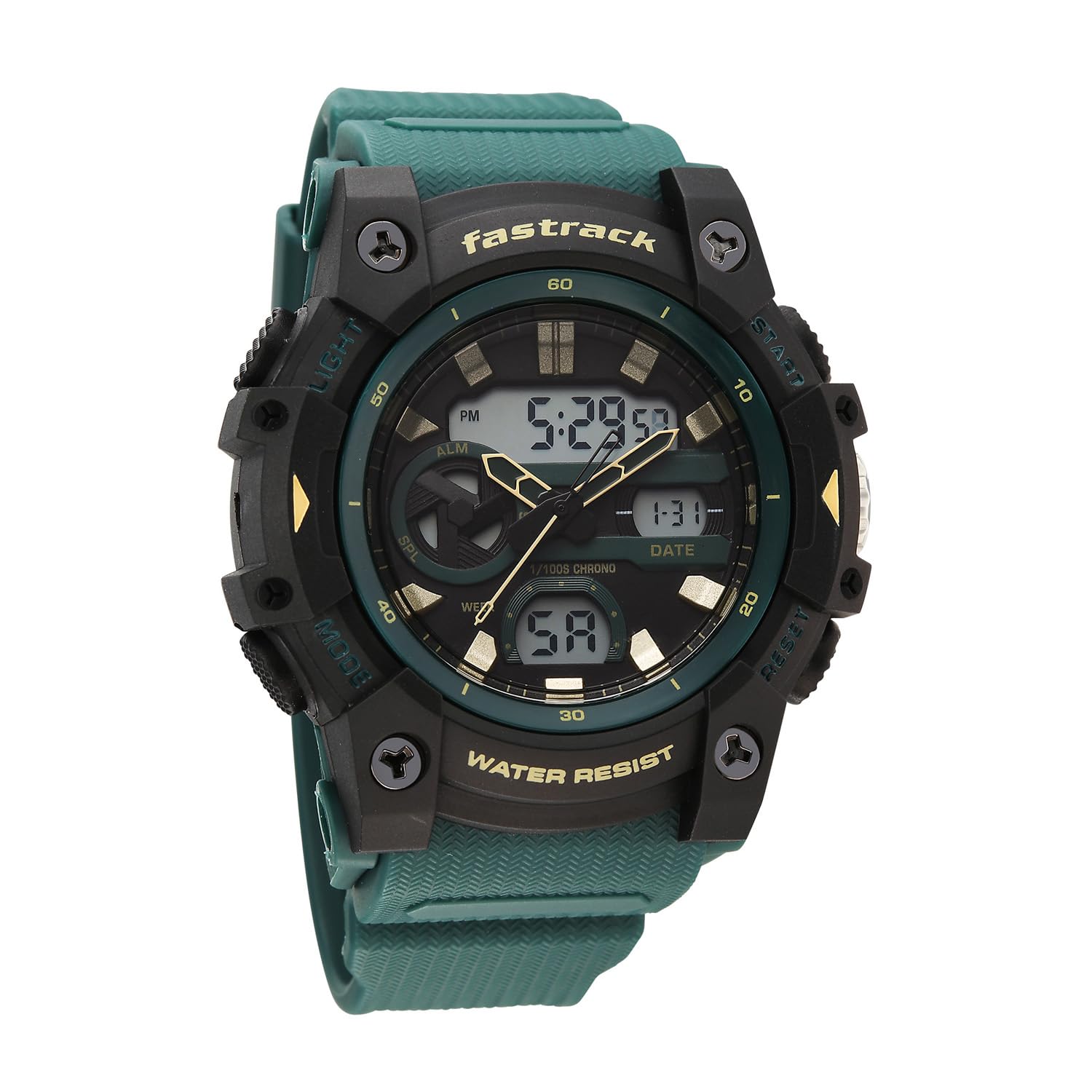
Image: Front view of the Fastrack StreetStyle 6.0 Analog-Digital Watch, showcasing its green dial and polyether strap.
Setup
1. Setting Analog Time
- Pull the crown (located on the right side of the watch case) outwards to the first click position.
- Rotate the crown to adjust the hour and minute hands to the desired time.
- Once the correct time is set, push the crown back into its original position to start the analog movement.

Image: Side view of the watch, highlighting the crown and function buttons for setting adjustments.
2. Setting Digital Time and Date
Your watch features four buttons: LIGHT (top left), MODE (bottom left), START (top right), and RESET (bottom right).
- Press the MODE button repeatedly until the digital time display starts flashing, indicating it is in setting mode.
- Use the RESET button to cycle through the settings (seconds, hour, minute, month, date, day).
- Use the START button to adjust the selected value (increase the number).
- Press the MODE button again to exit the setting mode and save your changes.
3. Strap Adjustment
The watch comes with a polyether strap and a buckle clasp. Adjust the strap by inserting the pin into the appropriate hole that provides a comfortable and secure fit on your wrist.
Operating Instructions
1. Digital Display Modes
Press the MODE button to cycle through the various digital display modes:
- Time Display: Shows current digital time (hours, minutes, seconds) and day of the week.
- Date Display: Shows month and date.
- Alarm Mode: Allows setting and activating an alarm.
- Stopwatch Mode: For measuring elapsed time. Use START to begin/pause and RESET to clear.
2. Backlight Function
Press the LIGHT button (top left) to illuminate the digital display for better visibility in low-light conditions. The backlight will remain on for a few seconds.
3. Water Resistance
This watch is water-resistant up to 50 meters (5 ATM). This means it is suitable for everyday use and can withstand splashes, rain, and brief immersion in water. It is not recommended for swimming, diving, or prolonged water activities.
- Do not operate the crown or buttons while the watch is submerged in water.
- Avoid exposing the watch to hot water, steam, or extreme temperature changes, as this can compromise the water resistance seals.
Maintenance
1. Cleaning Your Watch
To maintain the appearance of your watch, wipe the case and strap regularly with a soft, dry cloth. For stubborn dirt, a slightly damp cloth can be used, followed by drying thoroughly. Avoid using chemical cleaners or abrasive materials.
2. Battery Replacement
The watch is powered by a quartz movement, which requires a battery. When the watch stops or the digital display becomes dim, it indicates a low battery. Battery replacement should be performed by a qualified watch technician to ensure the water resistance seal is properly maintained.

Image: Back view of the watch, showing the stainless steel case back and water resistance marking.
3. Storage
When not in use, store your watch in a cool, dry place away from direct sunlight, extreme temperatures, and strong magnetic fields.
Troubleshooting
- Analog hands not moving: Check if the crown is pushed in completely. If it is, the battery may be depleted.
- Digital display is blank or dim: The battery may be low or depleted.
- Digital time is incorrect: Re-enter the setting mode and adjust the time and date as described in the "Setup" section.
- Water inside the watch: Immediately take the watch to a service center. Do not attempt to open it yourself.
Specifications

Image: Watch dimensions, showing case size of 45mm.
| Feature | Detail |
|---|---|
| Model Number | 38134PP03W |
| Display Type | Analog-Digital |
| Movement Type | Quartz |
| Water Resistance Depth | 50 Metres (5 ATM) |
| Band Material | Polyurethane |
| Crystal Material | Acrylic |
| Case Diameter | 56.4 Millimetres (approx. 45mm case size as per image) |
| Case Thickness | 18 Millimetres |
| Band Colour | Green |
| Dial Colour | Green |
| Clasp Type | Buckle |
| Weight | 200 Grams |
Warranty Information
Your Fastrack StreetStyle 6.0 watch is covered by a manufacturer's warranty. Please refer to the warranty card included with your purchase for specific terms, conditions, and duration of coverage. The warranty typically covers manufacturing defects under normal use. Damage resulting from improper handling, accidents, unauthorized repairs, or normal wear and tear may not be covered.
Support & Contact
For service, repairs, or any inquiries regarding your Fastrack watch, please contact the manufacturer directly or visit an authorized service center.
Manufacturer: Titan Company Limited
Address: #3, Sipcot Industrial Complex, Hosur, Tamil Nadu - 635126, India
Please retain your purchase receipt and warranty card for any service claims.