
Introduction
This manual provides essential instructions for the safe and effective use of your Thule Hitching Post Pro 9034Pro 4-Bike Hanging Hitch Rack Carrier. Please read all instructions carefully before installation and operation to ensure proper function and safety.
Safety Information
- Always ensure the hitch rack is securely attached to your vehicle's hitch receiver before loading bikes or driving.
- Do not exceed the maximum load capacity of 140 pounds or 4 bikes.
- Verify that all bikes are properly secured to the rack using the provided cradles and straps.
- Be aware of the increased length and width of your vehicle when the rack and bikes are installed, especially when backing up or maneuvering in tight spaces.
- Regularly inspect the rack for any signs of wear, damage, or loose components. Do not use if damaged.
- Keep hands and clothing clear of moving parts when folding or tilting the rack.
- Adhere to all local traffic laws and regulations regarding vehicle extensions and visibility of license plates and taillights.
Package Contents
Verify that all components are present before beginning installation:
- Thule Hitching Post Pro 4-Bike Hitch Rack
- Hitch pin and clip
- Instruction manual (this document)
Setup and Installation
The Thule Hitching Post Pro is designed for universal fit with both 1.25-inch and 2-inch hitch receivers.
- Insert into Hitch Receiver: Slide the rack's shank into your vehicle's hitch receiver. Ensure the hitch pin holes align.
- Secure with Hitch Pin: Insert the provided hitch pin through the aligned holes and secure it with the clip. Pull on the rack to confirm it is firmly seated and does not wobble excessively.
- Raise Bike Arms: Lift the bike carrying arms into the horizontal position until they lock into place.
- Initial Inspection: Before loading bikes, perform a visual check to ensure all parts are secure and the rack is stable.
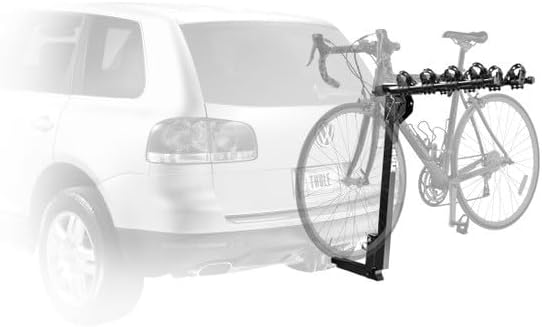
Image: The Thule Hitching Post Pro bike rack securely installed on a vehicle's hitch receiver, carrying two bicycles. This illustrates the rack in its operational, upright position.
Operating Instructions
Loading Bikes
- Prepare Cradles: Ensure the compact cradles and straps on the bike arms are ready to receive bike frames.
- Lift and Place Bike: Carefully lift each bike and place its top tube onto the cradles. The dual-arm design accommodates various bike sizes and frame styles.
- Secure Bikes: Use the integrated straps to firmly secure each bike frame to the cradles. Ensure bikes are stable and do not swing or make contact with each other or the vehicle.
- Check Clearance: Verify adequate ground clearance and clearance from the vehicle's exhaust.
Vehicle Access (Tilting Feature)
The rack features a convenient tilt-down mechanism for easy access to your vehicle's rear cargo area, even with bikes loaded.
- Release Tilt Mechanism: Locate the tilt release pin or lever at the base of the rack. Follow the specific instructions in your product's quick-start guide for safe release.
- Tilt Rack Down: Carefully tilt the entire rack assembly, with or without bikes, away from the vehicle until it rests in the tilted position.
- Access Cargo: Open your vehicle's trunk or hatch.
- Return to Upright: When finished, lift the rack back into its upright position until it locks securely. Confirm the locking mechanism is engaged before driving.
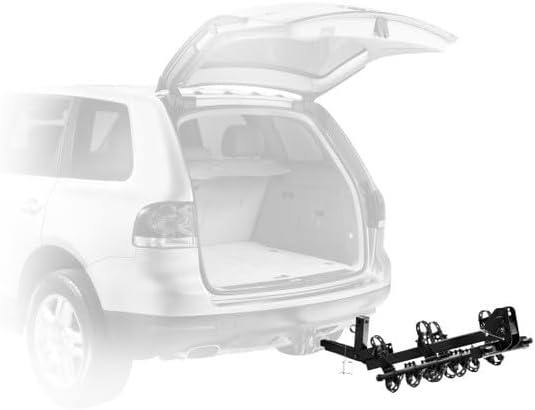
Image: The Thule Hitching Post Pro bike rack in its tilted-down position, providing clear access to the vehicle's rear cargo area. This demonstrates the rack's convenient vehicle access feature.
Folding Bike Arms
When not carrying bikes, the arms can be folded down to reduce the rack's profile.
- Remove Bikes: Ensure all bikes are removed from the rack.
- Release Arm Lock: Locate the arm release mechanism (usually a pin or lever) at the base of the bike arms.
- Fold Arms Down: Carefully lower the bike arms until they are in the vertical, folded position. Ensure they lock into place.
Maintenance
- Cleaning: Clean the rack regularly with mild soap and water to remove dirt, road grime, and salt. Rinse thoroughly and dry.
- Inspection: Periodically inspect all bolts, pins, straps, and welds for tightness, wear, or damage. Replace any worn or damaged parts immediately.
- Lubrication: Apply a small amount of silicone spray or light grease to moving parts, such as the tilt mechanism and arm folding joints, to ensure smooth operation.
- Storage: When not in use, store the rack in a dry place to prevent corrosion and prolong its lifespan.
Troubleshooting
- Rack Wobbles in Hitch: Ensure the hitch pin is fully inserted and secured. For some hitches, an anti-wobble device (often sold separately) may be necessary to minimize movement.
- Bikes Not Secure: Verify that all bike frame straps are tightly fastened around the bike frames and cradles. Adjust bike positioning if necessary to achieve a snug fit.
- Difficulty Tilting Rack: Check for obstructions. Ensure the tilt release pin/lever is fully disengaged. Lubricate moving parts if stiffness persists.
- Bike Arms Not Folding: Ensure no bikes are loaded. Check that the arm release mechanism is fully engaged. Lubricate the pivot points if necessary.
Specifications
| Model Number | 9034Pro |
| Brand | Thule |
| Capacity | 4 Bikes |
| Load Capacity | 140 Pounds (63.5 kg) |
| Hitch Receiver Compatibility | 1.25 inch and 2 inch |
| Material | Powder Coated Steel, Aluminum |
| Color | Black |
| Foldable | Yes |
Warranty Information
The Thule Hitching Post Pro 9034Pro is covered by a Limited Lifetime Warranty. This warranty covers defects in materials and workmanship for the original purchaser. For full details regarding warranty terms, conditions, and claim procedures, please refer to the official Thule website or contact Thule customer support directly.
Customer Support
If you have any questions, require assistance with installation, or need to troubleshoot an issue not covered in this manual, please contact Thule customer support. Visit the official Thule website for contact information, FAQs, and additional resources.
Online Resources: www.thule.com


