
1. Product Overview
The Topsky AV-326BT is a versatile HiFi power home amplifier designed for various audio applications, including home entertainment, karaoke, and events. It features Bluetooth connectivity, multiple microphone inputs, USB playback, and a remote control for convenient operation. This manual provides detailed instructions for setup, operation, and maintenance.
Key Features:
- High-quality sound reproduction with advanced chip technology.
- Rated voltage: 110V 50/60Hz. Max output: 300W + 300W.
- Noise reduction technology for clear audio.
- Full-function infrared remote control.
- Dual microphone inputs with independent volume, echo, and delay controls, suitable for karaoke.
- Wide range of applications: karaoke, concerts, meetings, parties, and more.
- USB and SD/MMC card playback.
- Built-in EQ for sound adjustment.
2. Safety Instructions
- Read all instructions carefully before operating the device.
- Do not expose this appliance to rain or moisture to prevent fire or shock hazards.
- Do not open the amplifier casing. There are no user-serviceable parts inside. Refer all servicing to qualified personnel.
- Ensure proper ventilation. Do not block ventilation openings.
- Use only the specified power supply (AC 110V 50/60Hz).
- Keep the unit away from heat sources, direct sunlight, and strong magnetic fields.
- Disconnect the power plug from the wall outlet if the unit is not used for a long period.
- Do not overload the amplifier. Ensure speaker impedance is within the recommended range (4-16Ω).
3. Package Contents
Please check that all items are present:
- Topsky AV-326BT Amplifier Unit
- Remote Control
- User Manual (this document)
4. Component Identification
Front Panel Controls:
Refer to the image below for a visual guide to the front panel controls.

Image: Front panel of the Topsky AV-326BT amplifier, showing various knobs, buttons, and input ports.
- MIC1-MIC4 Inputs: 6.35mm microphone input jacks.
- MIC VOL: Adjusts the overall volume of the microphones.
- TREBLE, MID, BASS (MIC): Tone controls for microphone audio.
- ECHO, DELAY: Adjusts the echo and delay effects for microphones.
- POWER: Main power switch (ON/OFF).
- LED DISPLAY: Shows current mode, track number, or time.
- SD/MMC CARD: Slot for SD or MMC memory cards.
- USB: USB port for playing audio from USB drives.
- INPUT: Selects the audio input source (e.g., Bluetooth, USB, AUX).
- MUSIC VOL: Adjusts the overall music volume.
- EQ Sliders: 10-band graphic equalizer for fine-tuning audio frequencies.
- BT Indicator: Lights up when Bluetooth is active.
Rear Panel Connections:
The rear panel typically includes speaker outputs, audio input/output jacks, and the power input. (Specific image for rear panel not available, refer to general product images for typical connections).
- Speaker Outputs: Connect your passive speakers here. Ensure correct polarity (+/-).
- Audio Input (RCA/AUX): Connect external audio sources like CD players, TVs, or other devices.
- Power Input: Connect the AC 110V power cable.
5. Setup
5.1 Power Connection
- Ensure the amplifier's power switch is in the OFF position.
- Connect the power cable to the AC 110V power input on the rear panel of the amplifier.
- Plug the other end of the power cable into a standard 110V AC wall outlet.
5.2 Speaker Connection
- Identify the positive (+) and negative (-) terminals on your speakers and on the amplifier's speaker outputs.
- Connect the positive (+) terminal of your speaker to the positive (+) terminal of the amplifier's speaker output.
- Connect the negative (-) terminal of your speaker to the negative (-) terminal of the amplifier's speaker output.
- Repeat for all speakers. Ensure all connections are secure and correct to prevent damage.
5.3 Audio Input Connection
The amplifier supports various audio input methods:

Image: Diagram illustrating various connectivity options for the amplifier, including Bluetooth devices and external audio output devices (speakers).
5.3.1 Bluetooth Connection
- Power on the amplifier.
- Press the INPUT button on the front panel or remote control to select the Bluetooth (BT) input mode. The LED display will show "BT" or a similar indicator.
- On your Bluetooth device (smartphone, tablet, laptop), enable Bluetooth and search for available devices.
- Select "AV-326BT" (or similar name) from the list of devices to pair.
- Once paired, you can play audio from your device through the amplifier.

Image: The amplifier highlighting its wireless Bluetooth functionality.
5.3.2 USB/SD/MMC Card Playback
- Insert a USB flash drive or an SD/MMC card containing audio files into the respective port/slot on the front panel.
- Press the INPUT button to select USB or CARD mode. The amplifier will automatically detect and start playing audio files.
- Use the playback controls (Play/Pause, Next/Previous Track) on the front panel or remote control.

Image: Close-up of the USB socket on the amplifier, indicating its use for playing songs from a U disk.
5.3.3 AUX/RCA Input
- Connect your external audio source (e.g., CD player, TV, DVD player) to the RCA/AUX input jacks on the rear panel using appropriate audio cables.
- Press the INPUT button to select the AUX input mode.
5.4 Microphone Connection
- Plug your microphones into the MIC1, MIC2, MIC3, or MIC4 input jacks on the front panel.
- The amplifier supports up to four microphones simultaneously.

Image: The amplifier highlighting its dual microphone input capability, suitable for karaoke events with multiple users.
6. Operating Instructions
6.1 Power On/Off
Press the POWER switch on the front panel to turn the amplifier ON or OFF.
6.2 Volume Control
- MUSIC VOL: Rotate this knob to adjust the overall volume of the music playback.
- MIC VOL: Rotate this knob to adjust the overall volume of the microphones.
6.3 Input Selection
Press the INPUT button on the front panel or remote control to cycle through available input sources (Bluetooth, USB, SD/MMC, AUX).
6.4 Microphone Effects
Use the TREBLE, MID, BASS, ECHO, and DELAY knobs in the microphone section to customize the sound and effects for your microphones.
6.5 Equalizer (EQ) Adjustment
Use the 10-band graphic EQ sliders to fine-tune the frequency response of the audio output. Adjust the sliders to boost or cut specific frequency ranges to match your listening preference or room acoustics.
6.6 Remote Control Usage
The included remote control provides full functionality for convenient operation from a distance.

Image: The infrared remote control for the Topsky AV-326BT amplifier, allowing full-function control.
Functions typically include:
- Power ON/OFF
- Input Source Selection
- Volume Up/Down (Music and Microphone)
- Mute
- Playback Controls (Play/Pause, Next/Previous Track for USB/SD)
- EQ Presets (if available)
7. Maintenance
7.1 Cleaning
- Wipe the exterior of the amplifier with a soft, dry cloth.
- Do not use abrasive cleaners, waxes, or solvents as they may damage the finish.
- Ensure ventilation openings are free from dust and debris.
7.2 Storage
If storing the amplifier for an extended period, disconnect it from power, clean it, and store it in a cool, dry place away from direct sunlight and extreme temperatures.
8. Troubleshooting
| Problem | Possible Cause | Solution |
|---|---|---|
| No power | Power cable not connected; Power outlet faulty; Power switch off. | Check power cable connection; Try a different outlet; Ensure power switch is ON. |
| No sound output | Incorrect input selected; Volume too low; Speaker cables loose/incorrectly connected; Mute function active. | Select correct input; Increase MUSIC VOL; Check speaker connections; Deactivate mute. |
| Bluetooth not pairing | Amplifier not in BT mode; Device too far; Bluetooth already paired to another device. | Ensure amplifier is in BT mode; Move device closer; Disconnect from other devices and try again. |
| Microphone not working | MIC VOL too low; Microphone faulty; Microphone not fully plugged in. | Increase MIC VOL; Test with another microphone; Ensure microphone is securely plugged in. |
| Distorted sound | Volume too high; Speaker impedance mismatch; Faulty audio source. | Reduce volume; Check speaker impedance (4-16Ω); Test with a different audio source. |
9. Specifications

Image: The Topsky AV-326BT amplifier with its dimensions (29 x 24 x 10 cm) and remote control shown.
| Feature | Detail |
|---|---|
| Model Number | AV-326BT |
| Brand | Topsky |
| Rated Voltage | AC 110V 50/60Hz |
| Rated Output Power | 150W + 150W |
| Maximum Output Power | 300W + 300W |
| Distortion Rate | 0.5% |
| Impedance | 4-16Ω |
| Signal-to-Noise Ratio (SNR) | 90dB |
| Product Dimensions (L x W x H) | 29 x 24 x 10 cm (11.4 x 9.45 x 3.94 inches) |
| Product Weight | 2.9 kg |
| Connectivity | Bluetooth, USB, SD/MMC Card, AUX/RCA |
| Microphone Inputs | 4 (6.35mm jacks) |
| Included Accessories | Remote Control |
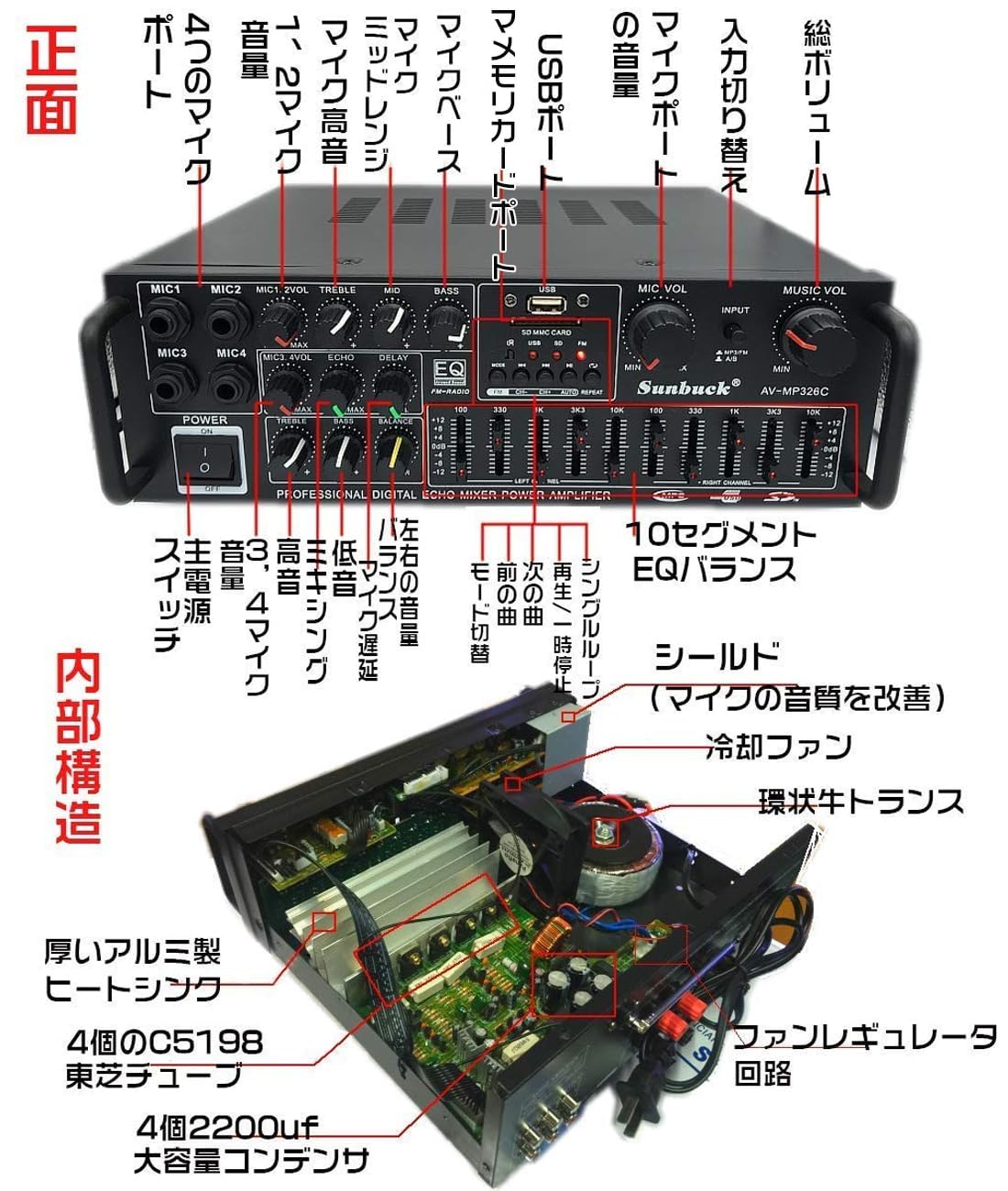
Image: Internal view of the Topsky AV-326BT amplifier, showing components like a toroidal transformer, cooling fan, heatsink, and capacitors, indicating robust design.
10. Warranty and Support
This product comes with a standard manufacturer's warranty. Please refer to the warranty card included in your package for specific terms and conditions. For technical support, troubleshooting assistance, or warranty claims, please contact your retailer or the manufacturer directly.
Keep your purchase receipt as proof of purchase for warranty purposes.