
1. Important Safety Instructions
Please read all instructions carefully before using this appliance and retain for future reference. Always follow basic safety precautions to reduce the risk of fire, electric shock, or injury.
- This appliance is for indoor use only.
- Ensure the power supply matches the rating label on the unit.
- Do not operate the unit with a damaged cord or plug.
- Keep the unit at least 50 cm away from walls or other objects to ensure proper airflow.
- Do not block air outlets or inlets.
- Always unplug the unit before cleaning or servicing.
- Do not use in wet environments like bathrooms or laundries.
- The appliance contains R290 refrigerant. Do not puncture or burn.
- Supervise children and ensure they do not play with the appliance.
2. Product Overview
2.1 Included Components
Carefully unpack your portable air conditioner and check that all items are present:
- 1 x Portable Air Conditioner Unit
- 1 x Exhaust Hose
- 1 x Air Outlet Duct Connector
- 1 x Window Exhaust Adapter
- 1 x Sealing Plate (for window kit)
- 1 x Remote Control
- 1 x User Manual
2.2 Key Features
- 5-in-1 Functionality: Cooling, Heating, Fan, Dehumidifier, and Automatic modes for year-round comfort.
- High Capacity: 14000 BTU (ASHRAE) cooling and 11000 BTU heating capacity.
- Wide Coverage: Suitable for rooms up to 65m².
- Adjustable Settings: 3 fan speeds and temperature range from 15°C to 31°C.
- Quiet Operation: Noise level below 54 dB.
- Smart Control: Wi-Fi connectivity for smart app control and a convenient remote control.
- Sleep Mode & Timer: Features a 24-hour timer and a dedicated sleep mode for undisturbed rest.
- Portability: Equipped with 4 universal wheels and 2 integrated handles for easy movement.
- Easy Maintenance: Removable and washable air filter.

Figure 2.1: Main unit of the GOPLUS Portable Air Conditioner. This image shows the overall design of the unit, highlighting its compact and portable nature with integrated handles and wheels.
3. Setup
3.1 Unpacking
Remove the unit from its packaging. Keep the packaging materials for future storage or transport. Ensure all components listed in Section 2.1 are present and undamaged.
3.2 Window Kit Installation
The included window kit is designed for most vertical or horizontal sliding windows. Follow these steps to install:
- Adjust the sealing plate to fit your window opening (60-120 cm width/height).
- Secure the sealing plate in the window frame.
- Attach the window exhaust adapter to the opening in the sealing plate.

Figure 3.1: Illustration of the window kit installation process for both vertical and horizontal sliding windows. This image demonstrates how to properly secure the exhaust hose adapter in various window types.
3.3 Exhaust Hose Connection
Connect the exhaust hose to the air outlet duct connector on the back of the unit. Then, connect the other end of the exhaust hose to the window exhaust adapter installed in your window. Ensure all connections are secure to prevent air leakage.
4. Operating Instructions
4.1 Control Panel
The unit features an LED touch panel for easy operation. Familiarize yourself with the buttons:
- ON/OFF: Powers the unit on or off.
- MODE: Cycles through Cooling, Heating, Fan, Dehumidifier, and Automatic modes.
- FAN: Adjusts fan speed (Low, Medium, High).
- TIMER: Sets the 24-hour on/off timer.
- SLEEP: Activates sleep mode for quiet operation.
- SWING: Controls the oscillation of the air outlet louvers.
- +/-: Adjusts temperature settings or timer duration.
4.2 Remote Control
The remote control provides convenient operation from a distance of up to 5 meters. It duplicates most functions available on the control panel.

Figure 4.1: Detailed view of the LED touch control panel and the remote control. This image illustrates the various buttons and display indicators for operating the unit.
4.3 Modes of Operation
The unit offers five primary operating modes:
- Cooling Mode: Provides powerful cooling with adjustable temperature (15°C-31°C) and fan speeds.
- Heating Mode: Delivers warmth with adjustable temperature and fan speeds.
- Fan Mode: Circulates air without cooling or heating. Fan speed is adjustable.
- Dehumidifier Mode: Removes excess moisture from the air, with a capacity of 36 liters per day.
- Automatic Mode: The unit automatically selects the appropriate mode (cooling, heating, or fan) based on the ambient room temperature.
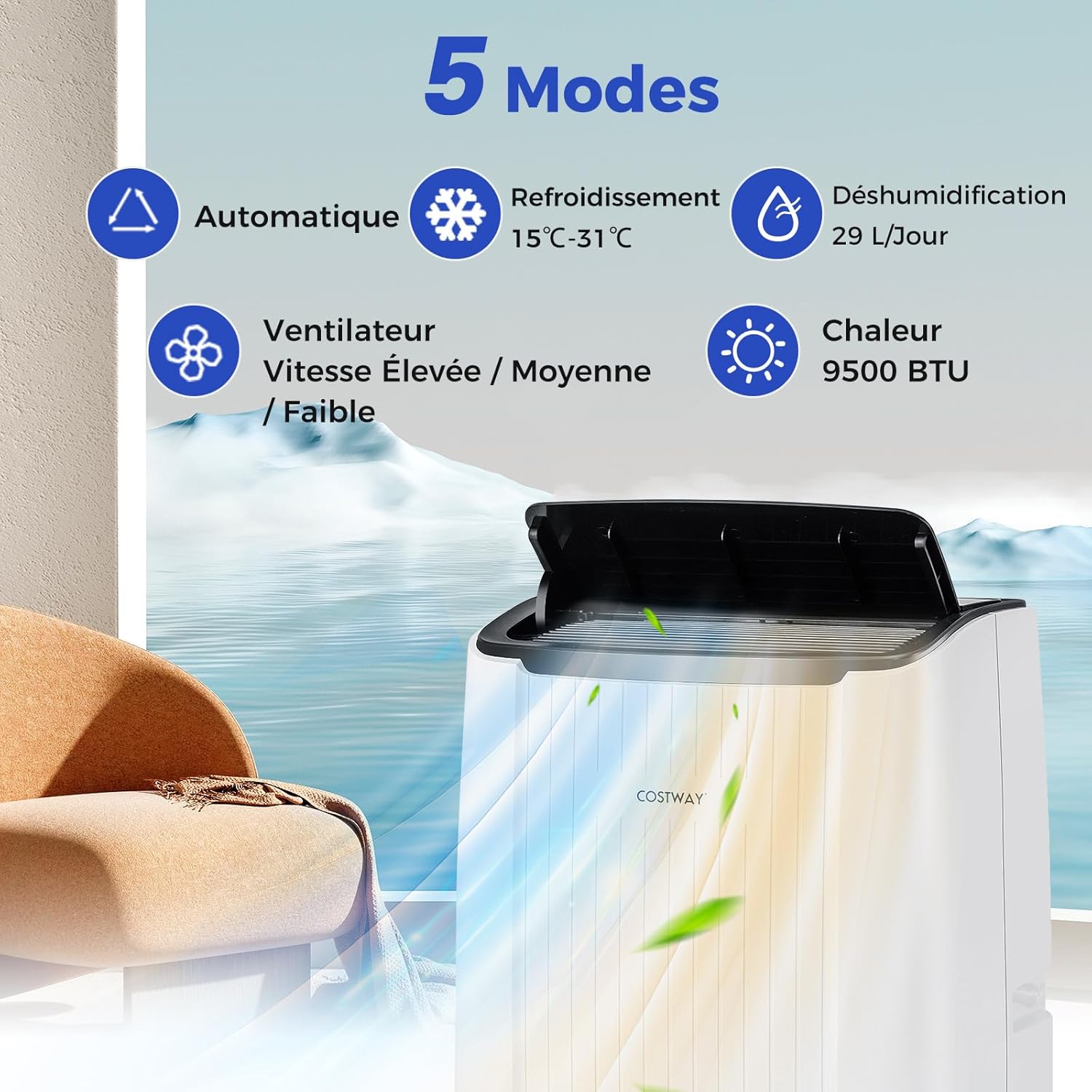
Figure 4.2: Visual representation of the five operating modes: Automatic, Cooling, Dehumidification, Fan, and Heat. This graphic helps users understand the different functions available.
4.4 Sleep Mode
Activate Sleep Mode for quieter operation and optimized temperature control during the night. In this mode, the unit maintains an optimal setpoint temperature at a low fan speed, ensuring a comfortable sleeping environment. This mode can be combined with the 24-hour timer.

Figure 4.3: Depiction of the Smart Sleep Mode, illustrating its low noise level (54 dB) and integration with the 24-hour timer for comfortable nighttime use.
4.5 Wi-Fi and Smart App Control
Connect your air conditioner to your home Wi-Fi network to control it remotely using a smart application on your smartphone. Refer to the specific instructions in the app for pairing and control functions.

Figure 4.4: Illustration of the smart app control feature, showing a smartphone connected to the air conditioner via Wi-Fi. This highlights the convenience of remote operation.
5. Maintenance
Regular maintenance ensures optimal performance and extends the lifespan of your appliance.
5.1 Filter Cleaning
The air filter should be cleaned every two weeks or more frequently depending on usage. A dirty filter reduces efficiency.
- Unplug the unit from the power outlet.
- Locate and remove the air filter from the back of the unit.
- Wash the filter with warm, soapy water. Rinse thoroughly.
- Allow the filter to air dry completely before reinserting it.
5.2 Drainage
The unit can be drained manually or set up for continuous drainage.
- Manual Drainage: When the internal water tank is full, the unit will stop operating and display an indicator. Place a shallow pan under the drain port and remove the drain plug to empty the water.
- Continuous Drainage: For continuous operation in high humidity or dehumidifier mode, attach the included drain hose (10 mm diameter) to the continuous drain port and direct it to a floor drain or suitable container.
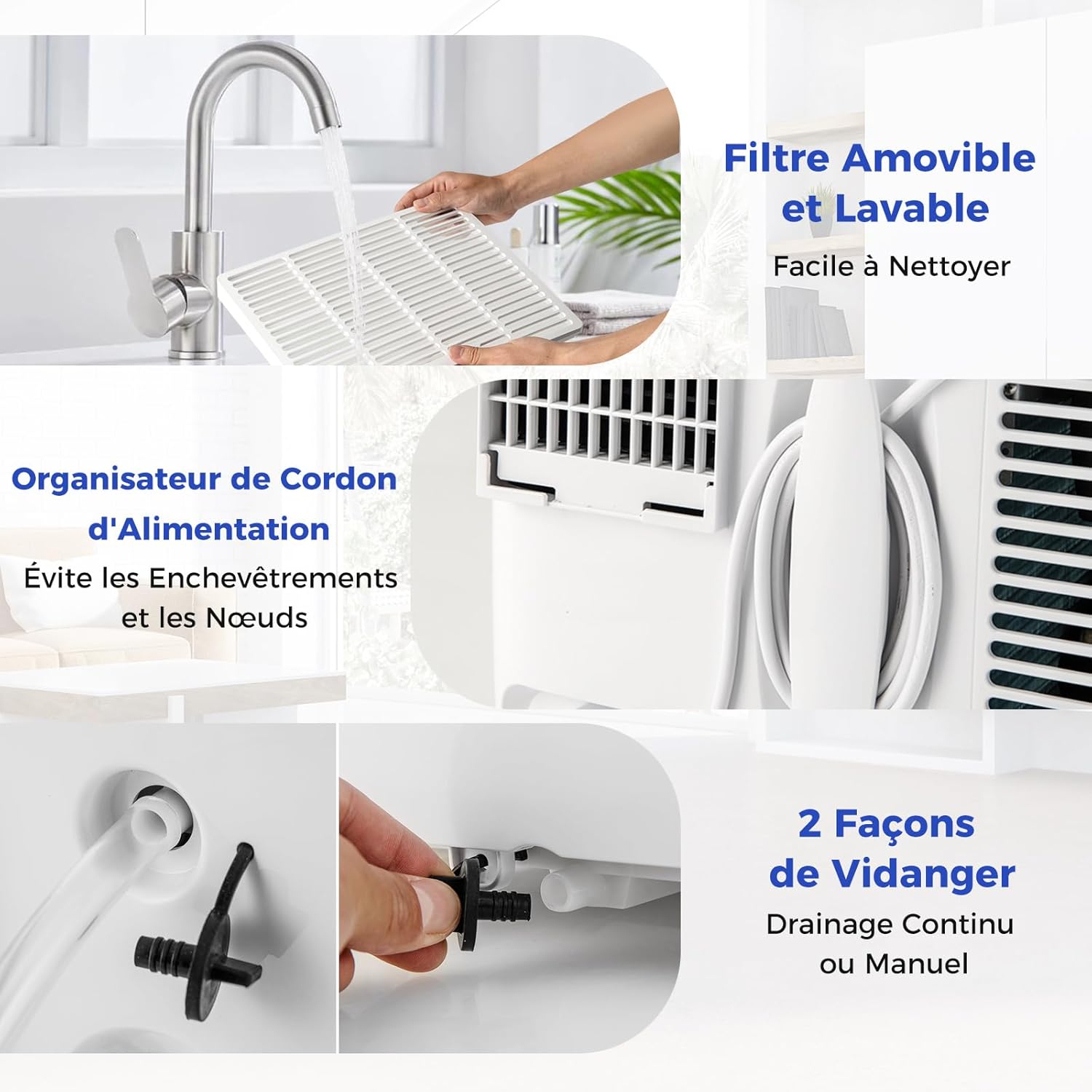
Figure 5.1: Instructions for cleaning the removable and washable air filter, and the two methods for draining water from the unit (continuous or manual drainage).
5.3 Storage
If the unit will not be used for an extended period:
- Drain all water from the unit.
- Clean the air filter.
- Run the unit in fan mode for a few hours to dry the interior.
- Unplug the power cord and wrap it neatly using the integrated cord organizer.
- Store the unit in a dry, cool place, preferably in its original packaging.
6. Troubleshooting
Before contacting customer support, please refer to the following table for common issues and solutions:
| Problem | Possible Cause | Solution |
|---|---|---|
| Unit does not turn on | No power supply; Power cord not plugged in; Fuse blown; Water tank full. | Check power outlet; Plug in power cord securely; Replace fuse; Empty water tank. |
| No cooling/heating | Air filter dirty; Room temperature too high/low for mode; Doors/windows open; Exhaust hose not properly installed. | Clean air filter; Adjust temperature setting; Close doors/windows; Ensure exhaust hose is sealed. |
| Unit is noisy | Unit not on a flat surface; Air filter dirty; Obstruction in fan. | Place on a flat, stable surface; Clean air filter; Check for and remove obstructions. |
| Water leakage | Drain plug loose; Continuous drain hose blocked or improperly connected. | Secure drain plug; Check continuous drain hose for blockages and proper connection. |
7. Specifications
| Specification | Value |
|---|---|
| Brand | GOPLUS |
| Model Number | GQ21695EF-XIFR-AG |
| Model Name | Climatiseur Mobile 14000BTU |
| Cooling Capacity (ASHRAE) | 14000 BTU |
| Cooling Capacity (SACC) | 9200 BTU |
| Heating Capacity | 11000 BTU |
| Dehumidification Capacity | 36 L/day |
| Coverage Area | 65 m² |
| Airflow | 400 m³/h |
| Voltage | 230 V / 50 Hz |
| Max Power Consumption | 4000 W |
| Noise Level | <54 dB |
| Temperature Range | 15°C to 31°C |
| Product Dimensions (D x W x H) | 31 x 41 x 71 cm |
| Product Weight | 31.5 kg |
| Control Method | Remote, Touch Panel, Wi-Fi App |
| Suitable Window Width/Height | 60-120 cm |
| Exhaust Hose Diameter | 15 cm |
| Exhaust Hose Length | 159 cm |
| Drain Hose Diameter (Continuous) | 10 mm |
| Drain Hose Length (Continuous) | 100 cm |
| Power Cord Length | 179 cm |
| Energy Efficiency Class | A |
8. Warranty and Support
For warranty information or technical support, please refer to the documentation provided at the time of purchase or contact your retailer. Keep your proof of purchase for warranty claims.