
Introduction
The UNIKOO N380 is a 4G LTE Push-to-Talk over Cellular (PoC) radio designed for nationwide communication. It utilizes cellular networks to provide stable, long-distance connectivity, making it suitable for business, logistics, security, and outdoor team communication. This manual provides essential information for setting up, operating, and maintaining your N380 radio.

Figure 1: UNIKOO N380 4G LTE PoC Radio overview, highlighting its nationwide unlimited range capability.
What's Included
The UNIKOO N380 package includes the following components:
- UNIKOO N380 Walkie Talkies (8 units)
- SIM cards (8 units, with 10 years of annual fees waived)
- Lithium-ion batteries (8 units, rechargeable)
- USB Cables (8 units)
- Charging Adapters (8 units)
- Belt Clips (8 units)
- Lanyards (8 units)
- User Manual (1 unit)
Key Features
- 4G Nationwide Cellular Connection: Provides stable, cross-state signal for long-distance communication.
- 10-Year Prepaid IoT SIM Service: Each radio includes an embedded IoT SIM with 10 years of cellular service, free of monthly or activation fees.
- Independent Self-Service Device Management: Allows users to set up devices and configure talk groups independently via a web platform.
- Encrypted Private Digital Network: Secures voice data and communication content, ensuring user ownership and control of accounts and groups.
- Noise Reduction Speaker: Built-in audio filter reduces background noise for clear sound quality.
- Large Capacity Battery: 3000mAh rechargeable battery supports extended continuous operation.
- 1.77-inch Color Screen: Digital display for clear visibility of channels, settings, and status.
- Water Resistant: Designed to withstand exposure to water.
Setup Guide
1. Battery and SIM Card Installation
Before first use, ensure the battery is fully charged and the SIM card is correctly installed. Open the battery compartment cover on the back of the radio. Insert the provided Lithium-ion battery and the IoT SIM card into their respective slots. Close the cover securely.
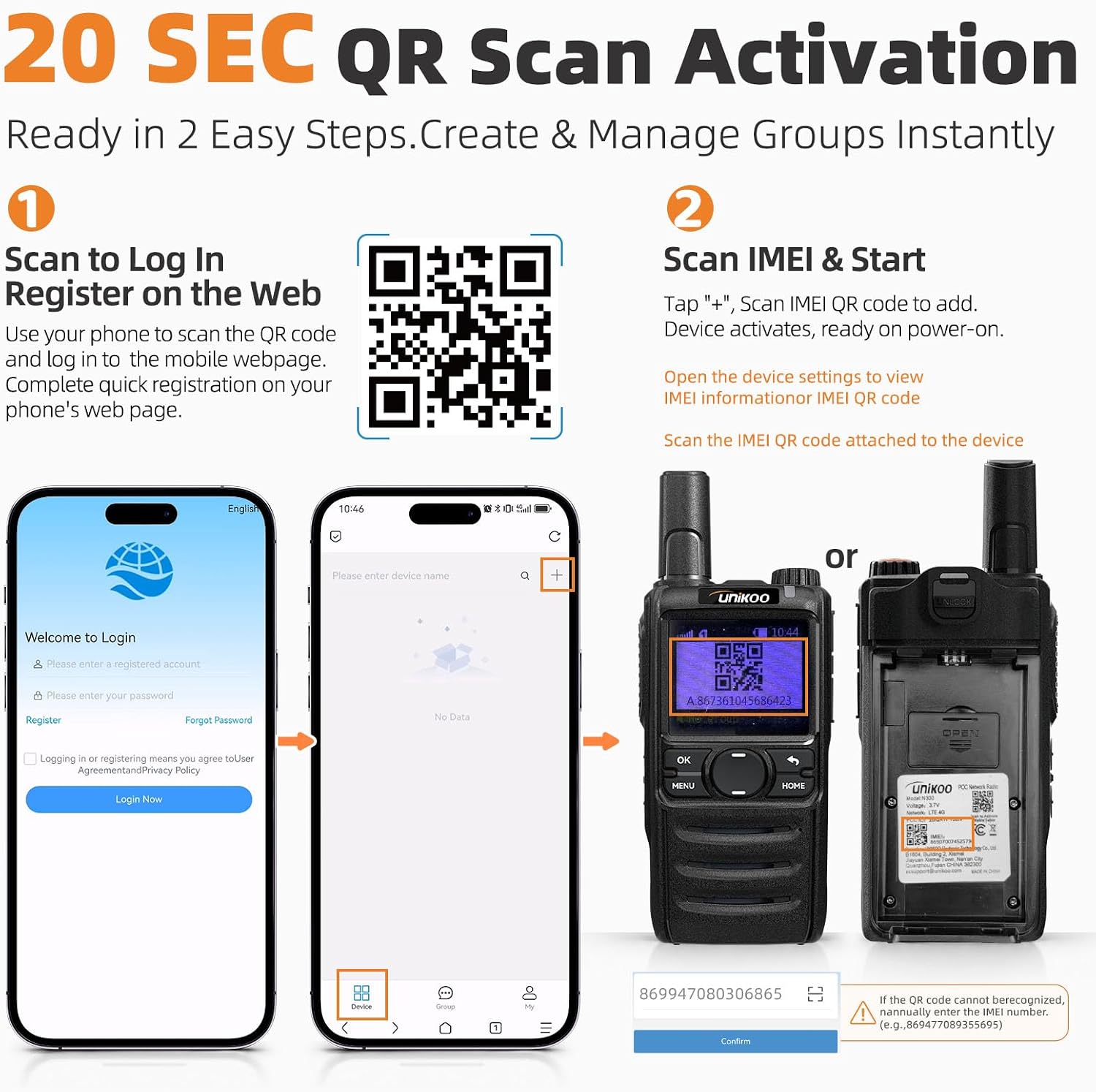
Figure 2: Rear view of the UNIKOO N380 radio, illustrating the location for SIM card and battery installation.
2. Device Activation and Account Management
The N380 radio features a 20-second self-activation process via a mobile web cloud platform. No app download is required.
- Scan to Log In: Use your smartphone to scan the QR code provided on the card inside the box or visit https://poc.unikoo.com/SCM. Register a new account or log in to the mobile webpage.
- Scan IMEI & Start: Once logged in, tap the "+" icon to add a device. Scan the IMEI QR code located on the face of the radio or inside the battery compartment. The device will activate and be ready for use upon power-on.

Figure 3: The UNIKOO N380 radio alongside the mobile web login interface for device registration and activation.
3. Group Configuration
The web platform allows for customized talk group configuration. You can add devices and adjust group permissions to streamline team operations. This independent management ensures full ownership and control over your communication network.

Figure 4: The UNIKOO N380 radio operating within a private and secure communication network, illustrating its use by various professionals.
Operating Instructions
1. Power On/Off
To power on or off the radio, press and hold the power key (usually located on the top or side) for approximately 3 seconds. A short press of the power key will wake or sleep the screen.
2. Basic Communication
To transmit your voice, press and hold the Push-to-Talk (PTT) button located on the side of the radio. Speak clearly into the microphone. Release the PTT button to listen. Ensure you are in the correct talk group for your intended recipients. The 1.77-inch color screen displays current group information and signal status.

Figure 5: The UNIKOO N380 radio maintaining connectivity across diverse environments, including urban areas, large buildings, and outdoor sites.
3. Using Product Features
The following videos provide detailed demonstrations of the UNIKOO N380's features and operational aspects.
Video 1: Detailed demonstration of the UNIKOO N380 radio's various product features and functionalities.
Video 2: Overview of the UNIKOO N380 radio's key product features and how they enhance communication.
Maintenance
1. Battery Charging
Charge the radio using the provided USB cable and charging adapter. Ensure the radio is powered off during charging for optimal battery life. The 3000mAh battery provides approximately 3 days of typical use or 8 days of standby time.
2. Cleaning and Storage
Clean the radio's exterior with a soft, damp cloth. Avoid using harsh chemicals or abrasive cleaners. Store the radio in a cool, dry place away from direct sunlight and extreme temperatures when not in use for extended periods.

Figure 6: Exploded diagram of the UNIKOO N380 radio, highlighting its internal structure, 1.77-inch color screen, and 3000mAh battery.
Troubleshooting
- No Signal/Limited Range: The N380 relies on cellular network coverage. If you experience no signal, ensure you are in an area with adequate 4G LTE coverage. Unlike traditional radios, its range is dependent on the cellular network.
- Activation Issues: If you encounter problems during the 20-second QR scan activation, double-check that you have scanned the correct QR code (either for login or IMEI). Ensure your internet connection is stable. If issues persist, verify the IMEI number and contact customer support.
- Audio Unclear/Noise: The radio has a noise reduction feature. Ensure the microphone is not obstructed. If the issue persists, check the volume settings.
- Battery Not Charging: Verify that the USB cable and charging adapter are properly connected and functional. Ensure the radio's charging port is clean and free of debris.
Specifications
| Feature | Description |
|---|---|
| Brand | UNIKOO |
| Model | N380 |
| Color | Black |
| Number of Channels | 200 |
| Frequency Range | LTE/PoC/4G |
| Talking Range Maximum | 5000 miles (Nationwide via 4G LTE) |
| Battery Capacity | 3000mAh Lithium-ion |
| Voltage | 3.7 volts |
| Water Resistance Level | Water Resistant |
| Special Features | Battery Saver Mode, Digital Display, Noise Reduction, Rechargeable |
| Connectivity Protocol | LTE |
Warranty Information
The UNIKOO N380 4G LTE PoC Radio comes with a 10-year warranty. For specific terms and conditions, please refer to the warranty documentation included with your product or contact customer support.
Customer Support
For technical assistance, troubleshooting, or any inquiries regarding your UNIKOO N380 radio, please contact UNIKOO customer support. Contact information is typically provided in the packaging or on the official UNIKOO website. Please have your product model and any relevant purchase details ready when contacting support.


