
1. Introduction
The UNIKOO N380 4G LTE PoC Radio provides reliable, long-distance communication using a cellular network. Designed for business, logistics, security, and outdoor team communication, this device offers stable connectivity across wide areas, including cities and multi-story buildings. It features a 10-year prepaid IoT SIM service, self-service device management, and an encrypted private digital network for secure and efficient communication.
Key Features:
- 4G Nationwide Cellular Connection: Utilizes cellular networks for stable, cross-state signal, ideal for long-distance communication.
- 10-Year Prepaid IoT SIM Service: Includes an embedded IoT SIM with ten years of cellular service, free from monthly or activation fees.
- Independent Self-Service Device Management: Allows users to self-setup and customize talk group configurations, adding devices and adjusting permissions.
- Encrypted Private Digital Network: Protects voice data and communication content through an independent digital network architecture.
- Noise Reduction Speaker & Large Capacity Battery: Features a built-in audio filter for clear sound and a 3000mAh rechargeable battery for extended use.
2. Package Contents
Upon unpacking your UNIKOO N380 radios, please verify that all items listed below are present and in good condition:
- 2 x UNIKOO N380 Walkie Talkies
- 2 x SIM cards (with 10 years of annual fees waived)
- 2 x Lithium-ion batteries (rechargeable)
- 2 x USB Cables
- 2 x Charging Adapters
- 2 x Belt Clips
- 2 x Lanyards
- 1 x User Manual

Image: The UNIKOO N380 Walkie Talkie and its included accessories, such as SIM cards, batteries, and charging equipment.
Video: An unboxing demonstration of the UNIKOO N380, showing all components included in the package.
3. Device Overview
The UNIKOO N380 radio features a robust design with an integrated antenna and a clear 1.77-inch color screen for easy navigation and status checks. Key controls include a large tactile Push-to-Talk (PTT) button and programmable buttons for quick access to functions.

Image: An exploded view of the UNIKOO N380 radio, highlighting its internal components, 3000mAh battery, and AI noise-cancelling speaker.

Image: Close-up of the UNIKOO N380's 1.77-inch color screen, showing channel, settings, and status information.
Video: A detailed overview of the UNIKOO N380's product features, including its design and functionalities.
4. Setup Guide
4.1. SIM Card and Battery Installation
- Remove the battery cover on the back of the radio.
- Carefully insert the provided IoT SIM card into the designated SIM card slot. Ensure correct orientation.
- Insert the rechargeable Lithium-ion battery into the battery compartment.
- Replace the battery cover, ensuring it clicks securely into place.
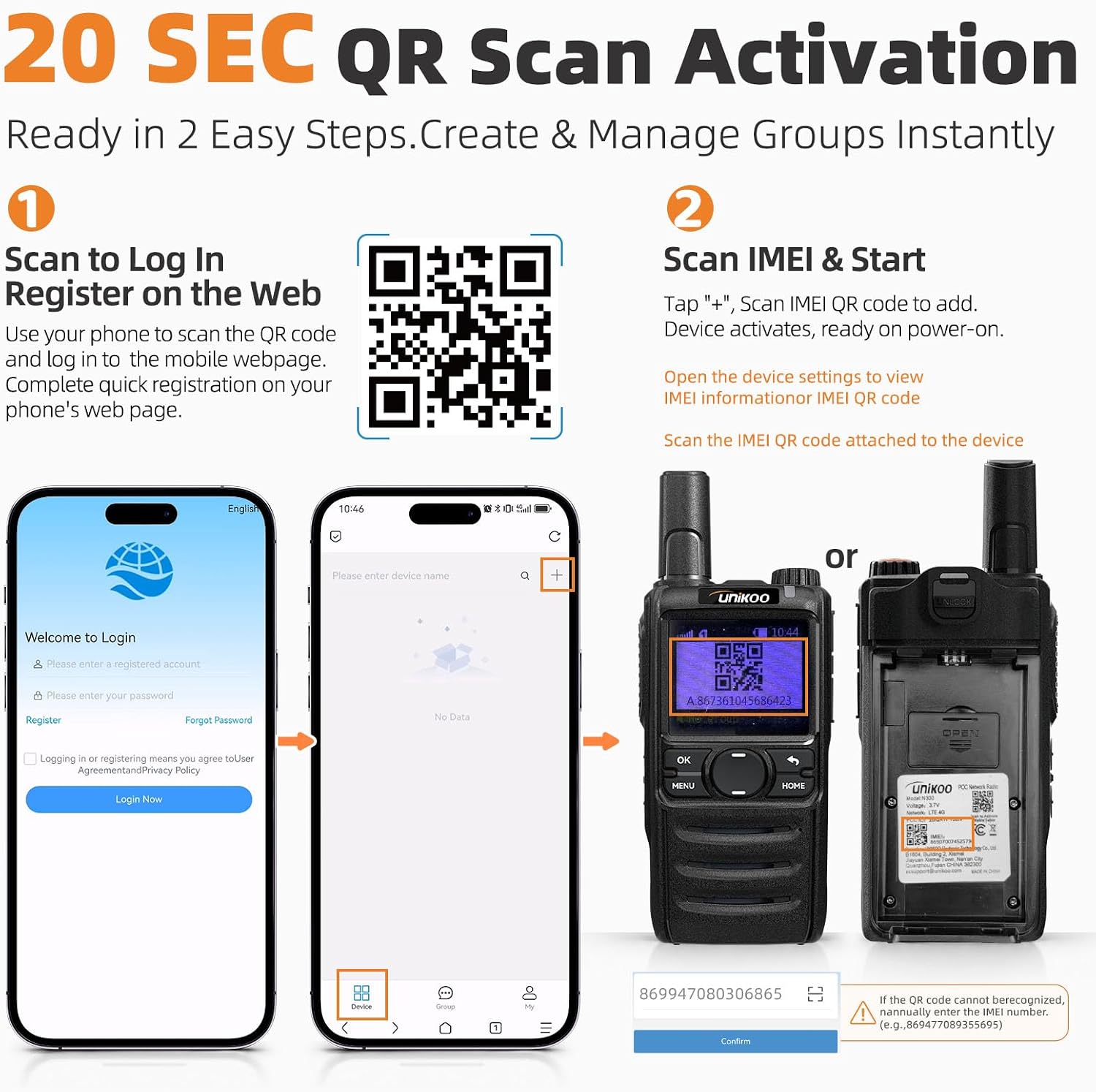
Image: The UNIKOO N380 radio alongside a SIM card and a mobile phone displaying the setup application, illustrating the prepaid data inclusion.
4.2. Device Activation (20-Second QR Scan)
The UNIKOO N380 features a quick 20-second QR scan activation process, eliminating the need for app downloads or seller-managed setups. You maintain full control over your account and groups.
- Scan to Log In: Use your smartphone to scan the QR code provided in the manual or on the device packaging. This will direct you to the mobile webpage for registration. Complete the quick registration process.
- Scan IMEI & Start: Once logged in, tap the '+' icon on the web platform. Scan the IMEI QR code located on the back of your radio (or within device settings).
- The device will activate and be ready for use upon power-on.
For device management and activation, visit the official platform: https://poc.unikoo.com/SCM

Image: Visual guide for the 20-second QR scan activation process, showing steps to log in and scan the IMEI for device activation.
Video: A step-by-step setup guide for the UNIKOO N380 radio, demonstrating the activation process.
5. Operating Instructions
5.1. Power On/Off
To power on or off the radio, long-press the power key for 3 seconds. A short press will wake or sleep the screen.
Video: A brief demonstration of the UNIKOO N380 Walkie Talkie, showing basic handling and power functions.
5.2. Making a Call (Push-to-Talk)
To transmit your voice, press and hold the large Push-to-Talk (PTT) button on the side of the radio. Speak clearly into the microphone. Release the PTT button to listen for a response.
5.3. Volume Adjustment
Use the volume up (+) and volume down (-) buttons, typically located on the side of the radio, to adjust the speaker volume to a comfortable level.
5.4. Group Management
The UNIKOO N380 allows for independent self-service device management. You can add devices and adjust group permissions through the web platform (https://poc.unikoo.com/SCM) to streamline team operations.

Image: The UNIKOO N380 radio demonstrating its AI noise-cancelling capabilities in various noisy environments like construction sites, windy conditions, and traffic.
6. Maintenance and Care
6.1. Charging the Battery
Connect the provided USB cable to the radio's charging port and the other end to the charging adapter. Plug the adapter into a standard wall outlet. The charging indicator on the radio will show the charging status. Ensure the radio is fully charged before extended use.
6.2. Cleaning
To clean the radio, use a soft, damp cloth. Do not use harsh chemicals, solvents, or abrasive cleaners, as these can damage the device's surface or internal components.
6.3. Water Resistance
The UNIKOO N380 has an IP54 water resistance rating, meaning it is protected from dust and splashing water from any direction. It is not designed for submersion. Avoid exposing the radio to heavy rain or direct water jets.
7. Troubleshooting
If you encounter issues with your UNIKOO N380 radio, please refer to the following common troubleshooting tips:
- No Signal: Ensure you are within an area with 4G LTE cellular coverage. Check the signal indicator on the radio's screen. If the issue persists, verify your SIM card is correctly installed and activated via the web platform.
- Activation Issues: Double-check that you have correctly followed the 20-second QR scan activation steps. Ensure your device's IMEI is correctly entered on the web platform. If problems continue, contact customer support.
- Poor Audio Quality: Ensure the microphone and speaker are clear of obstructions. Adjust the volume. If using in a noisy environment, the AI noise reduction feature should help, but extreme noise may still affect clarity.
- Battery Not Charging: Verify that the USB cable and charging adapter are securely connected and that the power outlet is functional. Ensure the battery is properly seated in the radio.
- Device Unresponsive: Try performing a soft reset by long-pressing the power button until the device restarts. If unresponsive, ensure the battery is charged.
8. Specifications
| Feature | Detail |
|---|---|
| Brand | UNIKOO |
| Model Number | N380 |
| Color | Black |
| Number of Channels | 200 |
| Frequency Range | LTE/PoC/4G |
| Talking Range Maximum | 5000 miles (Nationwide) |
| Voltage | 3.7 volts |
| Water Resistance Level | IP54 Water Resistant |
| Product Dimensions (D x W x H) | 1.38" x 2.24" x 5.43" |
| Item Weight | 1.1 pounds |
| Battery Type | Lithium-ion (3000mAh) |
| Special Features | Battery Saver Mode, Digital Display, Long Range Communication nationwide, Noise Reduction, Rechargeable |
| Connectivity Protocol | LTE |
| Manufacturer | Quanzhou UNIKOO Electronic Technology Co., Ltd |
9. Warranty and Support
9.1. Manufacturer's Warranty
The UNIKOO N380 4G LTE PoC Radio comes with a 10-Year Manufacturer Warranty. This warranty covers defects in materials and workmanship under normal use. Please retain your proof of purchase for warranty claims.
9.2. Customer Support
For any questions, technical assistance, or warranty claims, please contact UNIKOO customer support through the platform where you purchased the product or refer to the contact information provided in your product packaging. Our team is dedicated to providing prompt and helpful support.


