
1. Safety Instructions
Please read all instructions carefully before using the WALKINGPAD A1 Pro treadmill. Retain this manual for future reference.
- Weight Capacity: Do not exceed the maximum weight capacity of 136 kg (300 lbs).
- Age Restriction: This product is suitable for users aged 14 and above.
- Placement: Use the treadmill on a flat, stable surface. Ensure adequate clear space around the unit.
- Footwear: Wear appropriate athletic footwear during operation.
- Power: Always disconnect the power cord before cleaning, maintenance, or moving the treadmill.
- Supervision: Children and pets should be kept away from the treadmill during operation.
- Emergency Stop: Familiarize yourself with the emergency stop procedure.
2. Product Overview
The WALKINGPAD A1 Pro is a foldable under-desk treadmill designed for home and office use, offering a convenient way to integrate walking into your daily routine. Key features include:
- Foldable Design: Folds completely in half for compact storage, reducing its footprint by 50%.
- Integrated Display: A built-in display shows time, speed, and distance.
- Longer Walking Belt: Features a 47-inch walking belt for a natural stride.
- Adaptive Speed Control: Adjustable speed from 0.5 to 3.75 mph to suit various walking paces.
- Quiet Operation: Equipped with a brushless motor for calm and quiet use (below 65dB).
- High Capacity: Supports users up to 300 lbs.

This image shows the WALKINGPAD A1 Pro positioned under a standing desk, with a user walking on it while working on a computer. It highlights the treadmill's compact design and suitability for office environments.

This image illustrates the multi-layer cushioning system of the WALKINGPAD A1 Pro, including EVA cushioning, designed to provide a comfortable and natural walking experience while minimizing noise.
3. Setup
The WALKINGPAD A1 Pro requires no assembly and is ready to use out of the box.
3.1 Unfolding the Treadmill
- Place the folded treadmill on a flat, stable surface.
- Gently lift the rear section of the treadmill until it fully extends and locks into place.
- Ensure the treadmill is completely flat and stable before proceeding.
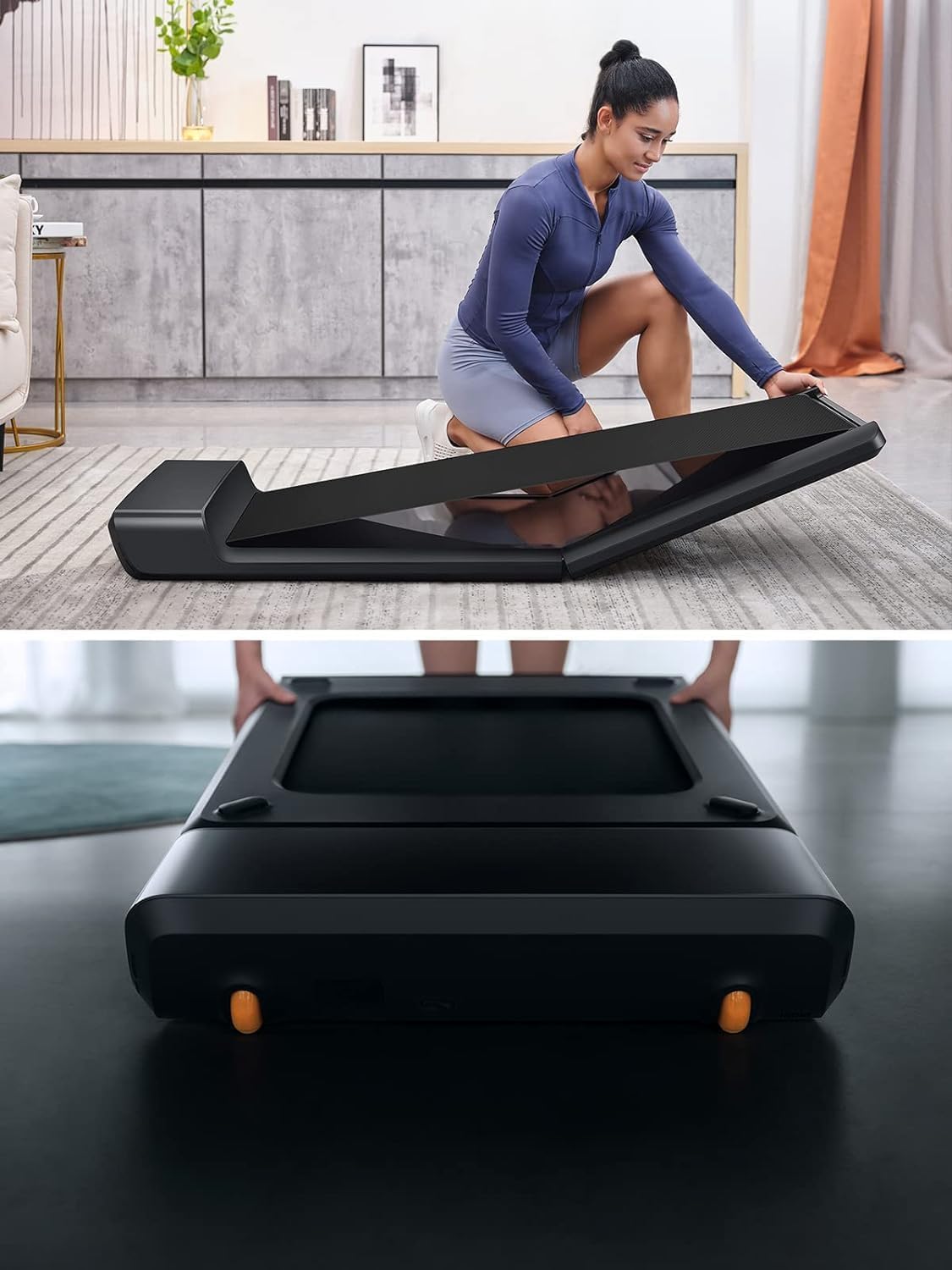
This image shows a user in the process of unfolding the WALKINGPAD A1 Pro, illustrating the simple mechanism for deployment.
3.2 Initial Power Connection
- Locate the power input port at the front of the treadmill.
- Connect the provided power cord securely to the treadmill and then to a suitable power outlet.
- Turn on the main power switch, usually located near the power input. The display should illuminate.
4. Operating Instructions
The WALKINGPAD A1 Pro offers multiple control methods for a personalized walking experience.
4.1 Remote Control Operation
Use the included remote control to manage the treadmill's functions.
- Start/Stop: Press the central button to start or stop the treadmill.
- Speed Adjustment: Use the '+' and '-' buttons to increase or decrease speed in manual mode.
- Mode Switch: Press the mode button to switch between manual (M) and automatic (A) modes.

This image provides a detailed view of the treadmill's integrated display, showing speed, steps, time, and distance, alongside the remote control with its acceleration, start/stop, deceleration, and mode switch buttons.
4.2 Manual Mode (M)
In Manual Mode, you directly control the speed using the remote control. The speed range is 0.5 to 3.75 mph.
4.3 Automatic Mode (A)
In Automatic Mode, the treadmill adapts its speed based on your position on the belt. Stepping towards the front increases speed, while moving towards the rear decreases it. This mode is ideal for hands-free operation.
4.4 KS Fit App Integration
Download the KS Fit App to connect your smartphone to the treadmill via Bluetooth. The app allows you to:
- Control speed and mode.
- Track your workout data (time, distance, speed, calories burned, steps).
- Access additional training programs and settings.
4.5 Automatic Shut-off
For safety, the treadmill will automatically turn off if no user is detected on the belt for a short period.
5. Maintenance
Regular maintenance ensures optimal performance and extends the lifespan of your treadmill.
5.1 Lubrication
The walking belt requires periodic lubrication with silicone oil to reduce friction and wear. Lubricate the belt before first use and every 3-6 months depending on usage.
- Turn off and unplug the treadmill.
- Lift one side of the walking belt and apply a small amount of lubricant oil in the middle of the running deck.
- Repeat on the other side.
- Plug in and turn on the treadmill, then run it at a low speed (e.g., 1 mph) for 1-2 minutes to spread the oil evenly.
5.2 Cleaning
Wipe down the treadmill surface with a damp cloth after each use. Avoid using abrasive cleaners or solvents.
5.3 Belt Adjustment
If the walking belt becomes misaligned or too loose/tight, refer to the detailed instructions in the full user manual for adjustment procedures. Proper belt tension and alignment are crucial for safe and efficient operation.
6. Troubleshooting
If you encounter issues with your WALKINGPAD A1 Pro, consult the following common solutions:
| Problem | Possible Cause | Solution |
|---|---|---|
| Treadmill does not power on | Power cord not connected, main switch off, power outlet issue. | Check power connections, ensure main switch is on, test outlet with another device. |
| Belt stops or slows unexpectedly | Overload (exceeding weight limit), insufficient lubrication, belt misalignment. | Ensure user weight is within limits, lubricate belt, check belt alignment. |
| Unusual noise during operation | Lack of lubrication, loose components, fan noise (normal at higher speeds). | Lubricate belt. Check for loose screws. Note that a cooling fan may activate during use. |
| Remote control unresponsive | Low battery, interference, remote out of range. | Replace remote battery. Ensure no obstructions. Use within recommended range. |
For further assistance, please contact customer support.
7. Specifications
| Feature | Detail |
|---|---|
| Brand | WALKINGPAD |
| Model Name | WALKINGPAD A1 Pro |
| Model Number | A1-pro |
| Color | Black |
| Product Dimensions (D x W x H) | 56.5" x 21.5" x 5" |
| Item Weight | 63 Pounds |
| Material | Aluminum |
| Maximum Speed | 3.75 Miles per Hour |
| Maximum Weight Recommendation | 300 Pounds |
| Deck Length | 47 Inches |
| Deck Width | 16.5 Inches |
| Included Components | Power Cord, Remote Control, Tool Kit, User Manual |
8. Storage
The WALKINGPAD A1 Pro's foldable design makes storage simple and convenient.
- Power Off: Always turn off the treadmill and disconnect the power cord before folding.
- Fold: Gently lift the rear section of the treadmill and fold it towards the front until it locks into its compact position.
- Move: Utilize the integrated transport wheels to easily move the folded treadmill.
- Store: Store the folded treadmill flat under a bed, sofa, or against a wall in a dry, safe place. The folded height is approximately 5 inches.

This image demonstrates the compact storage capability of the WALKINGPAD A1 Pro, showing it neatly tucked away under a sofa, highlighting its space-saving design.
9. Warranty and Support
Your WALKINGPAD A1 Pro comes with a one-year warranty from the date of purchase.
For warranty claims, technical support, or any product-related inquiries, please contact KINGSMITH WALKINGPAD customer support. Refer to your purchase documentation for specific contact details.
KINGSMITH WALKINGPAD offers 30-day easy returns and dedicated customer support.


