
Introduction
The EMSON BULLSEYE Blaster is a rechargeable, cordless electric air duster designed to provide a powerful and consistent airflow for various cleaning tasks. It serves as an effective alternative to disposable compressed air cans, offering a sustainable and cost-efficient solution for removing dust and debris from electronics, computer components, keyboards, car interiors, and other hard-to-reach areas.

Image: The Bullseye Blaster offers a reusable and consistent air supply compared to traditional single-use canned air.
Safety Instructions
- Read all instructions before using the device.
- Keep the device away from water or other liquids. Do not operate with wet hands.
- Do not point the air duster directly at people or animals.
- Avoid blocking the air intake or output vents during operation.
- Do not attempt to disassemble or modify the device. Refer all servicing to qualified personnel.
- Store the device in a cool, dry place, away from direct sunlight and extreme temperatures.
- Keep out of reach of children.
- Use only the provided charging cable and adapter (if included) to charge the device.
Package Contents
Verify that all items are present in the package:
- BULLSEYE Blaster Electric Air Duster Unit
- Precision Nozzle (for focused airflow)
- Broad Coverage Nozzle (for wider output)
- USB-C Charging Cable
- Instruction Manual (this document)

Image: All components included in the Bullseye Blaster package.
Product Overview
The BULLSEYE Blaster features a compact and ergonomic design for comfortable handling. It is equipped with a powerful motor capable of 130,000 RPM, providing strong airflow for effective cleaning. The device includes a built-in rechargeable Lithium-Ion battery and a power indicator to monitor battery levels.

Image: The main unit of the Bullseye Blaster.
Setup
1. Charging the Device
Before first use, fully charge the BULLSEYE Blaster. Connect the provided USB-C charging cable to the charging port on the device and plug the other end into a compatible USB power source (e.g., wall adapter, computer USB port). The power indicator lights will show the charging status and battery level.
- A full charge typically takes several hours.
- The power indicator lights will illuminate to show the battery level during charging and operation.
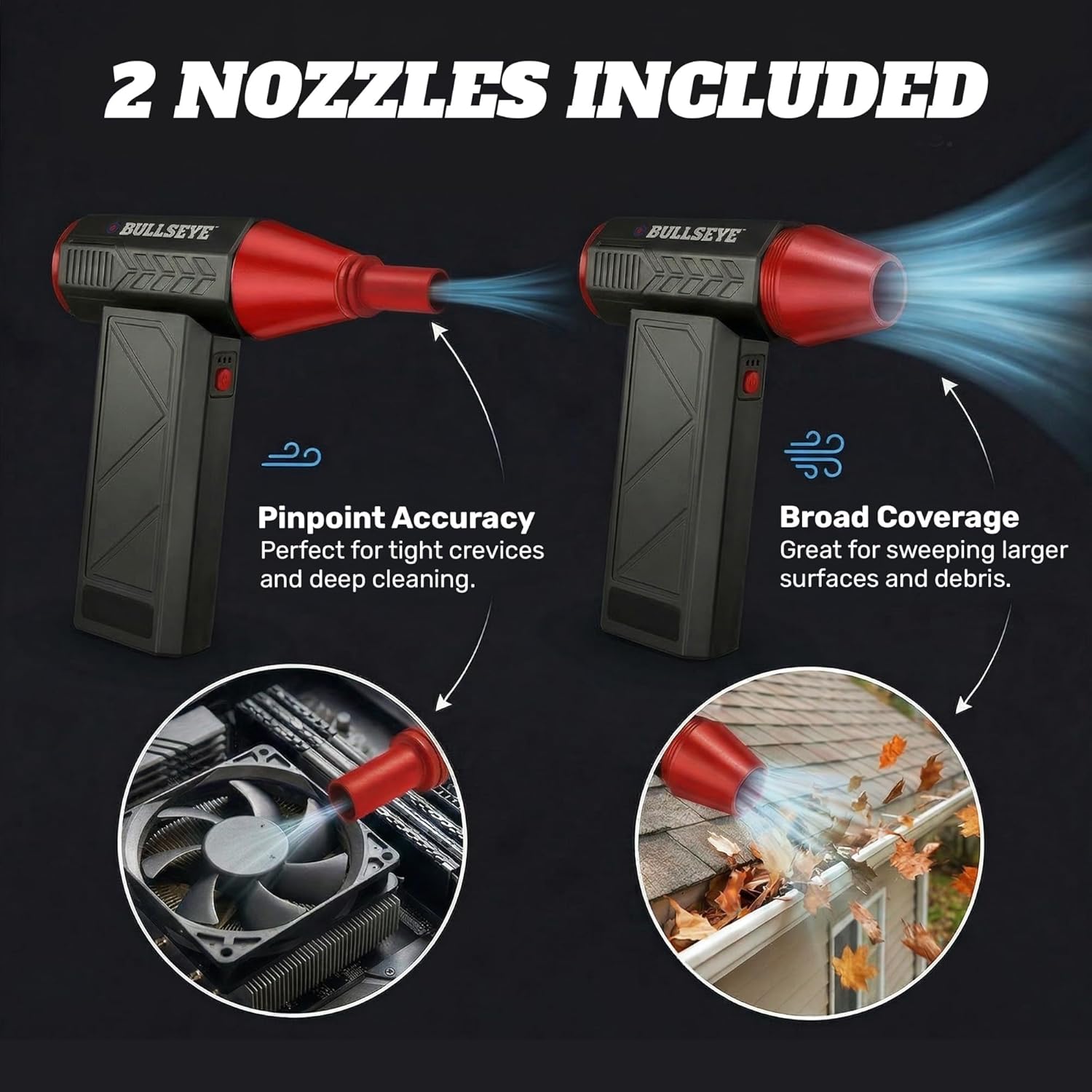
Image: Charging the Bullseye Blaster via USB-C.
2. Attaching Nozzles
The BULLSEYE Blaster comes with two interchangeable nozzles for different cleaning needs:
- Precision Nozzle: Provides a focused stream of air, ideal for tight crevices and detailed cleaning.
- Broad Coverage Nozzle: Offers a wider airflow, suitable for larger surfaces and sweeping away debris.
To attach a nozzle, simply push it firmly onto the air outlet of the main unit until it is securely in place. To remove, gently pull the nozzle off.

Image: The two precision nozzles included with the Bullseye Blaster.
Operating Instructions
Power On/Off
Press and hold the power button (usually located on the handle) for a few seconds to turn the device on or off.
Adjusting Airflow Speed
The BULLSEYE Blaster features three adjustable speed settings to control the airflow intensity. Once the device is powered on, press the speed control button (often located near the power button) to cycle through the low, medium, and high settings. Select the appropriate speed based on the cleaning task and the delicacy of the item being cleaned.
- Low Speed: Suitable for delicate electronics or light dust.
- Medium Speed: General cleaning tasks.
- High Speed: For heavier debris or stubborn dirt.
Applications
The BULLSEYE Blaster is versatile and can be used for a wide range of cleaning applications:
- Electronics: Safely remove dust from computer components, circuit boards, camera lenses, and other sensitive electronic devices.
- Keyboards: Effectively clear crumbs and dust from between keyboard keys.
- Car Detailing: Reach into car vents, seat crevices, and dashboard gaps to remove dirt and debris.
- Household Items: Clean blinds, fan blades, air conditioner filters, and other household items.

Image: Cleaning a keyboard with the Bullseye Blaster.

Image: Using the Bullseye Blaster for car interior detailing.
Maintenance
Cleaning the Duster
To maintain optimal performance, keep the exterior of the BULLSEYE Blaster clean. Wipe the device with a soft, dry cloth. Do not use harsh chemicals or abrasive cleaners. Ensure the air intake and output vents are free from obstructions.
Storage
When not in use, store the BULLSEYE Blaster in a cool, dry place. Ensure the device is turned off before storing. For long-term storage, it is recommended to charge the battery periodically to maintain its health.
Troubleshooting
| Problem | Possible Cause | Solution |
|---|---|---|
| Device does not turn on. | Battery is depleted. | Charge the device fully using the provided USB-C cable. |
| Weak airflow. | Low battery; clogged air intake/output; incorrect speed setting. | Charge the device; clear any obstructions from vents; select a higher speed setting. |
| Device stops unexpectedly. | Battery is depleted; overheating protection activated. | Recharge the device. If overheating, turn off and allow to cool down before resuming use. |
| Nozzles do not fit securely. | Nozzle not pushed on firmly enough. | Ensure the nozzle is pushed firmly onto the air outlet until it clicks or feels secure. |
Specifications
| Feature | Detail |
|---|---|
| Model Number | 4312 |
| Manufacturer | EMSON |
| Motor Speed | Up to 130,000 RPM |
| Power Source | Battery Powered |
| Battery Type | 1 Lithium Ion battery (included) |
| Charging Port | USB-C |
| Item Weight | 15.5 ounces |
| Package Dimensions | 8.58 x 6.81 x 2.13 inches |
| Speed Settings | 3 (Low, Medium, High) |
| Included Components | Air Duster Unit, 2 Nozzles, USB-C Charging Cable |
Warranty and Support
The BULLSEYE Blaster is backed by a 5-Year Warranty. For warranty claims, technical support, or any inquiries regarding your product, please contact EMSON customer service. Keep your purchase receipt as proof of purchase.
Contact information can typically be found on the product packaging or the official EMSON website.