
Introduction
This manual provides instructions for the safe and effective use of your Shadowhawk S1476 and S1796 rechargeable torch lights. Please read this manual thoroughly before operating the devices and retain it for future reference.

Image: The Shadowhawk S1476 and S1796 rechargeable torch lights, showcasing their design and compact form factor.
Package Contents
- 1 x Shadowhawk S1476 Rechargeable Torch Light
- 1 x Shadowhawk S1796 Rechargeable Keychain Light
- 1 x USB-C Charging Cable
- 1 x Storage Case (may vary by package)
- 1 x User Manual
Product Features
Shadowhawk S1476 Torch Light:
- High Brightness: Up to 10000 lumens with an upgraded XHM77.2 LED Chip.
- Adjustable Focus: Slide the head to switch between floodlight (wide range) and spotlight (long distance) modes.
- Multiple Light Modes: High, Medium, Low, Strobe, and SOS.
- Rechargeable Battery: Integrated 5000mAh rechargeable battery.
- USB Input/Output: USB-C port for charging the torch and USB-A output for power bank functionality.
- Durable Construction: Tactical style design.
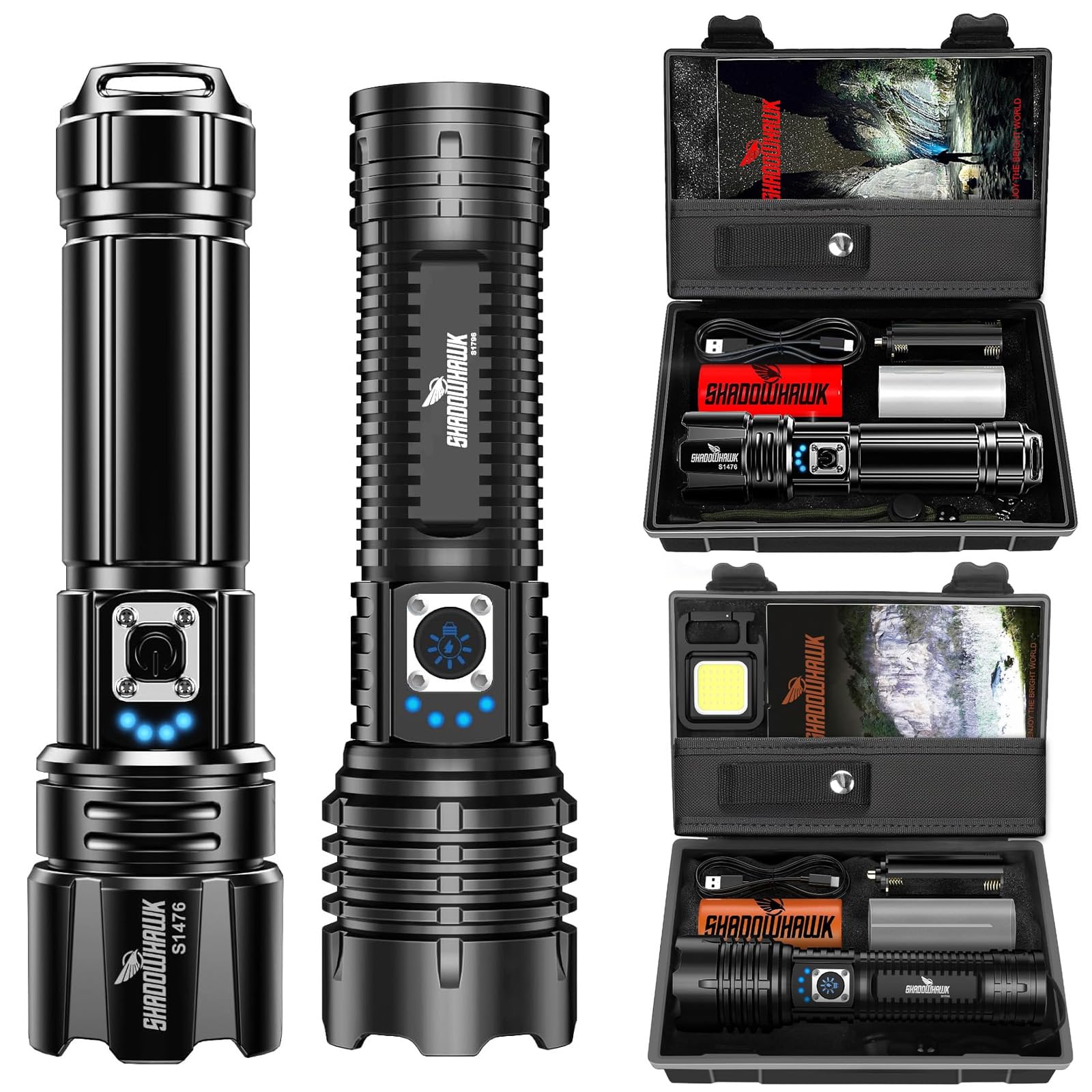
Image: The Shadowhawk S1476 torch light demonstrating its super bright 10000 lumens output and the XHM77.2 LED chip.

Image: The Shadowhawk S1476 torch light being used as an emergency light, illuminating an area under a car.
Shadowhawk S1796 Keychain Light:
- High Lumen COB: 800 High Lumen COB light source.
- 4 Light Modes: High, Medium, Strobe, and Super Bright (long press for 3 seconds).
- Multifunction Design: Includes a collapsible bracket, carabiner, built-in strong magnet, and bottle opener.

Image: The Shadowhawk S1796 keychain light illustrating its four light modes and additional features like the collapsible bracket, carabiner, magnet, and bottle opener.
Setup
Initial Charging (S1476 Torch Light):
- Locate the USB-C charging port on the S1476 torch light.
- Connect the provided USB-C cable to the torch light.
- Connect the other end of the USB-C cable to a compatible USB power source (e.g., wall adapter, power bank, computer USB port).
- The indicator lights will show charging progress. A full charge typically takes 4-6 hours.
- Disconnect the cable once fully charged.

Image: The Shadowhawk S1476 torch light being charged via its USB-C port, with indicator lights showing charging status.
Initial Charging (S1796 Keychain Light):
- Locate the charging port on the S1796 keychain light.
- Connect a compatible USB cable to the keychain light.
- Connect the other end to a USB power source.
- Allow the device to charge until the indicator shows full.
Operation
Shadowhawk S1476 Torch Light:
- Power On/Off: Press the power button once to turn the torch on or off.
- Change Light Modes: While the torch is on, press the power button repeatedly to cycle through High, Medium, Low, Strobe, and SOS modes.
- Quick Off Feature: Long press the power button for 3 seconds to turn off the torch from any mode, without cycling through all modes.
- Adjust Focus: Slide the head of the torch forward or backward to adjust the beam from a wide floodlight to a focused spotlight. No rotation is required.

Image: The Shadowhawk S1476 torch light showing how to adjust the focus by sliding the head, transitioning between a wide floodlight and a narrow spotlight beam.

Image: The Shadowhawk S1476 torch light displaying its five operational light modes: High, Medium, Low, Strobe, and SOS, along with the quick-off function.
Shadowhawk S1796 Keychain Light:
- Power On/Off: Press the power button once to turn the keychain light on or off.
- Change Light Modes: While on, press the power button repeatedly to cycle through High, Medium, and Strobe modes.
- Super Bright Mode: Long press the power button for 3 seconds to activate the Super Bright mode.
- Using Multifunctions:
- Collapsible Bracket: Extend the bracket to stand the light on a flat surface.
- Carabiner: Use the integrated carabiner to attach the light to bags, belts, or keys.
- Built-in Magnet: Attach the light to metallic surfaces for hands-free illumination.
- Bottle Opener: Use the designated slot to open bottles.
Charging and Power Bank Function (S1476 Torch Light)
The S1476 torch light features both USB-C input for charging its internal battery and a USB-A output to function as a power bank for other devices.
- Charging the Torch: Use the USB-C port with the provided cable and a compatible power adapter. Charging time is approximately 4-6 hours.
- Power Bank Function: Connect your external device (e.g., smartphone, smartwatch, earbuds, small fan) to the USB-A output port on the torch using a compatible USB cable. The torch will then supply power to charge your device.

Image: The Shadowhawk S1476 torch light highlighting its 5000mAh high-capacity rechargeable battery and its USB-A output port for charging external devices like a smartphone.

Image: The Shadowhawk S1476 torch light illustrating its USB input for charging the device itself and its USB output for functioning as a power bank for various gadgets.
Maintenance
- Keep the torch lights clean and dry. Wipe with a soft, damp cloth if necessary.
- Avoid dropping the devices or subjecting them to strong impacts.
- Store the torch lights in a cool, dry place away from direct sunlight and extreme temperatures.
- Charge the devices regularly, even if not in use, to maintain battery health. Avoid complete discharge for extended periods.
- Do not attempt to disassemble or modify the torch lights, as this will void the warranty and may cause damage.
Troubleshooting
| Problem | Possible Cause | Solution |
|---|---|---|
| Torch light does not turn on. | Low battery or completely discharged. | Charge the torch light fully using the provided USB-C cable. |
| Light output is dim. | Low battery. | Recharge the torch light. |
| Torch light not charging. | Faulty cable, adapter, or port. | Try a different USB-C cable or power adapter. Ensure the charging port is clean and free of debris. |
| Power bank function not working. | Torch battery is too low or cable is incompatible. | Ensure the torch light is sufficiently charged. Use a compatible USB-A cable for your external device. |
Specifications
Shadowhawk S1476 Torch Light:
| Model | S1476 |
| Light Source | Upgraded XHM77.2 LED Chip |
| Brightness | Up to 10000 Lumens |
| Light Modes | High, Medium, Low, Strobe, SOS |
| Battery Type | Rechargeable (5000mAh) |
| Charging Port | USB-C Input |
| Output Port | USB-A Output (Power Bank) |
| Charging Time | Approx. 4-6 hours |
| Running Time | Up to 12 hours (on lower settings) |
| Dimensions | Approx. 6.29 inches (Length) x 1.61 inches (Width) |
| Special Features | Adjustable Focus, Power Bank Function |
Shadowhawk S1796 Keychain Light:
| Model | S1796 |
| Light Source | COB LED |
| Brightness | 800 Lumens |
| Light Modes | High, Medium, Strobe, Super Bright |
| Special Features | Collapsible Bracket, Carabiner, Built-in Magnet, Bottle Opener |
Safety Information
- Do not look directly into the LED light, as it can cause temporary vision impairment or eye damage.
- Keep out of reach of children.
- Do not expose the devices to fire or extreme heat.
- Do not immerse the devices in water unless explicitly stated as waterproof (this product is generally water-resistant, not submersible).
- Use only the provided or compatible charging cables and adapters.
- Dispose of batteries according to local regulations.
Warranty and Support
Shadowhawk products are designed for reliability and performance. For warranty information or technical support, please refer to the documentation included with your purchase or contact Shadowhawk customer service through their official channels. Please retain your proof of purchase for warranty claims.