
1. Introduction
Thank you for choosing the Tuni G3 Coffee Grinder and Digital Scale. This manual provides essential information for the safe and efficient operation, maintenance, and care of your new appliance. Please read these instructions thoroughly before first use and keep them for future reference.
2. Safety Instructions
- Read all instructions before using the appliance.
- Do not immerse the appliance, cord, or plug in water or other liquids.
- Unplug from outlet when not in use, before assembling or disassembling parts, and before cleaning.
- Avoid contact with moving parts.
- Do not operate any appliance with a damaged cord or plug, or after the appliance malfunctions or has been damaged in any manner.
- The use of attachments not recommended or sold by the manufacturer may cause fire, electric shock, or injury.
- Do not use outdoors.
- Do not let the cord hang over the edge of a table or counter, or touch hot surfaces.
- Do not place on or near a hot gas or electric burner, or in a heated oven.
- Always check the bean hopper for the presence of foreign objects before use.
- This appliance is for household use only.
3. Package Contents
Verify that all items are present in the package:
- Tuni G3 Coffee Grinder (Ivory)
- Digital Coffee Scale (White)
- Large Capacity Bean Hopper (250g / 8.8oz)
- Single Dose Hopper (50g / 1.7oz)
- Hopper Bellow
- 58mm Magnetic Dosing Cup
- 58mm Magnetic Dosing Ring
- 51-58mm Portafilter Holder
- Cleaning Brushes
- USB Cable (for scale)
- Non-slip Silicone Pad (for scale)
4. Product Overview
Tuni G3 Coffee Grinder
The Tuni G3 features 64mm stainless steel flat burrs for consistent grinding and an anti-static system to minimize mess. It offers 100 precision grinding settings and includes two bean hoppers for versatile use.

Image: Close-up of the Tuni G3 grinder's 64mm stainless steel flat burrs, highlighting the rapid and uniform grinding mechanism at 550 RPM, designed to preserve coffee oils and freshness.

Image: Illustration of the Tuni G3's anti-static technology, showing a clean transfer of ground coffee into a dosing cup, contrasting with a depiction of static-induced mess from a conventional grinder.
White Digital Coffee Scale
The included digital coffee scale is compact and features multiple smart modes for precise coffee preparation, including Espresso, Manual, Auto Timing, and Flow Rate modes. It is rechargeable via USB.

Image: The white Tuni digital coffee scale, displaying its compact design and dimensions (4.1 inches by 4.1 inches by 0.8 inches). The image also shows the included USB cable and a non-slip silicone pad.
5. Setup
Follow these steps to set up your Tuni G3 coffee grinder:
- Unpack: Carefully remove all components from the packaging.
- Attach Upper Burr: Place the upper burr into its designated slot on the grinder.
- Secure Adjustment Ring: Place the adjustment ring over the upper burr and rotate clockwise until it is fully tightened.
- Tighten Hand Screw: Secure the adjustment ring by tightening the hand screw located on the side of the grinder.
- Attach Bean Hopper: Place your preferred bean hopper (large capacity or single dose) onto the grinder.
- Add Coffee Beans: Pull the paddle outward to open the bean entry and add whole coffee beans into the hopper.
Video: This video demonstrates the step-by-step assembly of the Tuni G3 coffee grinder, including attaching the upper burr, securing the adjustment ring, tightening the hand screw, attaching the bean hopper, and adding coffee beans. It also shows the grinding process for espresso and pour-over coffee.
6. Operating the Grinder
6.1 Grind Setting Adjustment
The Tuni G3 offers 100 precision grinding settings. Rotate the adjustment ring to select your desired grind size. Lower numbers correspond to finer grinds (e.g., espresso), while higher numbers correspond to coarser grinds (e.g., French press).

Image: A visual guide to the Tuni G3's 100 precision grinding settings, illustrating the dial and recommended grind ranges for various brewing methods such as Espresso (1-15), Mocca (15-40), Drip Coffee (40-60), Pour Over (60-80), and French Press (80-100).
6.2 Grinding Process
After setting the grind size, place either the portafilter (compatible with 51-58mm) or the dosing cup under the grinder chute. Press the single or double shot button on the control panel to begin grinding. The anti-static system ensures a clean and consistent output.

Image: The Tuni G3 coffee grinder with its portafilter holder attachment, demonstrating compatibility with portafilters ranging from 51mm to 58mm in diameter.

Image: A display of the Tuni G3's Espresso Single/Double Shot Modes, showing default settings for single shot (5-12g coffee grounds, 5-13 seconds) and double shot (8-17g coffee grounds, 8-17 seconds) with a default grind size of 10. Time and grind size are adjustable.
6.3 Dual Bean Hoppers
The Tuni G3 comes with two bean hoppers to suit different grinding needs:
- Large Capacity Hopper (250g / 8.8oz): Ideal for frequent use and larger batches of coffee.
- Single Dose Hopper (50g / 1.7oz): Perfect for precise single-dose grinding or for switching between different bean varieties.
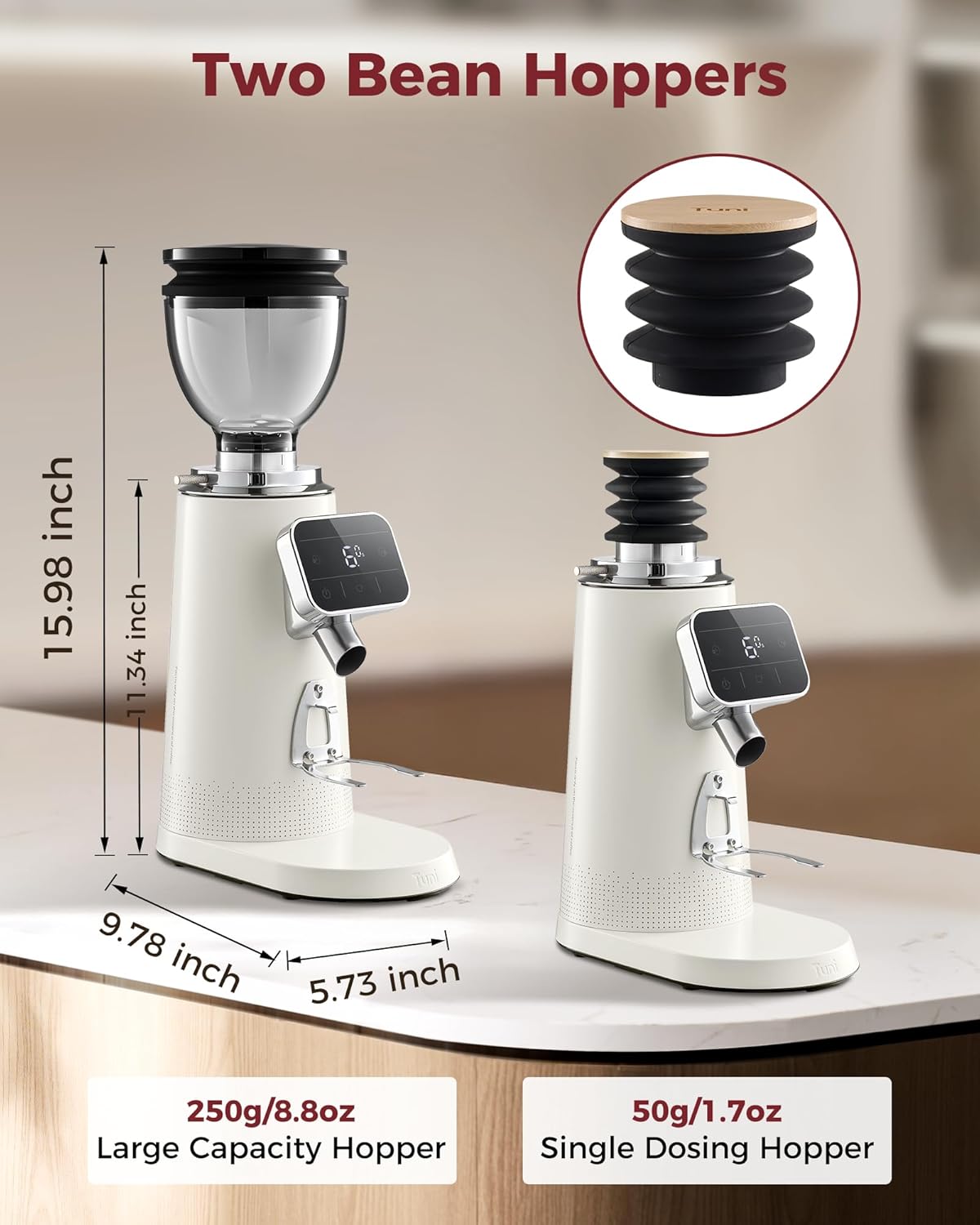
Image: The Tuni G3 coffee grinder is shown side-by-side with both its large capacity bean hopper (250g/8.8oz) and the smaller single dosing hopper (50g/1.7oz), highlighting their relative sizes and functionality.
7. Operating the Digital Coffee Scale
The Tuni digital coffee scale is designed for precise measurements and offers several smart modes:
- Espresso Mode: Easily access brewing time, powder/liquid weight, and powder-liquid ratio.
- Manual Mode: Allows manual start and stop timing.
- Auto Timing Mode: Automatically starts and stops timing.
- Flow Rate Mode: Monitors the flow rate of your shot in real-time.
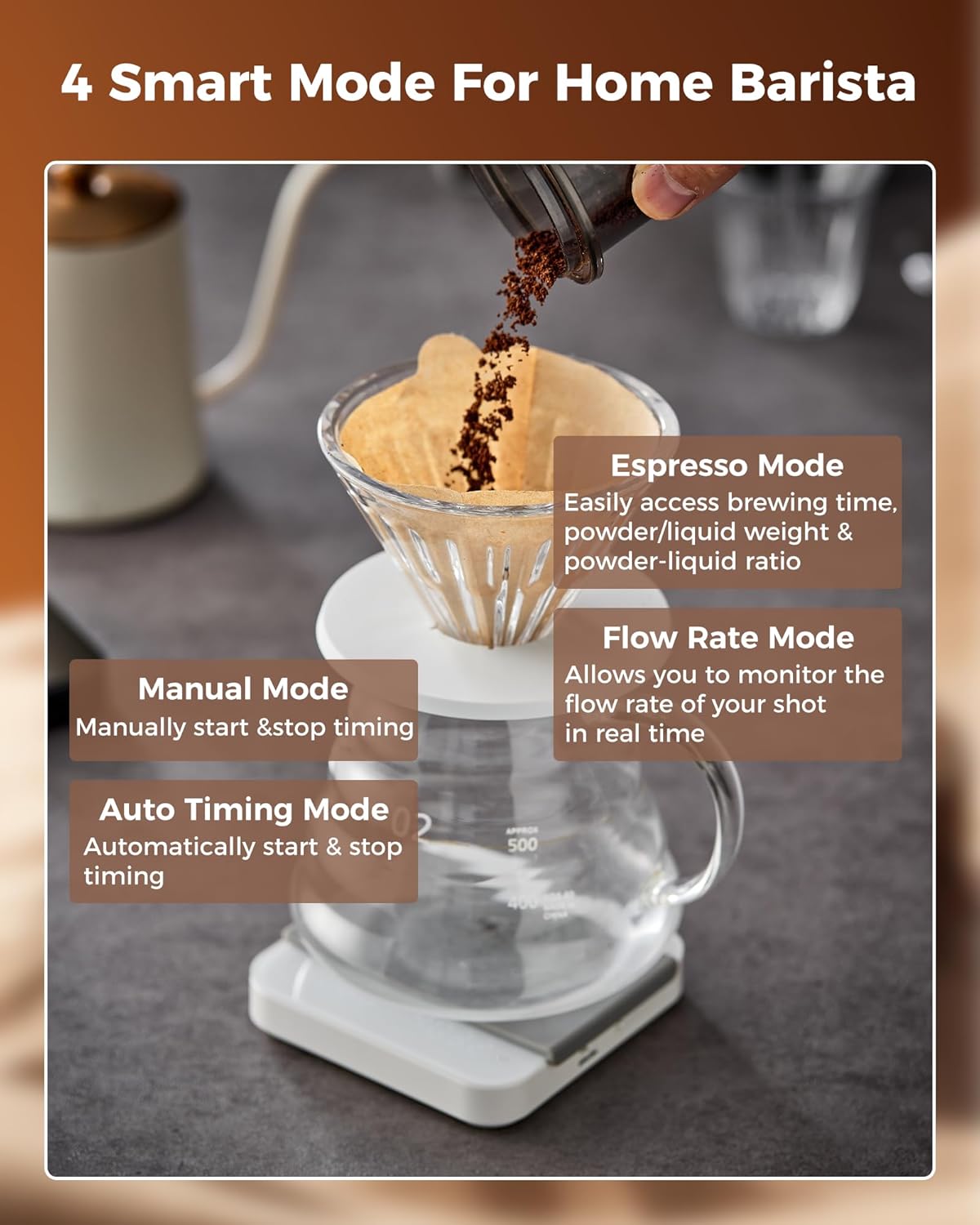
Image: The Tuni digital coffee scale is shown in use, illustrating its four smart modes: Espresso Mode (for brewing time, weight, ratio), Manual Mode (for manual timing), Auto Timing Mode (for automatic timing), and Flow Rate Mode (for real-time flow monitoring).
8. Maintenance and Cleaning
Regular cleaning ensures optimal performance and extends the lifespan of your Tuni G3 grinder.
8.1 Grinder Cleaning
- Unplug: Always unplug the grinder from the power outlet before cleaning.
- Remove Hopper: Detach the bean hopper.
- Remove Burrs: Unscrew the adjustment ring and carefully remove the upper burr.
- Brush Grounds: Use the provided cleaning brushes to remove any residual coffee grounds from the burrs and the grinding chamber.
- Clean Hopper & Dosing Cup: Wash the bean hopper and dosing cup with warm, soapy water. Rinse thoroughly and allow to air dry completely before reassembling.
- Use Hopper Bellow: For daily cleaning, use the hopper bellow to efficiently clear residual coffee grounds from the grinding chamber.
- Reassemble: Reassemble all parts in reverse order, ensuring the adjustment ring is securely tightened.

Image: The Tuni G3 coffee grinder with the hopper bellow accessory positioned on top, illustrating how it is used to efficiently clean and remove residual coffee grounds from the grinding chamber.
8.2 Scale Cleaning
Wipe the digital coffee scale with a soft, damp cloth. Do not immerse the scale in water.
9. Troubleshooting
If you encounter issues with your Tuni G3 grinder or scale, refer to the following common problems and solutions:
| Problem | Possible Cause | Solution |
|---|---|---|
| Grinder not starting | Not plugged in; power button not pressed; safety switch not engaged (hopper or burr not correctly installed). | Ensure the grinder is plugged in. Press the power button. Check that the bean hopper and burr assembly are correctly installed and secured. |
| Inconsistent grind | Burrs are dirty or worn; grind setting is too coarse/fine for desired method. | Clean the burrs thoroughly. Adjust the grind setting according to the brewing method. Consider replacing burrs if heavily worn. |
| Coffee grounds static/messy | High static electricity; very dry beans. | The Tuni G3 has an anti-static system. Ensure it is clean. A small amount of water mist on beans before grinding can help reduce static. |
| Scale not turning on/charging | Battery depleted; faulty USB cable/charger. | Charge the scale using the provided USB cable. Try a different USB port or charger. |
| Scale inaccurate readings | Not on a flat surface; interference; needs calibration. | Place the scale on a stable, flat surface. Remove any objects that might interfere with the sensors. Refer to the scale's specific instructions for calibration if available. |
10. Specifications
- Grinder Model: Tuni G3
- Burr Type: 64mm Stainless Steel Flat Burrs
- Grinding Speed: 550 RPM
- Grind Settings: 100 Precision Settings
- Anti-Static System: Yes
- Large Hopper Capacity: 250g / 8.8oz
- Single Dose Hopper Capacity: 50g / 1.7oz
- Portafilter Compatibility: 51mm - 58mm
- Scale Modes: Espresso, Manual, Auto Timing, Flow Rate
- Scale Dimensions: Approximately 4.1 x 4.1 x 0.8 inches
11. Warranty and Support
Tuni products are manufactured with quality and reliability in mind. For warranty information or technical support, please refer to the warranty card included with your product or visit the official Tuni website. You can also contact customer service through the retailer where the product was purchased.
