
Safety Information
Warning: This product is suitable for individuals weighing up to 150 kg (330 lbs). Please refer to these instructions for safe assembly and use the product only after successful assembly. Ensure all components are securely fastened before use. Do not stand on the chair. Do not use the chair if any parts are damaged or missing. Keep children away from moving parts during assembly and operation.
Package Contents
Before assembly, verify that all parts listed below are present and undamaged. If any parts are missing or damaged, please contact customer support.
- Backrest
- Seat Cushion
- Armrests (2)
- Five-Star Base
- Casters (5)
- Gas Lift Cylinder
- Gas Lift Cover
- Mechanism Plate
- Lumbar Support Cushion
- Headrest Pillow
- Hardware Kit (screws, washers, Allen wrench)
- Instruction Manual

Image: Two individuals seated in JUMMICO gaming chairs, one gaming at a desk and the other relaxing, demonstrating the chair's versatility for both work and leisure. This image provides a general view of the assembled product.
Assembly Instructions
Follow these steps carefully to assemble your JUMMICO Gaming Chair. It is recommended to assemble the chair on a soft, clean surface to prevent damage.
- Attach Casters to Base: Insert the five casters into the holes at the end of each leg of the five-star base. Push firmly until they click into place.
- Insert Gas Lift: Place the gas lift cylinder into the center hole of the five-star base. Cover it with the gas lift cover.
- Attach Mechanism Plate to Seat: Align the mechanism plate with the screw holes on the underside of the seat cushion. Ensure the front of the mechanism faces the front of the seat. Secure with screws and washers using the provided Allen wrench.
- Attach Armrests to Seat: Attach the armrests to the sides of the seat cushion using the designated screws. Do not overtighten initially to allow for minor adjustments.
- Attach Backrest to Seat: Align the backrest with the metal brackets on the seat cushion. Secure with screws and washers. Once all screws are in place, tighten all fasteners for the armrests and backrest securely.
- Connect Seat to Gas Lift: Carefully place the assembled seat and backrest onto the gas lift cylinder, ensuring the center hole of the mechanism plate aligns with the top of the gas lift.
- Attach Headrest and Lumbar Pillow: Position the headrest pillow and lumbar support cushion as desired. The lumbar support is dynamic and designed to adapt to your movements.

Image: An infographic detailing the chair's durable components, including the TUV-certified gas lift, reinforced steel frame, five-star base, and PU-coated silent wheels, which contribute to its robust construction.
Operating Instructions
Familiarize yourself with the chair's adjustable features to optimize your comfort and ergonomic support.
Height Adjustment
Locate the lever under the right side of the seat. To raise the seat, lift the lever while taking your weight off the seat. To lower the seat, remain seated and lift the lever. Release the lever at the desired height to lock it in position.
Recline Function
The backrest can be reclined between 90° (upright) and 140° (relaxed). Pull the recline lever, typically located on the right side of the seat, and lean back to the desired angle. Release the lever to lock the backrest in position. Ensure the chair is stable before reclining fully.
2D Armrest Adjustment
The armrests can be adjusted in height and angle. Use the buttons or levers on the side of each armrest to raise or lower them. Rotate the armrest pads to adjust their angle for optimal arm and shoulder support.
Lumbar Support Adjustment
The chair features an innovative dynamic lumbar support system that adapts to your movements. Ensure the lumbar cushion is positioned correctly against your lower back for continuous support and to alleviate pressure.

Image: A close-up view focusing on the innovative dynamic lumbar support system, designed to adapt to user movements and provide continuous lower back support.

Image: A detailed view of the chair's headrest, highlighting its soft memory foam padding for enhanced neck comfort and support.
Maintenance and Care
Proper maintenance ensures the longevity and optimal performance of your JUMMICO Gaming Chair.
- Cleaning: Wipe the chair's faux leather and plastic surfaces with a soft, damp cloth. For stubborn stains, use a mild soap solution and dry thoroughly immediately. Avoid using harsh chemicals, abrasive cleaners, or solvents, as these can damage the material.
- Fasteners: Periodically (e.g., every 3-6 months) check all screws and bolts to ensure they are tight. Retighten if necessary to maintain the chair's stability and safety. Loose fasteners can lead to wobbling or structural issues.
- Moving Parts: Keep the casters (wheels) free of debris, hair, and dirt to ensure smooth movement. If the casters become stiff, clean them thoroughly. The gas lift cylinder is maintenance-free, but ensure it operates smoothly.
- Avoid Direct Sunlight: Prolonged exposure to direct sunlight can cause the faux leather to fade or crack. Position your chair away from direct sunlight when possible.
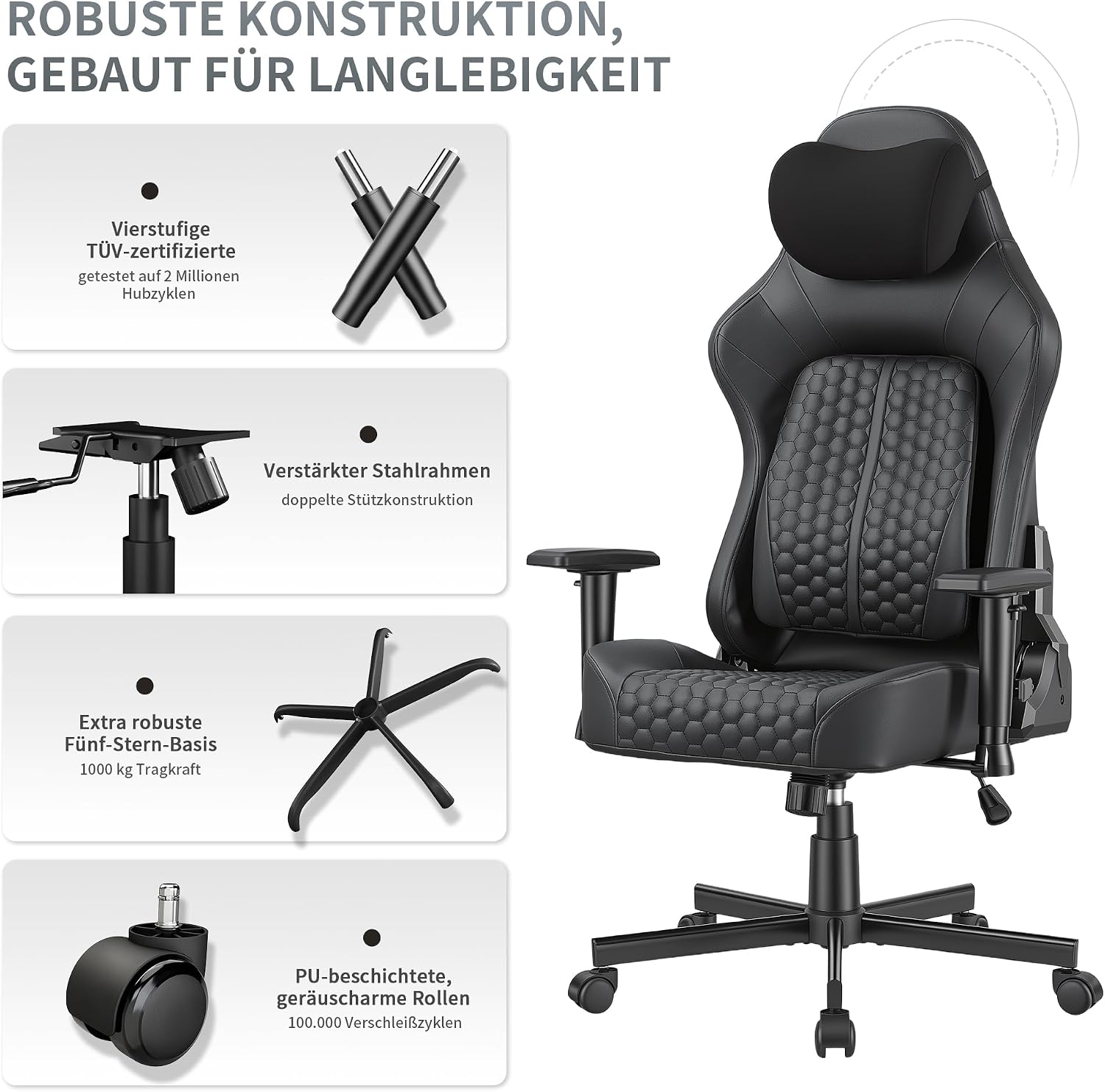
Image: A visual representation emphasizing the chair's use of high-density, cold-cure foam that maintains its shape and provides long-term comfort and durability.
Troubleshooting
Refer to this section for common issues and their solutions.
| Problem | Possible Cause | Solution |
|---|---|---|
| Chair does not adjust height. | Gas lift cylinder is faulty or lever is not engaged correctly. | Ensure the height adjustment lever is fully engaged. If the problem persists, the gas lift may need replacement. Contact customer support. |
| Chair is wobbly or unstable. | Loose screws or bolts. | Carefully inspect and tighten all screws and bolts, especially those connecting the backrest, armrests, and mechanism plate to the seat. |
| Casters (wheels) do not roll smoothly. | Debris (hair, dust, dirt) caught in the casters. | Turn the chair over and carefully remove any debris from the casters. You may need to use tweezers or a small tool. |
| Squeaking noises during movement. | Loose connections or friction between parts. | Tighten all fasteners. If squeaking persists, apply a small amount of silicone-based lubricant to moving metal-on-metal parts (avoiding plastic or fabric). |
Product Specifications
- Brand: JUMMICO
- Model Name: JUMMICO Gaming Chair
- Model Number: 1297
- Color: Black
- Material: Faux Leather (PU), High-Density Foam, Engineered Wood, Steel
- Overall Dimensions (Depth x Width x Height): 55 cm x 50 cm x 124-134 cm (adjustable height)
- Seat Dimensions (Depth x Width): 50 cm x 56 cm
- Backrest Height: 84 cm
- Armrest Type: 2D Adjustable (Height and Angle)
- Weight Capacity: 150 kg (330 lbs)
- Item Weight: 20 kg (44 lbs)
- Recline Angle: 90° - 140°
- Assembly Required: Yes
- UPC: 788418916686

Image: A detailed diagram illustrating the various dimensions of the JUMMICO Gaming Chair, including overall height, seat dimensions, and backrest height.
Warranty and Customer Support
For specific warranty information, please refer to the documentation included with your purchase or visit the official JUMMICO website. Warranty terms and conditions may vary by region and retailer.
If you require assistance with assembly, operation, maintenance, or troubleshooting that is not covered in this manual, please contact JUMMICO customer support.
Contact Information:
- Website: www.jummico.com
- Email: support@jummico.com
- Phone: Please refer to the official website for regional contact numbers.
