
1. Introduction
The Fosi Audio S3 is a versatile HiFi Music Streamer, Digital-to-Analog Converter (DAC), and Preamplifier designed to enhance your audio experience. It features an AK4493SEQ DAC chip for high-quality audio decoding and supports various connectivity options including Wi-Fi streaming, Bluetooth 5.3, and HDMI eARC. This manual provides detailed instructions for setting up, operating, and maintaining your S3 unit.
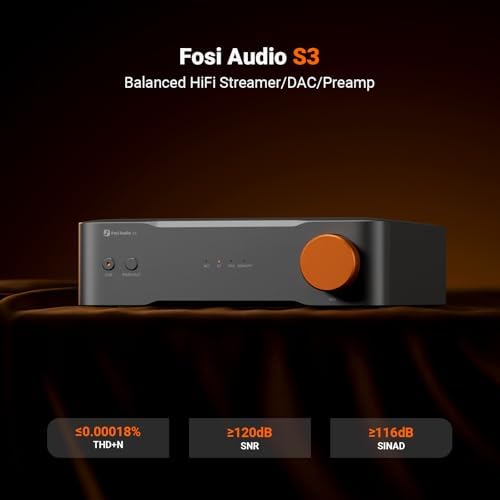
Image 1.1: Front view of the Fosi Audio S3 unit, highlighting its compact design and key performance metrics like THD+N, SNR, and SINAD.
2. Setup and Connections
Before connecting your Fosi Audio S3, ensure all components are powered off. The S3 is designed for easy integration into your existing audio system.
2.1 Package Contents
- Fosi Audio S3 HiFi Music Streamer DAC Preamp
- 3.9Ft Gold-Plated 2RCA to 2RCA Stereo Audio Cable
- Power Adapter
- User Manual (this document)
2.2 Panel Overview
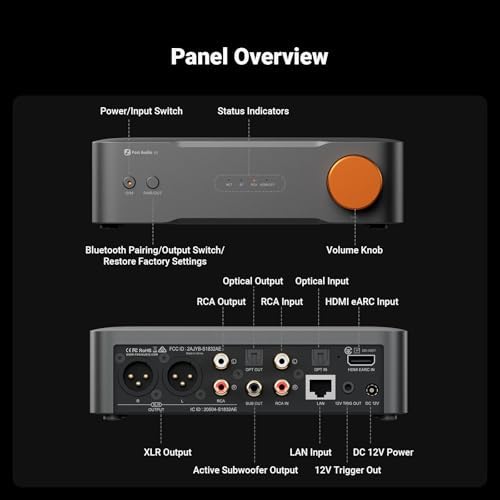
Image 2.1: Detailed view of the Fosi Audio S3's front and rear panels, indicating the location and function of all inputs, outputs, and controls.
- Front Panel: Power/Input Switch, Status Indicators, Bluetooth Pairing/Output Switch/Restore Factory Settings, Volume Knob.
- Rear Panel: Optical Output, Optical Input, RCA Output, RCA Input, HDMI eARC Input, XLR Output, Active Subwoofer Output, LAN Input, DC 12V Power, 12V Trigger Out.
2.3 Connecting to Audio Devices
Use the included 3.9Ft Gold-Plated 2RCA to 2RCA Stereo Audio Cable to connect the S3 to your amplifier, preamplifier, or active speakers. Ensure secure connections for optimal audio quality.

Image 2.2: Close-up view of the Fosi Audio fully shielded RCA cable, highlighting its gold-plated plugs, tangle-free design, oxygen-free copper, and braided cord for stable signal transmission.

Image 2.3: Diagram illustrating the compatibility of the Fosi Audio S3 with various input sources (CD Player, DVD Player, Phono Turntable) and output devices (TV, Amplifiers, Phono Preamplifiers, Active Speakers).
- RCA Output: Connect to the RCA input of your amplifier, preamplifier, or active speakers.
- XLR Output: For balanced audio connections to compatible amplifiers or preamplifiers.
- Optical/Coaxial Output: For digital audio output to a DAC or receiver.
- HDMI eARC Input: Connect to your TV's HDMI eARC port for high-quality audio from your television.
- Optical/Coaxial Input: For digital audio input from sources like CD players or game consoles.
- USB Input: Connect to a computer or other USB audio source.
- LAN Input: For wired network connection, ensuring stable streaming.
- DC 12V Power: Connect the provided power adapter.
3. Operating Instructions
The Fosi Audio S3 offers multiple ways to stream and play your music.
3.1 Power On/Off and Input Selection
- Press the Power/Input Switch button on the front panel to turn the unit on or off.
- Short press the Power/Input Switch button to cycle through available input sources (Wi-Fi, Bluetooth, HDMI eARC, Optical, Coaxial, USB). The status indicators will show the active input.
3.2 Volume Control
Rotate the Volume Knob on the front panel to adjust the output volume. This acts as a preamplifier, controlling the signal level sent to your amplifier or active speakers.
3.3 Wi-Fi Streaming and App Control
The S3 supports dual-band Wi-Fi (Wi-Fi 6) for stable, high-resolution audio streaming. Download the dedicated Fosi Audio control app (available for iOS and Android) to manage your S3, connect to your Wi-Fi network, and access streaming services.

Image 3.1: Display showing the Fosi Audio S3's compatibility with various streaming platforms and technologies, including Tidal Connect, Spotify, Google Cast, Roon Ready (in progress), Apple AirPlay, and UPnP.
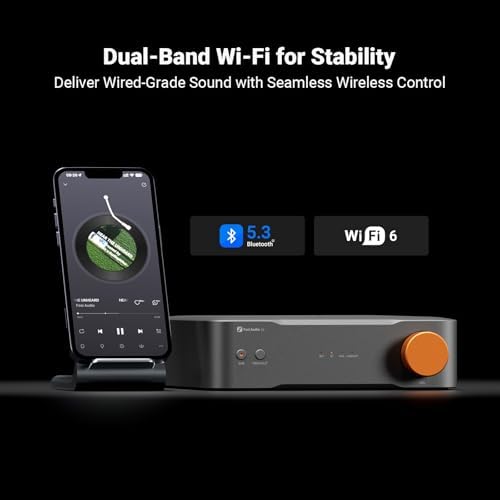
Image 3.2: The Fosi Audio S3 unit next to a smartphone displaying music playback, illustrating its dual-band Wi-Fi 6 and Bluetooth 5.3 capabilities for seamless wireless control and streaming.
- Supported Services: Stream directly from Tidal, Spotify, and other services via the app or compatible protocols like AirPlay 2 and Google Cast.
- Roon Ready: Roon Ready certification is in progress. You can still use Roon via AirPlay 2 or Google Cast.
3.4 Bluetooth Pairing
- Select Bluetooth as the input source using the Power/Input Switch.
- Press and hold the Bluetooth Pairing/Output Switch button until the Bluetooth indicator flashes, indicating pairing mode.
- On your mobile device, search for "Fosi Audio S3" in the Bluetooth settings and connect.
3.5 HDMI eARC Operation
When connected to a TV's HDMI eARC port, the S3 can receive high-quality audio. Ensure your TV's audio output settings are configured to use eARC and output to an external audio system.
3.6 Restore Factory Settings
To restore the S3 to its factory default settings, press and hold the Bluetooth Pairing/Output Switch/Restore Factory Settings button for an extended period (refer to the specific timing in the full product manual if available, typically 5-10 seconds) until the status indicators confirm the reset.
4. Maintenance
- Cleaning: Use a soft, dry cloth to clean the exterior of the S3. Avoid using liquid cleaners or solvents, as they may damage the finish or internal components.
- Ventilation: Ensure the unit has adequate ventilation. Do not block any ventilation openings.
- Environment: Operate the S3 in a dry environment, away from direct sunlight, heat sources, and excessive moisture.
- Cable Care: Handle all cables with care. Avoid sharp bends or excessive pulling, especially at the connectors.
5. Troubleshooting
If you encounter issues with your Fosi Audio S3, refer to the following common troubleshooting steps:
- No Power:
- Ensure the power adapter is securely connected to both the S3 and a working power outlet.
- Verify the power outlet is active.
- No Sound Output:
- Check all audio cable connections between the S3 and your amplifier/speakers.
- Confirm the correct input source is selected on the S3.
- Verify the volume level on the S3 and your connected amplifier/speakers is not set to minimum or muted.
- If using HDMI eARC, ensure your TV's audio output is correctly configured.
- Cannot Connect to Wi-Fi/Bluetooth:
- For Wi-Fi, ensure the S3 is within range of your router and the correct network password is entered via the app.
- For Bluetooth, ensure the S3 is in pairing mode and your device's Bluetooth is enabled and searching. Try resetting Bluetooth on both devices.
- Consider restoring factory settings if connectivity issues persist.
- Distorted Audio:
- Check cable integrity and connections.
- Ensure the source audio is not distorted.
- Reduce the volume level on the S3 or connected amplifier if clipping occurs.
6. Specifications
The following are the technical specifications for the Fosi Audio S3:
| Feature | Detail |
|---|---|
| Brand | Fosi Audio |
| Model Number | S3 |
| DAC Chip | AK4493SEQ |
| Connectivity Technology | HDMI, Optical, RCA, USB, LAN |
| Wireless Technology | Bluetooth 5.3, Wi-Fi (Dual-Band, Wi-Fi 6) |
| Controller Type | Mobile App, TV Remote (via eARC) |
| Special Feature | eARC |
| Compatible Devices | Television, Personal Computer, Game Console, Amplifier, Speaker |
| Total HDMI Ports | 1 (eARC) |
| Audio Output Mode | Stereo |
| Number of Channels | 2 |
| Supported Internet Services | Tidal, Spotify (via app/protocols) |
| Audio Output Type | RCA, HDMI, Bluetooth, XLR, Optical |
| Smart Home Compatibility | Not Smart Home Compatible |
| Included Cable | 3.9Ft Gold-Plated 2RCA to 2RCA Stereo Audio Cable |

Image 6.1: Diagram showing the dimensions of the included RCA cables, with a total length of 1.2 meters (47.24 inches).
7. Warranty and Support
Fosi Audio products are designed for reliability and performance. For warranty information and technical support, please refer to the official Fosi Audio website or contact their customer service directly. Keep your purchase receipt as proof of purchase for warranty claims.
For further assistance, you may visit the Fosi Audio Store on Amazon.


