
1. Introduction
Thank you for choosing the WALKINGPAD X25 Folding Treadmill. This manual provides essential information for the safe and efficient use of your new fitness equipment. Please read it thoroughly before initial use and retain it for future reference.
2. Safety Information
To ensure safe operation and prevent injury, please observe the following safety precautions:
- Always consult with a physician before starting any new exercise program.
- Place the treadmill on a flat, stable surface with adequate clearance around it (at least 2 feet on all sides).
- Keep children and pets away from the treadmill during operation.
- Wear appropriate athletic footwear and clothing.
- Do not operate the treadmill if it is damaged or malfunctioning.
- Use the safety key at all times. Attach it to your clothing before starting your workout.
- Do not step on or off the treadmill while the belt is moving.
- The maximum user weight for this treadmill is 300 lbs (136 kg).
- Unplug the treadmill from the power outlet when not in use or before cleaning and maintenance.
3. What's in the Box
Verify that all components are present upon unpacking:
- WALKINGPAD X25 Treadmill Unit
- Power Cord
- Safety Key
- Tool Kit
- User Manual (this document)
4. Setup
The WALKINGPAD X25 is designed for minimal assembly. It arrives largely pre-assembled, requiring only unfolding and placement.
4.1 Unfolding the Treadmill
To unfold the treadmill from its vertical storage position:
- Carefully pull the handle to release the locking mechanism.
- Slowly lower the running platform towards the floor until it lies flat.
- Extend the platform fully by lifting and unfolding the front section. Ensure all parts click securely into place.
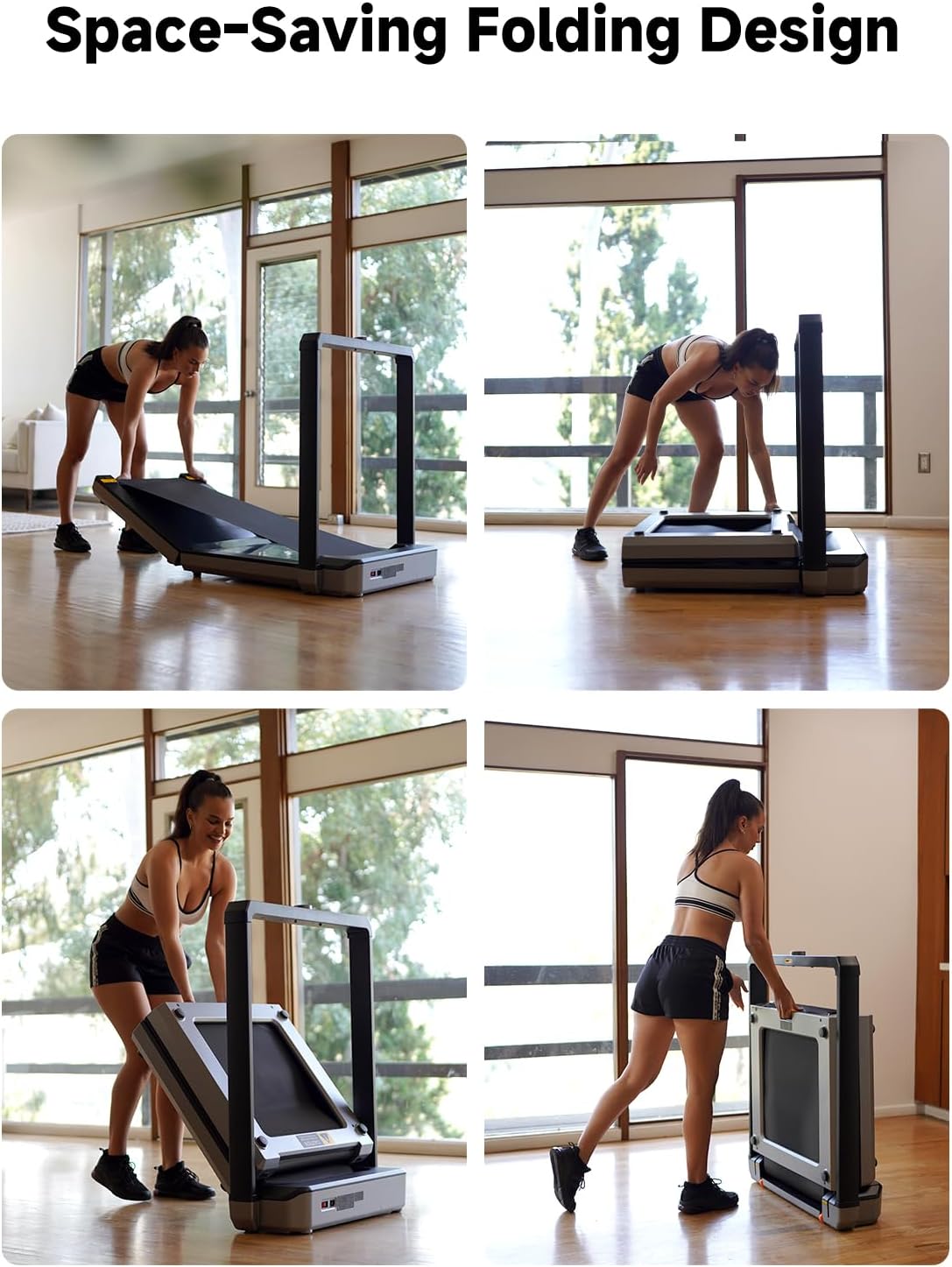
Figure 4.1: The Space-Saving Folding Design allows for easy unfolding and setup.

Figure 4.2: Product dimensions for both folded and unfolded states.
4.2 Initial Power-Up
Connect the power cord to the treadmill and then to a grounded electrical outlet. The LED display will illuminate.
Video 4.1: This video demonstrates the unfolding process and initial power-up of the KingSmith WalkingPad X25 treadmill.
5. Operating Instructions
The WALKINGPAD X25 features an intuitive control system for a seamless workout experience.
5.1 Understanding the Display and Controls
The oversized LED display shows key workout metrics, and the precision dial knob allows for easy speed adjustments.

Figure 5.1: The Oversized LED Display and Precision Dial Knob.
5.2 Starting a Workout
- Ensure the treadmill is unfolded and powered on.
- Attach the safety key to your clothing and place the magnetic end onto the designated area on the console.
- Step onto the treadmill belt.
- Rotate the central dial knob to start the treadmill. The speed will gradually increase. Continue rotating to adjust to your desired speed (1-10 mph).
- The display will show your workout time, speed, distance, and calories burned.
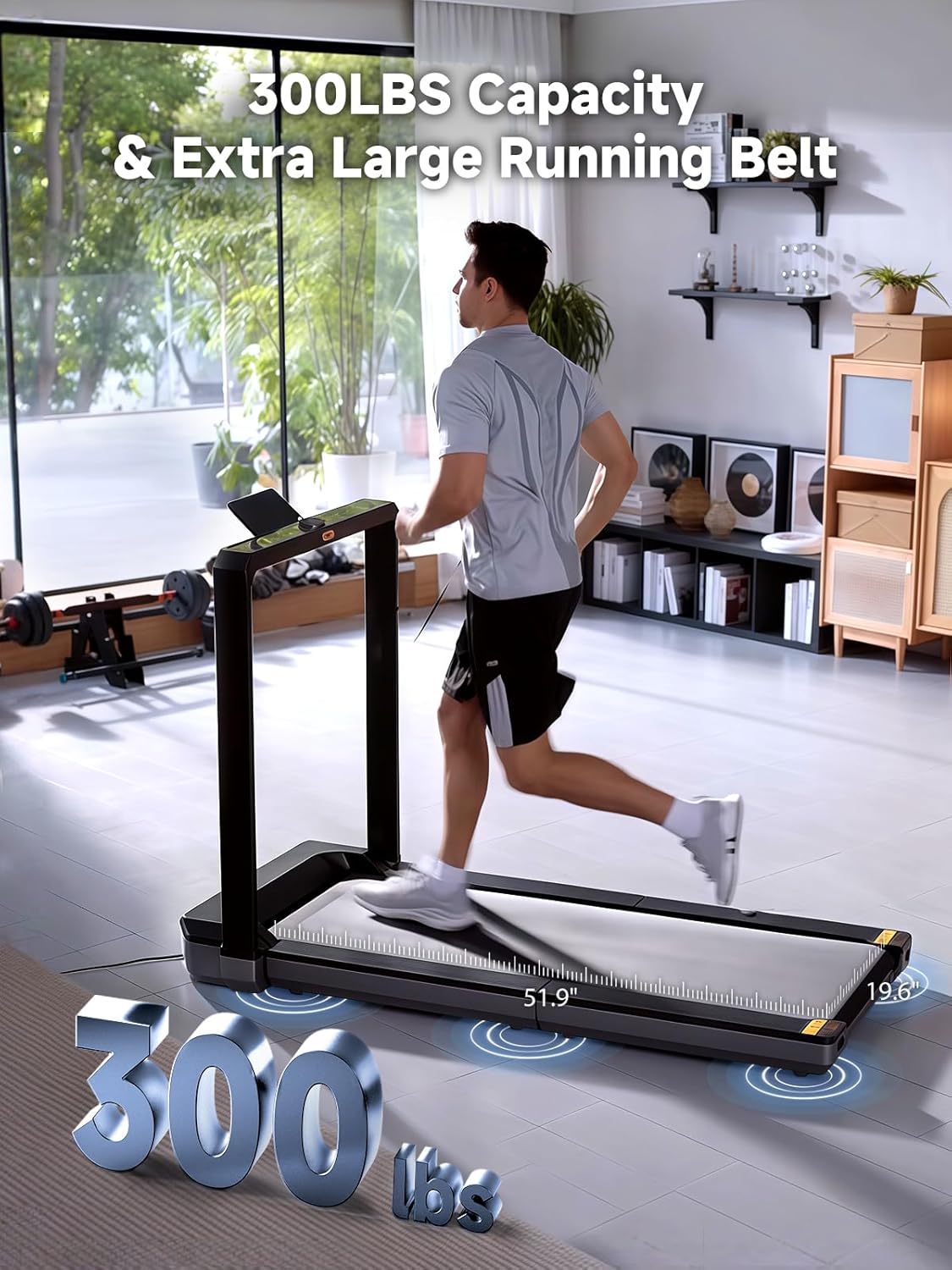
Figure 5.2: The extra-wide running belt provides ample space for comfortable strides.
Video 5.1: This video demonstrates the operation of the WalkingPad X25 treadmill, including speed adjustments.
5.3 Stopping a Workout
To stop the treadmill, rotate the dial knob counter-clockwise to decrease speed, or pull the safety key to immediately stop the belt.
6. Maintenance
Regular maintenance ensures the longevity and optimal performance of your treadmill.
6.1 Cleaning
- Wipe down the treadmill surfaces with a damp cloth after each use to remove sweat and dust.
- Do not use abrasive cleaners or solvents, as they may damage the finish.
- Periodically vacuum underneath the treadmill to prevent dust buildup from affecting motor performance.
6.2 Belt Lubrication
The running belt requires periodic lubrication to reduce friction and extend its lifespan. Refer to the included tool kit for lubricant and specific instructions. Lubricate every 3-6 months depending on usage.
6.3 Belt Adjustment
If the running belt becomes off-center or slips, it may need adjustment. Use the provided tool kit to adjust the tension bolts at the rear of the treadmill. Adjust in small increments and test the belt after each adjustment.
7. Troubleshooting
If you encounter issues with your WALKINGPAD X25, refer to the following common troubleshooting steps:
| Problem | Possible Cause | Solution |
|---|---|---|
| Treadmill does not power on | Power cord not connected, outlet malfunction, safety key not in place | Check power connections, try a different outlet, ensure safety key is correctly placed. |
| Running belt slips or hesitates | Belt too loose, insufficient lubrication | Adjust belt tension (refer to Section 6.3), lubricate the belt (refer to Section 6.2). |
| Unusual noise during operation | Loose components, foreign object, worn belt | Inspect for loose parts and tighten, check for objects under the belt, contact support if noise persists. |
| Display not showing correct metrics | Sensor issue, software glitch | Restart the treadmill, ensure all connections are secure. If the problem persists, contact customer support. |
If these steps do not resolve the issue, please contact WALKINGPAD customer support.
8. Specifications
Key technical specifications for the WALKINGPAD X25 Folding Treadmill:
- Brand: WALKINGPAD
- Model Number: TRX25F (MX16)
- Product Dimensions (Unfolded): 60.8"D x 30.4"W x 40.3"H (154.4cm x 77.2cm x 102.4cm)
- Folded Size: 10.1" x 30.4" x 40.3" (25.7cm x 77.2cm x 102.4cm)
- Item Weight: 104 Pounds (47.2 kg)
- Material: Metal
- Maximum Speed: 10 Miles per Hour (16 km/h)
- Minimum Speed: 1 Mile per Hour (1.6 km/h)
- Maximum Horsepower: 2 Horsepower
- Maximum Weight Recommendation: 300 Pounds (136 kg)
- Metrics Measured: Calories Burned, Distance, Speed, Time
- Power Source: Corded Electric
- Assembly Required: No

Figure 8.1: Internal components and performance features of the WalkingPad X25.
9. Warranty
The WALKINGPAD X25 Folding Treadmill comes with a 1 Year Manufacturer Warranty. Please retain your proof of purchase for warranty claims. For detailed terms and conditions, refer to the warranty card included in your packaging or contact customer support.
10. Support
For technical assistance, troubleshooting, or warranty inquiries, please contact WALKINGPAD customer support through the following channels:
- Online Support: Visit the official WALKINGPAD website or the brand store on Amazon.
- Email: Refer to your product packaging or warranty card for the customer service email address.
- Phone: Refer to your product packaging or warranty card for the customer service phone number.
When contacting support, please have your model number (TRX25F) and purchase date available.